InkThink - Handwritten Planner

This page is not an official page of the app or its developer, but an independent editorial publication created for informational and commentary purposes. Unless expressly stated otherwise, neither the app nor its developer is affiliated with, endorsed by, sponsored by, authorized by, or otherwise officially connected with MWM, Apple, Google Play, the app publisher, or the app's developer, and nothing on this page implies that the app was developed using MWM's services. Any trademarks, logos, screenshots, and other content remain the property of their respective owners.
Logo of InkThink - Handwritten Planner

InkThink - Handwritten Planner

Experience the fluid feel of paper with the power of a digital workspace. Transform your handwriting into interactive tasks, smart calendars, and visual mind maps—all without typing a single word.

Key Figures

Downloads

0

User Rating

1.0/5

Total Ratings

0

Publisher

Sundaram Applied Technologies Inc.

Category

Productivity

Locales

4

Latest Version

964

Size

444.7 MB

First Released

Feb 2, 2026
Features

Pens Over Pixels: Productivity Reimagined

Experience the tactile flow of a paper planner with the smart power of a digital engine. Built specifically for thinkers who find their best ideas at the tip of a stylus.

Date-Aware Intelligent Ink

Your handwriting is finally smart. Ink a meeting on your daily view and watch it automatically sync across your weekly and monthly layouts—no static PDFs required.

Fluid Task Management

Stop tapping and start flowing. Handwrite your to-do list in the dedicated input zone, then easily rearrange and reorder tasks with a simple flick of your pen.

The following screenshots and description are sourced directly from the app's official store listing and are the property of the app developer.

App Store

Screenshots
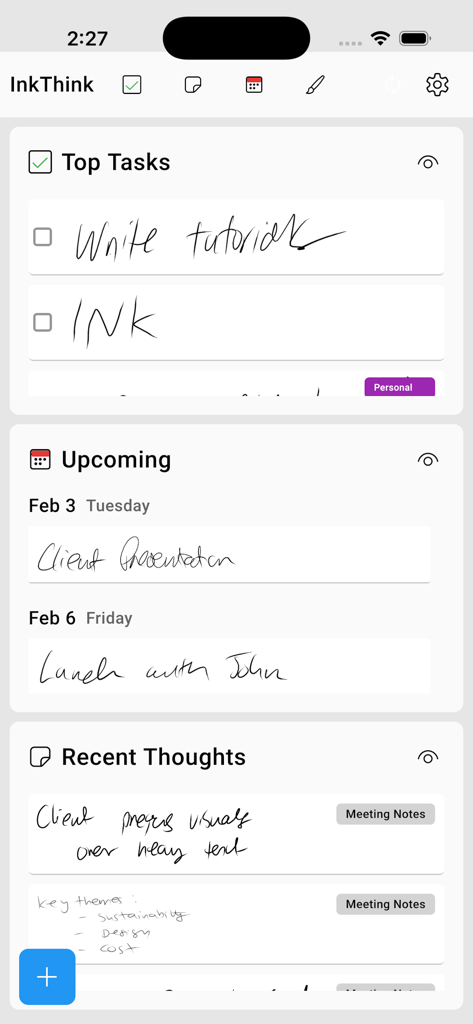
InkThink - Handwritten Planner - InkThink app dashboard showing handwritten tasks, upcoming calendar events, and recent meeting notes
InkThink app dashboard showing handwritten tasks, upcoming calendar events, and recent meeting notes

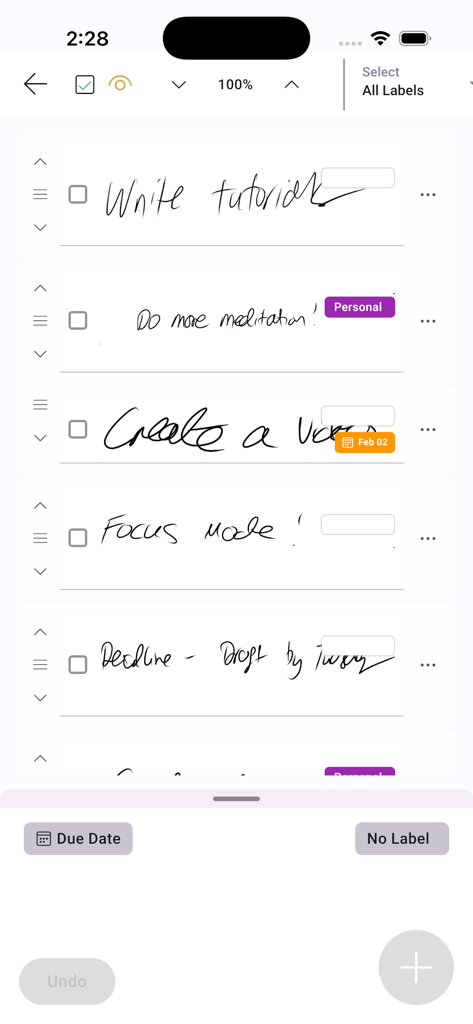
InkThink - Handwritten Planner - A handwritten to-do list in the InkThink app featuring interactive ink tasks with labels and due dates.
A handwritten to-do list in the InkThink app featuring interactive ink tasks with labels and due dates.

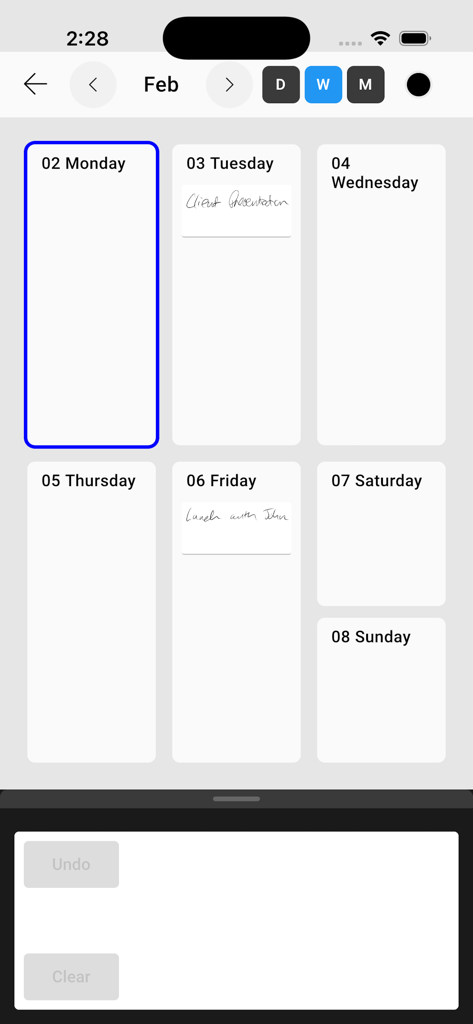
InkThink - Handwritten Planner - Weekly calendar view of the InkThink app showing handwritten notes for a client presentation and lunch

Weekly calendar view of the InkThink app showing handwritten notes for a client presentation and lunch

Description

InkThink – Pen Powered Productivity for Creative Minds. 7 Day Free Trial. *** LIMITED TIME LAUNCH OFFER: Get Pro Features Free with Base App Purchase *** InkThink is a groundbreaking stylus-first productivity suite designed for thinkers, creators, and note-takers who prefer ink over taps. Whether you're sketching out your day, brainstorming ideas, or building a visual mind map, InkThink gives you a fluid, pen-powered canvas to organize your thoughts your way. A quantum leap over traditional 'Pen Planner' apps where you just draw over a PDF, or even traditional pen enabled notebooks with templates. InkThink features unique intelligent ink where handwritten tasks can be re-ordered, handwritten calendar entries are date aware and actually show across your different Calendar views (Day, Week, Month - no longer just simply inking over a date box in a PDF and which don't show on other views. InkThink is what you have been waiting for from an intelligent ink-based diary and planner app - a true pen powered To-Do list and handwritten Calendar. Ink Tasks Draw your to-do list with your stylus in long ink blocks. Easily add, rearrange, and manage tasks in a tactile, visual format. The bottom of the screen becomes your ink input zone — just write and watch your tasks flow into place. Notes Capture individual ideas in real time — during meetings, while watching videos, or listening to audio. Notes lets you jot down key points in ink and save them as “thinking sessions” notes. Ink Calendar Draw directly into your calendar. Each inked date can be seen across different layouts - Day, Week and Month. It’s not just handwriting — it’s interactive ink. Thinking Canvas Create movable ink index cards on a freeform canvas. Sketch, connect, and rearrange your thoughts like sticky notes on a whiteboard — but smarter and stylus-native. Capture you brainstorm and mind map your ideas. InkThink is modular, intuitive, and built for the future of stylus powered creative productivity. No typing. No distractions. Just your pen, your ideas, and an app that connects and thinks with you. Built for tablets, e-ink devices, and stylus-enabled phones and tablets. InkThink transforms handwriting into a dynamic, movable, and meaningful workspace. 7 Day Free Trial - No Sign Up needed. Can work fully offline. Base App (One Time Purchase): All core features including Tasks, Calendar, Notes and Canvas. Sync. Can use on all devices. Pro Features (Optional Subscription): Filter by Task Label, Add Due Dates, Mindfulness Task Mode, View Tasks with Due Dates on Calendar... and more... Special Launch Offer: Pro Subscription offered free if you buy the Base App during 7 Day Trial. InkThink : To-Do, Notes, Calendar, MindMap Planner designed for Pen Stylus. Take back control with your mind and pen! When logging in our EULA Terms of Use (Terms of Service) apply as available on our website. https://inkthink.app/terms-of-service

Download

This page is not an official page of the app or its developer, but an independent editorial publication created for informational and commentary purposes. Unless expressly stated otherwise, neither the app nor its developer is affiliated with, endorsed by, sponsored by, authorized by, or otherwise officially connected with MWM, Apple, Google Play, the app publisher, or the app's developer, and nothing on this page implies that the app was developed using MWM's services. Any trademarks, logos, screenshots, and other content remain the property of their respective owners.