
This page is not an official page of the app or its developer, but an independent editorial publication created for informational and commentary purposes. Unless expressly stated otherwise, neither the app nor its developer is affiliated with, endorsed by, sponsored by, authorized by, or otherwise officially connected with MWM, Apple, Google Play, the app publisher, or the app's developer, and nothing on this page implies that the app was developed using MWM's services. Any trademarks, logos, screenshots, and other content remain the property of their respective owners.


KineMaster (OLD)
Desktop-level editing, on the go. This app hands users the power to craft polished video, ditching the desktop for mobile-first content creation.
Downloads
25M+User Rating
Total Ratings
261.0KPublisher
Category
Photo & VideoLocales
18Latest Version
5.2.17(1329)Size
97.5 MBFirst Released
Apr 28, 2017KineMaster (OLD) Core Feature Analysis
An evaluation of key functionalities for mobile content creators.
Professional Watermark Removal
A KineMaster Premium subscription removes the app's watermark from exported videos, allowing content creators to present their work with a clean, professional brand image.
Unlimited Premium Asset Access
It offers premium subscribers unlimited access to the entire Asset Store, unlocking a full spectrum of advanced creative resources without limitations.
Comprehensive Video Editing Tools
The app provides essential tools to cut, crop, and zoom videos and images, empowering users with fundamental editing capabilities for precise content creation.
Extensive KineMaster Asset Store
This tool features a vast, searchable Asset Store offering a wide range of downloadable transitions, effects, videos, images, stickers, fonts, and animations to enrich video projects.
High-Resolution 4K 60FPS Export
It allows users to save their finished videos in high-resolution 4K at 60 frames per second, ensuring professional-grade output quality suitable for diverse platforms.
Downloadable Video Templates
The app enables users to download and re-edit video templates, simplifying the creative process and providing a quick starting point for various content types.
Frequently Asked Questions
Everything you need to know about KineMaster (OLD)
What are the main features of KineMaster (OLD)?
KineMaster (OLD) enables video creation with tools to cut, crop, zoom, and save in 4K at 60FPS. It also provides downloadable templates, assets from the Asset Store, and features for text, effects, and transitions.
Is KineMaster (OLD) a free application?
Yes, KineMaster (OLD) is completely free to use. Users can access additional features and remove the watermark with a KineMaster Premium subscription.
What benefits does a KineMaster Premium subscription offer?
A KineMaster Premium subscription removes the KineMaster watermark, provides an ad-free experience, and grants unlimited access to the entire Asset Store for enhanced video editing.
Can users download and re-edit video templates in KineMaster (OLD)?
Yes, KineMaster (OLD) allows users to download and re-edit video templates directly within the application to streamline their video creation process.
Does KineMaster (OLD) support 4K video export?
Yes, KineMaster (OLD) supports saving videos in high resolution, including 4K at 60 frames per second, ensuring high-quality output for users.
How can I access additional assets for video editing in KineMaster (OLD)?
KineMaster (OLD) users can access additional assets like transitions, effects, stickers, and fonts through the KineMaster Asset Store. A Premium subscription offers unlimited access.
Can I use Chroma Key for green screen effects in KineMaster (OLD)?
Yes, KineMaster (OLD) includes a Chroma Key feature. Users can enable and adjust the key color and detail curve to create professional green screen effects.
Does KineMaster (OLD) offer color correction tools?
Yes, KineMaster (OLD) provides powerful color controls for video adjustment. Users can modify parameters such as shadows, gain, and gamma to enhance their video's appearance.
What types of content can KineMaster (OLD) be used for?
KineMaster (OLD) is used by creators for YouTube, TikTok, and Instagram videos. Journalists, educators, marketers, and vloggers also utilize it professionally for various content creation needs.
Does KineMaster (OLD) have an option to record audio or video directly within the app?
Yes, KineMaster (OLD) features a "Built-in Recording Studio". This allows users to record audio or video directly within the application using the REC button on the interface.
The following screenshots and description are sourced directly from the app's official store listing and are the property of the app developer.
App Store
Screenshots

Intuitive Editing Flow
Explore the app's intuitive interface, showcasing its unique circular media menu and robust multi-track timeline for precise project control.

Creative Template Library
Discover a rich library of pre-built video templates, allowing users to quickly start projects categorized by style and content type.

Expansive Asset Collection
Access an extensive in-app asset store, providing thousands of downloadable transitions and vibrant stickers to enhance any video.

Precision Audio Control
Achieve precision audio control with the built-in recording studio, featuring a detailed volume envelope and visual audio waveforms for fine-tuning sound.

Dynamic Text Effects
Elevate video narratives with dynamic text effects, offering comprehensive customizable text options and a wide range of font styles.

Rich Graphics & Animations
Enhance video projects with instant graphics and animations, showcasing diverse clip graphics and thematic animation categories.
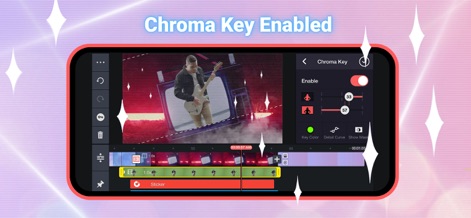
Professional Chroma Key
Achieve professional-grade video composites with the Chroma Key feature, allowing precise key color selection and detailed adjustments for seamless overlays.

Advanced Color Grading
Refine video aesthetics using powerful color controls, featuring intuitive sliders for shadows and gain, alongside a real-time visual adjustment preview.

High-Quality Export
Deliver razor-sharp quality with flexible export options, including stunning 4K 60FPS resolution and precise frame rate controls for optimal playback.
Description
Download
More Like This
Apps with similar features and user experience

Edits: Video Editor
Instagram, Inc.

VLLO- Video Editor, Vlog Edits
vimosoft

YouCut - AI Video Editor
SHANTANU PTE. LTD.

必剪-B站官方出品
Shanghai Bilibili Animation Co.,Ltd

剪影 - 视频剪辑 & 卡点影集制作
Shanghai Jian Ji Software Technology Co., Ltd

Videoshop - Video Editor
Jajijujejo Inc.

VDIT - Video Maker & Editor
ImgBase, Inc.

Video Editor with Music・VidLab
Onelight Apps CY Ltd

Video Maker-movie maker&Editor
Changsha Fugui Bamboo Network Technology Co., Ltd.
This page is not an official page of the app or its developer, but an independent editorial publication created for informational and commentary purposes. Unless expressly stated otherwise, neither the app nor its developer is affiliated with, endorsed by, sponsored by, authorized by, or otherwise officially connected with MWM, Apple, Google Play, the app publisher, or the app's developer, and nothing on this page implies that the app was developed using MWM's services. Any trademarks, logos, screenshots, and other content remain the property of their respective owners.