
This page is not an official page of the app or its developer, but an independent editorial publication created for informational and commentary purposes. Unless expressly stated otherwise, neither the app nor its developer is affiliated with, endorsed by, sponsored by, authorized by, or otherwise officially connected with MWM, Apple, Google Play, the app publisher, or the app's developer, and nothing on this page implies that the app was developed using MWM's services. Any trademarks, logos, screenshots, and other content remain the property of their respective owners.


连点器 - 自动点击持续滚动刷新&旋转指针工具
Repetitive tasks steal your time. This app reclaims it, transforming your device into an automation powerhouse.
Downloads
250k+User Rating
Total Ratings
36.7KPublisher
Category
UtilitiesLocales
1Latest Version
2.1Size
18.0 MBFirst Released
Jun 16, 2025An analytical overview of '连点器 - 自动点击持续滚动刷新&旋转指针工具's core functionalities, highlighting its value proposition for mobile efficiency and gaming.
Key Automation Features of '连点器'
Automated Tapping
The app provides a highly precise automatic clicking mechanism, enabling users to perform repeated taps at user-defined screen locations, essential for mobile gaming and accelerating routine interactions.
Advanced Automation Customization
This tool features professional-grade customization options, allowing users to fine-tune automation sequences with specific delays, intervals, and multi-point tap patterns to suit diverse application requirements.
Dynamic Pointer Manipulation
It allows users to automate complex pointer movements and rotations across the screen, offering advanced control for intricate gaming scenarios or specialized application usage.
Continuous Auto-Scrolling
The app provides continuous automatic scrolling through content, significantly enhancing the user experience for navigating long web pages, social media feeds, and digital documents.
Frequently Asked Questions
Everything you need to know about 连点器 - 自动点击持续滚动刷新&旋转指针工具
What is the 连点器 app?
The 连点器 app is an automatic clicker that offers professional automation solutions. It transforms mobile phones into efficiency tools for managing repetitive tasks.
What are the core automation features of 连点器?
连点器 provides automatic clicking, scheduled tasks, auto-scrolling, and auto-refreshing. It simplifies repetitive operations, turning a mobile phone into an efficiency tool.
Can users customize the speed of automatic clicks in 连点器?
Yes, the 连点器 app allows users to adjust the speed of automatic clicks. This feature provides flexibility for various automated tasks.
Does 连点器 include an automatic scrolling function?
Yes, 连点器 features an auto-scroll tool. Users configure the slide direction and interval seconds, automating continuous scrolling tasks efficiently.
How does 连点器 assist with automatic refreshing?
Yes, 连点器 acts as an automatic refresh assistant. It refreshes specified web pages or in-app content, automating continuous updates as needed.
What common tools are available within the 连点器 app?
连点器 includes common tools such as a barcode generator, a rotating pointer, a convenient whiteboard, and a random password generator.
Can 连点器 generate barcodes?
Yes, 连点器 features a barcode generation tool. Users input numerical data, and the app instantly produces a corresponding scannable barcode.
What is the purpose of the rotating pointer in 连点器?
The rotating pointer in 连点器 is a customizable spinner wheel. It allows users to input multiple options and then initiate a random selection.
The following screenshots and description are sourced directly from the app's official store listing and are the property of the app developer.
App Store
Screenshots

Discover the app's intuitive main interface, highlighting the trusted by over 2 million users badge and clear buttons for adjustable speed and auto settings.
Automate Tasks Seamlessly
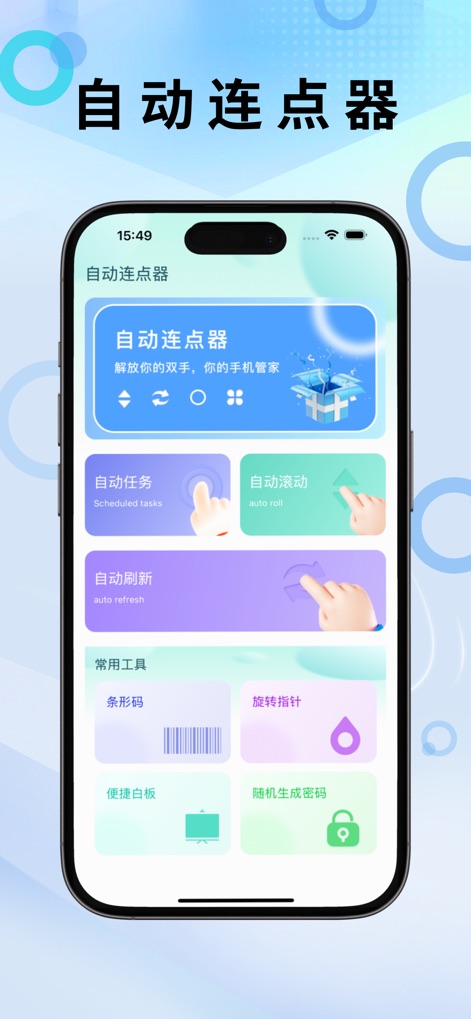
Explore the app's comprehensive dashboard, offering quick access to automation categories like auto roll and a suite of common tools including the spinning pointer.
Dashboard Overview

Observe how the app automates repetitive actions in games, showcasing an auto-refresh assistant in a mining game interface with a prominent click indicator.
Effortless Refreshing

See the powerful auto-scroll tool in action within a game, demonstrating fine-tuned settings for slide direction and customizable interval seconds.
Customizable Scrolling

Engage with the interactive spinning pointer tool, allowing users to customize options with names and initiate the spin with a clear 'Start Spinning' button.
Decision Spinner
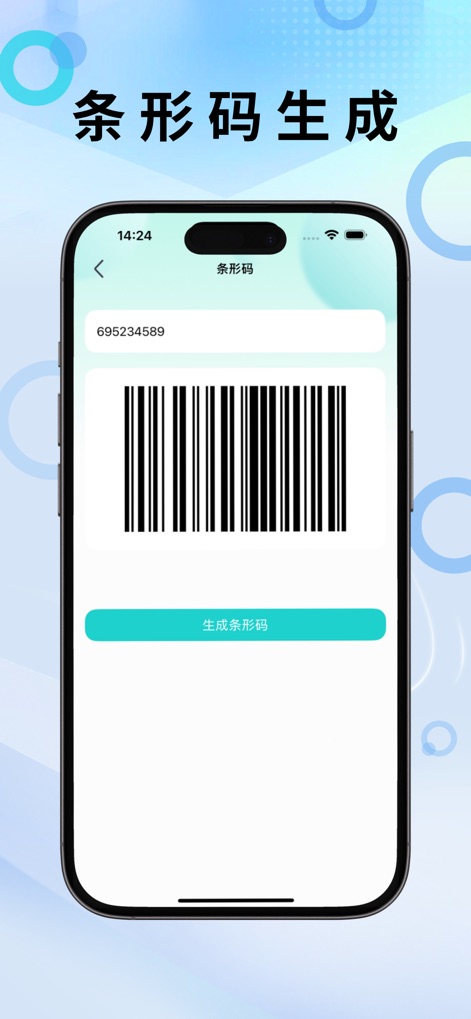
Utilize the integrated barcode generation feature, enabling users to input numerical data and instantly generate a scannable barcode.
Barcode Utility
Description
Download
More Like This
Apps with similar features and user experience

自动ּ连点器 - 自动点击器
壮壮 彭

连点器-高效自动点击按键辅助工具
和圆 魏

自动点击器·连点器
磊 赵

Auto Clicker-Auto Tapper tool
佳豪 张

Auto Clicker: Click Automatic
RH LANDSCAPING LLC

连点器-自动连点神器&点赞抢购助手
倩格 刘

Auto Clicker - Tap Assistant
乐飞 张

Auto Clicker - Automatic Tap Q
家豪 魏

Auto Tapper Assistant App
KUPERTINO BIL. YAZ. HALIL IBRAHIM KARAHAN SAFFET ARSLAN MUSTAFA AYTEN MUHAMMET YALCIN OZDEMIR K. S.
This page is not an official page of the app or its developer, but an independent editorial publication created for informational and commentary purposes. Unless expressly stated otherwise, neither the app nor its developer is affiliated with, endorsed by, sponsored by, authorized by, or otherwise officially connected with MWM, Apple, Google Play, the app publisher, or the app's developer, and nothing on this page implies that the app was developed using MWM's services. Any trademarks, logos, screenshots, and other content remain the property of their respective owners.