
This page is not an official page of the app or its developer, but an independent editorial publication created for informational and commentary purposes. Unless expressly stated otherwise, neither the app nor its developer is affiliated with, endorsed by, sponsored by, authorized by, or otherwise officially connected with MWM, Apple, Google Play, the app publisher, or the app's developer, and nothing on this page implies that the app was developed using MWM's services. Any trademarks, logos, screenshots, and other content remain the property of their respective owners.


My Contacts Backup
The app hands users absolute control, ensuring their contacts remain theirs, always.
Downloads
5M+User Rating
Total Ratings
18.3KPublisher
Category
ProductivityLocales
31Latest Version
2.3.6Size
27.0 MBFirst Released
Jul 6, 2011An evaluation for privacy-conscious iOS users prioritizing direct data control.
My Contacts Backup: Feature Analysis
Account-Free Operation
It allows users to manage contacts without the need for sign-ups or personal accounts, upholding user privacy and simplicity.
Offline Backup Capability
The app provides a fully offline backup solution, ensuring contact data never touches external servers or cloud services, directly addressing privacy concerns.
Direct .vcf Restore
It allows users to restore contacts directly from a .vcf file opened within the native iOS Mail app, eliminating the need for an external application and simplifying the process.
Email-Based Contact Transfer
This tool features the ability to easily transfer contacts between iOS devices using standard email, leveraging a universal .vcf format for broad compatibility.
Customizable Backup Reminders
The app provides an option to set regular, personalized reminders for contact backups (weekly or monthly), promoting consistent data security.
In-App vCard Restoration
It allows for direct restoration of vCard files from within the application itself, offering an alternative and convenient method to mail client restoration.
CSV Export Option
This tool features the capability to export contacts into a CSV (Excel) file, providing flexibility for data analysis or migration to other platforms.
Bulk Contact Deletion
The app provides a function to delete all contacts from the address book, offering comprehensive control over personal data and aiding in device resets.
Frequently Asked Questions
Everything you need to know about My Contacts Backup
How to backup contacts with My Contacts Backup?
My Contacts Backup allows you to back up all your contacts with a single touch. The app sends them to your email as a .vcf attachment. You then receive the backup file in your mailbox.
How to restore contacts using My Contacts Backup?
To restore contacts, open the .vcf file in your mailbox using the iOS Mail app. Tap the attachment to import all contacts directly from the file. No other app is required for restoration.
Does My Contacts Backup require an account or internet connection for backup?
No, My Contacts Backup does not require signing in, creating accounts, or internet synchronization with any server for backup. It performs offline backups directly from your phone.
What file formats does My Contacts Backup support for export?
My Contacts Backup supports exporting contacts as a VCF (vCard) file for backup. It also allows users to export contacts as a CSV (Excel) file.
Is there a limit to the number of contacts I can back up using My Contacts Backup?
Yes, the VCF backup in the free version of My Contacts Backup is limited to a maximum of 500 contacts. The PRO version offers unlimited contact backup.
Can My Contacts Backup remind me to backup my contacts regularly?
Yes, My Contacts Backup includes a feature to set reminders. Users can configure the app to prompt them for regular backups on a weekly or monthly basis.
Can I delete all contacts in my Address Book using My Contacts Backup?
Yes, My Contacts Backup provides a specific feature to delete all contacts in your Address Book. This function is available within the application.
The following screenshots and description are sourced directly from the app's official store listing and are the property of the app developer.
App Store
Screenshots
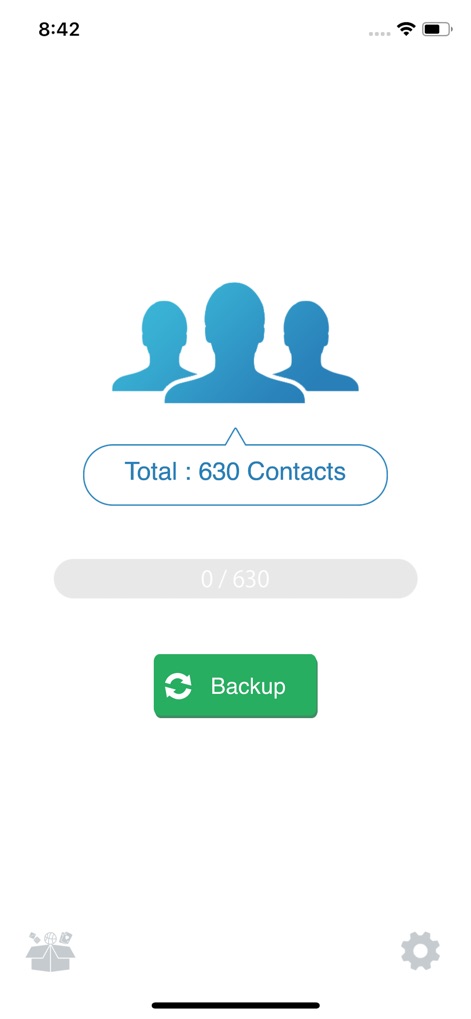
This screen highlights the total number of contacts available and features a prominent 'Backup' button for effortless data protection.
Simple Contact Backup

The app streamlines contact recovery, displaying a clear .vcf attachment and a distinct 'Add All Contacts' option for instant restoration.
Quick Contact Recovery
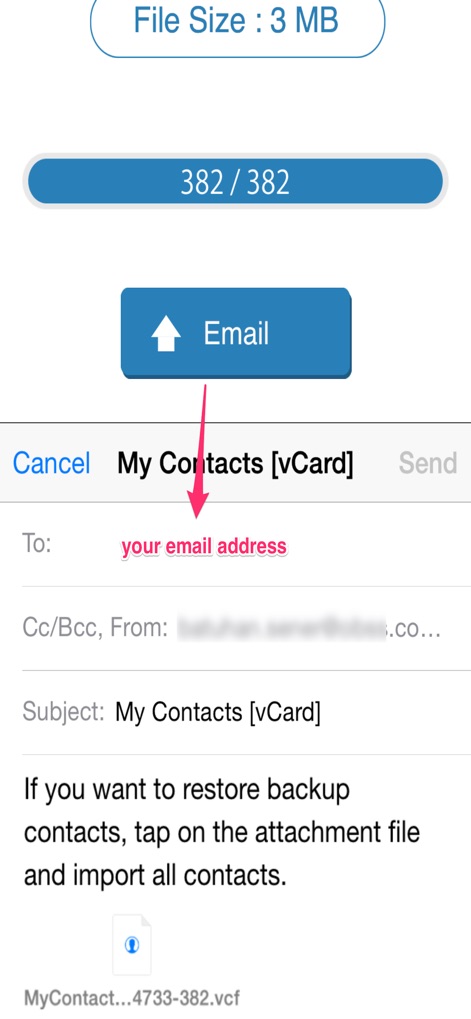
Users can easily manage backup size with the 'File Size' indicator and utilize the familiar email sending interface to self-send their contact data.
Secure Email Transfer
Description
Download
More Like This
Apps with similar features and user experience
Delete Contacts+
Shanghai Jia Feng Software Co. Ltd.

Contacts Sync: Google & More
Playa Apps

Contact.s Back Up
Symon Johnson

Sync Contact for Google & more
Reena Williams
Contacts Backup + Transfer
One Wave AB

Contacts Backup Pro & Restore
AppRover

Export Contacts to Excel, CSV
LE NGUYEN QUANG PHUOC

Simple Backup Contacts
Giacomo Guglielmi
Contacts Backup and Transfer⁺
serkat ret
This page is not an official page of the app or its developer, but an independent editorial publication created for informational and commentary purposes. Unless expressly stated otherwise, neither the app nor its developer is affiliated with, endorsed by, sponsored by, authorized by, or otherwise officially connected with MWM, Apple, Google Play, the app publisher, or the app's developer, and nothing on this page implies that the app was developed using MWM's services. Any trademarks, logos, screenshots, and other content remain the property of their respective owners.