My IP Address Checker & Test

My IP Address Checker & Test


Download on App Store
Logo of My IP Address Checker & Test

My IP Address Checker & Test: Professional Network Insight in One Click

The essential Safari extension for developers and privacy-conscious users. Instantly verify your IPv4/v6 addresses, ISP details, and VPN status with total data privacy.

Download on App Store

Publisher

Jelle Bekirovic

Category

Developer Tools

Downloads

2K+

User Rating

1.0/5

Total Ratings

0

Locales

1

Your Connection, Visualized

Discover the interface used by 2K+ users.
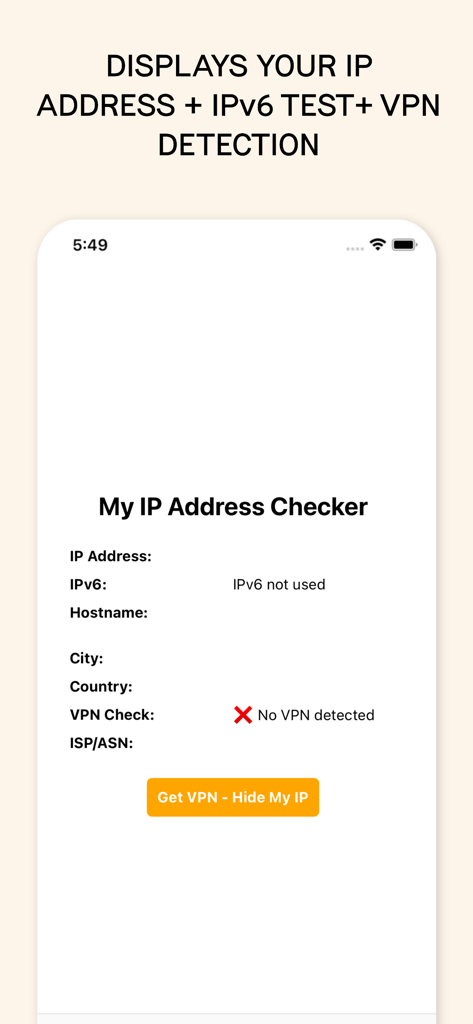
App screen displaying IP address IPv6 and VPN detection features

App screen displaying IP address IPv6 and VPN detection features

iPhone screenshot showing the My IP Address Checker app interface with details for IP address IPv6 and VPN detection

iPhone screenshot showing the My IP Address Checker app interface with details for IP address IPv6 and VPN detection

Master Your Connection with Pro-Grade Tools

The tools that make this app stand out, trusted by 2K+ users.

🛡️

One-Tap VPN & Privacy Audit

Instantly verify if your VPN is masking your identity and location to ensure your digital footprint remains private.

🔍

Deep Technical Intelligence

Go beyond the basics with full IPv4/IPv6 support, ASN details, and Hostname lookup for professional network management.

⚡

Zero-Friction Safari Access

Eliminate extra tabs. Access your full network profile through a lightweight extension designed for your macOS and iOS workflow.

About the app

Everything you need to know about My IP Address Checker & Test.

Description

My IP Address Checker is your go-to tool for detailed information about your current IP address and network status. With just one click, you can access vital details such as your IPv4 and IPv6 addresses, ISP/ASN information, hostname, city, country, and even detect the presence of a VPN. ### Features - Instant IP Information: Quickly retrieve your current IP address (IPv4) and, if available, IPv6 address. - Detailed Geolocation: Find out the city and country of your IP address. - ISP and ASN Details: Get comprehensive data about your Internet Service Provider and Autonomous System Number. - Hostname Lookup: See the hostname associated with your IP addresses. - VPN Detection (beta): Determine whether you are connected via a VPN with a simple check. Still experimental, so not 100% accurate. - Privacy and Security: No personal information is stored or shared. Your IP data is securely fetched and displayed. ### How It Works 1. Activate the Extension in Safari by clicking on the Aa button in your browser and selecting Manage Extensions. 2. Open the Extension by clicking on the Aa button and then on SEO Website Scanner. 3. We Fetch IP Data: The extension fetches IP data to provide the IP information. 4. Displays the Information: View your IP address, geolocation, hostname, ISP/ASN, and VPN status effortlessly in the popup. ### Why You Need It - IP Info: See you IP info such as your IPv4 and IPv6 addresses, ISP/ASN information, hostname, city, country, and even detect the presence of a VPN. - Verify VPN Connection (beta): Ensure your VPN connection is active and properly masking your IP address. This site and extension were created in English and translated in other languages, which could lead to translation errors. Please keep this in mind.

Latest Version

1.0.6

Size

17.9 MB

First Released

Jul 24, 2024

Secure Your Connection in One Click

Join thousands of developers and privacy-focused users verifying their VPN status and network security directly from Safari. Download the extension now.

Download on App Store

App information, icons, screenshots, and descriptions displayed on this page are sourced from the Apple App Store and are the property of their respective developers. Download estimates and rankings are based on MWM's proprietary models and may not reflect actual figures. This page is provided for informational and analytical purposes only.

Believe this page infringes your intellectual property? File a dispute