
This page is not an official page of the app or its developer, but an independent editorial publication created for informational and commentary purposes. Unless expressly stated otherwise, neither the app nor its developer is affiliated with, endorsed by, sponsored by, authorized by, or otherwise officially connected with MWM, Apple, Google Play, the app publisher, or the app's developer, and nothing on this page implies that the app was developed using MWM's services. Any trademarks, logos, screenshots, and other content remain the property of their respective owners.


Mynaportal
Bureaucracy crumbles. The Mynaportal app converts your My Number Card into a powerful digital key, granting users instant, secure access to official services.
Downloads
25M+User Rating
Total Ratings
37.2KPublisher
Category
UtilitiesLocales
2Latest Version
71.5.0Size
69.3 MBFirst Released
Feb 28, 2020Key Features of Mynaportal App
An analytical overview of essential functionalities for digital government interaction.
Secure Government Service Access
The app provides a secure and efficient method for users to log in and authenticate their identity when accessing Mynaportal and other critical government services.
Reliable Digital Identification
The app facilitates reliable online identification, utilizing the My Number Card to provide secure and trustworthy verification for government and private services.
Digital Signature Capability
It allows users to perform digital signing for official applications and procedures, ensuring legal validity and streamlining administrative tasks.
My Number Card Integration (iPhone)
This tool features the capability to set up and configure the My Number Card directly on an iPhone, enabling seamless integration of physical and digital identity for mobile use.
Frequently Asked Questions
Everything you need to know about Mynaportal
What is the Mynaportal App used for?
The Mynaportal App enables login, authentication, and signing for Mynaportal services. It also facilitates setting up your My Number Card on an iPhone for various government and private applications.
What is a My Number Card in Japan?
A My Number Card provides reliable personal identification both physically and online in Japan. It supports various official applications and logins for government and private sector services.
What are the requirements to use the Mynaportal App?
To use the Mynaportal App, you need a My Number Card along with its electronic certificate and passcode. If the certificate is not set up, visit your local municipal office.
Can I add my My Number Card to my iPhone using the Mynaportal App?
Yes, the Mynaportal App allows you to add your My Number Card to your iPhone. This enables convenient login and certificate acquisition for Mynaportal and other services.
Does the Mynaportal App support Face ID for login?
Yes, the Mynaportal App supports logging in with Face ID. Users can select the 'Login with Face ID' option for secure and convenient access to Mynaportal services.
How do I scan my My Number Card with the Mynaportal App?
To scan your My Number Card using the Mynaportal App, position the top of your iPhone precisely over the card's back. The app provides visual guidance for accurate scanning.
Can I manage electronic certificates in the Mynaportal App?
Yes, the Mynaportal App allows certificate management. Users can access settings for the Electronic Certificate of User Proof and the Electronic Certificate of the Bearer's Signature within the app.
What troubleshooting steps resolve Mynaportal App launch issues?
If the Mynaportal App fails to launch after installation, users must reinstall the app and restart their iPhone. This process often resolves application startup problems.
Does the Mynaportal App integrate with Apple Wallet?
Yes, the Mynaportal App integrates with Apple Wallet. After adding your My Number Card to your iPhone, you can display it using the 'Show with Apple Wallet' option.
Can users change their My Number Card passcode using the Mynaportal App?
Yes, users can change their My Number Card passcode or password directly within the Mynaportal App. This setting is accessible through the app's dedicated settings menu.
The following screenshots and description are sourced directly from the app's official store listing and are the property of the app developer.
App Store
Screenshots
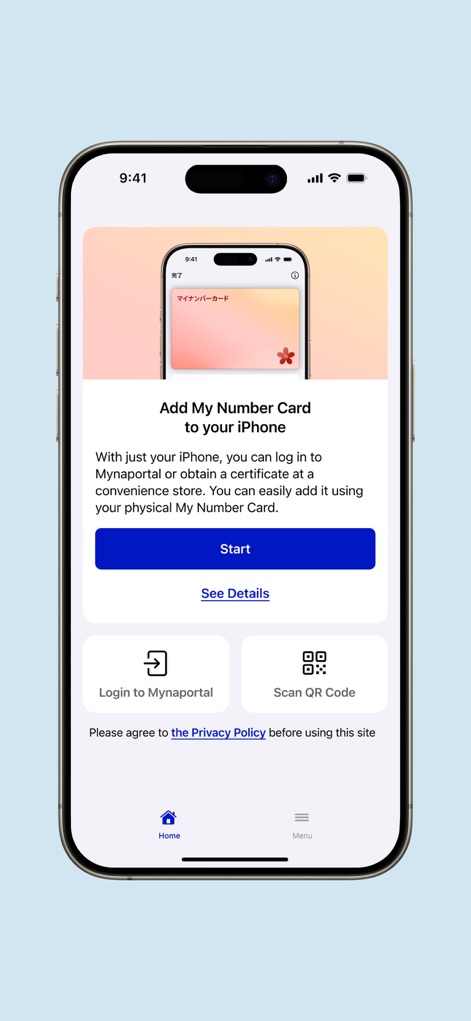
Seamless Card Integration
This screen showcases the intuitive process to "Add My Number Card to your iPhone" and provides options for quick access such as "Login to Mynaportal" or scanning a QR Code.

Comprehensive Card Management
The app offers distinct sections for "My Number Card on iPhone" and "Physical My Number Card", alongside valuable "Usage Guides" to assist users.
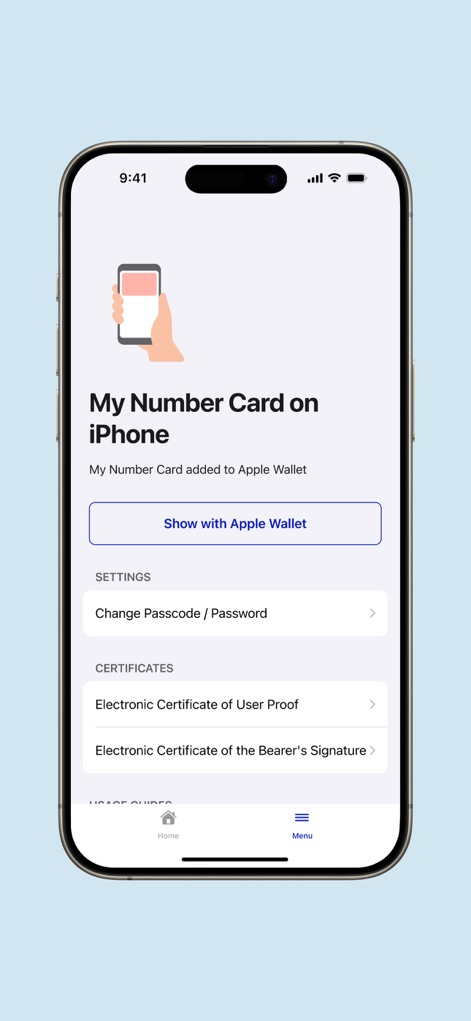
Digital ID Details
Users can view their "My Number Card on iPhone" status and manage important "Certificates" like the Electronic Certificate of User Proof directly within the app.
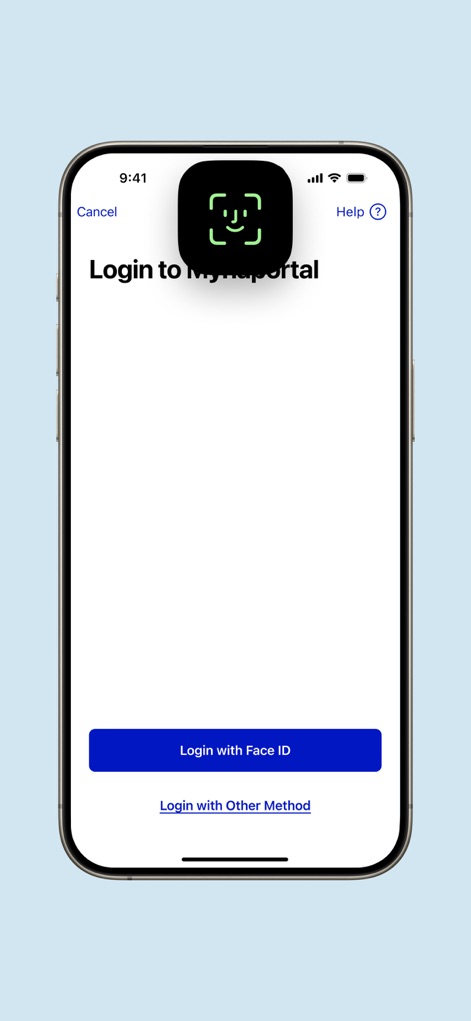
Secure Login Access
The app prioritizes secure access to "Mynaportal" services, offering a convenient "Login with Face ID" option for swift authentication.
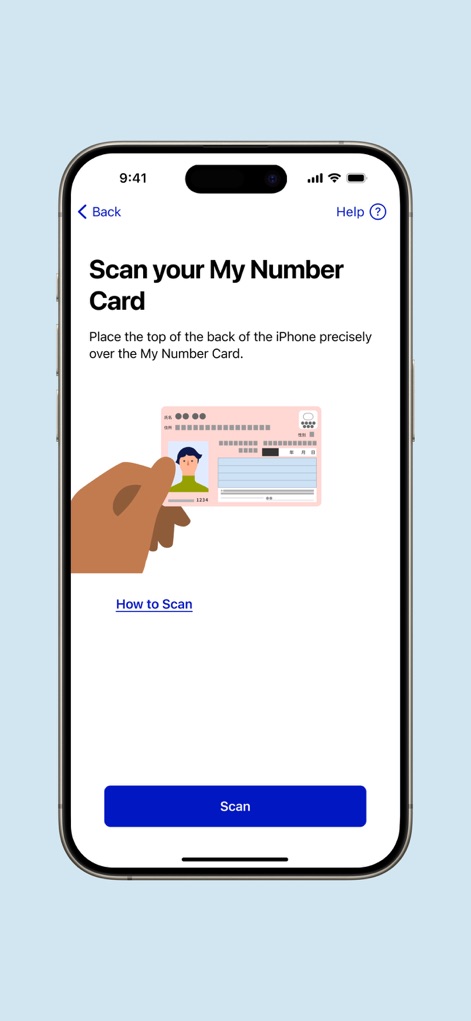
Effortless Card Scanning
This screen demonstrates the simple procedure to "Scan your My Number Card", with clear visual instructions for precise card placement.
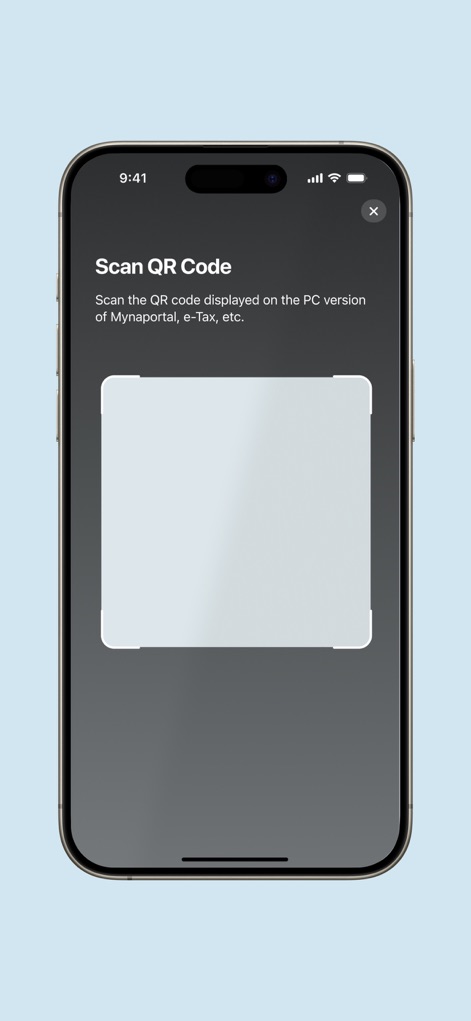
Quick QR Verification
The app facilitates swift authentication by allowing users to "Scan QR Code" from the Mynaportal PC version or other relevant services like e-Tax.
Description
Download
More Like This
Apps with similar features and user experience

itsme
Belgian Mobile ID SA

myDSS 2.0
SafeTech Ltd

SİMA - Rəqəmsal İmza
Data Processing Center of the Ministry of Communications and High Technologies

Singpass
Government Technology Agency

SoyYo - Identidad Digital
Servicios de Identidad Digital SAS

VIDaaS
valid certificadora digital ltda

TrustMe: Your Digital Identity
A3BC GROUP

Bird ID
Vault Id Solucoes em Criptografia e Identificacao Ltda ME
eDO App
Polska Wytwornia Papierow Wartosciowych S.A.
This page is not an official page of the app or its developer, but an independent editorial publication created for informational and commentary purposes. Unless expressly stated otherwise, neither the app nor its developer is affiliated with, endorsed by, sponsored by, authorized by, or otherwise officially connected with MWM, Apple, Google Play, the app publisher, or the app's developer, and nothing on this page implies that the app was developed using MWM's services. Any trademarks, logos, screenshots, and other content remain the property of their respective owners.