NguyenKey

NguyenKey

Download on App Store
Logo of NguyenKey

NguyenKey: The Smarter, Faster Way to Type Vietnamese

Experience a revolutionary phonetic keyboard designed for efficiency. Reduce taps with automatic consonant-vowel switching, master complex tone marks effortlessly, and type with total privacy on your iPhone and iPad.

Download on App Store

Publisher

Takayuki Imai

Category

Utilities

Downloads

0

User Rating

1.0/5

Total Ratings

0

Locales

2

Experience the Flow

Discover the interface used by 0 users.
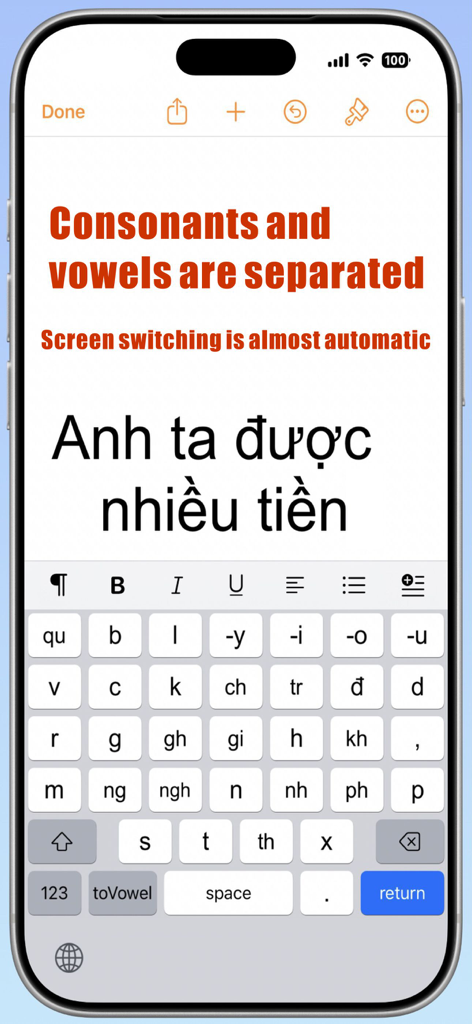
A screenshot of the NguyenKey app on an iPhone showing the consonant keyboard layout and automated screen switching for efficient Vietnamese typing.

A screenshot of the NguyenKey app on an iPhone showing the consonant keyboard layout and automated screen switching for efficient Vietnamese typing.

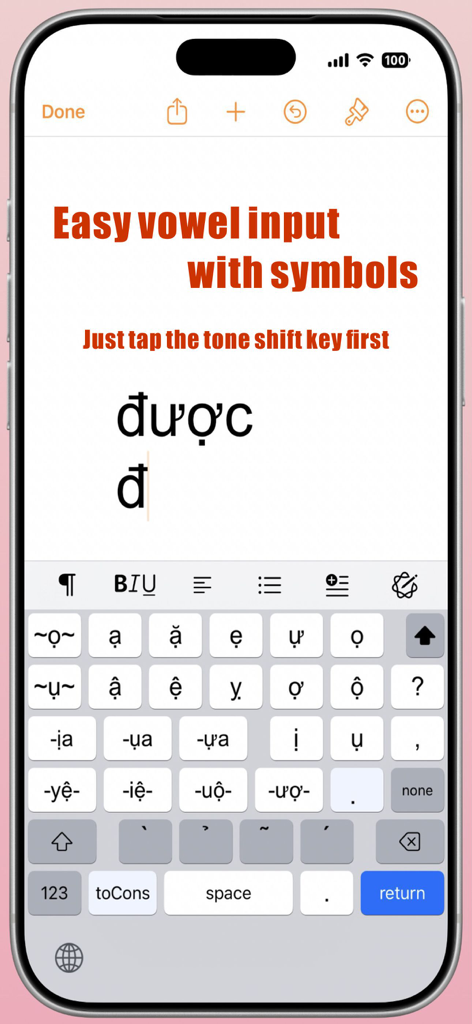
NguyenKey app interface on an iPhone showing a specialized Vietnamese keyboard for easy vowel and tone mark input.

NguyenKey app interface on an iPhone showing a specialized Vietnamese keyboard for easy vowel and tone mark input.

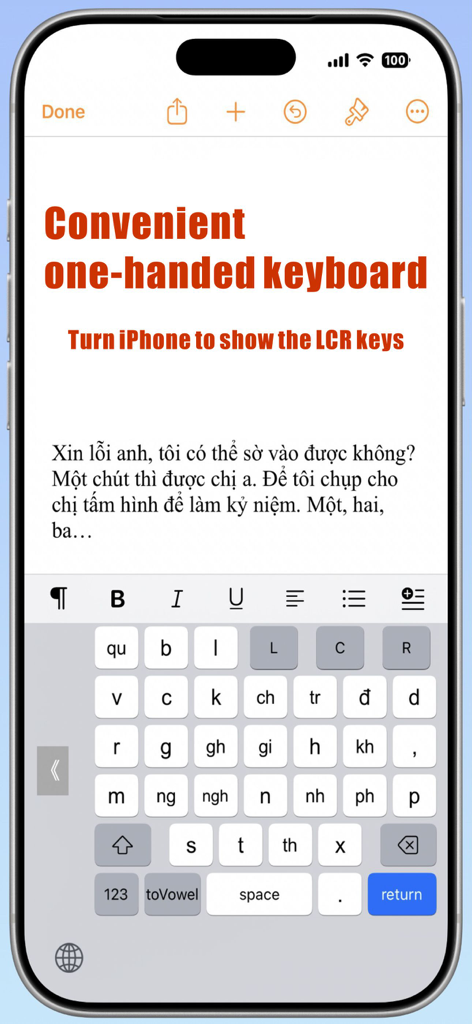
iPhone screenshot showing the NguyenKey Vietnamese one-handed keyboard with LCR alignment keys

iPhone screenshot showing the NguyenKey Vietnamese one-handed keyboard with LCR alignment keys

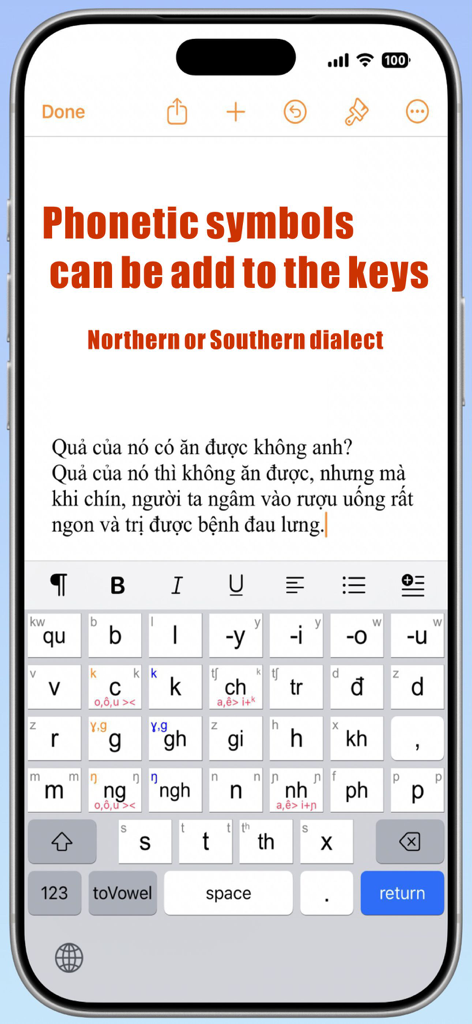
A smartphone screen displaying the NguyenKey Vietnamese keyboard interface with phonetic symbols and dialect options for users.

A smartphone screen displaying the NguyenKey Vietnamese keyboard interface with phonetic symbols and dialect options for users.

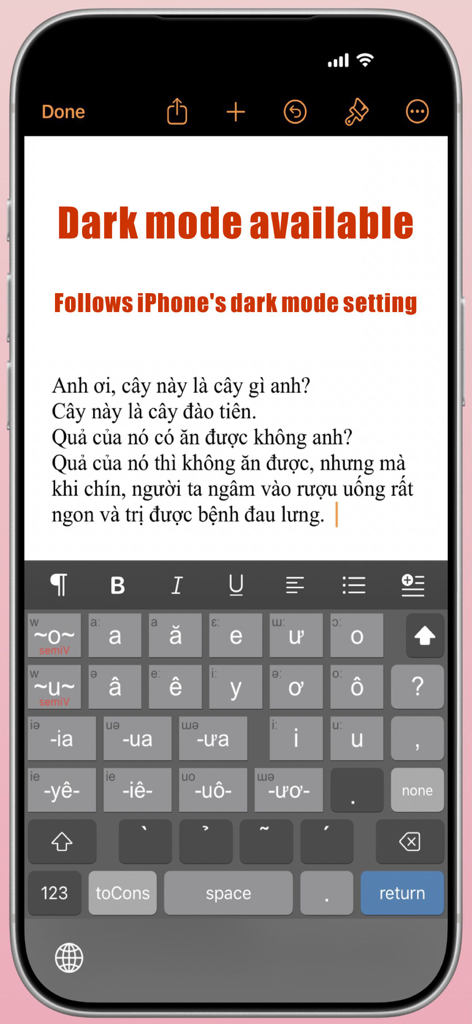
NguyenKey app showing the Vietnamese vowel keyboard interface in dark mode on an iPhone

NguyenKey app showing the Vietnamese vowel keyboard interface in dark mode on an iPhone

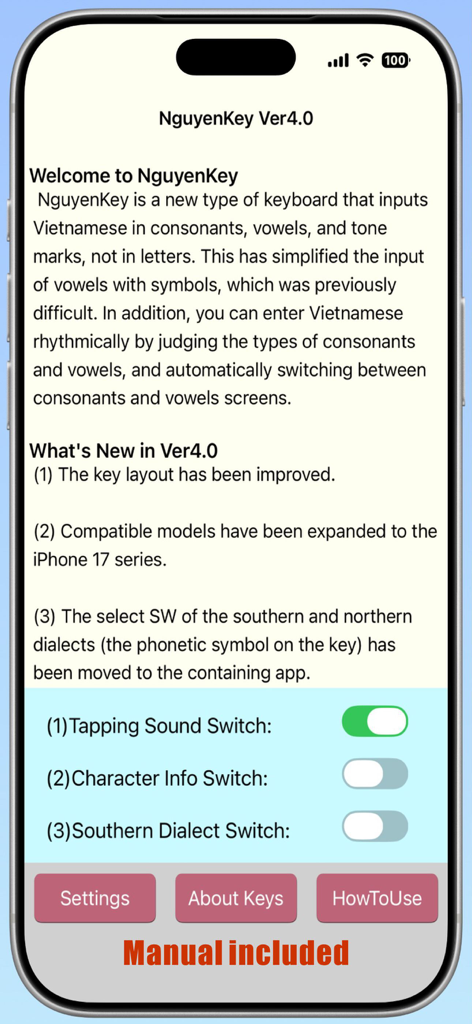
NguyenKey app settings interface on iPhone showing version 4.0 updates and toggle switches for tapping sound and southern dialect.

NguyenKey app settings interface on iPhone showing version 4.0 updates and toggle switches for tapping sound and southern dialect.

The Smarter Way to Type Vietnamese

The tools that make this app stand out, trusted by 0 users.

Maximum Efficiency, Minimum Taps

Our smart logic predicts your next move, automatically switching between consonants and vowels to drastically reduce typing time.

🎯

Precision Tone Mapping

Stop hunting for accents. Use tone shift keys to visualize all 21 vowel variations instantly before you even select them.

🎓

Built for Learners & Pros

Optional phonetic guides help heritage learners master spelling, while professional-grade speed keeps experts and power users productive.

About the app

Everything you need to know about NguyenKey.

Description

1. Introduction NguyenKey is a new type keyboard that inputs Vietnamese in consonants, vowels, and tone marks, not in letters. This has simplified the input of vowels with symbols, which was previously difficult. In addition, you can enter Vietnamese rhythmically by judging the types of consonants and vowels, and automatically switching between consonants and vowels screens. 2. Features (1) Since Vietnamese is entered in consonants and vowels, not in letters, the number of taps is reduced. (2) Consonants and vowels are on separate screens, making it easy to select letters. (3)NguyenKey guesses whether the consonant is the Initial consonant or the final consonant. Determine whether the vowel is a single vowel, a diphthong, a semivowel, or a final consonant vowel with the pressed key, and the screen switching of consonants and vowels is almost automated. (4) By pressing one of the six tone shift keys before entering vowels, all 21 vowel keys will have tone symbols, making it easier to enter vowels with tone marks and symbols. (5) There are five input modes: consonants, vowels, numbers, symbols, and English characters. You can type Vietnamese sentences without switching to another keyboard. (6) You can add phonetic symbols of consonants and vowels on top of the keys, which is convenient for Vietnamese learners. (7) You can use the one-handed keyboard with the LCR key on the consonant screen. (iPhone) 3. Compatible models and OS [2025.10] (1) Compatible models [iPhone] - iPhone SE2 to iPhone 17 series [iPad] - iPad from the 5th generation to iPad A16 *iPhone includes Pro, Pro Max, Air, etc. *iPad includes Pro, Air, mini, etc. (2) Compatible OS ・iOS15 to iOS18.X and iOS26.X ・iPadOS15 to iPadOS18.X and iPadOS26.X 4. Initial settings The following two settings are required to be able to use NguyenKey. Additional keyboard settings (1) Tap the "Settings" icon from the iOS home screen (2) Go to [General] - [Keyboard] and select "Add a new keyboard" (3) Tap “NguyenKey" Setting to add sound when key tapping (allow full access to the keyboard) (1) Select [Settings] - [Accessibility] - [Keyboard and Input] (2) On the screen that appears, tap [Full Keyboard Access] (3) Turn on the "Full Keyboard Access" switch on the screen *If you make this setting, you can turn the tapping sound on and off with the tapping sound switch in the containing app. 5. Example Example of entering the most common name "Nguyễn" in Vietnam (1) First, check the structure of the word. In this case, the Initial consonant (Ng), the semivowel (u), the main vowel is diphthong (yê) and the final consonant (n), and the second character of the diphthong is added the tone mark of the wave symbol. (2) Since the first letter of the Initial consonant is only a capital letter (Ng), so tap the white arrow shift key. →Then, only the first character of all consonants on the consonant screen will be capitalized. (3) Tap (Ng). →Then (Ng) is entered, and the screen is automatically replaced by a vowel screen. (4) Next, tap the semivowel (~u~) key. →The screen does not switch. (5) Next, tap the tone shift key of the wave symbol. →Then all vowel keys on the vowel screen will have a tone symbol. (6) Tap(yễ). →Then (yễ) is entered and automatically switches to the consonant screen. (7) Enter the final consonant (n). →Entering the final consonant the screen don’t switch to the vowel screen. This is because NguyenKey infers that the consonant to be tapped next is the Initial consonant. ― That's it. 6. About the Creator - Name: Takayuki Imai (今井 隆行) - Email address: snowysap@gmail.com Support site: https://superscript.sakura.ne.jp/ 7. Privacy Policy (1) The content entered by the user from the keyboard is not transferred to others via the Internet. (2) We will not disclose or sell personal information such as the user's name and email address, as well as the contents of communication with us without permission.

Latest Version

4.0

Size

1.7 MB

First Released

Mar 15, 2018

Master the Rhythm of Vietnamese Typing

Join the next generation of Vietnamese-American typists. Download NguyenKey for iPhone and iPad and experience a faster, more logical way to connect with your heritage.

Download on App Store

App information, icons, screenshots, and descriptions displayed on this page are sourced from the Apple App Store and are the property of their respective developers. Download estimates and rankings are based on MWM's proprietary models and may not reflect actual figures. This page is provided for informational and analytical purposes only.

Believe this page infringes your intellectual property? File a dispute