
This page is not an official page of the app or its developer, but an independent editorial publication created for informational and commentary purposes. Unless expressly stated otherwise, neither the app nor its developer is affiliated with, endorsed by, sponsored by, authorized by, or otherwise officially connected with MWM, Apple, Google Play, the app publisher, or the app's developer, and nothing on this page implies that the app was developed using MWM's services. Any trademarks, logos, screenshots, and other content remain the property of their respective owners.


Nomad Sculpt
The app frees artists from the desktop, delivering true 3D sculpting power on the go.
Downloads
1M+User Rating
Total Ratings
46.3KPublisher
Category
Graphics & DesignLocales
23Latest Version
2.8Size
189.4 MBFirst Released
Aug 4, 2020An Analytical Overview of Key Features for Professional-Grade Sculpting and Painting on Mobile Devices.
Nomad Sculpt: A Mobile Powerhouse for 3D Creation
Comprehensive Sculpting Toolkit
The app features a diverse range of brushes like Clay, Flatten, Smooth, and Mask, along with advanced options such as the trim boolean cutting tool, enabling precise and intricate model shaping.
Robust File Interoperability
The app supports various industry-standard file formats such as glTF, OBJ, STL, and PLY, allowing seamless integration with other 3D software and pipelines.
Flexible Multiresolution Workflow
It allows users to navigate between different resolution levels of their mesh, providing a highly flexible and non-destructive approach to adding or refining detail.
Advanced Data Baking Capabilities
The app enables the transfer of vertex data, including color, roughness, metalness, and small-scale details, into textures, which is essential for efficient PBR workflows and asset optimization.
Non-Destructive Layer System
It provides a layer system to record both sculpting and painting operations independently, facilitating iterative design and easy modifications without permanently altering the base mesh.
Integrated Vertex Painting
The app offers robust vertex painting tools for applying color, roughness, and metalness, alongside a material preset manager, crucial for developing fully textured 3D assets.
Intelligent Automatic UV Unwrapping
This tool features an automatic UV unwrapper that can leverage face groups to guide the unwrapping process, streamlining the preparation of models for texturing.
Efficient Voxel Remeshing
The app allows for quick voxel remeshing to achieve a uniform level of detail across the mesh, which is highly beneficial for initial blocking and maintaining clean topology.
Adaptive Dynamic Topology
It features dynamic topology, which automatically refines the mesh locally under the brush, providing an adaptive level of detail and supporting organic sculpting without manual subdivision.
High-Quality PBR Rendering
The app includes beautiful PBR rendering with real-time lighting and shadows, complemented by post-processing effects like Screen Space Reflection and Ambient Occlusion, for stunning visual presentation.
Frequently Asked Questions
Everything you need to know about Nomad Sculpt
What sculpting tools are available in Nomad Sculpt?
Nomad Sculpt offers various sculpting tools including clay, flatten, smooth, mask, and trim boolean cutting with lasso and rectangle shapes. These tools are designed for detailed organic and hardsurface modeling tasks.
Does Nomad Sculpt support painting models?
Yes, Nomad Sculpt allows users to paint models using vertex painting. This feature includes options for color, roughness, and metalness, with easy management of material presets.
Does Nomad Sculpt include a layer system?
Yes, Nomad Sculpt features a layer system. It records both sculpting and painting operations in separate layers, enabling easier iteration and flexible modifications during the creative process.
What file formats can Nomad Sculpt import and export?
Nomad Sculpt supports importing and exporting models in glTF, OBJ, STL, and PLY file formats. This ensures compatibility with various other 3D software and platforms.
Does Nomad Sculpt have advanced rendering capabilities?
Yes, Nomad Sculpt offers beautiful PBR rendering by default, complete with lighting and shadows. It also includes post-processing options like Screen Space Reflection and Depth of Field.
Is the Quad Remesher tool free in Nomad Sculpt?
No, the Quad Remesher tool in Nomad Sculpt is not included with the base application. It is available as a separate in-app purchase, providing automatic quad-dominant mesh remeshing.
How does dynamic topology function in Nomad Sculpt?
Nomad Sculpt's dynamic topology refines the mesh locally under the brush, providing an automatic level of detail. This feature also automatically updates existing layers.
Is the Nomad Sculpt interface optimized for mobile devices?
Yes, the Nomad Sculpt interface is designed specifically for a mobile experience. It is easy-to-use and offers customization options to suit individual user preferences.
What is voxel remeshing used for in Nomad Sculpt?
Voxel remeshing in Nomad Sculpt quickly remeshes your mesh to achieve a uniform level of detail. It is particularly useful for sketching rough shapes at the beginning of the creation process.
Can brush strokes be customized in Nomad Sculpt?
Yes, Nomad Sculpt allows extensive customization of brush strokes. Users can adjust parameters such as falloff, alphas, tilings, and pencil pressure, and save or load their custom tool presets.
The following screenshots and description are sourced directly from the app's official store listing and are the property of the app developer.
App Store
Screenshots

Explore the advanced sculpting tools and PBR rendering that bring intricate character details, like the beard and armbands, to life on mobile.
Detailed Character Sculpting

Observe how the app empowers creation of complex creatures using sculpting tools such as Mask and Smooth, enhanced by a diverse array of primitive shapes for foundational forms.
Creature Design Unleashed

Witness the application's capability for achieving high-fidelity smooth surfaces and realistic lighting, critical for detailed character busts.
Refined Sculpting Fidelity
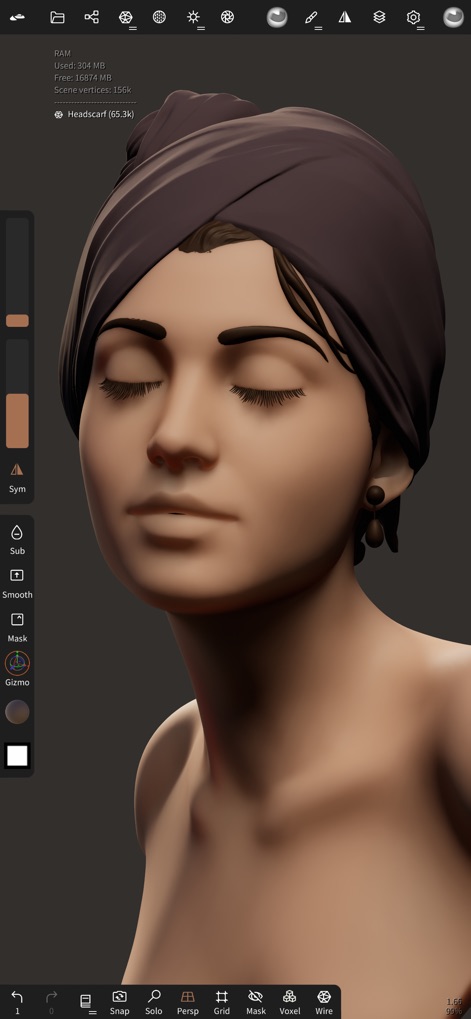
Discover how users can apply vertex painting for intricate color details and manage various material presets to achieve diverse skin tones and textures.
Expressive Color Detail

This tool provides comprehensive control over rendered scenes, allowing users to import HDR environments and finely adjust exposure and rotation for realistic lighting setups.
Immersive Environment Control
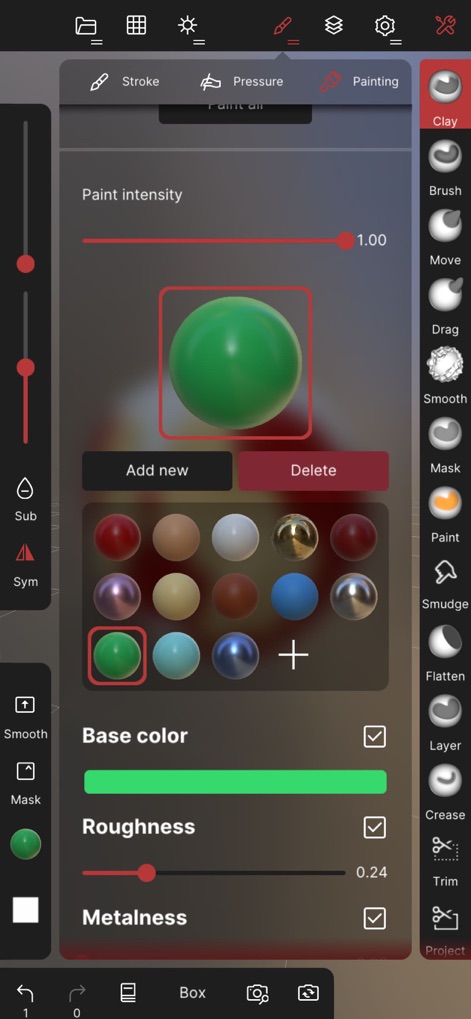
Users can precisely define surface properties through vertex painting, adjusting base color, roughness, and metalness, alongside a rich selection of material presets for rapid material application.
Advanced Material Painting
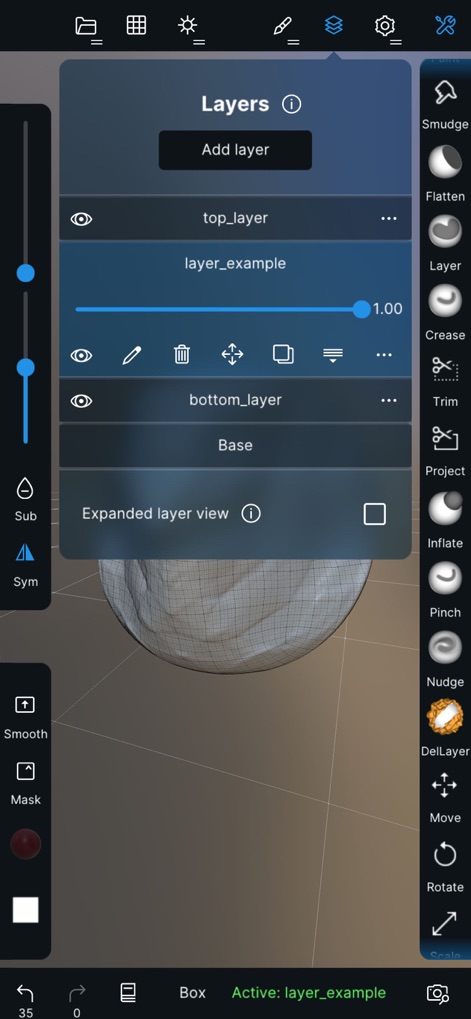
The app facilitates a flexible creative process with robust layer management, enabling users to record sculpting and painting operations in separate layers and adjust their opacity for refined iteration.
Non-Destructive Workflow

Digital artists gain unparalleled control over brush strokes by customizing falloff curves and importing alpha textures, allowing for highly specific and detailed surface manipulation.
Precision Stroke Customization
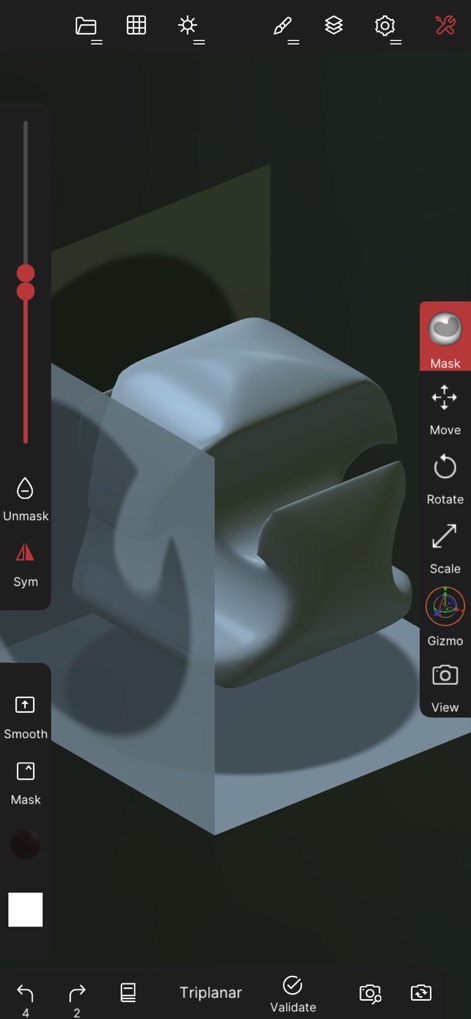
The app streamlines 3D object manipulation through intuitive tools like the Mask feature for selective editing and the Gizmo for precise transformations, enhancing workflow efficiency.
Intuitive Object Manipulation
Description
Download
More Like This
Apps with similar features and user experience


This page is not an official page of the app or its developer, but an independent editorial publication created for informational and commentary purposes. Unless expressly stated otherwise, neither the app nor its developer is affiliated with, endorsed by, sponsored by, authorized by, or otherwise officially connected with MWM, Apple, Google Play, the app publisher, or the app's developer, and nothing on this page implies that the app was developed using MWM's services. Any trademarks, logos, screenshots, and other content remain the property of their respective owners.