OCR Subtitle

OCR Subtitle

Download on App Store
Logo of OCR Subtitle

OCR Subtitle: Extract and Edit Video Captions Instantly

The ultimate tool for creators and editors to turn burned-in video text into editable SRT files. Stop transcribing by hand and streamline your localization workflow directly from your iPhone or iPad.

Download on App Store

Publisher

韩 明洁

Category

Utilities

Downloads

200

User Rating

1.0/5

Total Ratings

0

Locales

2

Your Workflow, Visualized

Discover the interface used by 200 users.
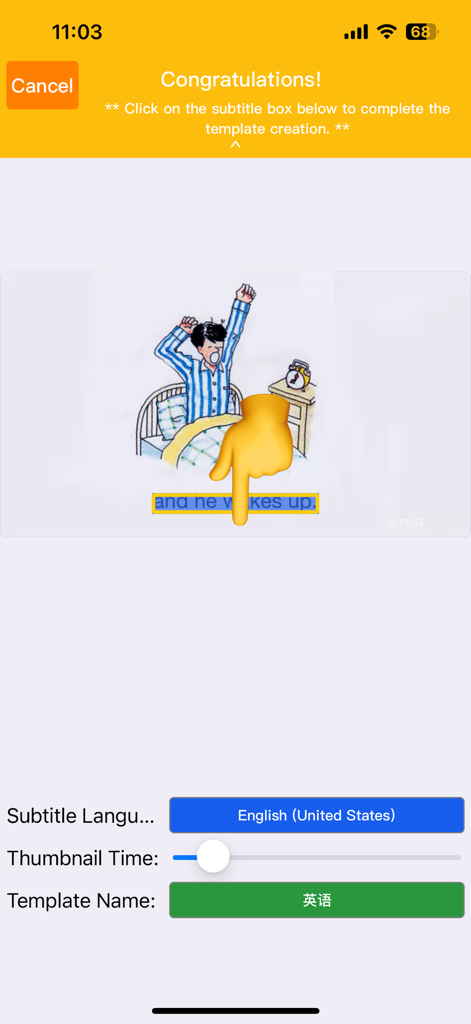
OCR Subtitle app interface for creating a subtitle extraction template by selecting text in a video frame

OCR Subtitle app interface for creating a subtitle extraction template by selecting text in a video frame

A grid view of video projects showing extracted SRT subtitle files and thumbnails in the OCR Subtitle app.

A grid view of video projects showing extracted SRT subtitle files and thumbnails in the OCR Subtitle app.

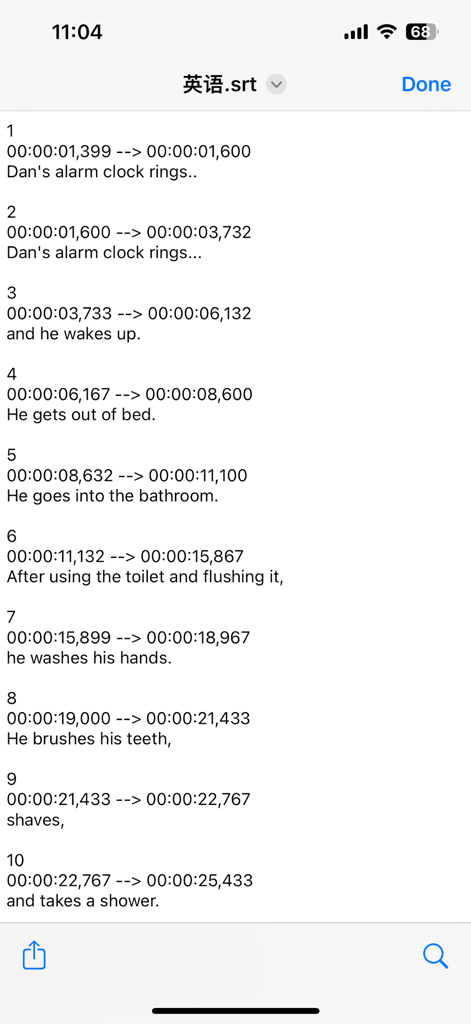
A list of numbered subtitles with timecodes and English text in an SRT file format.

A list of numbered subtitles with timecodes and English text in an SRT file format.

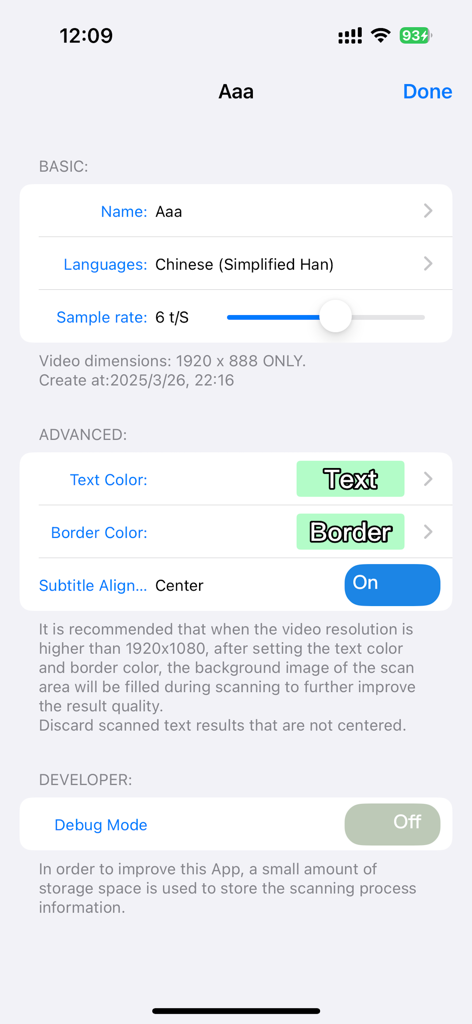
Settings menu of the OCR Subtitle app showing basic and advanced customization options for video text extraction

Settings menu of the OCR Subtitle app showing basic and advanced customization options for video text extraction

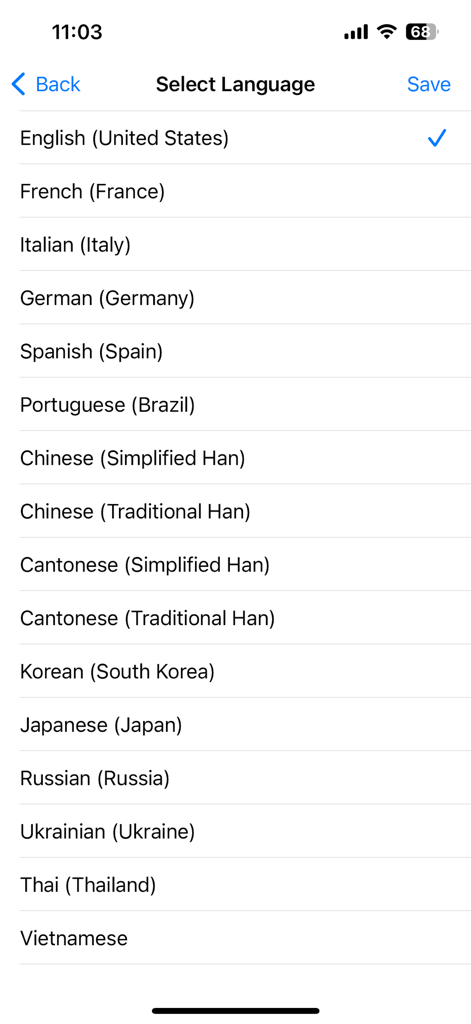
Screen showing multiple language options for subtitle recognition in the OCR Subtitle app

Screen showing multiple language options for subtitle recognition in the OCR Subtitle app

Master Your Subtitle Workflow

The tools that make this app stand out, trusted by 200 users.

Instant OCR Extraction

Convert hardcoded video text into live, editable SRT files in seconds using high-precision AI recognition.

🌎

Global Content Localization

Bridge the gap for international audiences with support for English, Chinese, Japanese, Korean, and French.

🎬

Studio-Ready Exports

Perfect your mobile-to-desktop workflow with SRT files compatible with YouTube, Premiere Pro, and Final Cut.

About the app

Everything you need to know about OCR Subtitle.

Description

OCR Subtitle is a powerful and user-friendly tool that converts embedded subtitles in videos into standard SRT files. It’s designed for creators, editors, educators, and YouTubers who need fast, flexible subtitle extraction with full editing capabilities. Key Features: • Easy Video Import: Quickly import video files directly from your iPhone or iPad system—no extra steps required • Accurate Subtitle Recognition: Uses OCR technology to detect on-screen embedded subtitles and generate time-coded SRT files with sequence numbers • Flexible SRT Export: Exported SRT files can be freely edited, copied, shared, or uploaded to platforms like YouTube • Customizable Templates: Fine-tune subtitle extraction by adjusting font color, outline color, subtitle time intervals, and maximum line length for improved accuracy • Multilingual Support: Extract subtitles in English, Japanese, Korean, Russian, French,Simplified Chinese, Traditional Chinese and more • Broad Compatibility: Generated SRT files work seamlessly with YouTube, VLC, Final Cut Pro, Adobe Premiere, and most major media tools Ideal For: • Recovering subtitles from legacy videos • Creating multilingual subtitle versions for global audiences • Adding subtitles to videos that don’t already have them Highlights: • Fast, precise OCR-based subtitle recognition • Clean and intuitive user interface • Flexible template settings to match various subtitle styles OCR Subtitle helps streamline your subtitle workflow—making video accessibility and localization easier than ever! Support: If you have any suggestions and comments, please do not hesitate to contact the developer: Email: hanmingjie@gmail.com WeChat: MingJie-Han We will continue to improve the app to achieve 100% customer satisfaction.

Latest Version

2.0

Size

19.0 MB

First Released

Feb 20, 2025

Ready to Save Hours of Manual Transcription?

Join the creators and editors streamlining their workflow. Download OCR Subtitle for iPhone and iPad to turn any video into editable SRT files instantly.

Download on App Store
FAQ

Frequently Asked Questions

Everything you need to know about OCR Subtitle

What is the primary function of OCR Subtitle?

OCR Subtitle extracts embedded subtitles from videos using optical character recognition (OCR). It converts these into standard SRT files, useful for creators, editors, educators, and YouTubers.

What type of subtitle files does OCR Subtitle generate?

OCR Subtitle generates standard SRT files with time codes and sequence numbers. These files are flexible for editing, sharing, and uploading to platforms like YouTube.

Is OCR Subtitle compatible with other media tools?

Yes, generated SRT files from OCR Subtitle work seamlessly with YouTube, VLC, Final Cut Pro, Adobe Premiere, and most major media tools for broad compatibility.

Can users customize subtitle recognition settings in OCR Subtitle?

Yes, OCR Subtitle allows customizable templates. Users can adjust font color, outline color, subtitle timing intervals, and maximum line length for improved accuracy.

Does OCR Subtitle support multiple languages for subtitle extraction?

Yes, OCR Subtitle offers multilingual support. It recognizes English, Japanese, Korean, Russian, French, Simplified Chinese, Traditional Chinese, and many more, as listed in the language selection menu.

How do users import videos into the OCR Subtitle app?

OCR Subtitle allows easy video import. Users can import video files directly from their iPhone or iPad with no extra steps, streamlining the workflow.

Who can benefit from using the OCR Subtitle app?

OCR Subtitle is ideal for creators, editors, educators, and YouTubers. It assists in recovering subtitles from legacy videos, creating multilingual versions, and adding subtitles to videos.

App information, icons, screenshots, and descriptions displayed on this page are sourced from the Apple App Store and are the property of their respective developers. Download estimates and rankings are based on MWM's proprietary models and may not reflect actual figures. This page is provided for informational and analytical purposes only.

Believe this page infringes your intellectual property? File a dispute