
This page is not an official page of the app or its developer, but an independent editorial publication created for informational and commentary purposes. Unless expressly stated otherwise, neither the app nor its developer is affiliated with, endorsed by, sponsored by, authorized by, or otherwise officially connected with MWM, Apple, Google Play, the app publisher, or the app's developer, and nothing on this page implies that the app was developed using MWM's services. Any trademarks, logos, screenshots, and other content remain the property of their respective owners.


OnWear Pro
Track your vitals, optimize your sleep, and never miss a notification. Empower your wellness journey with all-in-one data syncing for a healthier, more connected you.
Downloads
253K+User Rating
Total Ratings
100Publisher
Category
Health & FitnessLocales
39Latest Version
1.5.8Size
307.3 MBFirst Released
May 4, 2022Your Health, Simplified
Unlock the full potential of your smartwatch with expert health tracking and seamless connectivity designed for your daily life.
Comprehensive Health Insights
Monitor heart rate, blood oxygen, and blood pressure to get a clear picture of your vitals anytime, anywhere.
Stay Connected Effortlessly
Never miss an important call or message. Get instant notifications from WhatsApp, SMS, and more right on your wrist.
Frequently Asked Questions
Everything you need to know about OnWear Pro
What types of standard motion data does OnWear Pro track?
OnWear Pro accurately tracks and provides daily exercise steps, calories burned, and distance covered. This helps users monitor their physical activity levels effectively.
Does OnWear Pro monitor sleep patterns?
Yes, OnWear Pro monitors sleep patterns. It records deep sleep, light sleep, and awake states daily, enabling users to better understand and manage their sleep quality.
Can OnWear Pro display notifications from my phone?
Yes, OnWear Pro displays notifications. It ensures users receive SMS, phone calls, WeChat, WhatsApp, Line, and other application news directly on their smart watch when the feature is enabled.
Does OnWear Pro have a sedentary reminder feature?
Yes, OnWear Pro includes a sedentary reminder. Users can set a specific reminder time for their smart watch, which then vibrates to prompt them to get up and exercise regularly.
Does OnWear Pro offer a water reminder?
Yes, OnWear Pro offers a water reminder feature. The smart watch prompts users to replenish water in time, promoting better hydration and overall health habits throughout the day.
How does the intelligent alarm clock work in OnWear Pro?
The intelligent alarm clock in OnWear Pro wakes users up discreetly. It reminds users to get up or begin work without disturbing individuals nearby, ensuring a gentle start to the day.
Can OnWear Pro sync data with Apple Health?
Yes, OnWear Pro can synchronize data with Apple Health. It transfers exercise data, sleep metrics, heart rate, blood pressure, blood oxygen, and respiratory rate for a comprehensive health overview.
Does OnWear Pro have a phone loss prevention feature?
Yes, OnWear Pro features loss prevention for phones. If the mobile phone remains connected, the smart watch vibrates to remind the user, and the phone rings to assist in locating it.
What health metrics does OnWear Pro monitor?
OnWear Pro monitors several health metrics. It tracks heart rate, blood oxygen, blood pressure, and respiratory rate, providing users with a comprehensive overview of their physiological well-being.
Does OnWear Pro support a dark mode interface?
Yes, OnWear Pro supports a dark mode interface. The application allows users to switch between day and night themes for comfortable viewing, as demonstrated on the home screen display.
What detailed information does OnWear Pro provide for workout logs?
OnWear Pro provides detailed workout logs including distance, exercise time, calories consumed, average pace, total steps, average cadence, and average heart rate for each activity.
Can users customize the appearance of the OnWear Pro app?
Yes, users can customize the appearance of the OnWear Pro app. It offers a variety of themes, enabling users to switch the app's style based on personal preferences or specific scenarios.
What device information does OnWear Pro display in the 'Mine' section?
In the 'Mine' section, OnWear Pro displays the connected device model, such as 'LW61-S124', and its current battery percentage. It also presents options for watch settings.
The following screenshots and description are sourced directly from the app's official store listing and are the property of the app developer.
App Store
Screenshots
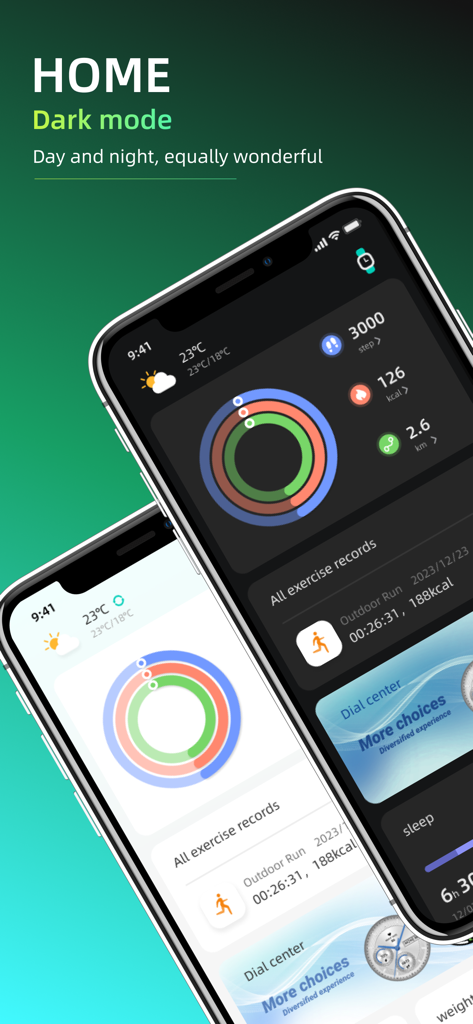
OnWear Pro app home screen showing health activity rings and exercise data in both light and dark modes
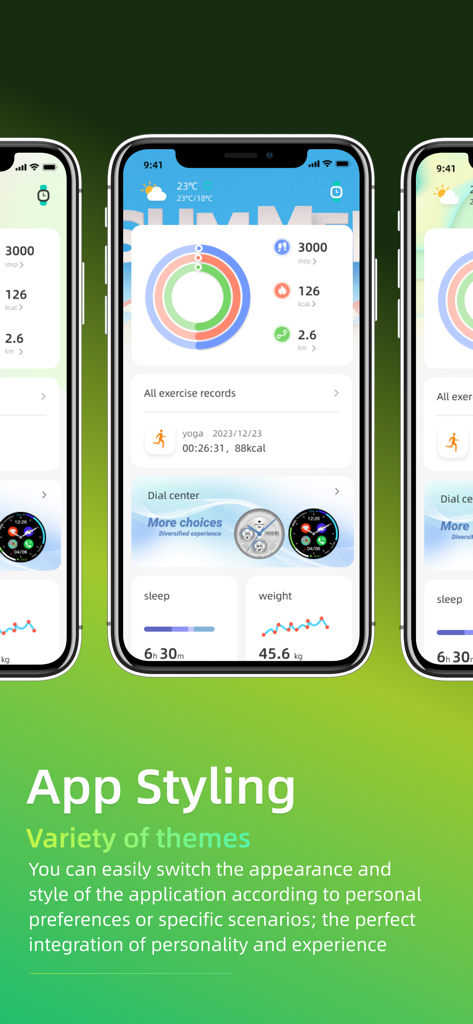
Three iPhone screens showing OnWear Pro app dashboard with customizable themes and health tracking data.
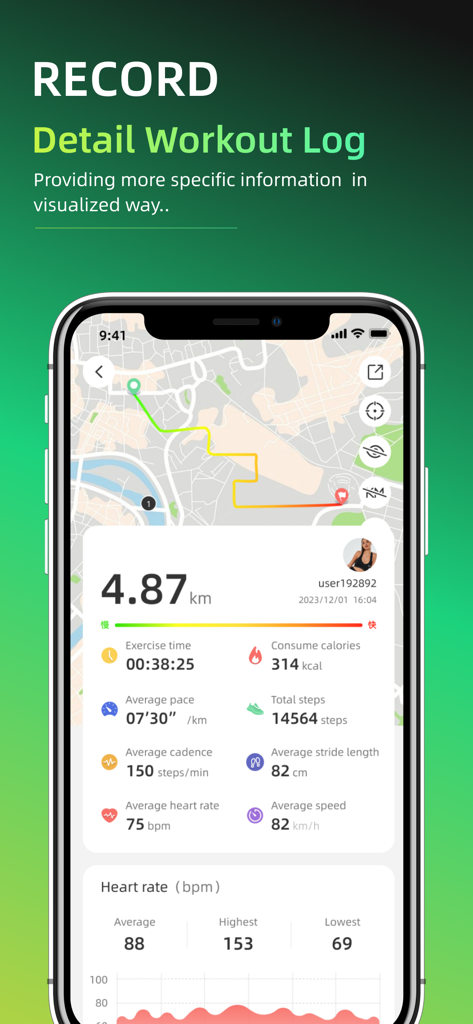
OnWear Pro app workout summary screen showing a GPS map and exercise metrics like steps and heart rate.
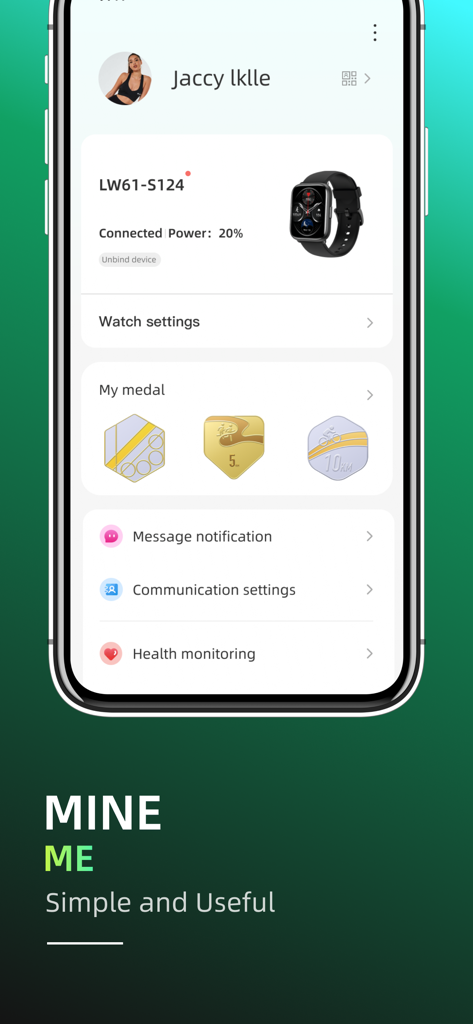
OnWear Pro app user profile screen with connected smartwatch status and settings menu
Description
Download
More Like This
Apps with similar features and user experience

Mi Fitness (Xiaomi Wear Lite)
Beijing Xiaomi Co., Ltd

HUAWEI Health
Huawei Software Technologies Co., Ltd.

Oura
Oura Health Oy

iHealth MyVitals
iHealth Labs Inc.

Da Fit
MO YOUNG LIMITED

Zepp
Zepp Inc.

OMRON connect US/CAN/EMEA
Omron Healthcare, Inc.
CASIO WATCHES
CASIO COMPUTER CO., LTD.

NoiseFit: Health & Fitness
NEXXBASE MARKETING PRIVATE LIMITED
This page is not an official page of the app or its developer, but an independent editorial publication created for informational and commentary purposes. Unless expressly stated otherwise, neither the app nor its developer is affiliated with, endorsed by, sponsored by, authorized by, or otherwise officially connected with MWM, Apple, Google Play, the app publisher, or the app's developer, and nothing on this page implies that the app was developed using MWM's services. Any trademarks, logos, screenshots, and other content remain the property of their respective owners.