
This page is not an official page of the app or its developer, but an independent editorial publication created for informational and commentary purposes. Unless expressly stated otherwise, neither the app nor its developer is affiliated with, endorsed by, sponsored by, authorized by, or otherwise officially connected with MWM, Apple, Google Play, the app publisher, or the app's developer, and nothing on this page implies that the app was developed using MWM's services. Any trademarks, logos, screenshots, and other content remain the property of their respective owners.


Oracle Mobile Authenticator
Protect your professional accounts with enterprise-grade multi-factor authentication. Approve logins with a single tap or generate secure passcodes even when you are offline.
Downloads
1M+User Rating
Total Ratings
100Publisher
Category
BusinessLocales
27Latest Version
4.21Size
3.9 MBFirst Released
Mar 21, 2014Secure Your Enterprise Access
Oracle Mobile Authenticator adds a powerful layer of security to your professional accounts with seamless, one-tap verification.
One-Tap Approval
Skip the codes. Approve your login requests instantly via push notifications for a frictionless, high-speed experience.
Offline Reliability
Stay productive anywhere. Generate secure one-time passcodes even when your device is offline or in airplane mode.
Frequently Asked Questions
Everything you need to know about Oracle Mobile Authenticator
What is Oracle Mobile Authenticator used for?
Oracle Mobile Authenticator securely verifies user identity by utilizing the mobile device as an authentication factor. It generates one-time passcodes and receives login notifications for approval, adding a crucial layer of security to online applications.
How does Oracle Mobile Authenticator improve login security?
Oracle Mobile Authenticator improves login security by adding an additional authentication layer. It requires either a generated one-time passcode or approval via push notification, augmenting the traditional username-password method for enhanced protection.
Can Oracle Mobile Authenticator generate passcodes when offline?
Yes, Oracle Mobile Authenticator can generate one-time passcodes even when the mobile device is offline. This ensures users can still authenticate securely without requiring an active internet connection.
Does Oracle Mobile Authenticator support multiple user accounts?
Yes, Oracle Mobile Authenticator supports multiple user accounts. The application allows users to manage and generate passcodes for several different accounts simultaneously, as shown in the accounts interface.
What are the setup options for accounts in Oracle Mobile Authenticator?
Accounts in Oracle Mobile Authenticator can be set up via a QR code, a configuration URL, or by manually entering a key. These flexible options simplify the initial setup process for users.
How is the Oracle Mobile Authenticator app protected?
The Oracle Mobile Authenticator app is protected using either Touch ID or an App PIN. This security measure prevents unauthorized access to the authenticator application itself, safeguarding stored accounts and passcodes.
Can Oracle Mobile Authenticator approve logins through notifications?
Yes, Oracle Mobile Authenticator can approve logins through push notifications. Users receive an alert and can complete the authentication process with a simple tap, streamlining the login experience.
What is the security advantage of Oracle Mobile Authenticator for online applications?
Oracle Mobile Authenticator provides a critical security advantage by adding a second factor to online application logins. This multi-factor authentication significantly reduces the risk of unauthorized access, even if passwords are compromised.
The following screenshots and description are sourced directly from the app's official store listing and are the property of the app developer.
App Store
Screenshots
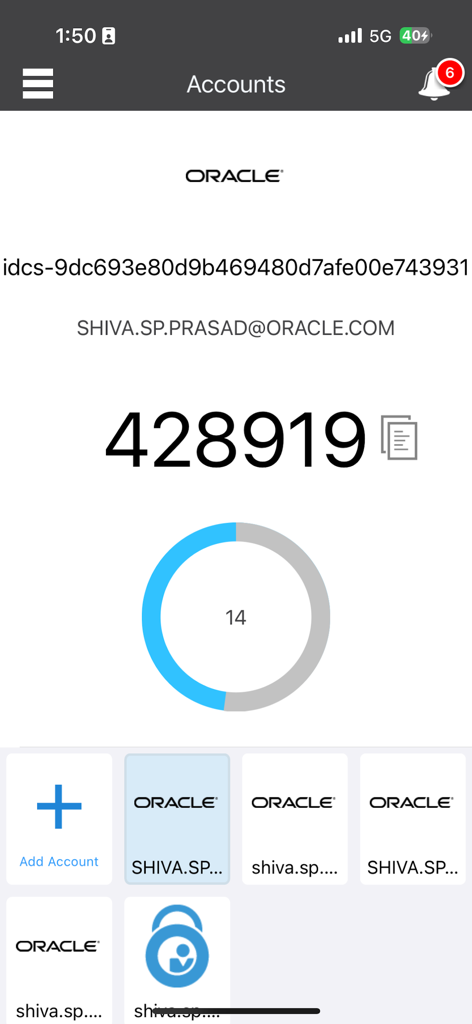
Oracle Mobile Authenticator app displaying a six digit one time passcode with a countdown timer and account list
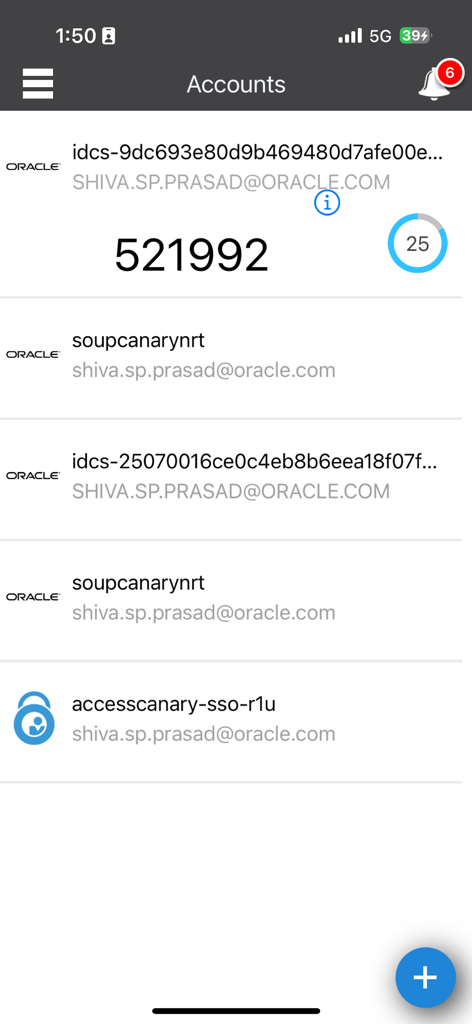
Oracle Mobile Authenticator app showing a list of accounts and a 6-digit security code
Description
Download
More Like This
Apps with similar features and user experience

Google Authenticator
Google LLC

Duo Mobile
Duo Security LLC

Authenticator App - 2FA &. MFA
APPLY DIJITAL HIZMETLER TICARET LIMITED SIRKETI

authenticator . app
Mustafa Uz

SafeNet MobilePASS+
Thales DIS (Singapore) Pte Ltd

Čítačka
Tatra banka, a.s.

Authenticator App - SafeAuth
Brilliant App Limited

Authenticator App - 2FA Auth
UNIVERSE DIJITAL HIZMETLER LIMITED SIRKETI

Authenticator App : Scan & 2FA
XSOFT GLOBAL LIMITED
This page is not an official page of the app or its developer, but an independent editorial publication created for informational and commentary purposes. Unless expressly stated otherwise, neither the app nor its developer is affiliated with, endorsed by, sponsored by, authorized by, or otherwise officially connected with MWM, Apple, Google Play, the app publisher, or the app's developer, and nothing on this page implies that the app was developed using MWM's services. Any trademarks, logos, screenshots, and other content remain the property of their respective owners.