Pencil Planner & Calendar Pro

Pencil Planner & Calendar Pro

Download on App Store
Logo of Pencil Planner & Calendar Pro

Pencil Planner & Calendar Pro: The Paper Planner That Syncs With Your Life

Experience the freedom of handwriting directly on your digital calendar. Designed for Apple Pencil users who want the soul of a bullet journal with the efficiency of modern tech.

Publisher

Wasdesign, LLC

Category

Productivity

Downloads

3M+

User Rating

4.5/5

Total Ratings

22K+

Locales

12

Your Planner, Reimagined

Discover the interface used by 3M+ users.
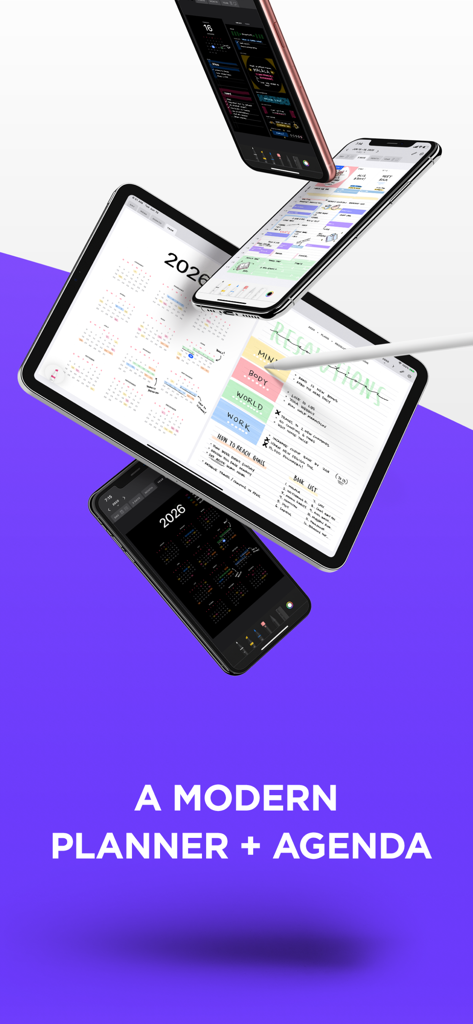
Pencil Planner and Calendar Pro app showing handwritten scheduling on iPad and iPhone

Pencil Planner and Calendar Pro app showing handwritten scheduling on iPad and iPhone

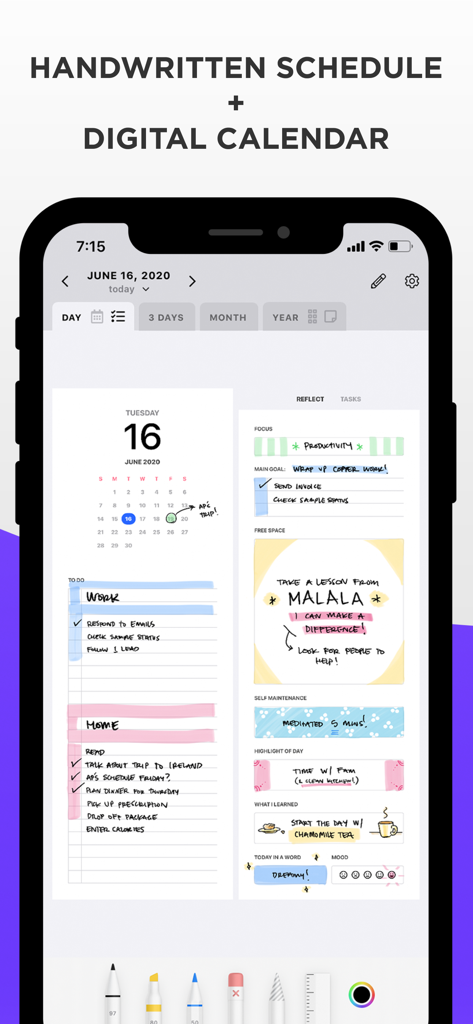
Pencil Planner Pro app interface on a smartphone showing a handwritten daily schedule and digital calendar integration

Pencil Planner Pro app interface on a smartphone showing a handwritten daily schedule and digital calendar integration

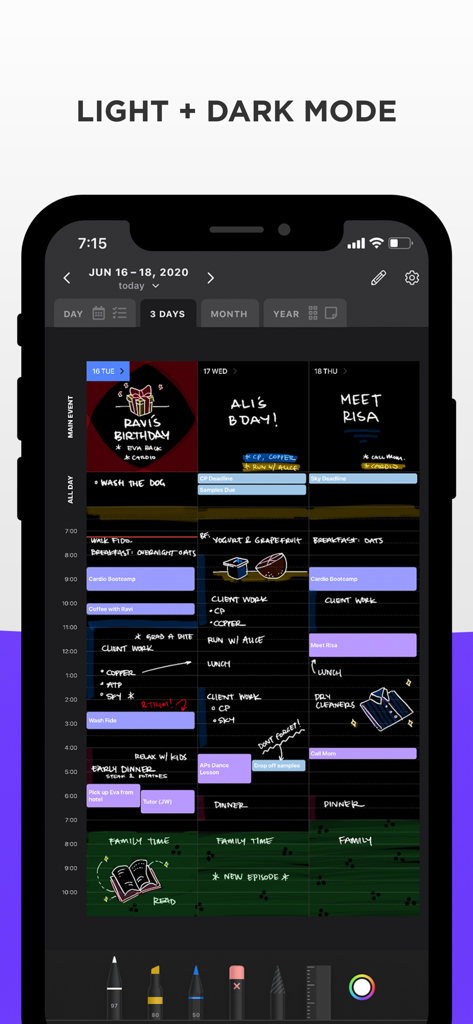
Digital planner app on an iPhone showing a 3-day calendar view in dark mode with handwritten notes and colorful sketches.

Digital planner app on an iPhone showing a 3-day calendar view in dark mode with handwritten notes and colorful sketches.

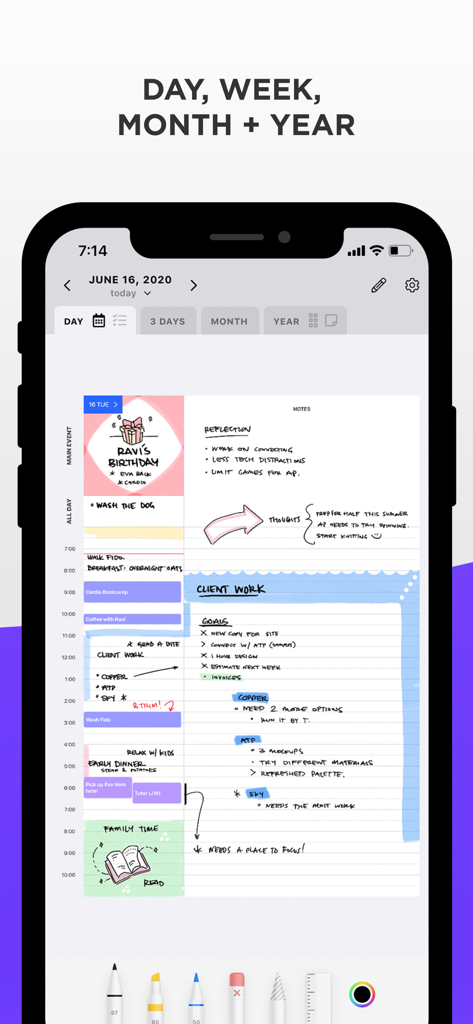
A smartphone screen showing the Pencil Planner app with colorful handwritten notes and sketches integrated into a digital daily schedule.

A smartphone screen showing the Pencil Planner app with colorful handwritten notes and sketches integrated into a digital daily schedule.

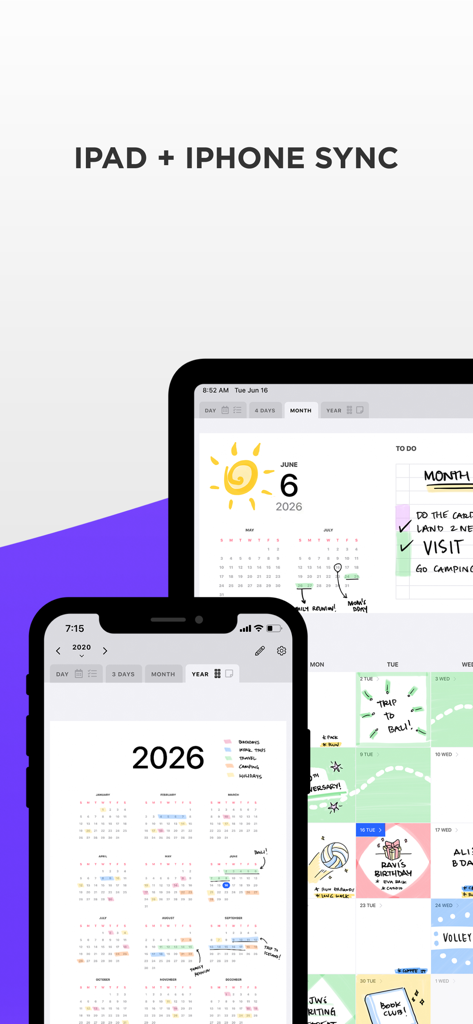
Pencil Planner app interface showing handwritten notes and digital calendar sync between an iPad and iPhone

Pencil Planner app interface showing handwritten notes and digital calendar sync between an iPad and iPhone

Master Your Schedule with a Personal Touch

The tools that make this app stand out, trusted by 3M+ users.

✍️

Handwritten Freedom

Annotate meetings, sketch ideas, and highlight priorities with the natural feel of your Apple Pencil directly on your iPad.

🔄

Zero-Effort Syncing

Stop duplicating work. Your handwriting lives right on top of your existing digital calendar events across all your Apple devices.

Aesthetic Organization

Experience the beauty of a bullet journal with the power of a digital app, featuring fluid navigation between daily, weekly, and monthly views.

Review Analysis

Insights from user reviews.

Sentiment Score

34%
Negative

Summary

This app receives predominantly negative feedback, with many users expressing frustration over its instability and lack of reliability despite some initial appreciation for its handwriting feel, ease of use, and aesthetic design. Core issues include frequent crashes, freezing, and critical data loss where notes and planned items disappear, rendering the app unusable for many. Users also consistently report unreliable syncing across devices and unresponsive customer support, with many noting specific problems introduced by the V2 update and recent iOS updates. These significant drawbacks lead many to regret their subscriptions and advise against using the app.

Common Themes

Handwriting Experience(8)
Planning & Organization Features(4)
Ease of Use & Design(3)
Apple Ecosystem Integration(3)
Subscription Value(1)

About the app

Everything you need to know about Pencil Planner & Calendar Pro.

Description

Combine your daily digital calendar with your paper planner! Now you no longer have to choose between typing and handwriting your schedule, events and reminders. Pencil Planner Pro is the best of both worlds as you can write directly over the events that come from the Calendar app using your Apple Pencil. Take your paper agenda into the digital world! Plan daily, weekly, monthly and yearly with this handwritten bullet journal, agenda, and diary. VARIOUS CALENDAR INTEGRATIONS & DEVICES * Connect with you Calendar from all sources that the Calendar app supports * Sync between devices, including iPad and iPhone * Screen adapts to portrait and landscape * Integration with the Reminders app! BEAUTIFUL CALENDAR NAVIGATION * Main events written on the month view show up in the day and week * Schedule written in the week view shows up in the day * Tap on titles to quickly navigate * Full screen or split screen with other apps * Beautiful pages for day, week, month, year, and year grid LIKE ON REAL PAPER - NATURAL WRITING EXPERIENCE * Fluent, precise, and completely natural writing experience * Write with the Apple Pencil, Logitech Crayon, or with many capacitive styluses * Select and customize your pen color, thickness, and style (fountain pen, colored pencil, highlighter) * Easily switch between pen, highlighter, and eraser PLANNING YOUR AGENDA IS A BREEZE * Several writing tools and many different styles * Swipe left/right to go between dates * Dark mode and light mode * Zoom in & pan * Draw with pencil, finger, or other stylus BETTER THAN YOUR PAPER AGENDA * Select and move your handwriting * Undo & Redo * Powerful & smart eraser tool: Choose to erase the entire stroke or only parts of it. Set it to "Erase Highlighter Only" to leave the ink intact * Pinch to zoom and write more precisely * Sync to iPhone for your calendar on the go! PRO ACCESS Pencil Planner Pro Access is a subscription that unlocks all of the features available in Pencil Planner Pro shown below. Pro Access is available as a monthly ($4.99 USD) and a yearly ($24.99 USD) subscription. Try out all of Pencil Planner's features with a 3 day free trial. * Unlimited entries * Unlimited storage * Unlimited devices * Cloud backup & sync * Incredible planning experience! QUESTIONS * Reach out to us at support@pencilplanner.app with any questions or requests. We are always happy to help. Terms of use: https://pencilplanner.app/terms-of-use/

Latest Version

2.1.0

Size

46.2 MB

First Released

May 31, 2020

The Planner Your Apple Pencil Has Been Waiting For

Join over 3 million users who have bridged the gap between the tactile joy of handwriting and the power of digital sync. Start your 3-day free trial and elevate your daily ritual today.

Download on App Store
FAQ

Frequently Asked Questions

Everything you need to know about Pencil Planner & Calendar Pro

Can I handwrite in Pencil Planner Pro using my Apple Pencil?

Yes, Pencil Planner Pro allows users to handwrite directly over digital calendar events using an Apple Pencil or other supported styluses.

What planning views are available in Pencil Planner Pro?

Pencil Planner Pro offers comprehensive daily, weekly, monthly, and yearly views for organizing schedules, events, and reminders effectively.

Does Pencil Planner Pro integrate with other calendar apps?

Yes, Pencil Planner Pro connects with all calendar sources supported by the native Calendar app and integrates with the Reminders app.

Can I sync Pencil Planner Pro across multiple Apple devices?

Yes, Pencil Planner Pro syncs seamlessly between devices, including iPad and iPhone, adapting to portrait and landscape orientations.

Does Pencil Planner Pro support dark mode?

Yes, Pencil Planner Pro supports both dark mode and light mode, allowing users to select their preferred visual interface.

What are the subscription costs for Pencil Planner Pro Access?

Pencil Planner Pro Access costs $4.99 USD monthly or $24.99 USD annually. A 3-day free trial is available to new users.

What features does Pencil Planner Pro Access unlock?

Pencil Planner Pro Access unlocks unlimited entries, storage, and devices, along with cloud backup and sync for an enhanced planning experience.

How can I get support for Pencil Planner Pro?

Users can obtain support for Pencil Planner Pro by sending an email to support@pencilplanner.app with any questions or requests.

App information, icons, screenshots, and descriptions displayed on this page are sourced from the Apple App Store and are the property of their respective developers. Download estimates and rankings are based on MWM's proprietary models and may not reflect actual figures. This page is provided for informational and analytical purposes only.

Believe this page infringes your intellectual property? File a dispute