
This page is not an official page of the app or its developer, but an independent editorial publication created for informational and commentary purposes. Unless expressly stated otherwise, neither the app nor its developer is affiliated with, endorsed by, sponsored by, authorized by, or otherwise officially connected with MWM, Apple, Google Play, the app publisher, or the app's developer, and nothing on this page implies that the app was developed using MWM's services. Any trademarks, logos, screenshots, and other content remain the property of their respective owners.

Google Tasks: Get Things Done
Chaos consumes your day. The app offers direct command over your obligations, transforming scattered notes into executed actions.
Downloads
12.5M+User Rating
Total Ratings
309.4KPublisher
Category
ProductivityLocales
55Latest Version
26.13.0Size
138.2 MBFirst Released
Apr 27, 2018Google Tasks: Core Functionality and Ecosystem Integration
An evaluation of key features for productivity within the Google ecosystem.
Deep Google Ecosystem Integration
This tool features robust integration with Gmail and Google Calendar, streamlining workflow and centralizing task management within the Google suite for enhanced productivity.
Cross-Device Synchronization
The app provides seamless task synchronization across all user devices, ensuring accessibility and consistency for managing to-dos from anywhere, at any time.
Effortless Task Capture & Management
It allows users to quickly capture, create, view, edit, and manage tasks on the go from any device, ensuring productivity regardless of location.
Due Dates and Notification Reminders
The app enables users to set due dates for tasks and receive timely notification reminders, aiding in staying organized and proactively meeting deadlines.
Email-to-Task Conversion
This tool facilitates the direct creation of tasks from emails within Gmail, allowing users to streamline their inbox management and trace tasks back to their original communication.
Subtasks and Task Detailing
It allows users to break down larger tasks into smaller, manageable subtasks and add detailed descriptions, facilitating better organization and progress tracking for complex projects.
Frequently Asked Questions
Everything you need to know about Google Tasks: Get Things Done
What is Google Tasks: Get Things Done?
Google Tasks: Get Things Done is a task management app for managing, capturing, and editing tasks. It syncs across all devices and integrates with Gmail and Google Calendar for efficient task completion.
How can I capture tasks quickly using Google Tasks?
Google Tasks allows quick task capture by enabling users to create task lists. Users can view, edit, and manage these tasks on the go from any device, ensuring flexibility and accessibility.
Does Google Tasks support subtasks for detailed organization?
Yes, Google Tasks supports subtasks. Users can break down main tasks into smaller subtasks and add specific details. Task details are editable as work progresses, providing flexible organization.
How does Google Tasks integrate with Gmail?
Google Tasks integrates with Gmail, allowing users to create tasks directly from emails. Users can view tasks in the Gmail side panel and trace each task back to its original source email.
Can Google Tasks set due dates and send notifications?
Yes, Google Tasks enables users to set due dates for tasks and receive notification reminders. Users can also organize tasks by date or prioritize them using a drag-and-drop interface.
Is Google Tasks part of the Google Workspace suite?
Yes, Google Tasks is part of Google Workspace. It brings powerful, intelligent apps together, leveraging Google's AI. This suite seamlessly connects users with Gmail, Calendar, and more.
Does Google Tasks sync across all my devices?
Yes, Google Tasks ensures tasks sync across all user devices. This feature allows users to manage, capture, and edit their tasks efficiently from anywhere and at any time.
How does Google Tasks work with Google Calendar?
Google Tasks integrates with Google Calendar. Users can manage tasks originally created in Calendar directly from their mobile device. This integration helps streamline task completion for users.
The following screenshots and description are sourced directly from the app's official store listing and are the property of the app developer.
App Store
Screenshots

Quick Task Capture
This tool allows users to effortlessly add new tasks via the on-screen keyboard, instantly integrating them into organized task lists like "My Tasks" or "Project Phoenix".

Detail-Oriented Organization
Users can refine tasks with added details such as supporting notes and break down larger goals into manageable subtasks for structured workflow management.
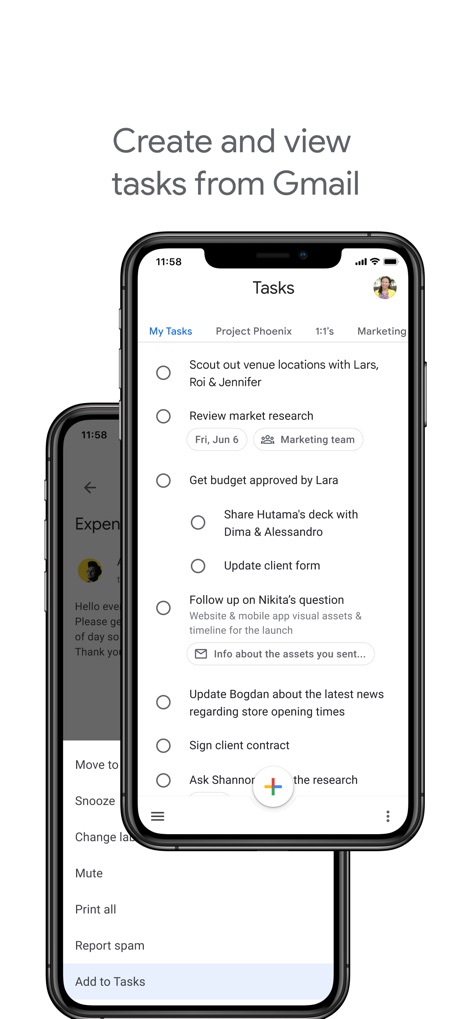
Seamless Gmail Integration
This app demonstrates its deep integration by allowing users to effortlessly create new tasks directly from Gmail emails and then view these tasks within their main task list.

Calendar Sync & View
The app seamlessly integrates with Google Calendar, allowing users to schedule and visualize their tasks directly within their daily agenda for improved time management and overview.

Cross-Device Productivity
Users benefit from consistent task management across devices, with the app accessible on both mobile and tablet interfaces, integrated within the broader Google Workspace ecosystem.
Description
Download
More Like This
Apps with similar features and user experience

Notion: Notes, Tasks, AI
Notion Labs, Incorporated

Freenotes®: AI Notes Taking
Hangzhou Free Notes Technology Co., Ltd

Structured - Daily Planner
unorderly GmbH

TickTick:To-Do List & Calendar
Appest Limited

Noteful: Notes & PDF Markup
Noteful Technologies Ltd

Todoist: To Do List & Calendar
Doist Inc.

To do list MinimaList & Widget
Inner Grow Limited

monday.com - Work Platform
monday.com Ltd.

Prodrafts - Infinite Notes
EMMO Corp.
This page is not an official page of the app or its developer, but an independent editorial publication created for informational and commentary purposes. Unless expressly stated otherwise, neither the app nor its developer is affiliated with, endorsed by, sponsored by, authorized by, or otherwise officially connected with MWM, Apple, Google Play, the app publisher, or the app's developer, and nothing on this page implies that the app was developed using MWM's services. Any trademarks, logos, screenshots, and other content remain the property of their respective owners.