
This page is not an official page of the app or its developer, but an independent editorial publication created for informational and commentary purposes. Unless expressly stated otherwise, neither the app nor its developer is affiliated with, endorsed by, sponsored by, authorized by, or otherwise officially connected with MWM, Apple, Google Play, the app publisher, or the app's developer, and nothing on this page implies that the app was developed using MWM's services. Any trademarks, logos, screenshots, and other content remain the property of their respective owners.


Philips Hue
Forget simple switches. This app weaponizes light, giving users complete command over their environment's mood, security, and immersive media experiences.
Downloads
12.5M+User Rating
Total Ratings
400.6KPublisher
Category
LifestyleLocales
19Latest Version
5.63.1Size
243.5 MBFirst Released
Apr 28, 2016Philips Hue App: A Comprehensive Smart Lighting & Home Automation Hub
An analytical overview of key features enhancing convenience, aesthetics, and security for modern living spaces.
Integrated Home Security
The app integrates with Philips Hue Secure devices, allowing users to monitor their home, receive alerts, and trigger light and sound alarms for enhanced safety and peace of mind.
Immersive Media Sync
It enables users to synchronize their smart lights with TV, music, and games, creating a dynamic and immersive entertainment experience.
Customizable Automations
This tool provides robust customization options for scheduling lights to fit daily routines, offering effortless convenience from waking up to arriving home.
Remote Control
The app allows users to control their smart lights from any location with an internet connection, providing ultimate convenience and peace of mind.
Dynamic Scene Management
It features a rich gallery of professionally designed lighting scenes and allows users to create custom scenes based on photos or favorite colors, enhancing home aesthetics.
Voice Control Integration
The app supports integration with major voice assistants like Apple Home, Amazon Alexa, and Google Assistant, enabling hands-free control of lighting.
Circadian Lighting (Natural Light Scene)
This feature automatically adjusts lighting throughout the day with the Natural Light scene, promoting well-being by optimizing light for energy, focus, and relaxation.
Light Organization (Rooms & Zones)
The app simplifies managing multiple lights by organizing them into logical Rooms or Zones, mirroring the physical layout of a home for intuitive control.
Frequently Asked Questions
Everything you need to know about Philips Hue
What is the Philips Hue app?
The Philips Hue app is the official application for organizing, controlling, and customizing Philips Hue smart lights and accessories. It provides comprehensive management for your smart lighting system.
How does the Philips Hue app organize smart lights?
The Philips Hue app organizes smart lights by grouping them into Rooms or Zones. Users can group lights into areas like an entire downstairs floor or specific rooms, such as a living room or bedroom.
Can I control my Philips Hue lights remotely with the app?
Yes, you can control your Philips Hue lights remotely using the app. The Philips Hue app allows control from anywhere with an active internet connection, providing convenient management for your lighting system.
Does the Philips Hue app offer pre-designed lighting scenes?
Yes, the Philips Hue app offers pre-designed lighting scenes. The scene gallery, created by professional lighting designers, helps set the mood for various occasions. Users can also create custom scenes.
Can the Philips Hue app enhance home security?
Yes, the Philips Hue app enhances home security through its Security Center. It allows programming Secure cameras and sensors to send alerts, trigger alarms, and monitor your home in real-time for safety.
Does the Philips Hue app support automated lighting schedules?
Yes, the Philips Hue app supports automated lighting schedules. Users can effortlessly set up customizable automations to make smart lights work around their daily routines, including gentle wake-ups or greetings upon arrival.
Can Philips Hue lights sync with entertainment content?
Yes, Philips Hue lights can sync with TV, music, and games. This feature creates immersive experiences by making lights flash, dance, dim, brighten, and change color in sync via devices like the Hue Play HDMI sync box or Spotify.
Does the Philips Hue app support voice control for smart lights?
Yes, the Philips Hue app supports voice control for smart lights. Users can control lights hands-free using voice commands through integrations with Apple Home, Amazon Alexa, or Google Assistant.
Is a Philips Hue Bridge required to use the Philips Hue app?
No, a Philips Hue Bridge is not always required for the app. While some advanced features necessitate a Bridge, the app can control one room with Bluetooth without it. A Bridge is needed for whole-home control.
What is the Natural light scene in the Philips Hue app?
The Natural light scene in the Philips Hue app automatically changes your lights throughout the day. It transitions from cool blue tones in the morning to warmer hues for sunset, aiming to optimize energy, focus, relaxation, or rest.
Can the Philips Hue app integrate with other smart home systems?
Yes, the Philips Hue app integrates with other smart home systems. It connects Philips Hue lights to Amazon Alexa, Google Assistant, Siri & Apple Home, and other Matter-compatible smart apps or devices.
How can I quickly control Philips Hue lights without opening the app?
You can quickly control Philips Hue lights without opening the app by using Siri Shortcuts. Create shortcuts and place them into widgets on your Home Screen to adjust brightness, temperature, or set scenes.
The following screenshots and description are sourced directly from the app's official store listing and are the property of the app developer.
App Store
Screenshots

Hue Immersion Begins
This tool introduces users to the comprehensive Philips Hue experience, showcasing the brand's identity and smart lighting capabilities.
Whole Home Mastery
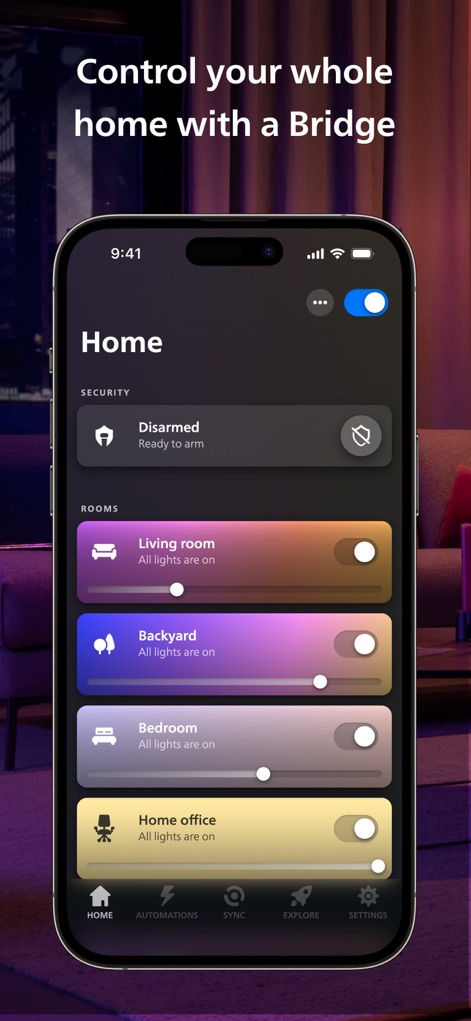
The app enables users to manage their entire home’s lighting by grouping lights into Rooms and integrating security features like the 'Disarmed' status.

Scene Exploration
Users can directly control individual rooms via Bluetooth, exploring pre-designed 'MY SCENES' such as 'Tropical twilight' and 'Arctic Aurora'.

Expert Scene Customization
This screen highlights the expertly curated scene gallery, allowing users to preview and customize scene colors, as seen with the 'Tropical twilight' preset and its vibrant color palette.

Personalized Light Creation
The app empowers users to craft unique lighting moods using a dynamic color wheel for precise color selection and granular control over individual lights like 'Festive lights'.

Home Security Hub
This tool transforms smart lighting into a comprehensive security system, displaying the 'Armed: Home' status and offering live monitoring from security cameras, such as the 'Front yard' view.

Smart Lighting Routines
Users can effortlessly schedule their lighting with customizable automations, including options like 'Wake up' routines and 'Backyard evening' schedules.

Immersive Sync Experience
The app offers deep integration with services like Spotify, enabling users to synchronize their lighting with music and adjust the 'Style' and 'Color' dynamically for an immersive experience.

Ecosystem Connectivity
This screen demonstrates the app's broad compatibility, allowing connections to popular smart home assistants like 'Amazon Alexa' and supporting 'Matter-compatible smart apps or devices'.
Description
Download
More Like This
Apps with similar features and user experience

TP-Link Tapo
TP-Link Systems Inc.

Дом с Алисой
DIRECT CURSUS COMPUTER SYSTEMS TRADING LLC

VeSync
Vesync Technology Corporation

Kasa Smart
TP-Link Systems Inc.

ecobee
ecobee Ltd.

Hubspace
Afero, Inc.

ADT Control ®
ADT LLC

First Alert by Resideo
Resideo Technologies, Inc.

Mibo Smart: Casa Inteligente
Intelbras S.A. Ind. de Telecom. Elet. Brasileira
This page is not an official page of the app or its developer, but an independent editorial publication created for informational and commentary purposes. Unless expressly stated otherwise, neither the app nor its developer is affiliated with, endorsed by, sponsored by, authorized by, or otherwise officially connected with MWM, Apple, Google Play, the app publisher, or the app's developer, and nothing on this page implies that the app was developed using MWM's services. Any trademarks, logos, screenshots, and other content remain the property of their respective owners.