
This page is not an official page of the app or its developer, but an independent editorial publication created for informational and commentary purposes. Unless expressly stated otherwise, neither the app nor its developer is affiliated with, endorsed by, sponsored by, authorized by, or otherwise officially connected with MWM, Apple, Google Play, the app publisher, or the app's developer, and nothing on this page implies that the app was developed using MWM's services. Any trademarks, logos, screenshots, and other content remain the property of their respective owners.


Plus: Dual Messenger for iPad
No more digital juggling. The app gives users the power to neatly separate their digital lives, keeping work and personal chats distinctly apart on one device.
Downloads
2.5M+User Rating
Total Ratings
39Publisher
Category
Social NetworkingLocales
12Latest Version
2.4Size
48.4 MBFirst Released
Oct 31, 2022Key Features Analysis
Software Evaluation: Plus: Dual Messenger for iPad
Dual Account Support
The app provides users with the capability to run two WhatsApp and Telegram accounts simultaneously on a single iPad, streamlining communication management.
Seamless Account Separation
It allows users to distinctly manage and separate their professional and personal communications, maintaining clear boundaries between digital personas within the same application.
Single-Device Efficiency
This tool enables the convenient use of multiple messenger accounts on one device, eliminating the need for constant logging in and out or managing separate physical devices.
Effortless Account Linking
The app facilitates quick and straightforward setup by allowing users to link their secondary WhatsApp account via a simple QR code scan directly from their iPad.
Frequently Asked Questions
Everything you need to know about Plus: Dual Messenger for iPad
What is Plus: Dual Messenger for iPad?
Plus: Dual Messenger for iPad is an unofficial tool that enables synchronous use of a second WhatsApp and Telegram Messenger on your phone or iPad. It helps manage and separate personal and business chats.
How do I set up a second WhatsApp account with Plus: Dual Messenger for iPad?
You set up a second WhatsApp account with Plus: Dual Messenger for iPad by scanning a QR code on your phone or iPad. This initiates synchronous use of the additional messenger.
Does Plus: Dual Messenger for iPad support Telegram?
Yes, Plus: Dual Messenger for iPad is an unofficial tool that supports both WhatsApp and Telegram Messenger. It offers dual chat functionality for these platforms.
Is Plus: Dual Messenger for iPad officially associated with WhatsApp?
No, Plus: Dual Messenger for iPad is an UNOFFICIAL tool. It is developed by an independent developer and is not affiliated, associated, authorized, or endorsed by WhatsApp LLC.
Are subscriptions required for all features in Plus: Dual Messenger for iPad?
Yes, premium subscriptions are needed for unlimited features within Plus: Dual Messenger for iPad. Payment occurs through your iTunes account following purchase confirmation.
How can I cancel my subscription for Plus: Dual Messenger for iPad?
You can cancel Plus: Dual Messenger for iPad subscriptions through your iTunes account settings. Auto-renewal can be turned off, and further cancellation instructions are available on Apple's support page.
Can Plus: Dual Messenger for iPad manage multiple messenger accounts?
Yes, Plus: Dual Messenger for iPad manages multiple messenger accounts, including dual WhatsApp and Telegram. It allows for the separation of business and private chats.
What devices are compatible with Plus: Dual Messenger?
Plus: Dual Messenger is compatible with phones and iPads. It enables synchronous use of a second messenger account on these devices.
The following screenshots and description are sourced directly from the app's official store listing and are the property of the app developer.
App Store
Screenshots

Users can efficiently manage a secondary WhatsApp account, clearly displaying active chat dialogues and embedded links to product catalogs.
Dual WhatsApp Chats
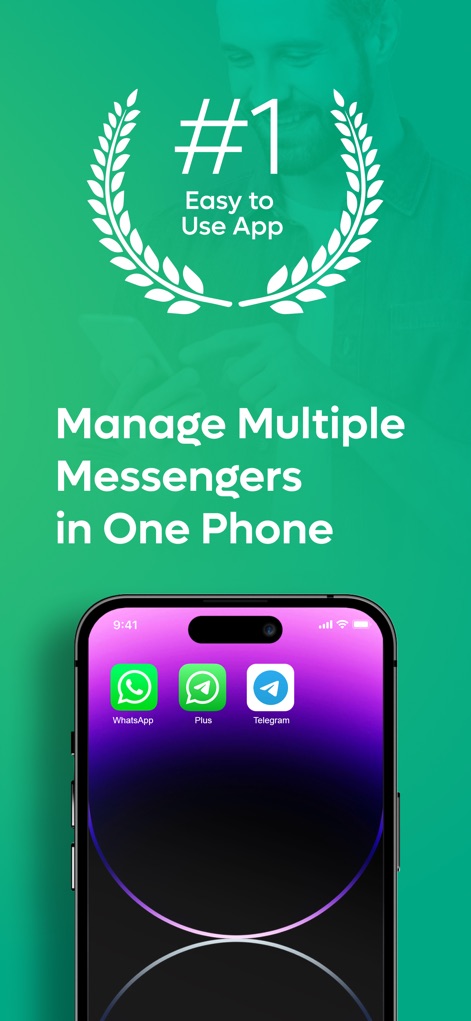
The app demonstrates its central role in managing multiple communication platforms, showcasing integrated access to WhatsApp and Telegram from a single device.
Unified Messenger Hub
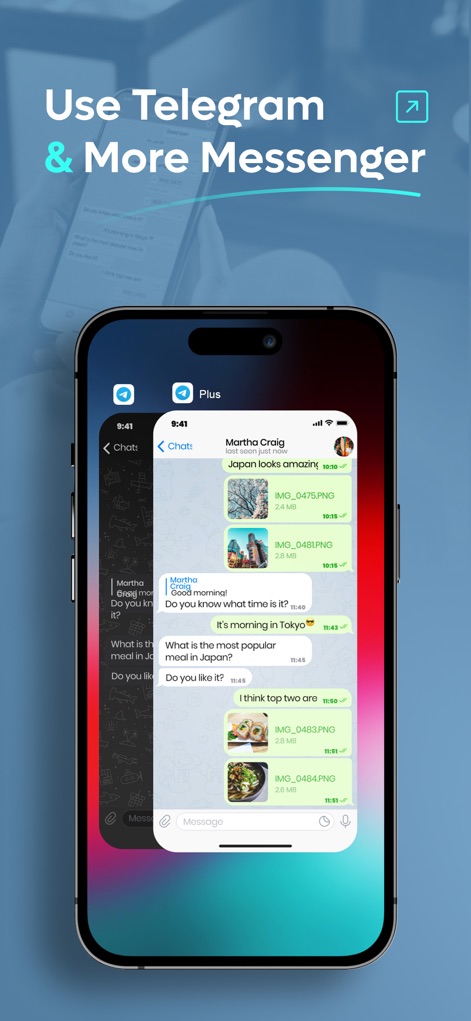
This tool seamlessly integrates Telegram functionality, allowing for clear chat conversations and the smooth display of image attachments within messages.
Extended Telegram Access

The interface provides a straightforward menu for accessing different messenger web instances, allowing users to effortlessly switch between separate WhatsApp Web and Telegram Web accounts.
Organized Account Switching
Description
Download
More Like This
Apps with similar features and user experience

WAAI: Web Messenger, Dual Chat
SEAMOBI TECH PTE LTD

WA Web - Dual Chat App
Guangdong Wuji Network Technology Co., Ltd.

Web scan 2024
Kanubhai Ukani

Whats Web - Dual App Messenger
Pravin Gondaliya

Status Saver WT - StoryBox
Pravin Gondaliya

WAMR - Undelete messages
Dweej Zalavadiya
WT Scan for Web 2026
Gaurang Radadiya

GB Version 2025
Javar Singh

Web Scan - Dual Chat
Ankur Kalkani
This page is not an official page of the app or its developer, but an independent editorial publication created for informational and commentary purposes. Unless expressly stated otherwise, neither the app nor its developer is affiliated with, endorsed by, sponsored by, authorized by, or otherwise officially connected with MWM, Apple, Google Play, the app publisher, or the app's developer, and nothing on this page implies that the app was developed using MWM's services. Any trademarks, logos, screenshots, and other content remain the property of their respective owners.