
Pro Map Tools

Pro Map Tools

Download on App Store
Logo of Pro Map Tools

Pro Map Tools: Professional Geographic Intelligence & Precise Measurements

The ad-free toolkit for real estate, logistics, and property management. Calculate areas, map zip code radii, and analyze travel-time zones with professional-grade precision.

Download on App Store

Publisher

GV Software Solutions Limited

Category

Utilities

Downloads

0

User Rating

4.0/5

Total Ratings

0

Locales

1

Precision Visualized

Discover the interface used by 0 users.
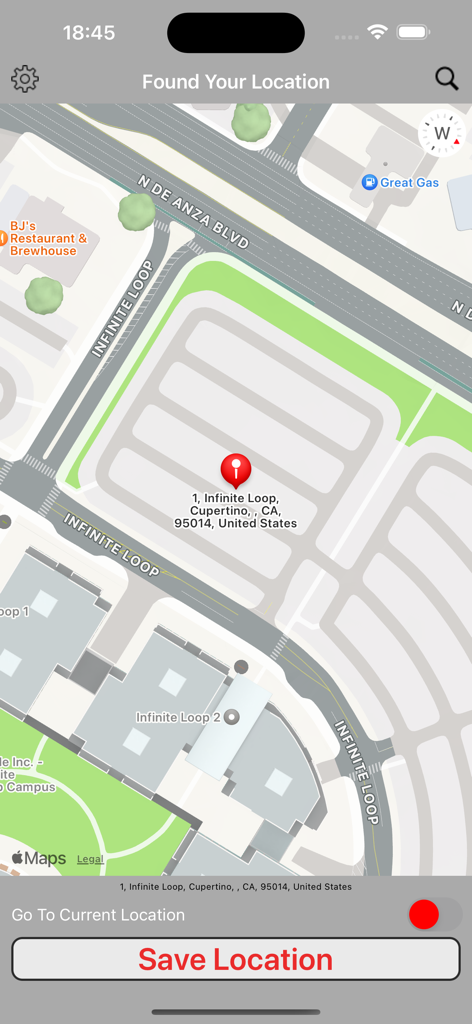
Pro Map Tools interface displaying a map pin in Cupertino and a save location button

Pro Map Tools interface displaying a map pin in Cupertino and a save location button

Professional Mapping Tools for Precision Planning

The tools that make this app stand out, trusted by 0 users.

📍

Radius & Zip Code Analysis

Instantly identify zip codes within a set radius and visualize coverage areas for territory management or logistics.

📐

Precise Area & Distance Metrics

Calculate exact square footage, perimeters, and point-to-point distances with professional-grade accuracy for property assessments.

⏱️

Dynamic Travel-Time Mapping

Determine exactly how far you can travel within a set time frame to optimize commutes, delivery zones, and service areas.

About the app

Everything you need to know about Pro Map Tools.

Description

Pro Map Tools is the ad-free version of Free Map Tools app Pro Map Tools is a collection of tools based on maps. These tools allow you to perform various functions for a wide range of applications. You can measure distances and areas. You can also send or share the map as an image to indicate the area, route or radius you have plotted. The Radius Around Point tool lets you plot a distance radius on a map. You specify the centre point, the radius and other features such as colour. You can then visualise the radius to see the area covered. The Measure Distance tool lets you plot a route on a map and find out the distance covered in various units. It also uses your GPS sensor to plot the route automatically. The Area Calculator Tool lets you draw an area on the map and find the measurement of the area enclosed. The Find How Far I Can Travel tool will show how far you can drive or walk within a set time. For example, how far can I get if I drive for 60 minutes from my current location. How Far is it Between allows you to find the road and crow-flies distance between 2 addresses. It also shows both routes on the map. The Map Tunnelling Tool allows you to find out where on the globe your antipodal point is. You can also find the antipode of any custom location. The Elevation Finder Tool will display the elevation above sea level for your current location, a location tapped on the map or an address you type in. Country Specific Tools ———————————————- For the following countries: ∙USA ∙UK You can use the following tools: ∙The zip/postcodes found inside a radius ∙The distance between two zip/postcodes

Latest Version

2.22

Size

2.4 MB

First Released

May 12, 2016

Unlock Professional Precision with Pro Map Tools

The ad-free, all-in-one geographic toolkit for real estate, logistics, and land management. Stop guessing and start measuring with the industry's most reliable map utility.

Download on App Store

App information, icons, screenshots, and descriptions displayed on this page are sourced from the Apple App Store and are the property of their respective developers. Download estimates and rankings are based on MWM's proprietary models and may not reflect actual figures. This page is provided for informational and analytical purposes only.

Believe this page infringes your intellectual property? File a dispute








