
This page is not an official page of the app or its developer, but an independent editorial publication created for informational and commentary purposes. Unless expressly stated otherwise, neither the app nor its developer is affiliated with, endorsed by, sponsored by, authorized by, or otherwise officially connected with MWM, Apple, Google Play, the app publisher, or the app's developer, and nothing on this page implies that the app was developed using MWM's services. Any trademarks, logos, screenshots, and other content remain the property of their respective owners.


Reality Composer
No longer does AR demand specialized 3D expertise. This app empowers users to craft immersive augmented worlds with unprecedented ease.
Downloads
1M+User Rating
Total Ratings
426Publisher
Category
UtilitiesLocales
33Latest Version
1.6Size
152.4 MBFirst Released
Sep 19, 2019An in-depth evaluation for professionals and advanced hobbyists in AR/3D development.
Reality Composer: Feature Analysis
LiDAR-Powered 3D Scanning
The app provides advanced photogrammetry capabilities, utilizing LiDAR sensors on compatible devices, to generate high-quality 3D models from real-world objects through a guided capture process.
Location Data Recording & Playback
This tool features the ability to record and replay sensor and camera data from a specific location, enabling offline iteration and development of AR experiences in Xcode without needing to be physically present at the site.
USDZ Export & Integration
It allows users to export complete scenes as .usdz files, enabling integration into AR Quick Look, other 3D projects, or Xcode projects via Reality Composer on Mac.
Intuitive AR Prototyping
The app provides an intuitive environment for prototyping and creating AR experiences directly within augmented reality, eliminating the need for prior 3D modeling expertise.
Cross-Device Workflow
The app provides seamless project transfer between iOS devices and Mac, enhancing workflow continuity within the Apple ecosystem.
Interactive Spatial Audio
This tool features the integration of spatial audio, which can be triggered by various user interactions such as taps, proximity, or other custom events.
Content Library & USDZ Import
This tool features the ability to import custom .usdz files and offers a rich built-in library of AR-ready virtual objects, facilitating quick scene creation.
Accessible Object Animation
The app provides intuitive tools to add pre-defined animations like movement, scaling, wiggles, and spins to virtual objects, making animation accessible without prior experience.
Drag-and-Drop Scene Assembly
It allows users to assemble scenes efficiently by dragging and dropping virtual objects, either in an AR view or on a 2D canvas.
Object Customization
It allows users to customize properties such as size and style for virtual objects within their scenes.
Frequently Asked Questions
Everything you need to know about Reality Composer
Can I create AR experiences with Reality Composer without prior 3D experience?
Yes, Reality Composer enables users to easily prototype and produce AR experiences directly in AR without requiring prior 3D experience. It streamlines the creation process for augmented reality content.
What are the core features of Reality Composer for AR content creation?
Reality Composer allows users to drag and drop virtual objects, import .usdz files, access a built-in content library, create 3D models via photogrammetry, customize objects, add animations, and integrate spatial audio.
Does Reality Composer support importing custom 3D models?
Yes, Reality Composer supports importing your own .usdz files to build scenes. This allows for greater flexibility and customization beyond the app's built-in content library.
Does Reality Composer include photogrammetry capabilities?
Yes, Reality Composer creates high-quality 3D models using photogrammetry and a guided capture process. This feature leverages advanced LiDAR sensors for detailed object reconstruction.
What devices are compatible with Reality Composer's photogrammetry feature?
Photogrammetry in Reality Composer requires an iPhone 12 Pro or later, or an iPad Pro 5th generation or later. These devices provide the necessary advanced LiDAR sensors for the guided capture process.
Can I customize the properties of virtual objects in Reality Composer?
Yes, Reality Composer allows users to customize virtual objects extensively. This includes adjusting their size, style, position, rotation, and scale to fit the AR scene.
Does Reality Composer allow adding animations to virtual objects?
Yes, Reality Composer enables users to add various animations to virtual objects. These include movements, scaling, and emphasis effects like 'wiggle' or 'spin', without requiring animation experience.
Does Reality Composer offer a library of ready-to-use content?
Yes, Reality Composer features a built-in AR content library. This library provides ready-to-use virtual objects, allowing users to quickly populate their AR scenes with predefined assets like houses and locations.
Can Reality Composer projects be transferred between iOS and Mac devices?
Yes, Reality Composer projects can be easily transferred between an iOS device and a Mac. This interoperability is facilitated through the Reality Composer app bundled with Xcode.
What file format does Reality Composer use for exporting AR scenes?
Reality Composer exports complete scenes as .usdz files. This format supports use in AR Quick Look, integration into existing 3D projects, or incorporation into Xcode projects with Reality Composer on Mac.
The following screenshots and description are sourced directly from the app's official store listing and are the property of the app developer.
App Store
Screenshots
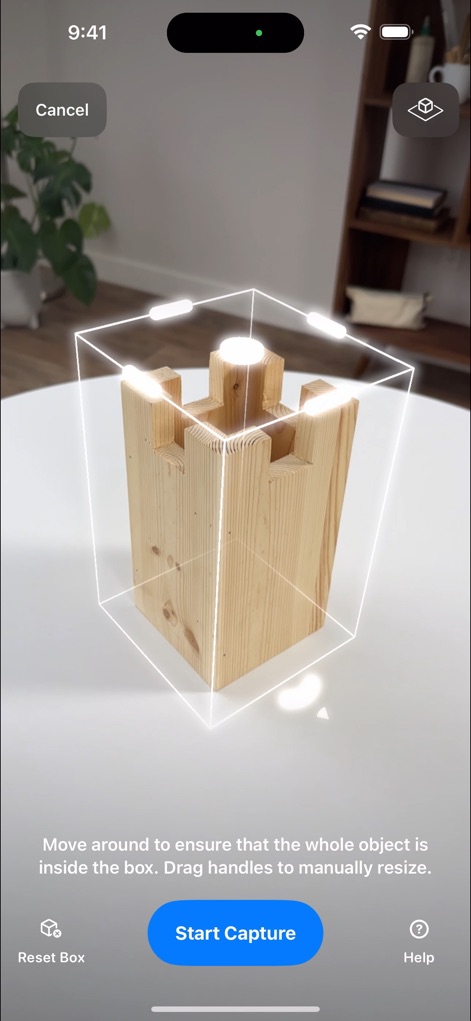
See how the app guides users through photogrammetry setup with a precise bounding box and a prominent 'Start Capture' button for object acquisition.
Object Capture Setup
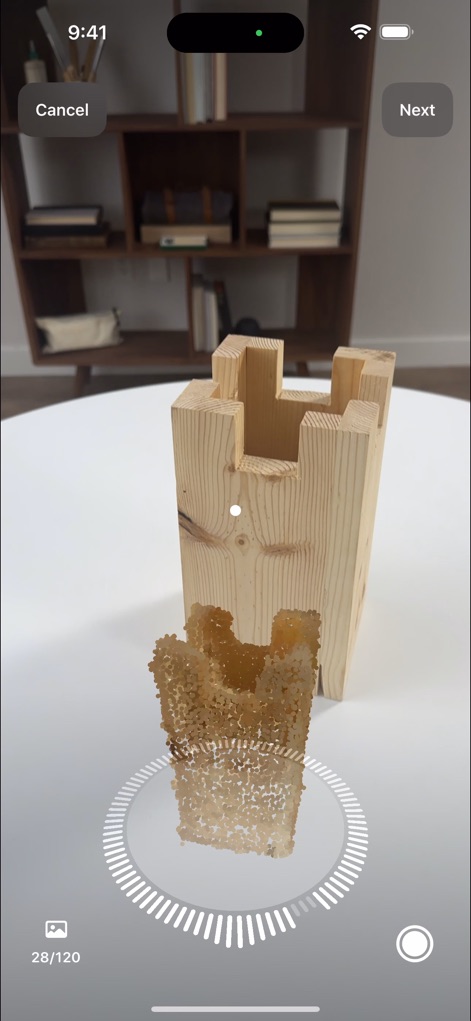
Observe the real-time capture process as the app displays a dotted scan pattern and a clear numerical progress indicator for comprehensive 3D model creation.
Real-time Scan Progress
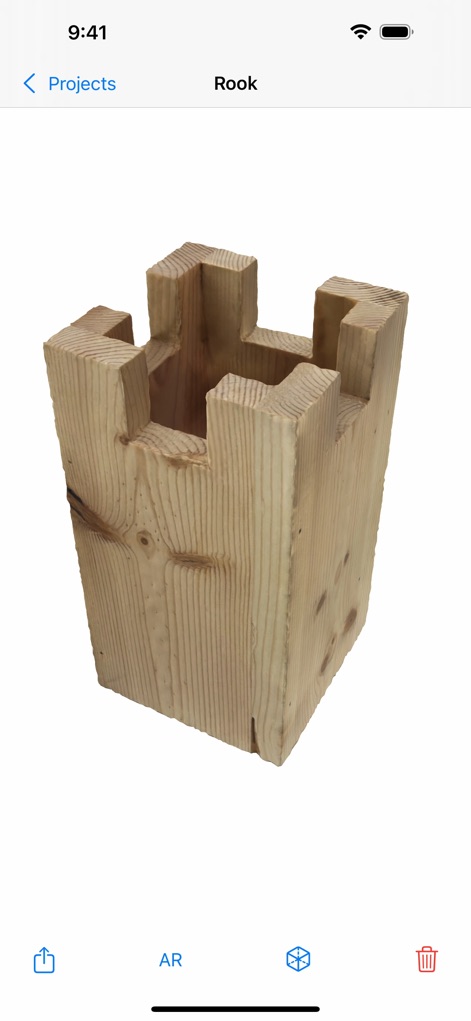
This view showcases the fully rendered 3D model of the captured object, complemented by a convenient bottom action bar offering AR preview and sharing options.
3D Model Preview
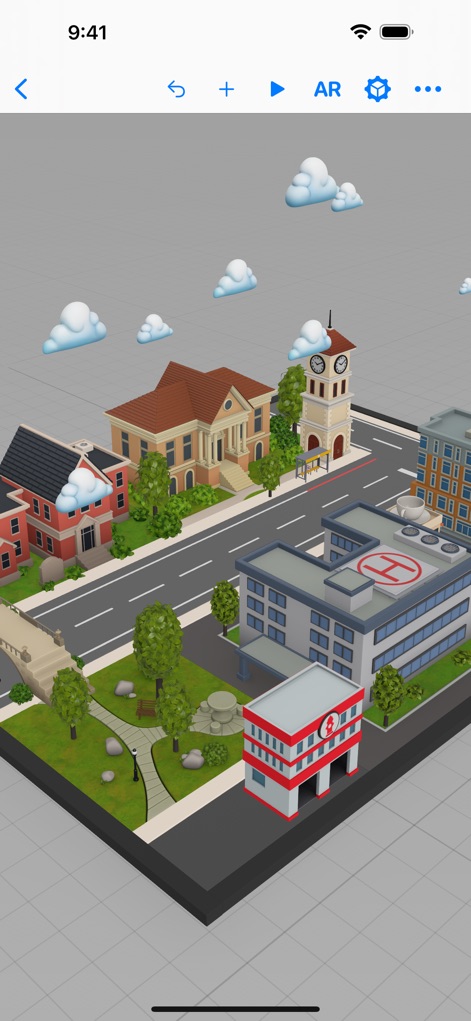
Explore the app's extensive scene assembly capabilities, featuring detailed buildings and roads alongside an intuitive top toolbar for project management and AR preview.
World Building Canvas
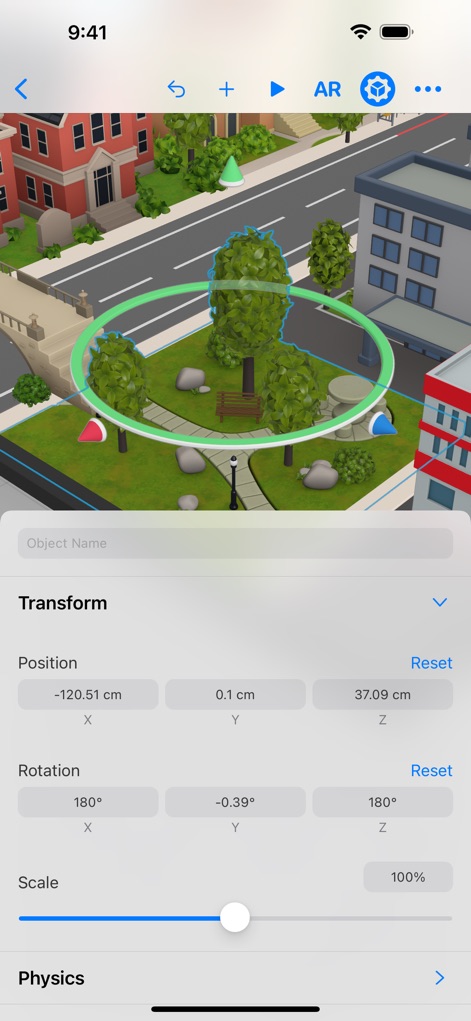
Users can precisely manipulate objects within the scene, demonstrated by the selected tree with its green highlight and the comprehensive transform properties panel.
Object Properties Editor

Access a vast collection of ready-to-use 3D models, organized into intuitive categories like 'Houses' and 'Locations', with cloud icons indicating downloadable assets.
Content Library Browser

Craft dynamic AR experiences using the powerful Behaviors panel, allowing users to define complex animations like 'Move, Rotate, Scale To' with adjustable duration and ease type settings.
Interactive Behavior Design
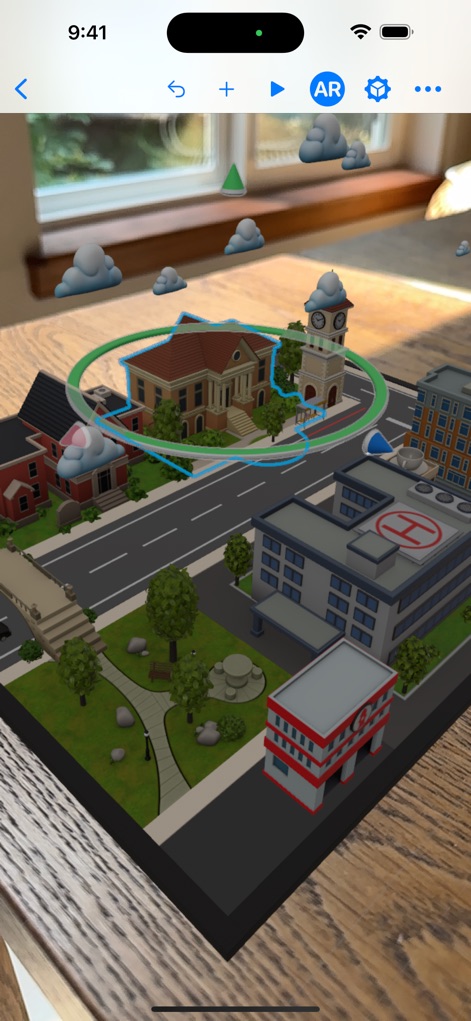
Experience seamless integration of 3D scenes into the real world, as depicted by the virtual city overlaying a physical table and the clear outline of a selected object.
Live AR Integration
Description
Download
More Like This
Apps with similar features and user experience

JigSpace
JigSpace Inc.

ARLOOPA: Scan & Discover AR
ARLOOPA Inc

ARvid Augmented Reality
Elie Gebran

Feather: 3D sketchbook
Sketchsoft Inc.

Wintor AR Tours
Wintor b.v.

BOCLAA
Zachary Aghaizu

UniAR
Light Generation Co., Ltd.

ARDrawing: Unleash Creativity
Tung Tran Thanh
This page is not an official page of the app or its developer, but an independent editorial publication created for informational and commentary purposes. Unless expressly stated otherwise, neither the app nor its developer is affiliated with, endorsed by, sponsored by, authorized by, or otherwise officially connected with MWM, Apple, Google Play, the app publisher, or the app's developer, and nothing on this page implies that the app was developed using MWM's services. Any trademarks, logos, screenshots, and other content remain the property of their respective owners.