RecorderHQ -Recorder for cloud

RecorderHQ -Recorder for cloud


Download on App Store
Logo of RecorderHQ -Recorder for cloud

RecorderHQ: The Professional Audio Powerhouse for Your Cloud Workflow

Go beyond simple voice memos with high-quality MP3 recording, speech-to-text transcription, and seamless sync to Google Drive, Dropbox, and OneDrive. Designed for the professionals who need more from their audio.

Download on App Store

Publisher

SHENG TA TSAI

Category

Utilities

Downloads

205K+

User Rating

4.5/5

Total Ratings

2K+

Locales

7

Efficiency at a Glance

Discover the interface used by 205K+ users.
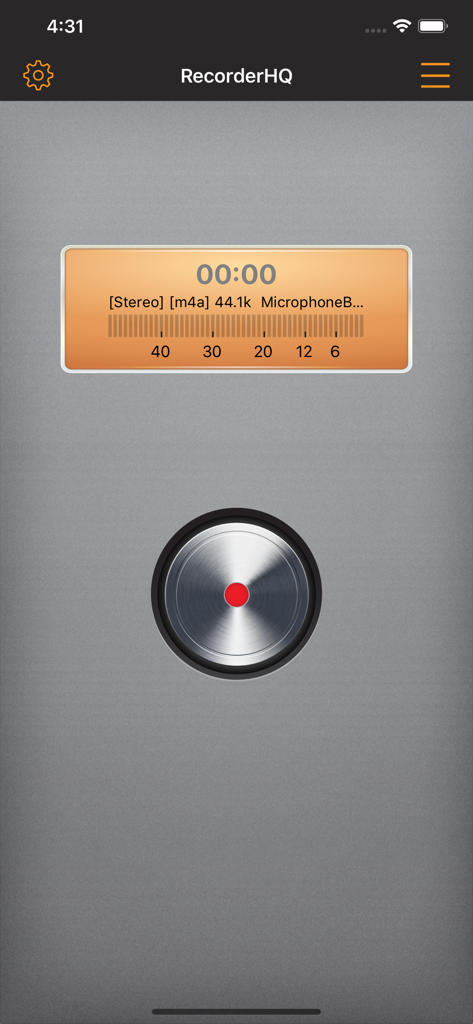
Main recording screen of RecorderHQ showing stereo audio levels and a central metallic record button

Main recording screen of RecorderHQ showing stereo audio levels and a central metallic record button

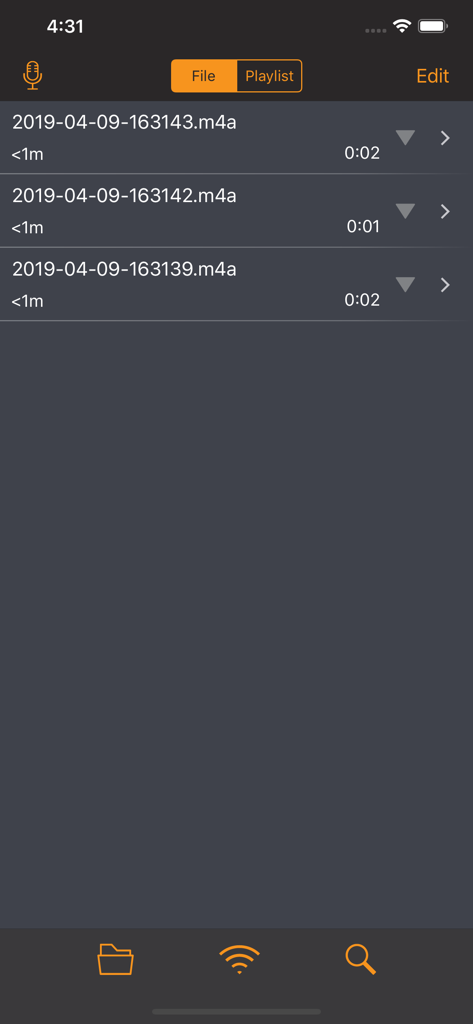
A list of recorded audio files with timestamps and durations within the RecorderHQ app interface.

A list of recorded audio files with timestamps and durations within the RecorderHQ app interface.

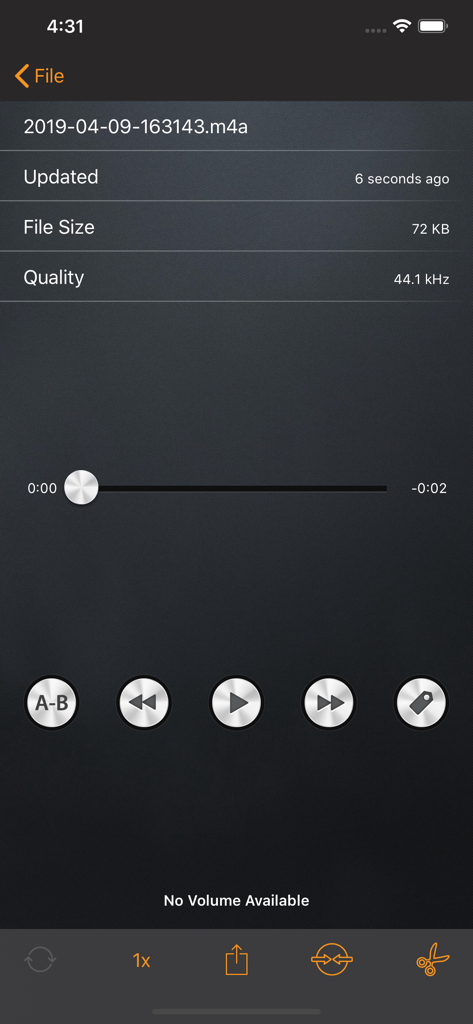
RecorderHQ playback screen displaying file information and editing buttons

RecorderHQ playback screen displaying file information and editing buttons

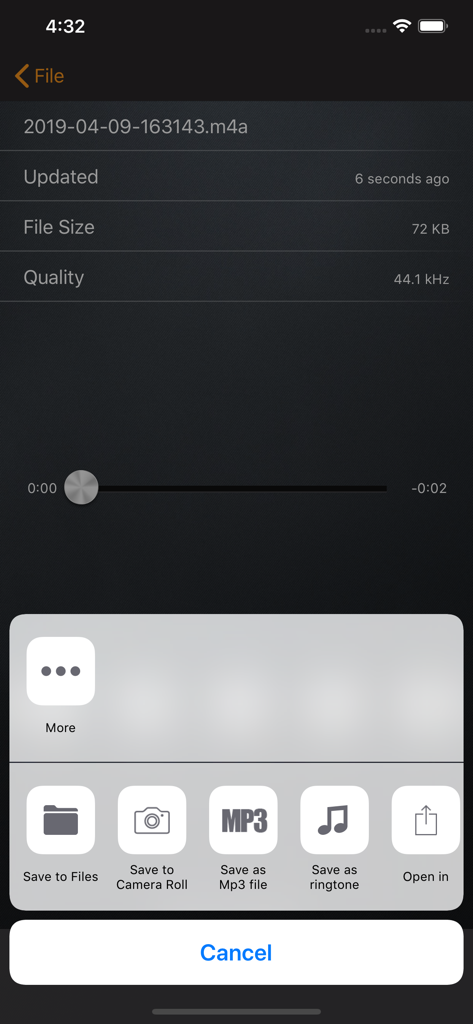
RecorderHQ app interface showing audio file details and export menu with options to save as MP3 or ringtone.

RecorderHQ app interface showing audio file details and export menu with options to save as MP3 or ringtone.

Master Your Workflow with Professional Audio Tools

The tools that make this app stand out, trusted by 205K+ users.

☁️

Universal Cloud & WiFi Sync

Break free from the Apple ecosystem. Automatically sync recordings to Google Drive, Dropbox, or OneDrive, and transfer files to your PC instantly via WiFi.

🎙️

AI-Powered Speech to Text

Save hours of manual transcription. Convert interviews, lectures, and corporate meetings into accurate text using advanced iOS-integrated speech recognition.

✂️

Professional Grade Editing

Record directly to MP3 or WAV with Bluetooth mic support. Trim, merge, and organize your audio into folders for a studio-quality experience on the go.

About the app

Everything you need to know about RecorderHQ -Recorder for cloud.

Description

RecorderHQ make your iPhone or iPad an voice recorder. We support record mp3 m4a and wav format directly. Sharing audio files to iCloud Drvie, Dropbox, Google Drive and OneDrive. • Speech to text (iOS 10) • support audio file upload or download from iCloud Drvie, Dropbox, Google Drive , OneDrive and audioBoom • support transfer large file via USB in iTunes, just connect your iPhone to PC. • Transferring audio file via WIFI is easy. No restriction at all. • support sending file via whatsapp( try open in other application feature) • Multiple sample rate from 8000hz to 44100hz • support trim audio file, merge multiple audio files. • Save audio file to camera roll • Support aif,wav,m4a and caf and mp3 file format. • Support pause,forward,rewind. • export file via iTunes, email. • Organize you voice files in folder. • support background recording and playback. • support bluetooth microphone. • iCloud,Airplay support. • support sending audio file to Dropbox, Google Drive. • support sending voice to other device via bluetooth or wifi. • transfer files from iphone to pc via wifi and browser • Convert files into Mp3 format(CBR, VBR support) • Convert files into ringtone format • Support lock screen while recording.( iPhone only) • Support Today Widget Premium Features 1. Choose recording device(bluetooth, usb). 2. Adjust input gain. 3. Real time monitor. 4. Stereo meter. 5. Advertisement free.

Latest Version

4.14.6

Size

62.5 MB

First Released

Jan 18, 2013

Master Your Audio Workflow with RecorderHQ

Join 200,000+ power users who have outgrown standard voice memos. Record, transcribe, and sync your audio directly to your favorite cloud storage today.

Download on App Store

App information, icons, screenshots, and descriptions displayed on this page are sourced from the Apple App Store and are the property of their respective developers. Download estimates and rankings are based on MWM's proprietary models and may not reflect actual figures. This page is provided for informational and analytical purposes only.

Believe this page infringes your intellectual property? File a dispute