
This page is not an official page of the app or its developer, but an independent editorial publication created for informational and commentary purposes. Unless expressly stated otherwise, neither the app nor its developer is affiliated with, endorsed by, sponsored by, authorized by, or otherwise officially connected with MWM, Apple, Google Play, the app publisher, or the app's developer, and nothing on this page implies that the app was developed using MWM's services. Any trademarks, logos, screenshots, and other content remain the property of their respective owners.


Remove object from photo app
Unwanted elements vanish. The app offers users a digital eraser for photographic perfection, turning everyday shots into flawless compositions.
Downloads
750k+User Rating
Total Ratings
4.4KPublisher
Category
Graphics & DesignLocales
15Latest Version
3.5.1Size
185.7 MBFirst Released
Mar 15, 2022An evaluation of key functionalities for casual users and content creators.
Comprehensive Analysis: Remove Object from Photo App
AI-Powered Seamless Object Removal
The app leverages advanced artificial intelligence to seamlessly remove unwanted objects, people, or imperfections from photos, automatically reconstructing the background with precision and natural results.
Intuitive Touch-Based Selection
It allows users to effortlessly select and highlight unwanted elements in images using simple touch gestures, providing a quick and user-friendly editing experience without complex tools.
Professional-Grade Results, No Expertise Required
The app delivers professional-quality object removal and intelligent image reconstruction without demanding advanced graphic design skills or expensive software, making sophisticated editing accessible to casual users.
Broad Range of Distraction Removal
This tool features the capability to eliminate diverse distractions such as text, logos, stickers, lines, shadows, and even specific individuals or pets, ensuring images are clean and focused.
Rapid Photo Cleanup for Social Media
It dramatically accelerates the photo editing workflow, enabling social media enthusiasts and content creators to quickly clean up images and prepare them for instant sharing across platforms.
Versatile Specific Element Removal
The app supports the removal of highly specific and detailed elements like hair strands, emojis, watermarks, or small marks, providing comprehensive clean-up capabilities for various image types.
Frequently Asked Questions
Everything you need to know about Remove object from photo app
How does the Remove object from photo app work?
The Remove object from photo app uses artificial intelligence to erase unwanted objects from pictures. Users select the object by drawing on it with their finger, and the AI then reconstructs the image seamlessly.
Can I remove people from photos using the Remove object from photo app?
Yes, the Remove object from photo app allows users to remove people from photos. The app uses AI to erase selected individuals and reconstruct the background, as demonstrated in screenshots.
Does the Remove object from photo app require Photoshop experience?
No, the Remove object from photo app does not require Photoshop skills. It simplifies the process of removing unwanted content using artificial intelligence, making it accessible to all users.
What are the subscription options for the Remove object from photo app?
The Remove object from photo app provides weekly for $2.99, monthly for $8.99, and yearly for $29.99 subscription plans. Auto-renewal can be managed in account settings.
Can the Remove object from photo app remove text or logos from images?
Yes, the Remove object from photo app can remove text, quotes, logos, and stickers from photos. Its advanced AI handles various unwanted elements without blur.
How do I manage my subscription for the Remove object from photo app?
Users manage subscriptions for the Remove object from photo app through their account settings. Auto-renewal can be turned off there at least 24 hours before the current period ends.
Can the Remove object from photo app remove backgrounds?
Yes, the Remove object from photo app can remove backgrounds from photos. It effectively isolates subjects by erasing unwanted background elements using AI, as seen in the examples.
Does the Remove object from photo app have blurring capabilities?
Yes, the Remove object from photo app includes blurring capabilities. Users can apply various blur effects to enhance or modify their images, as shown in the app's interface.
Are there filters available in the Remove object from photo app?
Yes, the Remove object from photo app offers various filters. Users can apply these filters to adjust the appearance and style of their edited photographs.
The following screenshots and description are sourced directly from the app's official store listing and are the property of the app developer.
App Store
Screenshots
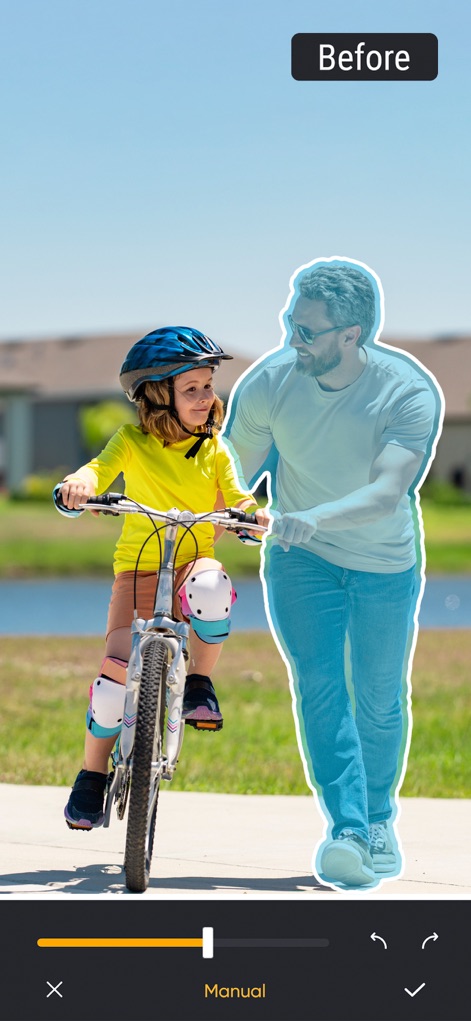
See how the app effortlessly removes unwanted elements, transforming the image from its 'Before' state with a selected object to a pristine 'After' result.
Effortless Object Removal

Observe how this tool eliminates visual clutter, effectively erasing the outlined bag from the 'Before' image to achieve a clean 'After' composition.
Seamless Distraction Removal

Witness the app's capability to isolate subjects, clearly demonstrating the transition from the original 'Before' scene to an 'After' image with a perfectly transparent background.
Precision Background Control

Explore the creative possibilities of depth, showcasing various blur effects via selectable thumbnails and the adjustable 'Blur' slider for professional results.
Artistic Background Blur

Discover an array of aesthetic enhancements, presenting diverse filter thumbnails to instantly transform photo mood and the 'Filters' option for easy application.
Vibrant Photo Filters

This tool expertly cleans up minor flaws, demonstrating the removal of the distinct purple line from the 'Before' image for a refined 'After' presentation.
Clean Up Imperfections


Description
Download
More Like This
Apps with similar features and user experience

CocoAI - BG Remover
Beijing Jianchang Technology Co., Ltd.

水印宝-视频水印助手软件
Beijing Pengtuzhumeng Technology Co., Ltd.

Photo Retouch - Remove object
化媚 席

PhotoBy-Batch adding borders
岳森 刘

Watermarkly ― Watermark Maker
Julia Nikitina

去水印大师-短视频编辑助手
志阳 郭

大神水印-照片图像制作修图神器
伟 黄

Add Watermark -Batch Process
Saraswati Javalkar

Background Eraser: AI Remove
SUNWOONG JANG
This page is not an official page of the app or its developer, but an independent editorial publication created for informational and commentary purposes. Unless expressly stated otherwise, neither the app nor its developer is affiliated with, endorsed by, sponsored by, authorized by, or otherwise officially connected with MWM, Apple, Google Play, the app publisher, or the app's developer, and nothing on this page implies that the app was developed using MWM's services. Any trademarks, logos, screenshots, and other content remain the property of their respective owners.