
This page is not an official page of the app or its developer, but an independent editorial publication created for informational and commentary purposes. Unless expressly stated otherwise, neither the app nor its developer is affiliated with, endorsed by, sponsored by, authorized by, or otherwise officially connected with MWM, Apple, Google Play, the app publisher, or the app's developer, and nothing on this page implies that the app was developed using MWM's services. Any trademarks, logos, screenshots, and other content remain the property of their respective owners.

Roborock
Manual chores yield to intelligent management. The app delivers a centralized command center, empowering users to automate, monitor, and fine-tune every cleaning and laundry operation remotely.
Downloads
12.5M+User Rating
Total Ratings
747.2KPublisher
Category
LifestyleLocales
32Latest Version
4.60.04Size
190.8 MBFirst Released
Jun 18, 2019Roborock App: A Comprehensive Smart Home Cleaning & Laundry Hub
An analytical evaluation of the Roborock app's core functionalities designed for modern, tech-savvy homeowners seeking convenience and personalized control.
Comprehensive Remote Control & Monitoring
The app allows users to remotely initiate, pause, and monitor the real-time status and progress of their Roborock cleaning and laundry appliances from any location, ensuring complete oversight and convenience.
Intelligent Map Management & No-Go Zones
It enables users to precisely define and label areas within their home maps, setting virtual boundaries and restricted zones to ensure targeted, efficient, and hassle-free cleaning.
Customizable Cleaning & Laundry Routines
This tool provides extensive options for creating tailored cleaning schedules, defining specific zones, and personalizing wash/dry cycles to match diverse home layouts, fabric types, and individual lifestyle needs.
Precision Cleaning & Washing Settings
It allows users to fine-tune operational parameters such as suction power, water flow, roller speed, and detergent levels, ensuring optimal performance for different surfaces, dirt types, and fabric requirements.
Automated Self-Maintenance
This tool features intelligent self-cleaning and drying capabilities for compatible devices, automatically initiating maintenance cycles based on usage history to ensure hygiene and reduce manual effort.
Unified Smart Home Appliance Control
The app serves as a central hub for managing a diverse range of Roborock smart appliances, including robotic vacuums, wet & dry vacuums, and washer dryers, offering a cohesive smart home experience.
Frequently Asked Questions
Everything you need to know about Roborock
What is the Roborock app used for?
The Roborock app controls Roborock's smart hardware devices, including robotic vacuum cleaners, wet and dry vacuum cleaners, and molecular sieve-based washer dryers. It enables remote management and status checks for network-enabled products.
Can I remotely control my Roborock devices with the app?
Yes, the Roborock app allows users to remotely control their smart devices. It also enables checking their status and cleaning progress anytime, anywhere.
What advanced cleaning features does the Roborock app offer for robot vacuums?
The Roborock app unlocks advanced features for robot vacuums, including real-time map and path checking, personalized cleaning methods like room and zone cleaning, and custom cleaning plans for suction power and water flow.
How can I personalize cleaning plans using the Roborock app?
Users can personalize cleaning plans for robotic vacuums by adjusting suction power, water flow, cleaning frequency, and route. The app also allows setting up invisible walls and no-go zones.
Does the Roborock app provide mapping capabilities for robot vacuums?
Yes, the Roborock app provides advanced mapping capabilities for robot vacuums. Users can view and edit maps, naming thresholds, carpets, floor types, furniture, and rooms within their home.
What features does the Roborock app have for wet and dry vacuum cleaners?
For wet and dry vacuum cleaners, the Roborock app allows adjustment of water flow, suction power, roller speed, and detergent level. It also supports smart scheduled self-cleaning and drying based on operation records.
Can I manage washing programs for my Roborock washer dryer with the app?
Yes, the Roborock app allows users to manage washer dryers. It offers over 20 smart washing and drying programs to meet various fabric needs and allows setting one program for quick access.
Are app permissions like Location and Camera mandatory for the Roborock app?
No, permissions like Location and Camera are optional for the Roborock app. Users can refuse or withdraw these, though it may limit corresponding services, it will not affect other app functions.
How does the Roborock app use optional permissions like Bluetooth or WLAN?
The Roborock app uses optional Bluetooth and WLAN permissions to connect to smart devices. WLAN facilitates connection to WiFi networks emitted by devices, while Bluetooth enables communication and device connectivity.
Does the Roborock app support integration with Siri?
Yes, the Roborock app supports Siri & Search integration on iOS devices. Users can interact with Siri to control device starting and movement, based on Routines set up in the mobile device.
The following screenshots and description are sourced directly from the app's official store listing and are the property of the app developer.
App Store
Screenshots

Smart Home Ecosystem
This image showcases the comprehensive range of Roborock devices controlled by the app, highlighting both the robotic vacuum and the smart washer dryer for integrated home management.
Centralized Device Hub
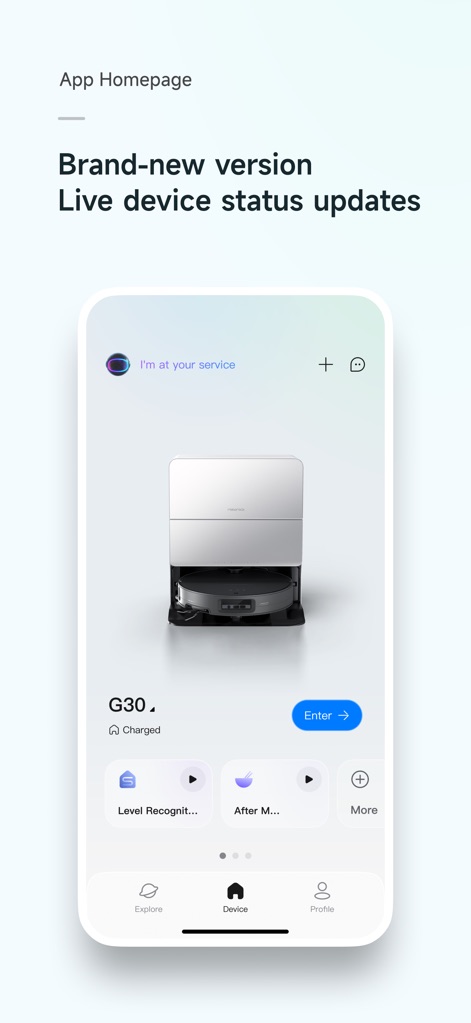
Users can monitor the live status of their Roborock appliances, including the G30 washer dryer's charge level, and access quick actions like 'Level Recognition' directly from the app's homepage.
Intelligent Mapping
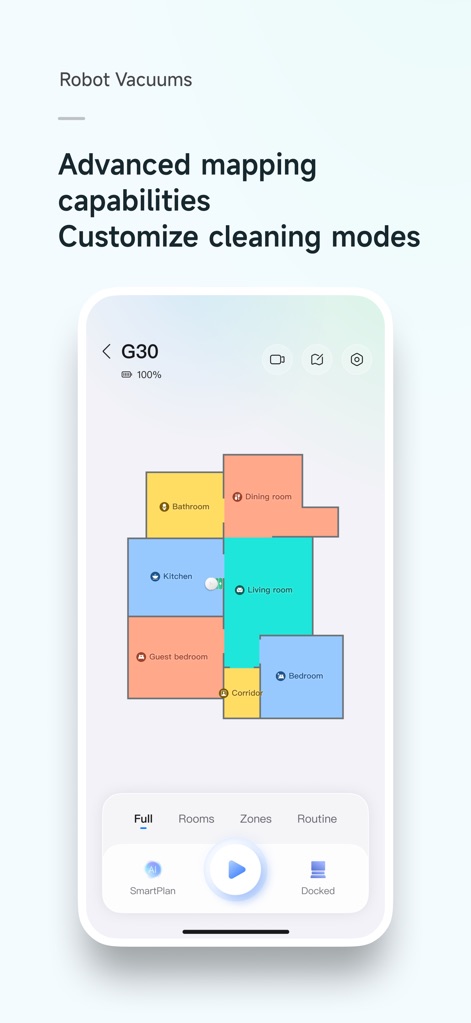
The app provides advanced mapping capabilities, allowing users to view a detailed, color-coded floor plan and select specific cleaning modes like 'Rooms' or 'Zones' for targeted cleaning.
Laundry Program Customization
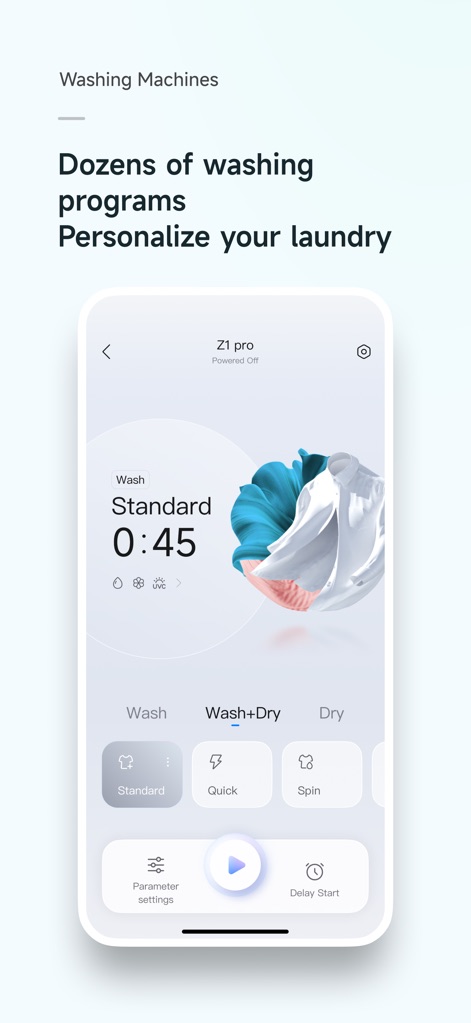
This interface reveals a wide array of washing programs, enabling users to select specialized cycles like 'Standard' or 'Quick' and customize parameters for specific fabric and dirt levels.

Integrated Self-Care
The tool offers advanced control over wet and dry vacuum cleaners, displaying the '65%' charge status and providing options for smart 'Self-Cleaning' and 'Drying' cycles.
Description
Download
More Like This
Apps with similar features and user experience
Dreamehome
Dreame Innovation Technology (Suzhou) Co., Ltd.

Tineco Life
Tineco Appliances Co,.Ltd.

YEEDI
YEEDI TECHNOLOGY LIMITED
ECOVACS HOME
Ecovacs Robotics Inc.

Roomba Home
iRobot Corporation

iRobot Home (Classic)
iRobot Corporation
SharkClean
SHARKNINJA OPERATING LLC
Philips HomeRun Robot App
Versuni Netherlands B.V

Robot Vacuum App
GloryskyX Studio LLC
This page is not an official page of the app or its developer, but an independent editorial publication created for informational and commentary purposes. Unless expressly stated otherwise, neither the app nor its developer is affiliated with, endorsed by, sponsored by, authorized by, or otherwise officially connected with MWM, Apple, Google Play, the app publisher, or the app's developer, and nothing on this page implies that the app was developed using MWM's services. Any trademarks, logos, screenshots, and other content remain the property of their respective owners.