
This page is not an official page of the app or its developer, but an independent editorial publication created for informational and commentary purposes. Unless expressly stated otherwise, neither the app nor its developer is affiliated with, endorsed by, sponsored by, authorized by, or otherwise officially connected with MWM, Apple, Google Play, the app publisher, or the app's developer, and nothing on this page implies that the app was developed using MWM's services. Any trademarks, logos, screenshots, and other content remain the property of their respective owners.


Ruler®
Precision on demand. It arms users with exact measurements, turning a phone into a serious tool. MWM's creation focuses on eliminating measurement guesswork.
Downloads
2.5M+User Rating
Total Ratings
37.3KPublisher
Category
UtilitiesLocales
1Latest Version
3.8.5Size
24.9 MBFirst Released
Mar 28, 2013An evaluation of key features impacting precision, convenience, and documentation for diverse user needs.
Analysis of Ruler®: Digital Measurement Toolkit
Camera Ruler Mode
It allows users to utilize their phone's camera to seamlessly measure objects, offering a practical solution for real-world scenarios.
Photo Measures Mode
The app provides the capability to add measurement data directly to photos, facilitating organized documentation for projects or professional use.
Dual Units
This tool features the ability to easily switch between inches and centimeters, ensuring versatile measuring for a global user base and varied project requirements.
Precision Sliders
It allows users to accurately measure small objects with intuitive sliders, enhancing precision for detailed tasks.
Frequently Asked Questions
Everything you need to know about Ruler®
What is the Ruler® app?
Ruler® is a comprehensive phone application that provides a complete ruler toolkit, including a classic ruler, a tape measure, and a camera ruler. It features an elegant design and user-friendly interface.
Does Ruler® support both inches and centimeters for measurements?
Yes, the Ruler® app supports dual units, allowing users to easily switch between inches and centimeters for versatile measuring. This feature is available across its various measurement tools.
How does the Camera Ruler and Photo Measures mode work in Ruler®?
The Ruler® app utilizes the phone's camera to seamlessly measure objects using its Camera Ruler Mode. It also offers a Photo Measures Mode to add measurement data directly to photos for organized documentation.
Is the Ruler® app optimized for specific iPhone models?
Yes, Ruler® is optimized for newer iPhone models, specifically including the iPhone 16 Pro and 16 Pro Max. This ensures peak performance and compatibility with the latest devices.
Can I measure small objects accurately using the Ruler® app?
Yes, Ruler® includes precision sliders specifically designed for accurately measuring small objects. This feature ensures detailed and reliable measurements for various items directly on your phone screen.
Does the Ruler® app include a tape measure feature?
Yes, Ruler® offers a comprehensive tape measure function, allowing users to make extended measurements. The app provides a dedicated '25' Tape Measure' tool as part of its toolkit.
Where can I find the Terms of Use for Ruler®?
The Terms of Use for Ruler® are provided via the link: "https://www.apple.com/legal/internet-services/itunes/dev/stdeula/". Users can review this document for legal details regarding app usage.
The following screenshots and description are sourced directly from the app's official store listing and are the property of the app developer.
App Store
Screenshots

See how Ruler® offers pinpoint accuracy with its precision sliders for small objects and instant results displayed in dual units like inches and centimeters.
Precise Digital Measuring
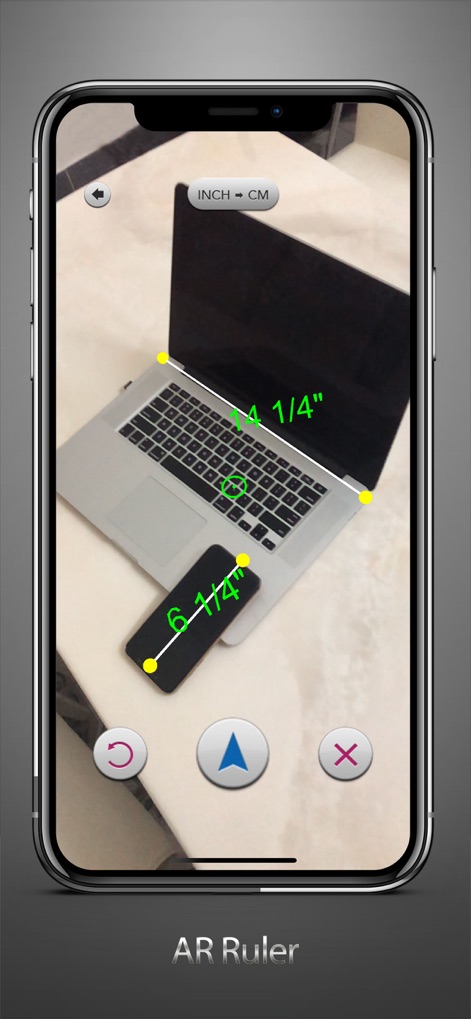
The app's camera ruler mode allows users to measure objects seamlessly within their environment, providing real-time dimensions with an easy "INCH <> CM" unit toggle.
Augmented Reality Ruler

Users can capture scenes and directly overlay measurement data onto their photos, facilitating organized documentation of dimensions for various projects and items.
Photo Measure Documentation

Experience the traditional tape measure interface reimagined, with clear numerical markings and simple controls for effortlessly measuring longer distances.
Classic Tape Experience
Description
Download
More Like This
Apps with similar features and user experience

Pocket Bubble Level XXL
ExaMobile S.A.

Measuring Tape +ㅤ
Rocket Apps GmbH

CamToPlan - 3D Scanner & LiDAR
Tasmanic Editions

Tape Measure: AR Ruler
Veysel OTI

Home Planner - AI Room Design
Room Planner Ltd

Polycam 3D Scanner, LiDAR, 360
Polycam Inc.

Measuring Tape+ Measure AR app
MEASURE TECH SOCIEDAD LIMITADA

Tape Measure®
AI Photo Editor Lab SRL

Bubble Level for iPhone
Lemondo Apps LLC
This page is not an official page of the app or its developer, but an independent editorial publication created for informational and commentary purposes. Unless expressly stated otherwise, neither the app nor its developer is affiliated with, endorsed by, sponsored by, authorized by, or otherwise officially connected with MWM, Apple, Google Play, the app publisher, or the app's developer, and nothing on this page implies that the app was developed using MWM's services. Any trademarks, logos, screenshots, and other content remain the property of their respective owners.