
This page is not an official page of the app or its developer, but an independent editorial publication created for informational and commentary purposes. Unless expressly stated otherwise, neither the app nor its developer is affiliated with, endorsed by, sponsored by, authorized by, or otherwise officially connected with MWM, Apple, Google Play, the app publisher, or the app's developer, and nothing on this page implies that the app was developed using MWM's services. Any trademarks, logos, screenshots, and other content remain the property of their respective owners.


Santander Bank US
No more ATM runs for check deposits or fumbling for your card. This app puts the bank's power in your pocket.
Downloads
2.5M+User Rating
Total Ratings
411.0KPublisher
Category
FinanceLocales
1Latest Version
5.9.18Size
104.0 MBFirst Released
Mar 13, 2013A comprehensive evaluation for enhanced financial management and security.
Santander Bank US Mobile App: Feature Analysis
Secure Fund Transfers
It facilitates one-time and recurring transfers between Santander accounts, to other Santander customers, and to accounts at other banks within the U.S., as well as moving money from external financial institutions into Santander accounts.
Instant Card Security Hold
The app provides Santander® Instant Card Hold, allowing users to immediately place a hold on a misplaced debit or credit card to block most transaction types.
One-Time Passcode Security
It offers One-Time Passcode (OTP) security to verify identity for certain transactions, adding an extra layer of protection.
Biometric Login
This tool enables secure and convenient login using Touch ID® or Face ID® for quick access to accounts.
Quick Balance Access
It allows users to view account balances with one touch before logging in, either through Quick Balance or by using Siri®.
Mobile Check Deposit
The app features the ability to deposit checks directly from a mobile device, eliminating the need to visit an ATM or branch.
Comprehensive Bill Pay
It provides robust Bill Pay functionalities, allowing users to add payees, schedule payments, review activity, and manage unpaid e-Bills efficiently.
Secure Account Recovery
The app enables users to securely retrieve their User ID and change or reset their Password directly from their mobile device.
Debit & Credit Card Management
It allows users to manage their debit and credit cards, including activation, PIN creation or change, reporting lost or stolen cards, and ordering replacements.
Account & Statement Overview
This tool enables users to view deposit, credit card, lending statements, and various loan/line of credit and investment account balances.
Frequently Asked Questions
Everything you need to know about Santander Bank US
How can I enroll in mobile banking with the Santander Bank US app?
Yes, you can enroll in Mobile and Online Banking directly through the Santander Bank US app. This allows you to manage your accounts conveniently.
Does the Santander Bank US app support Face ID for login?
Yes, the Santander Bank US app supports Face ID for secure login. Users can also utilize Touch ID® for authentication on compatible devices.
Can I view my account balances quickly in the Santander Bank US app?
Yes, the Santander Bank US app allows you to view balances quickly with one-touch through Quick Balance or by using Siri® before logging in.
How do I deposit checks using the Santander Bank US mobile app?
Yes, you can deposit checks directly from your mobile device using the Santander Bank US app, eliminating the need to visit an ATM.
Can I manage my credit card payments with Autopay in the Santander Bank US app?
Yes, the Santander Bank US app allows you to set up, change, or cancel Autopay for your credit card payments directly within the application.
How do I activate a new debit or credit card using the Santander Bank US app?
Yes, you can activate your debit and credit cards directly through the Santander Bank US app. You can also create or change your card PIN.
Can I temporarily block my Santander Bank US debit or credit card if it's misplaced?
Yes, the Santander Bank US app features Santander® Instant Card Hold, allowing you to temporarily put your misplaced debit or credit card on hold.
Does the Santander Bank US app support sending money with Zelle®?
Yes, the Santander Bank US app integrates Zelle®, allowing users to quickly and safely send, request, or receive money with trusted contacts.
How can I find a Santander branch or ATM using the app?
Yes, the Santander Bank US app provides functionality to find directions to the nearest Santander branch or ATM directly from your mobile device.
Can I set up account alerts in the Santander Bank US app?
Yes, you can manage, select, and customize your alerts within the Santander Bank US app. Choose how to receive them via text, email, or push messages.
The following screenshots and description are sourced directly from the app's official store listing and are the property of the app developer.
App Store
Screenshots

The app offers secure entry, allowing users to log in with convenient Face ID or traditional User ID and Password fields.
Secure Access Options

This tool streamlines access, featuring a Quick Balance option for instant financial overview and a clear "Forgot User ID/Password?" link for easy recovery.
Quick Login Features
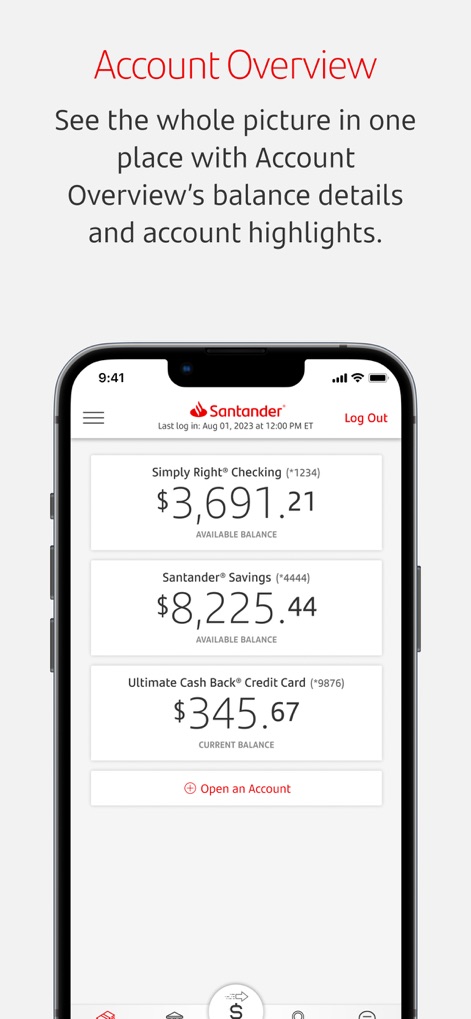
Users gain a comprehensive financial snapshot, seeing all consolidated account balances and precise last login timestamps for enhanced security and oversight.
Unified Account View

The app's streamlined bottom navigation bar provides instant access to essential functions, including convenient Deposit Check and integrated Zelle® options.
Intuitive Navigation Bar
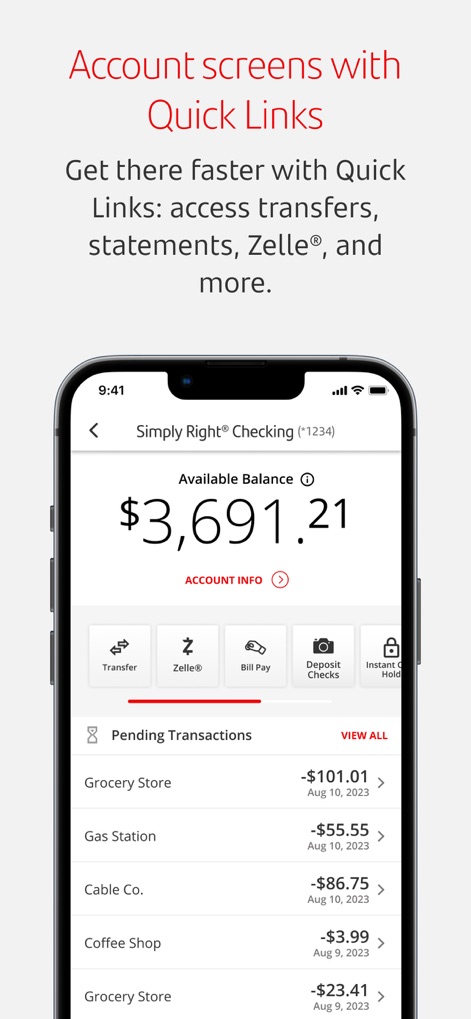
Users can quickly navigate account specifics via the prominent Quick Links menu and easily review their financial activity through the organized Pending Transactions list.
Detailed Account Insights

The app integrates robust Zelle functionality, offering large, clear "Send" and "Request" options for swift and secure peer-to-peer payments.
Seamless Money Transfers

Users maintain full control over their cards with the ability to instantly activate the "Instant Card Hold" feature and easily access the "Report Lost or Stolen" option.
Comprehensive Card Management

The app delivers critical financial updates through real-time deposit notifications and offers users extensive control over customizable alert settings for various transactions.
Personalized Account Alerts
Description
Download
More Like This
Apps with similar features and user experience

Enpara Bank Cep Şube
Enpara Bank Anonim Sirketi

Alinma App - تطبيق الإنماء
Alinma Bank

Huntington Mobile Banking
The Huntington National Bank, Inc

國泰世華網路銀行CUBE
Cathay United Bank

中國信託行動銀行
CTBC Bank Co., Ltd.

FNB Banking App
FirstRand Bank Limited

Riyad Bank App
Riyad Bank

CIMB OCTO MY
CIMB Bank Berhad

Regions Mobile
Regions Financial
This page is not an official page of the app or its developer, but an independent editorial publication created for informational and commentary purposes. Unless expressly stated otherwise, neither the app nor its developer is affiliated with, endorsed by, sponsored by, authorized by, or otherwise officially connected with MWM, Apple, Google Play, the app publisher, or the app's developer, and nothing on this page implies that the app was developed using MWM's services. Any trademarks, logos, screenshots, and other content remain the property of their respective owners.