
This page is not an official page of the app or its developer, but an independent editorial publication created for informational and commentary purposes. Unless expressly stated otherwise, neither the app nor its developer is affiliated with, endorsed by, sponsored by, authorized by, or otherwise officially connected with MWM, Apple, Google Play, the app publisher, or the app's developer, and nothing on this page implies that the app was developed using MWM's services. Any trademarks, logos, screenshots, and other content remain the property of their respective owners.


SaveTik: Tik Tock Video Saver
TikTok's ephemeral nature meets its match. SaveTik puts users in control of their video library, allowing permanent retention and effortless sharing of top content.
Downloads
250k+User Rating
Total Ratings
11.6KPublisher
Category
Photo & VideoLocales
1Latest Version
1.2.0Size
54.6 MBFirst Released
Oct 20, 2023An Analytical Overview for TikTok Content Management
Key Features of SaveTik: Tik Tock Video Saver
High-Definition Video Downloading
The app provides the capability to save TikTok videos in superior visual clarity, ideal for archiving and re-sharing.
Effortless Video Reposting
It allows users to quickly and easily repost TikTok content, facilitating engagement and distribution.
Streamlined Download Workflow
This tool features an intuitive process, allowing users to save videos quickly via a simple copy-link and automatic download mechanism.
Integrated Video Sharing
The app provides functionality for users to easily share downloaded TikTok videos across various platforms.
Frequently Asked Questions
Everything you need to know about SaveTik: Tik Tock Video Saver
How does SaveTik help users save Tik videos?
SaveTik allows users to save Tik videos by copying the video link from Tik. After opening SaveTik, the app automatically downloads the video. Users can then save and bookmark their favorite videos.
Can I repost videos using SaveTik?
Yes, SaveTik allows users to repost Tik videos easily and quickly. The app's core functionality includes saving, sharing, reposting, and bookmarking favorite Tik videos in HD quality.
Is SaveTik affiliated with TikTok?
No, SaveTik is not affiliated with or endorsed by TikTok. The app description includes a clear disclaimer stating this direct non-affiliation.
What are the steps to save a video using SaveTik?
To save a video with SaveTik, first find a video on Tik. Tap the 'Share' button, then 'Copy Link'. Open SaveTik, agree to paste from the clipboard, and the video downloads automatically.
Does SaveTik allow users to bookmark videos?
Yes, SaveTik allows users to bookmark their favorite videos. The app features a dedicated 'Collections' section where users can organize and store their saved video content.
What quality are videos saved with SaveTik?
SaveTik supports saving, sharing, reposting, and bookmarking Tik videos in HD quality. This ensures that all content handled by the app retains its high-definition resolution.
Where can I find the privacy policy for SaveTik?
The privacy policy for SaveTik is accessible directly through the provided link: https://tapstorm.net/apps/savetik/privacy.html. This link is specified within the application's description.
What happens if I repost unauthorized content using SaveTik?
Any unauthorized reposting of content or violations of intellectual property rights is the sole responsibility of the user. SaveTik's disclaimer explicitly states this condition.
The following screenshots and description are sourced directly from the app's official store listing and are the property of the app developer.
App Store
Screenshots
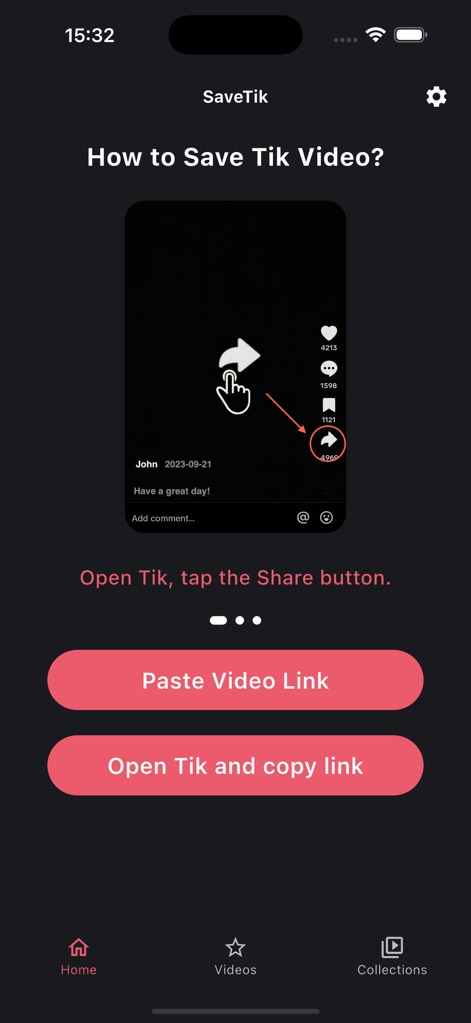
The app guides users to initiate video saving directly from TikTok, emphasizing the clear 'Share' button and a helpful instructional overlay.
Seamless Sharing Start
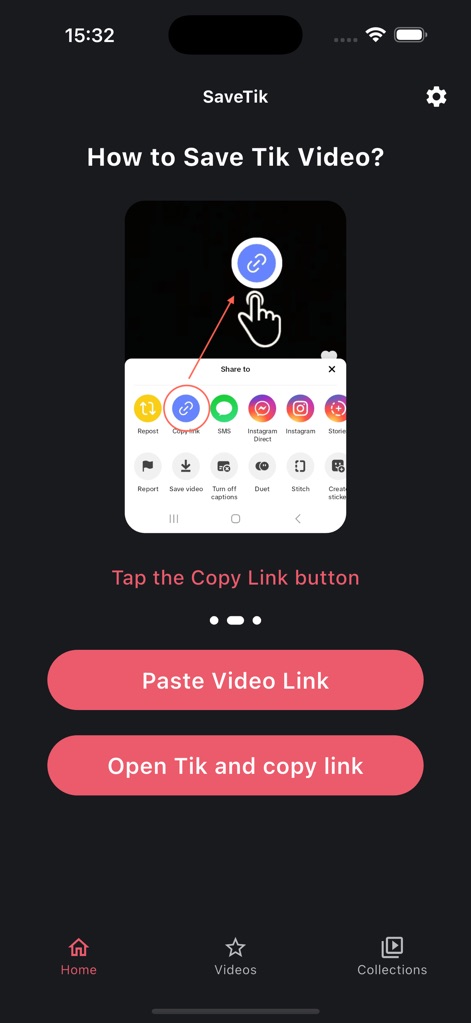
This tool simplifies the process of obtaining video links by directing users to the essential 'Copy Link' option within TikTok's share sheet interface.
Direct Link Acquisition
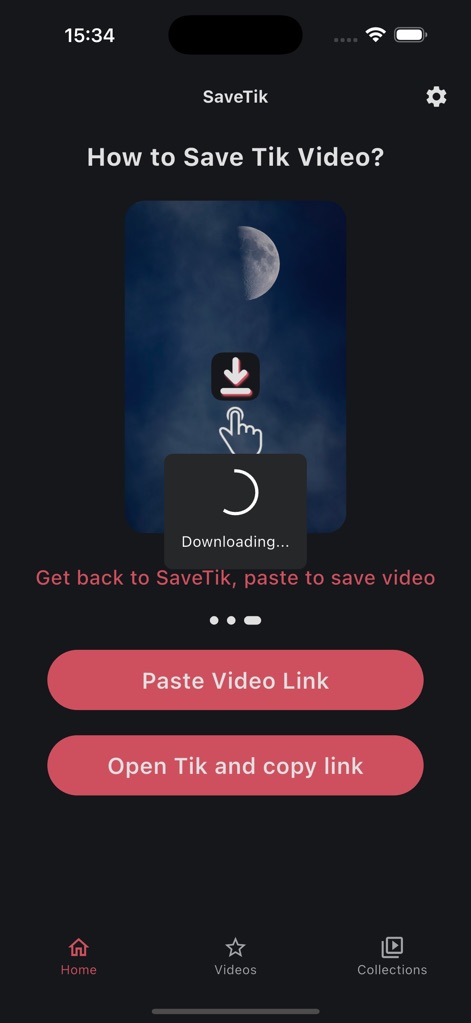
Upon returning, the app displays a dynamic 'Downloading...' animation, signaling immediate video acquisition, and presents an option to 'Paste Video Link' for manual input.
Instant Download Activation

A visually rich video grid display organizes all downloaded content, complete with original engagement metrics such as like and view counts for each entry.
Curated Video Library
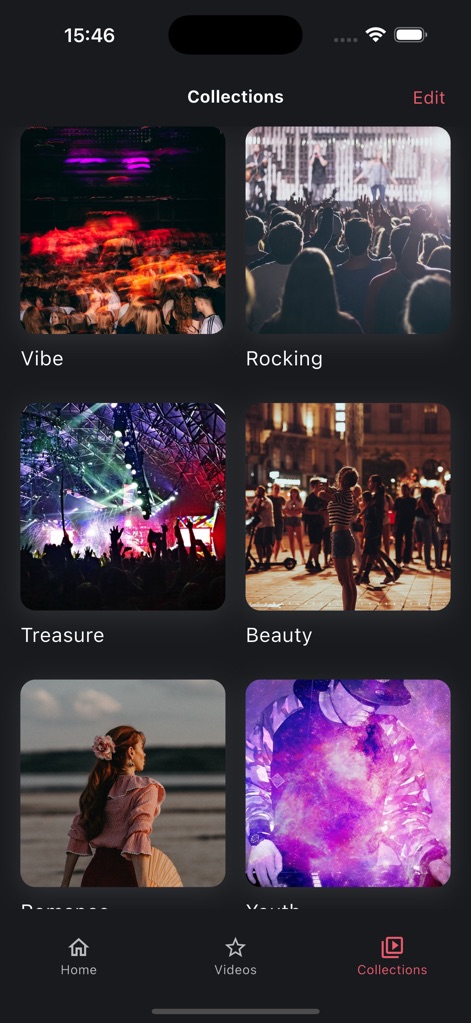
Users can meticulously categorize saved videos into personalized content collections, identified by user-defined, themed titles like 'Vibe' and 'Rocking'.
Personalized Content Collections
Description
Download
More Like This
Apps with similar features and user experience

SSSTik Lite: Trend Video Saver
Alina Pustovit

Instant Save
sagar vaddoriya

InSaver : Video Downloader
Thembi Mothalo

Instant Saver : Story, Reels
Yousef Atieh

InstSave: Reels Story Repost
Narendra Sorathiya

Tik Saver: Save Tok Video Pro
SPEKTRUM EPPS, TOV

InDown・Reels Video Story Saver
FATMA MELIS CAN

SaveTik : TikTok Videos Saver
TOYIN- ISRAEL IBIYEMI

TikPro : Save Tik Videos
Md Amdadul Hoque
This page is not an official page of the app or its developer, but an independent editorial publication created for informational and commentary purposes. Unless expressly stated otherwise, neither the app nor its developer is affiliated with, endorsed by, sponsored by, authorized by, or otherwise officially connected with MWM, Apple, Google Play, the app publisher, or the app's developer, and nothing on this page implies that the app was developed using MWM's services. Any trademarks, logos, screenshots, and other content remain the property of their respective owners.