ServicePlanner

ServicePlanner

Download on App Store
Logo of ServicePlanner

ServicePlanner: Elevate Your Ministry and Reach Your Spiritual Goals

The complete assistant for Jehovah's Witnesses to manage return visits, track service hours, and simplify monthly reporting—all perfectly synced across your devices.

Download on App Store

Publisher

iMatt Solutions Limited

Category

Productivity

Downloads

131K+

User Rating

4.7/5

Total Ratings

400

Locales

17

Ministry at a Glance

Discover the interface used by 131K+ users.

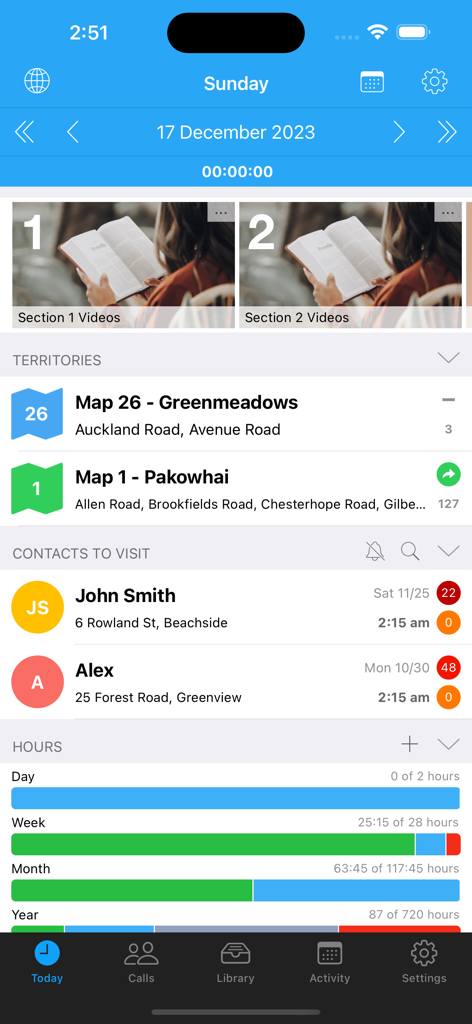
ServicePlanner app Today screen displaying ministry territories, scheduled contact visits, and service hour progress bars.
ServicePlanner app Today screen displaying ministry territories, scheduled contact visits, and service hour progress bars.

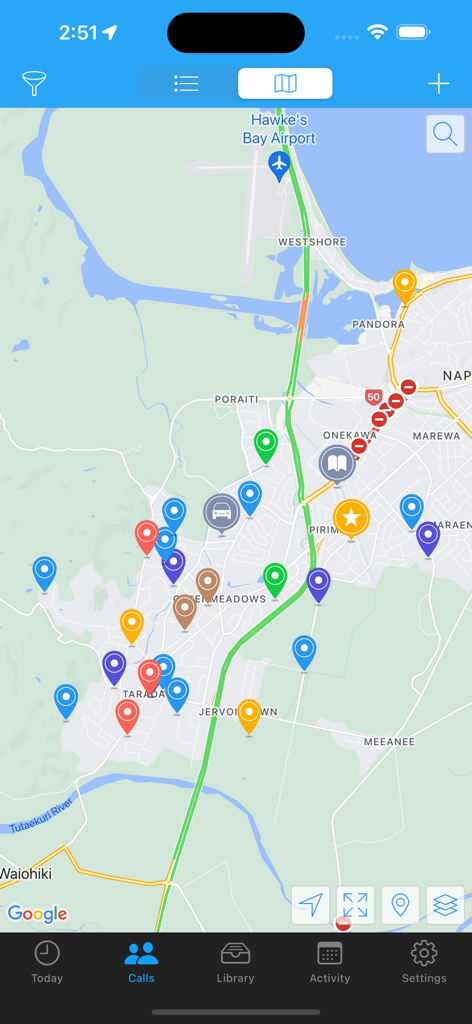
A map interface within the ServicePlanner app showing colored pin markers for ministry contacts and territory locations
A map interface within the ServicePlanner app showing colored pin markers for ministry contacts and territory locations

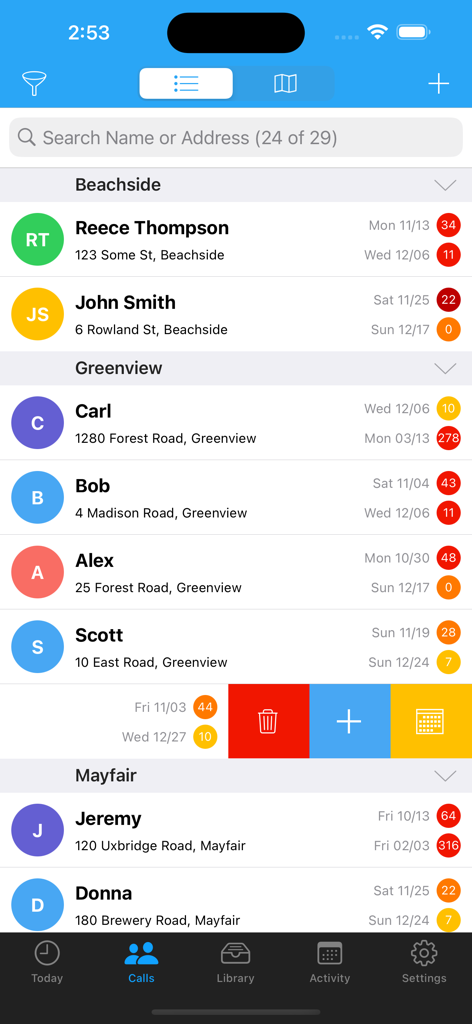
A list of ministry contacts in the ServicePlanner app showing visit history and heat map indicators.
A list of ministry contacts in the ServicePlanner app showing visit history and heat map indicators.

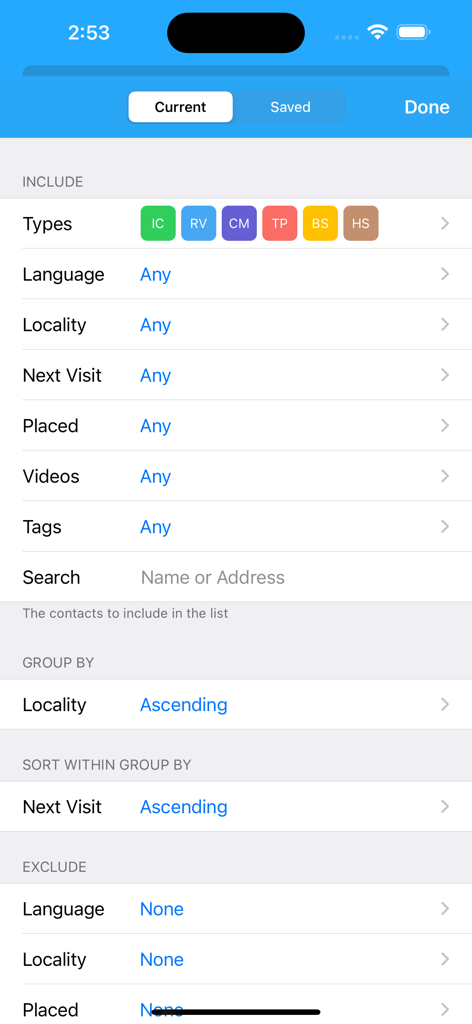
Advanced contact filtering and sorting settings in the ServicePlanner app showing options for grouping by locality and sorting by next visit date.
Advanced contact filtering and sorting settings in the ServicePlanner app showing options for grouping by locality and sorting by next visit date.

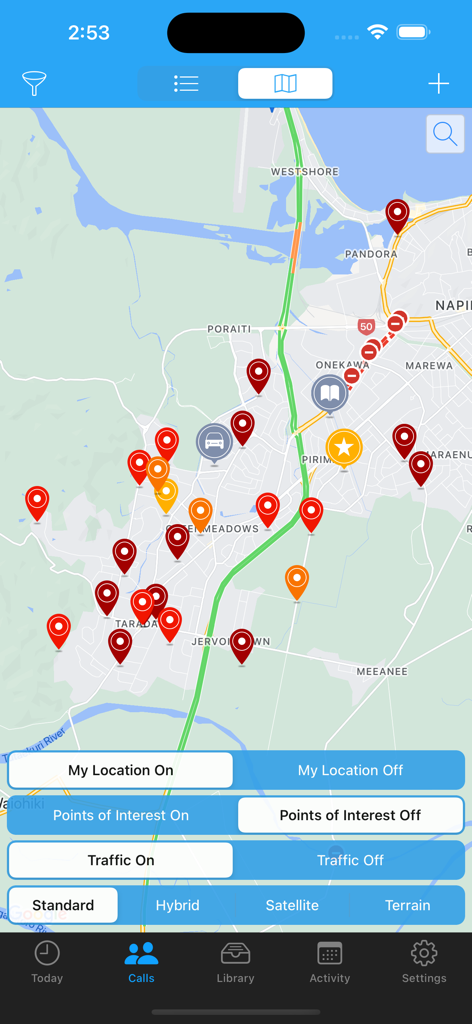
ServicePlanner app map view displaying color-coded pins for contact management and field ministry
ServicePlanner app map view displaying color-coded pins for contact management and field ministry

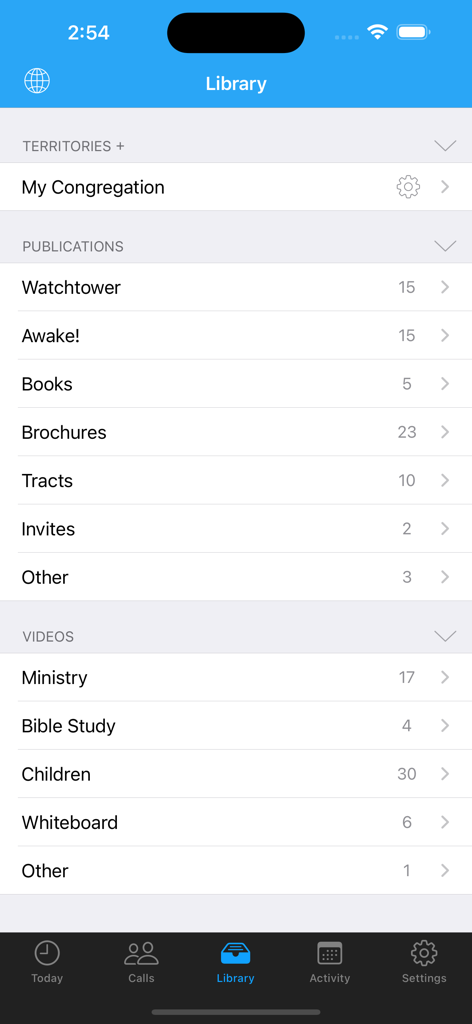
Interface of ServicePlanner app showing library of publications and videos
Interface of ServicePlanner app showing library of publications and videos

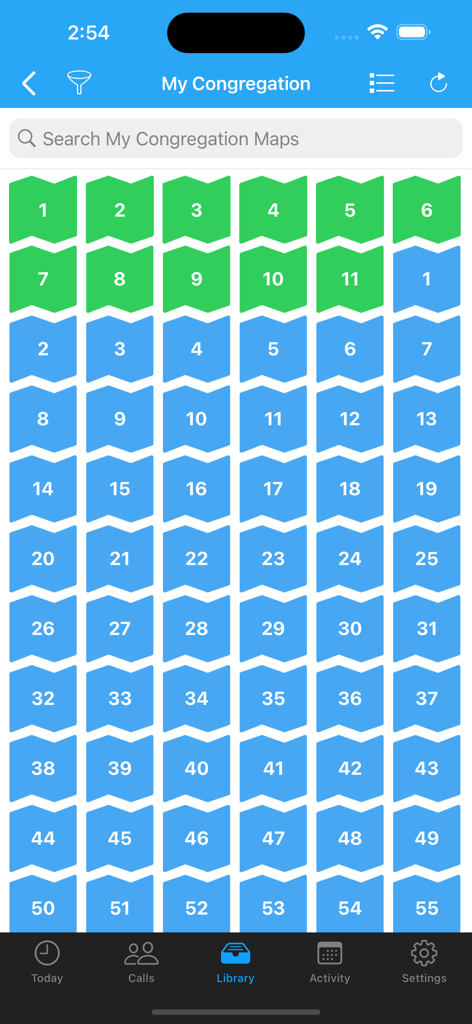
Grid of numbered green and blue territory maps in the ServicePlanner app library
Grid of numbered green and blue territory maps in the ServicePlanner app library

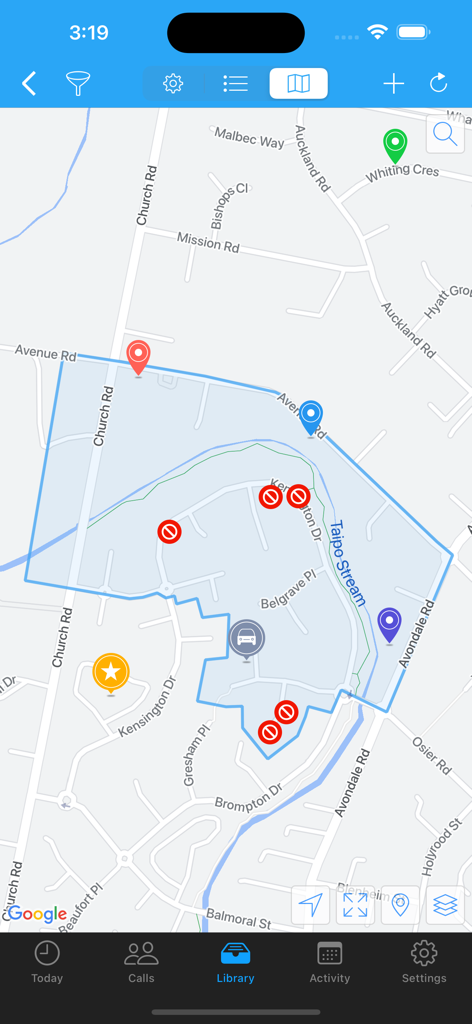
ServicePlanner mobile app map view showing a highlighted territory area and custom location markers
ServicePlanner mobile app map view showing a highlighted territory area and custom location markers

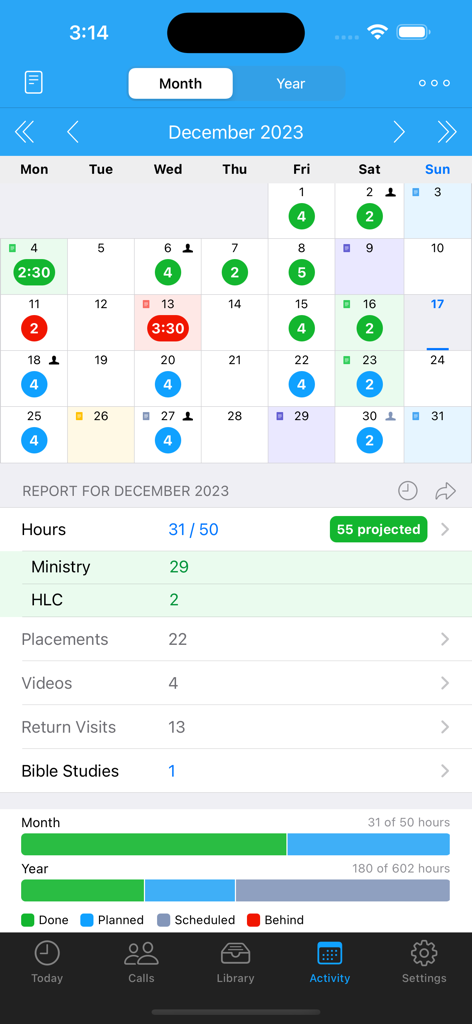
Monthly activity report and calendar view in the ServicePlanner app showing ministry hours and spiritual goals.
Monthly activity report and calendar view in the ServicePlanner app showing ministry hours and spiritual goals.

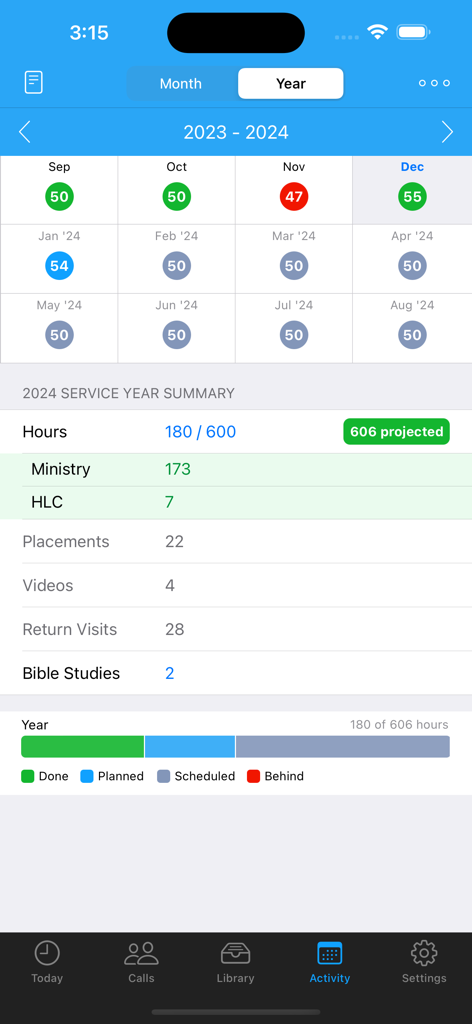
ServicePlanner activity screen showing service year summary and ministry goal progress

ServicePlanner activity screen showing service year summary and ministry goal progress

Stay Organized in Your Ministry

The tools that make this app stand out, trusted by 131K+ users.

📖

Intelligent Contact Management

Never lose track of interested people again. Use visual heat maps and a searchable library to manage your return visits and placements effortlessly.

⏱️

Goal-Driven Time Tracking

Stay on track for your pioneer goals with a built-in timer, projected hours, and a dedicated view for monthly and annual service progress.

📤

Seamless Reporting and Sharing

Eliminate the administrative burden. Submit your monthly report in seconds via SMS or WhatsApp, and coordinate arrangements with witnessing partners instantly.

About the app

Everything you need to know about ServicePlanner.

Description

ServicePlanner is a Field Ministry and Contact Management app designed for Jehovah's Witnesses. • Dropbox Sync - automatically backup your data and sync across multiple devices. • Integration with Territory Helper. • Today Screen - quick access to the Timer, Videos, Publications, Website Browser, Activity Planner and your scheduled calls for the day. • Timer - record your time spent in the ministry or on "other" work (LDC etc). Tap the timer bar on the Today screen or force touch the app icon. • Contact Management - centrally manage your Calls with a searchable Contact list. Colours are carefully used to indicate the Contact Type and render a heat map showing if your visits are overdue or on schedule. Swipe or long-press on a Contact to quickly reschedule or update a contact. • Contact Visit History & Library - quickly access your call history with a list of previous visits. Colour again is used to visually indicate the Visit Type. Define your Next Visit Date and Plans. A central Library for each contact shows all of the publications you have ever placed with them. • Contact Filtering - powerful filtering allows you to define how you Group and Sort your calls. Search for Contacts using Tags, Language, Locality, Next Visit Date and more criteria. • Map View - get an overview of your Calls, search for addresses, place custom markers for the location of your Car, Territory, Kingdom Hall, your Home and more. You can tap+hold to create a new Contact straight from a map location. • Library - centrally manage Publications and Videos. Optionally add Cover Art to make it easier to visualise items. Video locations can be downloaded for offline use, or streamed to free up storage space. Add items to your Today screen. Note that the Library is empty by default, users will need to populate it themselves. • Websites - use the inbuilt browser to show web content. Bookmark your favourite websites. Supports Reader View with Themes. Reader View supports Chinese Pinyin, Zhuyin, Yale, Sidney Lau above Chinese characters when reading content from the official websites. • Monthly Activity - plan your daily activity with Planned Hours vs Actual Hours. Projected Hours indicate if you are on track with your time. • Service Year - see at a glance your hours per month and a summary of your activity for the Service Year. Projected Hours indicate if you are on target to reach your annual goal. OR ... * "Shared in Ministry" Mode - You can optionally switch both the Month and Annual calendars to just show a green tick when you shared in the ministry, instead of focussing on hours. • Scheduling - define your Annual, Monthly and Daily Hour Goals. These will then be used to track your progress for the Month and Year. Apply your Daily Schedule to your Month and view the Projected Hours - so easy to see if you will get your time in or if you need to alter your schedule. • Witnessing Partners - arrange your partners each day. Contact your witnessing partner by SMS, Phone, or messaging apps. Mark the arrangement as confirmed or not. Icons on the calendar indicate days with arranged partners. Optional integration with iOS calendars. • Reporting - support for multiple Hour Credits and Carry-Over Minutes. Your Monthly Report can be submitted using Email, TXT, Telegram, WhatsApp, LINE, Hourglass or NW Publisher. • "Other Hours" - log your non-ministry hours such as LDC or Branch Consultation work. Up to 5 "Other Hour" categories can be scheduled and planned alongside your Ministry Hours. Configure the category name (eg "LDC") and Reporting options in Settings. --- And this is just the beginning! Please check the website for details and support: www.serviceplanner.app Requirements: iOS 14+ Some mapping features require a connected device. All support and documentation is provided in English. Some cannot locate the app because they search for "Service Planner". The app is called "ServicePlanner".

Latest Version

3.1.1

Size

46.2 MB

First Released

Aug 18, 2017

Ready to Simplify Your Ministry?

Join over 130,000 publishers and pioneers who use ServicePlanner to stay organized, reach their goals, and focus on what truly matters.

Download on App Store

App information, icons, screenshots, and descriptions displayed on this page are sourced from the Apple App Store and are the property of their respective developers. Download estimates and rankings are based on MWM's proprietary models and may not reflect actual figures. This page is provided for informational and analytical purposes only.

Believe this page infringes your intellectual property? File a dispute