
This page is not an official page of the app or its developer, but an independent editorial publication created for informational and commentary purposes. Unless expressly stated otherwise, neither the app nor its developer is affiliated with, endorsed by, sponsored by, authorized by, or otherwise officially connected with MWM, Apple, Google Play, the app publisher, or the app's developer, and nothing on this page implies that the app was developed using MWM's services. Any trademarks, logos, screenshots, and other content remain the property of their respective owners.


Shared Family Calendar: FamCal
No more missed pickups or forgotten appointments. FamCal gives every family member the power of omnipresence.
Downloads
1M+User Rating
Total Ratings
33.1KPublisher
Category
ProductivityLocales
9Latest Version
8.5.2Size
189.6 MBFirst Released
Apr 7, 2016An analytical overview of key features enhancing family organization and collaboration.
FamCal: A Centralized Household Management Hub
Shared Family Calendar
The app provides a centralized family calendar where all members can view, add, and edit events, ensuring everyone is informed and schedules are harmonized with color-coding and versatile views.
Cross-Device Sync & Access
This tool ensures continuous synchronization across all devices, allowing family members to access and manage their schedules, tasks, and notes anytime, anywhere, fostering seamless collaboration and real-time updates.
Shared Lists & Task Management
It allows users to create and share various lists, including grocery or shopping lists, and manage to-dos and tasks collaboratively within the family, enhancing household efficiency and delegation.
Event Notifications & Reminders
The app allows users to set local notifications or send cloud-based alerts for events, ensuring that no important appointments or tasks are missed by any family member, thereby reducing stress and improving punctuality.
Flexible Family Member Profiles
This tool allows for the creation of distinct profiles for adult and child members, supporting different access needs and enabling personalized color-coding of events for easier identification and tailored organization.
Shared Recipe Management
This app offers comprehensive recipe management, allowing families to organize recipes, add ingredients directly to shopping lists with a single tap, and schedule meals on the calendar, streamlining meal planning and preparation.
Collaborative Family Memos
It features a shared memo section for jotting down notes, sharing important information, and leaving comments, serving as a central hub for family communication and knowledge sharing.
Shared Trip Expense Tracking
The app provides dedicated functionality to organize trips and track expenses collaboratively, offering analytical charts and export options to manage family finances effectively during travel.
Frequently Asked Questions
Everything you need to know about Shared Family Calendar: FamCal
What is Shared Family Calendar: FamCal and what does it do?
Shared Family Calendar: FamCal is an app that organizes family schedules, tasks, and notes in one place. It offers shared calendars, task lists, memos, recipes, trip expense tracking, and notifications to keep families connected.
Can FamCal manage both adult and child family members?
Yes, FamCal supports both adult members with email addresses and child members without email addresses. Users can color-code events with individual member colors for easy identification.
Does Shared Family Calendar: FamCal offer shared grocery lists and task management?
Yes, FamCal includes a feature for sharing grocery lists, shopping lists, and other task lists. Users can create and assign to-dos to keep track of family responsibilities.
Can I manage and schedule recipes with FamCal?
Yes, FamCal provides a dedicated feature to organize all family recipes. Users can add ingredients to shopping lists with one tap and schedule meals directly onto the calendar.
Does FamCal provide event notifications for family members?
Yes, FamCal sends notifications for events. Users can set local notifications or notify other family members from the cloud server to ensure everyone stays informed about upcoming activities.
How does Shared Family Calendar: FamCal help with shared trip expenses?
FamCal organizes trip expenses by allowing users to record every cost incurred during a trip. It provides multiple charts for analysis and supports exporting all expenses in PDF or CSV format.
Are there additional features or an ad-free version available for FamCal?
Yes, FamCal offers an ad-free version with additional features available through a subscription. These include Text month view, Shared contacts, Birthday Tracker, Anniversary Tracker, and Export Schedule.
How do I manage my FamCal subscription and auto-renewal?
FamCal subscriptions are managed through the user's iTunes Account Settings. Users can turn off auto-renewal there, which must be done at least 24 hours before the current period ends.
Can Shared Family Calendar: FamCal be used across multiple devices?
Yes, FamCal allows families to access their calendar, projects, and notes from any device. The entire family group shares one account, logging in with a personal email and a shared password.
Does FamCal support integration with smartwatches like Apple Watch?
Yes, FamCal integrates with wearables, enabling users to check their calendar and receive event notifications directly on their watch. This ensures important events are not missed.
Can FamCal be used to share notes or memos with family members?
Yes, FamCal features "Family Memos" where users can share notes, jot down moments, and leave comments for each memo. There is no limit to the number of notes created.
The following screenshots and description are sourced directly from the app's official store listing and are the property of the app developer.
App Store
Screenshots
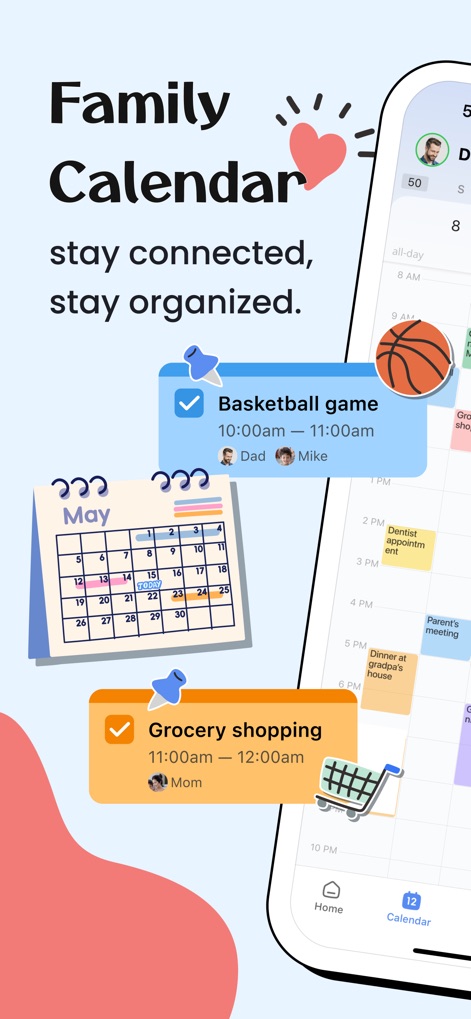
The app provides a centralized view of family schedules, clearly displaying both a monthly calendar icon and individual event cards with member avatars.
Connected Calendar View
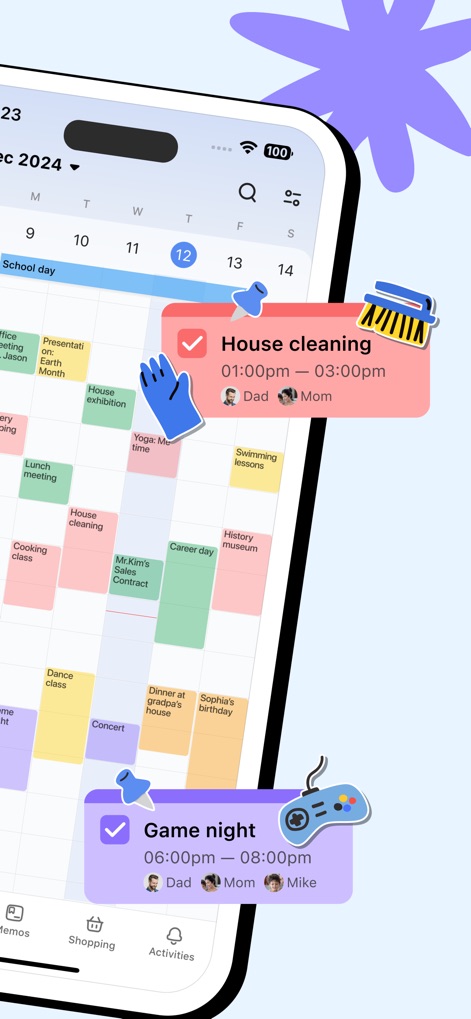
Users can visualize their busy schedules through color-coded events in the month view, alongside specific task cards for 'House cleaning' and 'Game night'.
Dynamic Event Display

This tool consolidates over ten features, from efficient 'Shopping List' management to comprehensive 'Recipe' organization, simplifying household tasks.
Comprehensive Toolset

The app facilitates effortless grocery planning, showcasing features like clearly checked items and descriptive item emojis for family shopping.
Streamlined Grocery Lists
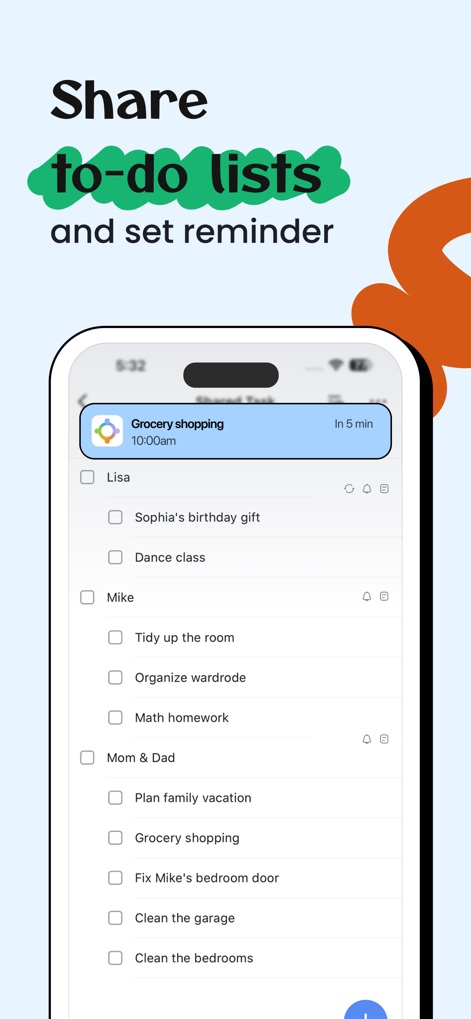
Users can easily share to-do lists and assign tasks to different family members, complemented by convenient reminder settings to keep everyone on track.
Collaborative Task Management

The app extends its utility to smartwatches, allowing users to receive 'Game night' notifications and view calendar events directly from their wearable device.
On-the-Go Access

The memo feature enables users to capture and share precious moments, displaying multiple shared photos and comments from family members.
Cherished Family Memos
Description
Download
More Like This
Apps with similar features and user experience

FamilyWall: Family Organizer
Family & Co

Cozi Family Organizer
Cozi

Cubbily: Family Calendar
DISCOVERY BAY PTE. LTD.

Christmas Gift List Tracker
LW Brands, LLC

Podz: Family & Group Organizer
Strikebrite, LLC

SuperFam - Shared Family App
Rosharan Technologies PRIVATE LIMITED

ienon:Family&Couples Organizer
Dear Inc.

WeDo: Shared To-Do & Planner
hiroshi sakamoto

Lubble: Couple Calendar&To-do
kyujin yum
This page is not an official page of the app or its developer, but an independent editorial publication created for informational and commentary purposes. Unless expressly stated otherwise, neither the app nor its developer is affiliated with, endorsed by, sponsored by, authorized by, or otherwise officially connected with MWM, Apple, Google Play, the app publisher, or the app's developer, and nothing on this page implies that the app was developed using MWM's services. Any trademarks, logos, screenshots, and other content remain the property of their respective owners.