
This page is not an official page of the app or its developer, but an independent editorial publication created for informational and commentary purposes. Unless expressly stated otherwise, neither the app nor its developer is affiliated with, endorsed by, sponsored by, authorized by, or otherwise officially connected with MWM, Apple, Google Play, the app publisher, or the app's developer, and nothing on this page implies that the app was developed using MWM's services. Any trademarks, logos, screenshots, and other content remain the property of their respective owners.


sMote - for Sony cameras
Unlock advanced automation for your Alpha or ZV series gear. From precision focus stacking to custom bulb intervals, master every shot with a reliable, feature-rich remote that works even in the background.
Downloads
3K+User Rating
Total Ratings
0Publisher
Category
Photo & VideoLocales
1Latest Version
1.2.0Size
2.3 MBFirst Released
Feb 2, 2023Professional Control Without the Bulk
Upgrade your Sony workflow with precision tools designed to replace expensive hardware and clunky official software.
Smart Automation for Macro & Astro
Capture perfect star trails or razor-sharp macro shots with automated focus stacking and programmable bulb intervals.
Instant, Rock-Solid Connection
Skip the pairing headaches of official apps. Experience a fast, stable Bluetooth LE connection that stays locked to your camera.
Frequently Asked Questions
Everything you need to know about sMote - for Sony cameras
What is sMote - for Sony cameras?
sMote is a Bluetooth LE remote control app for Sony cameras. It provides features like interval timer, automatic focus stacking, and bulb mode interval timer, functioning as an alternative to physical remotes.
Is my Sony camera compatible with sMote?
sMote supports specific E-Mount and compact Sony camera models. Examples include ILCE-6100, ILCE-7C, ILCE-1, DSC-RX0M2, and ZV-1. Check the app's compatibility list for detailed versions.
Can I control zoom and focus with the sMote app?
Yes, sMote allows users to adjust zoom, control focus, and activate AF focus and the C1 button on their Sony camera remotely.
Does sMote offer an interval timer feature?
Yes, sMote features an interval timer. It schedules shots at precise intervals (seconds, minutes, hours) and supports repeating intervals with customizable delays for automated photography.
How does sMote handle focus stacking?
sMote provides automatic focus stacking. Users define the number of shots, delays, and focus steps between exposures. It also supports manual focus stacking for precise control.
Does sMote include a bulb mode interval timer?
Yes, sMote includes a bulb interval timer. This feature programs a sequence of bulb shots with defined exposure lengths and delays, optimized for low light and astrophotography.
Is an internet connection required for the sMote manual?
No, sMote features an inbuilt manual. This internal guide provides instructions on pairing, setup, and camera control, eliminating the need for an internet connection to access documentation.
Can sMote operate in the background?
Yes, sMote supports background operation. The app continues to execute interval timer functions even if other applications are opened or the phone screen is off.
What are the steps to pair sMote with a Sony camera?
First, enable "Bluetooth Rmt Ctrl" in your camera's network settings. Then, within the sMote app, initiate a camera search and accept the pairing prompt on your device.
The following screenshots and description are sourced directly from the app's official store listing and are the property of the app developer.
App Store
Screenshots
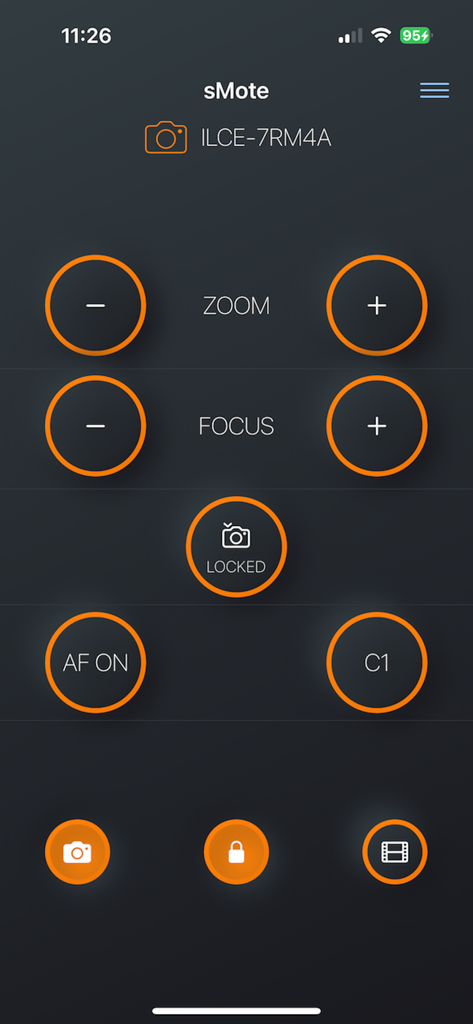
Remote control interface of the sMote app for Sony cameras showing zoom focus and shutter settings
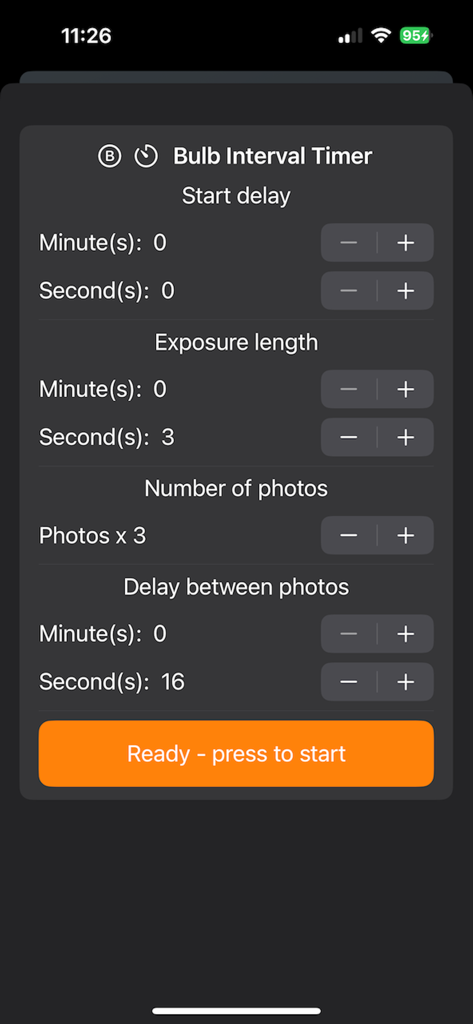
Interface of the sMote app showing configurations for bulb interval timer including exposure length and delay for Sony cameras
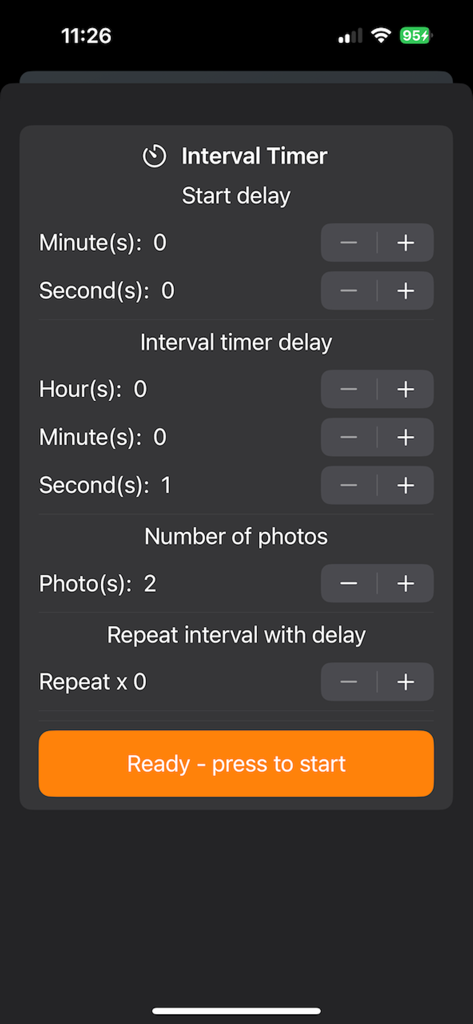
Interval timer interface in the sMote app for Sony cameras
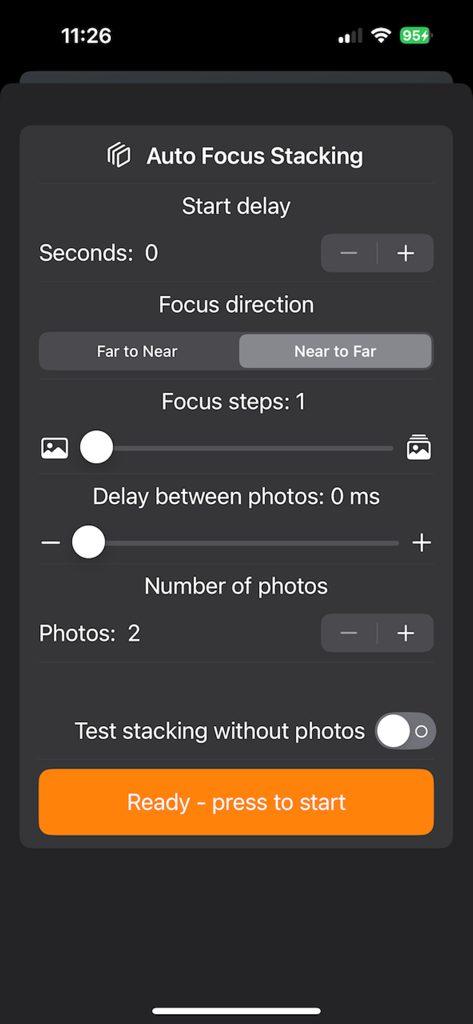
Interface of the sMote app showing auto focus stacking settings for Sony cameras
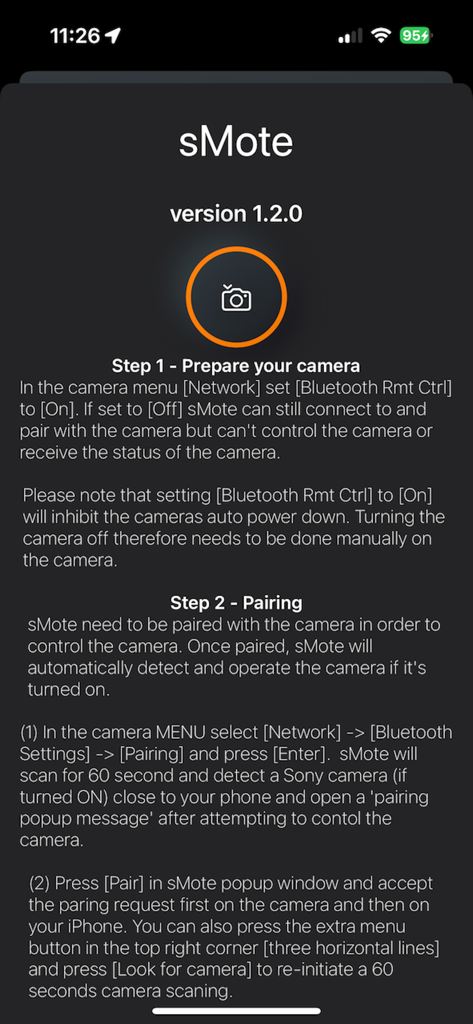
In-app setup guide for sMote showing instructions for preparing and pairing a Sony camera via Bluetooth.
Description
Download
More Like This
Top-ranked apps in the same category

CapCut: Photo & Video Editor
BYTEDANCE PTE. LTD.

Instagram, Inc.

YouTube
Google LLC

Canva: AI Photo & Video Editor
Canva Pty Ltd

Snapchat
Snap, Inc.

快手
Beijing Kwai Technology Co., Ltd.

Edits: Video Editor
Instagram, Inc.

Meitu- AI Photo & Video Editor
Xiamen Meitu Technology Co., Ltd.

Google Photos: Backup & Edit
Google LLC
This page is not an official page of the app or its developer, but an independent editorial publication created for informational and commentary purposes. Unless expressly stated otherwise, neither the app nor its developer is affiliated with, endorsed by, sponsored by, authorized by, or otherwise officially connected with MWM, Apple, Google Play, the app publisher, or the app's developer, and nothing on this page implies that the app was developed using MWM's services. Any trademarks, logos, screenshots, and other content remain the property of their respective owners.