
This page is not an official page of the app or its developer, but an independent editorial publication created for informational and commentary purposes. Unless expressly stated otherwise, neither the app nor its developer is affiliated with, endorsed by, sponsored by, authorized by, or otherwise officially connected with MWM, Apple, Google Play, the app publisher, or the app's developer, and nothing on this page implies that the app was developed using MWM's services. Any trademarks, logos, screenshots, and other content remain the property of their respective owners.


Status Saver: Photo & Video
Native WhatsApp features hold you back. This app unleashes your content control.
Downloads
1M+User Rating
Total Ratings
5.6KPublisher
Category
Social NetworkingLocales
1Latest Version
2.1Size
41.3 MBFirst Released
May 17, 2020An evaluation highlighting key functionalities for advanced WhatsApp status management and content enhancement.
Comprehensive Analysis of Status Saver: Photo & Video Capabilities
WhatsApp Status Archiving
The app enables users to download and securely store WhatsApp photo and video statuses to their device, providing a permanent archive beyond WhatsApp's temporary display.
Extended Video Status Composer
This tool automatically splits lengthy videos into shorter, compliant segments, allowing users to post full-length video narratives as WhatsApp statuses without manual editing.
Instant Status Reposting
It allows users to quickly repost saved photo and video statuses directly to WhatsApp or share them effortlessly across other social media platforms.
In-App Media Enhancement
The app features an integrated editor with various effects and filters, enabling users to creatively enhance their photos and videos before publishing them as status updates.
Offline Status Viewing
It provides convenient offline access to all downloaded WhatsApp statuses, ensuring users can review their archived content anytime without requiring an active internet connection.
Multi-Platform Split Video Sharing
The tool facilitates direct sharing of split video segments to various social platforms like Instagram, Facebook, and Snapchat, extending the reach of long-form video content.
Frequently Asked Questions
Everything you need to know about Status Saver: Photo & Video
What is the primary function of Status Saver: Photo & Video?
Status Saver: Photo & Video is a comprehensive tool for managing, editing, saving, and reposting WhatsApp stories and statuses. It allows users to view, save, edit, and share content offline on iPhone and iPad.
How do users connect to WhatsApp with Status Saver: Photo & Video?
Users connect to WhatsApp by scanning a QR code. The app provides three scanning options: QR code on the phone, on a web page, or on an Apple Watch. It remembers the state to avoid rescanning.
Can Status Saver: Photo & Video handle long videos for WhatsApp Status?
Yes, Status Saver: Photo & Video allows users to create long stories and split videos for WhatsApp Status. It supports posting high-quality, unlimited length videos efficiently to various social platforms.
Does Status Saver: Photo & Video offer a free trial for its premium features?
Yes, Status Saver: Photo & Video offers a 3-day free trial for the monthly subscription. Following the trial, users can choose auto-renewing weekly or monthly subscription options.
Is Status Saver: Photo & Video officially affiliated with WhatsApp?
No, Status Saver: Photo & Video is not affiliated with or endorsed by WhatsApp. It is an independent, third-party application that assists with WhatsApp status management and photo editing.
Can users edit photos within the Status Saver: Photo & Video app?
Yes, users can edit their photos directly within Status Saver: Photo & Video. The app offers various effects and filters to enhance images before sharing them on WhatsApp.
The following screenshots and description are sourced directly from the app's official store listing and are the property of the app developer.
App Store
Screenshots
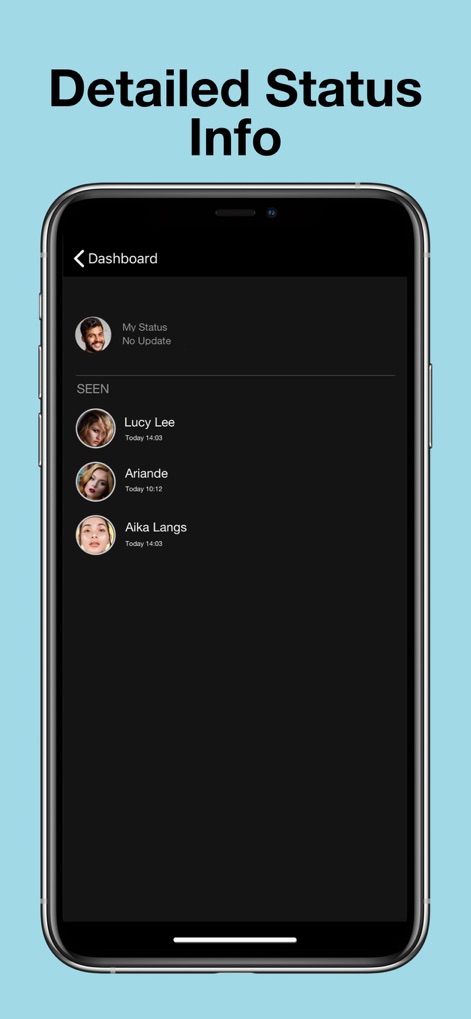
This interface provides a clear overview of status interactions, displaying 'My Status' updates and detailing who has 'SEEN' status posts with timestamps.
Status Interaction Overview
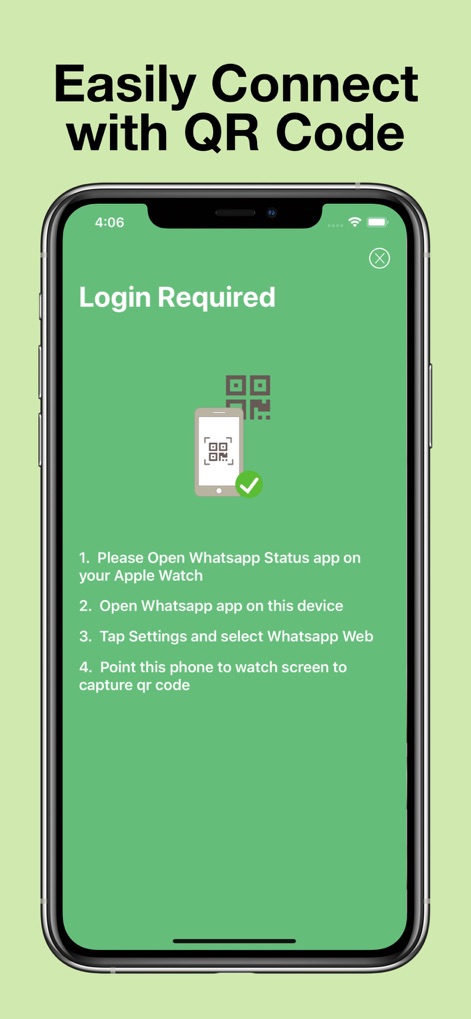
Users can effortlessly connect the app using clear, numbered instructions for QR code scanning, alongside an illustrative graphic demonstrating Apple Watch integration.
Effortless QR Setup
The app efficiently processes status data, indicated by a sleek loading animation and the direct message 'Getting Whatsapp Status Info'.
Intelligent Status Sync
Description
Download
More Like This
Apps with similar features and user experience

Status Video Saver Reposter
Ketan Kathiriya

Status Saver and Save Story
Ahmed Bastam

Status Saver: Download Status
Vivek Warde

Status Saver : Videos
Natalie Stirner

Status Saver - Videos Saver
NAITIK, RAMESHBHAI VIRANI

Story saver : Video saver
Erasoft

Status Download For Whatsapp +
Pramod Tapaniya
This page is not an official page of the app or its developer, but an independent editorial publication created for informational and commentary purposes. Unless expressly stated otherwise, neither the app nor its developer is affiliated with, endorsed by, sponsored by, authorized by, or otherwise officially connected with MWM, Apple, Google Play, the app publisher, or the app's developer, and nothing on this page implies that the app was developed using MWM's services. Any trademarks, logos, screenshots, and other content remain the property of their respective owners.