
This page is not an official page of the app or its developer, but an independent editorial publication created for informational and commentary purposes. Unless expressly stated otherwise, neither the app nor its developer is affiliated with, endorsed by, sponsored by, authorized by, or otherwise officially connected with MWM, Apple, Google Play, the app publisher, or the app's developer, and nothing on this page implies that the app was developed using MWM's services. Any trademarks, logos, screenshots, and other content remain the property of their respective owners.


Stick Master - Remote Control
Physical remotes are dead. This app grants users total command over their entertainment, transforming their smartphone into the ultimate control hub.
Downloads
250k+User Rating
Total Ratings
501Publisher
Category
UtilitiesLocales
1Latest Version
1.2Size
31.3 MBFirst Released
Oct 21, 2024An evaluation of core functionalities designed for consolidated smart TV management.
Key Features Analysis: Stick Master - Remote Control
Smartphone as Universal Remote
The app transforms a smartphone into a universal remote, offering a consolidated and modern solution to manage home entertainment systems.
Wide TV Compatibility
The app provides extensive compatibility with various smart TV brands, allowing users to control multiple devices from a single interface.
Integrated Keyboard
It allows users to utilize an integrated keyboard for rapid text input, simplifying searches and interactions within smart TV applications.
Touchpad & Joystick Navigation
This tool features a dynamic touchpad and joystick, enabling intuitive and precise navigation through smart TV interfaces.
Frequently Asked Questions
Everything you need to know about Stick Master - Remote Control
What is Stick Master - Remote Control?
Stick Master - Remote Control transforms your smartphone into a TV remote. It provides effortless control, allowing users to switch channels, adjust volume, and navigate menus directly from their mobile device.
Which TV brands are compatible with Stick Master - Remote Control?
Yes, Stick Master - Remote Control supports a wide range of TV brands. These include Samsung, AndroidTV, LG, Sony, Roku, Vizio, Hisense, FireTV, and TCL televisions.
Does Stick Master - Remote Control feature a keyboard for typing?
Yes, Stick Master - Remote Control includes an integrated keyboard. This feature allows users to quickly type and select channels or search within their TV applications, enhancing the control experience.
Can I use a touchpad for navigation with Stick Master - Remote Control?
Yes, Stick Master - Remote Control provides touchpad functionality. Users can utilize their phone’s screen as a dynamic touchpad for smooth and comfortable navigation across their television interface.
Is there a free trial available for Stick Master - Remote Control?
Yes, Stick Master - Remote Control offers a 3-day free trial period. After this trial, the subscription automatically renews into a paid plan unless it is canceled beforehand.
How much does Stick Master - Remote Control cost?
Stick Master - Remote Control offers a weekly subscription for $3.99 and a lifetime purchase option for $24.99. Prices may vary in other currencies according to the App Store Pricing Matrix.
How do I cancel my Stick Master - Remote Control subscription?
To cancel your Stick Master - Remote Control subscription or free trial, access your iTunes settings. Ensure cancellation occurs at least 24 hours before the current period ends to avoid automatic renewal.
What benefits do Premium users receive with Stick Master - Remote Control?
Premium users of Stick Master - Remote Control benefit from no ads, no limits, unlimited control capabilities, and full access to both the touchpad and keyboard features without restrictions.
The following screenshots and description are sourced directly from the app's official store listing and are the property of the app developer.
App Store
Screenshots

This app offers wide compatibility with various smart TV brands, as shown by the diverse logos, and provides a comprehensive on-screen remote interface for effortless command.
Universal Control Hub

Users can efficiently search for content using the integrated QWERTY keyboard, with results displayed instantly on the simulated TV screen and direct access to popular apps.
Smart Keyboard Input

The app converts your phone into a dynamic touchpad for smooth navigation, complemented by essential media playback buttons for complete entertainment management.
Intuitive Touchpad Control

This view presents a traditional numeric keypad for direct channel selection and precise control, alongside quick-access buttons for enhanced user experience.
Numeric & Channel Access
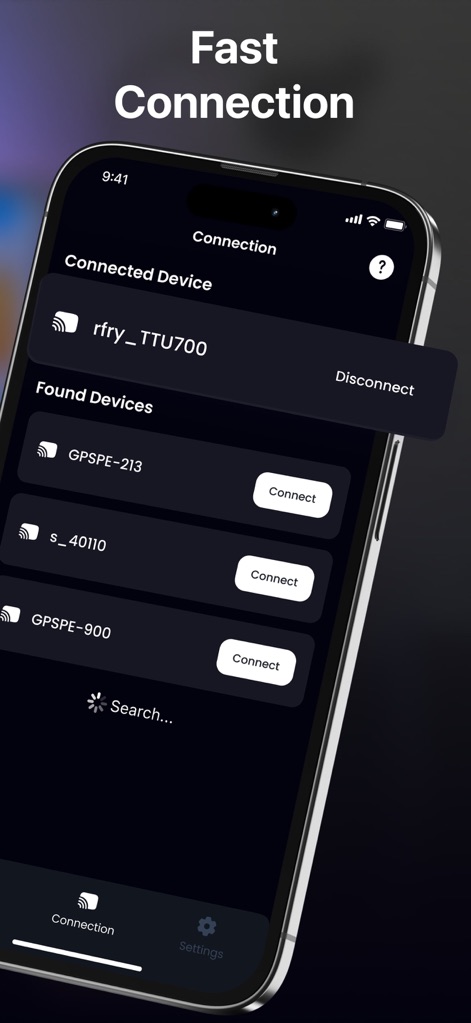
The tool simplifies connectivity by clearly listing "Found Devices" for instant pairing and displaying the "Connected Device" for transparent status updates.
Seamless Device Pairing
Description
Download
More Like This
Apps with similar features and user experience

The Roku App (Official)
ROKU INC

TV Remote & Smart TV Control
To Ngoc Mai

Universal TV Remote Control .
Apps Venture Inc.

TV Remote, Universal Remote
Hangzhou Yingshitong Technology Co., Ltd.

TV Remote Control “Universo”
Nemo Apps LLC

TV Remote・Universal Control #1
Mihai Turlea

Remote Smart Tv Universal
clement gasner

Remote TV Control TCL Onn App
CEMAL CAGLAR KIRICI

TV Remote Control Universal AI
Anh Ngo
This page is not an official page of the app or its developer, but an independent editorial publication created for informational and commentary purposes. Unless expressly stated otherwise, neither the app nor its developer is affiliated with, endorsed by, sponsored by, authorized by, or otherwise officially connected with MWM, Apple, Google Play, the app publisher, or the app's developer, and nothing on this page implies that the app was developed using MWM's services. Any trademarks, logos, screenshots, and other content remain the property of their respective owners.