StopTheMadness Pro

StopTheMadness Pro

Download on App Store
Logo of StopTheMadness Pro

StopTheMadness Pro: Reclaim your browser and browse the web on your own terms.

Restore essential UI features, block invasive tracking, and eliminate annoying banners. The powerful, indie-developed utility that puts you back in charge of your iPhone, iPad, and Mac browsing experience.

Publisher

Jeff Johnson

Category

Utilities

Downloads

18K+

User Rating

4.7/5

Total Ratings

300

Locales

1

Total Browser Mastery

Discover the interface used by 18K+ users.
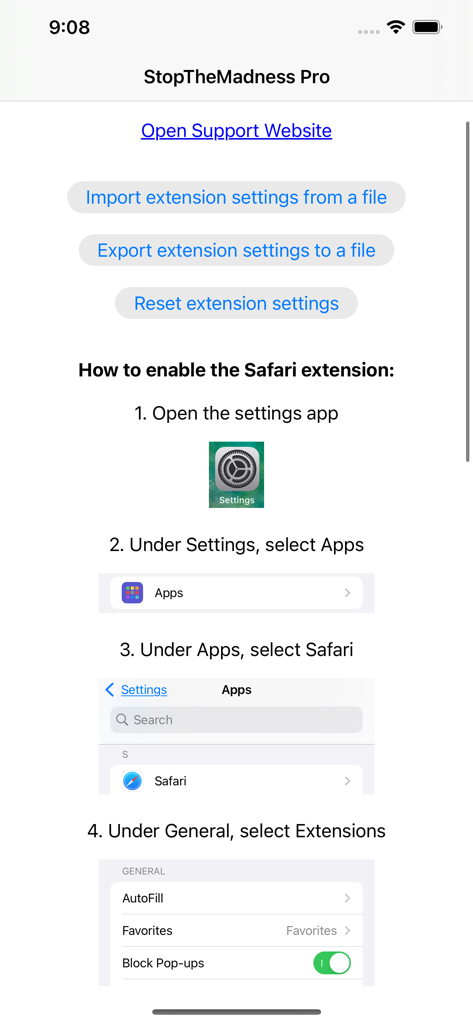
Step by step instructions on how to enable the StopTheMadness Pro extension in iOS Safari settings

Step by step instructions on how to enable the StopTheMadness Pro extension in iOS Safari settings

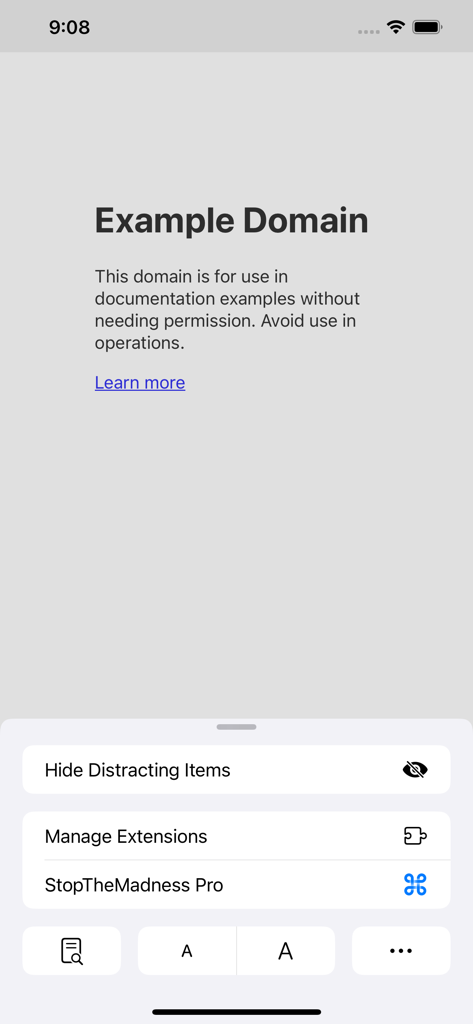
StopTheMadness Pro extension menu in Safari on iPhone showing options to hide distracting items and manage settings

StopTheMadness Pro extension menu in Safari on iPhone showing options to hide distracting items and manage settings

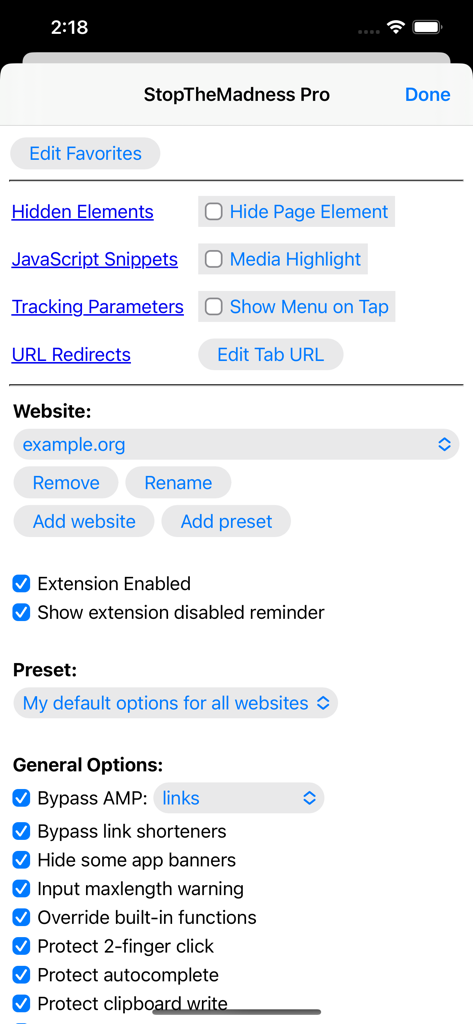
StopTheMadness Pro iOS settings screen showing general browsing options and privacy features

StopTheMadness Pro iOS settings screen showing general browsing options and privacy features

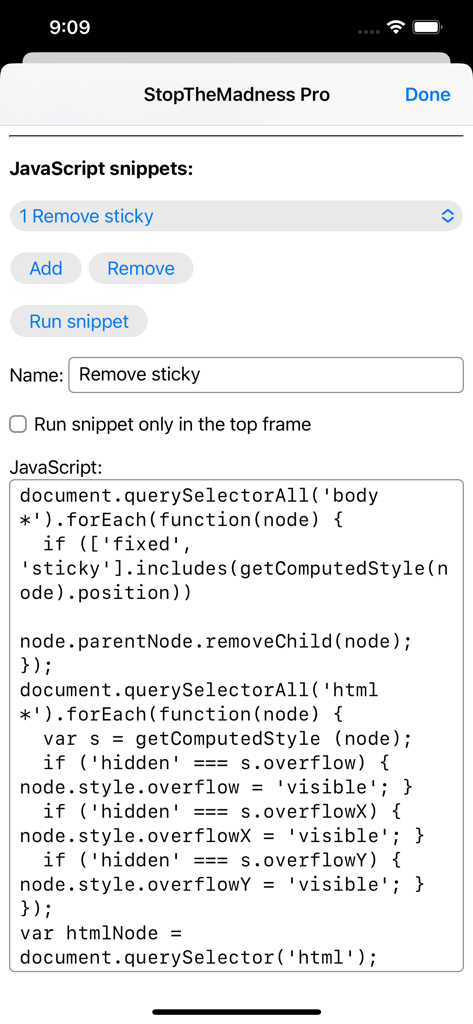
StopTheMadness Pro interface for managing and running custom JavaScript snippets

StopTheMadness Pro interface for managing and running custom JavaScript snippets

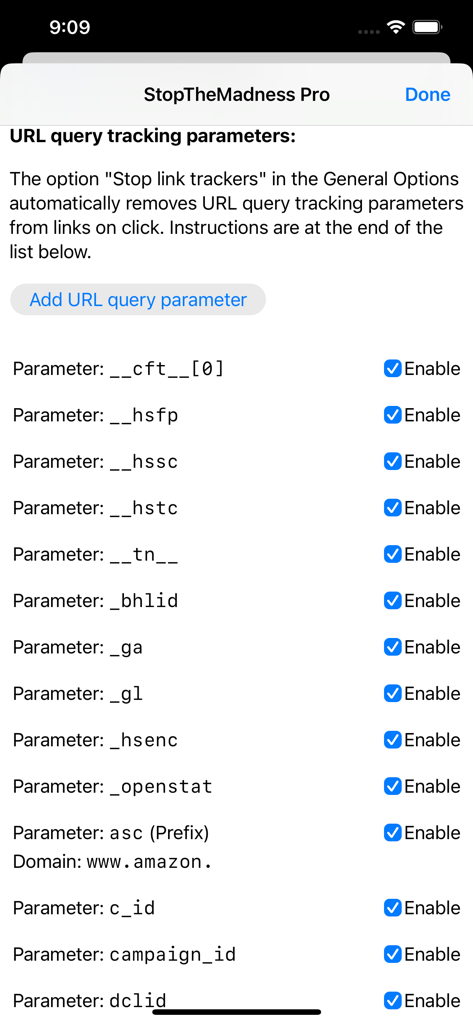
A menu in StopTheMadness Pro showing a list of URL query tracking parameters with toggle switches to enable or disable their removal for privacy protection.

A menu in StopTheMadness Pro showing a list of URL query tracking parameters with toggle switches to enable or disable their removal for privacy protection.

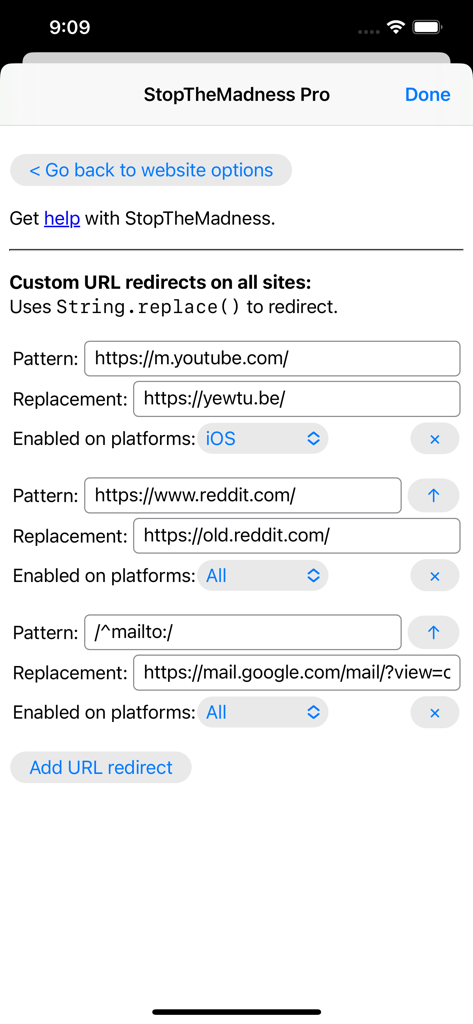
Interface of the StopTheMadness Pro app showing the custom URL redirects settings for YouTube and Reddit

Interface of the StopTheMadness Pro app showing the custom URL redirects settings for YouTube and Reddit

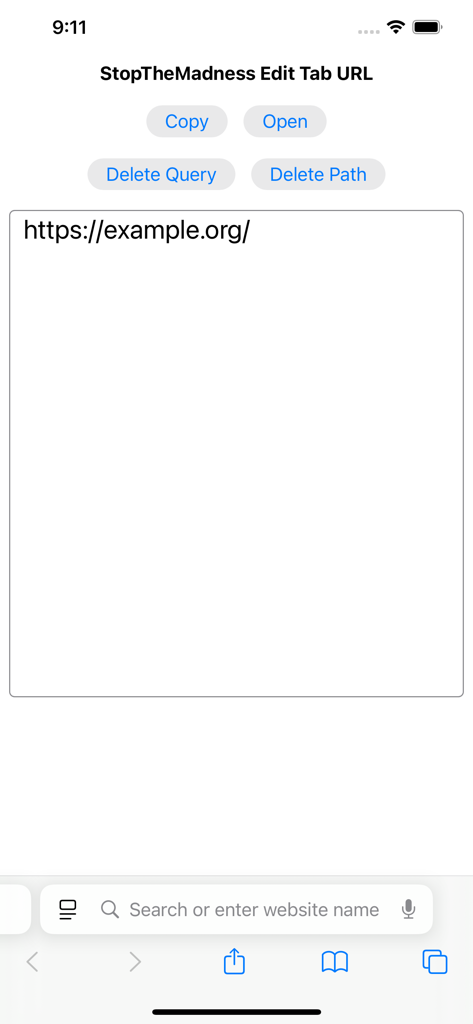
Interface of StopTheMadness Pro showing the Edit Tab URL feature with options to copy, open, or delete URL components.

Interface of StopTheMadness Pro showing the Edit Tab URL feature with options to copy, open, or delete URL components.

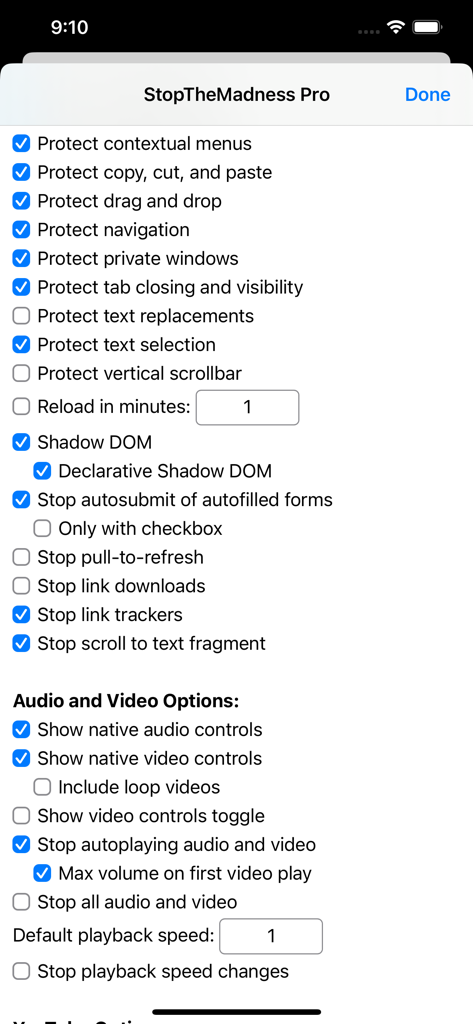
Interface of the StopTheMadness Pro app showing a list of privacy and browser protection settings

Interface of the StopTheMadness Pro app showing a list of privacy and browser protection settings

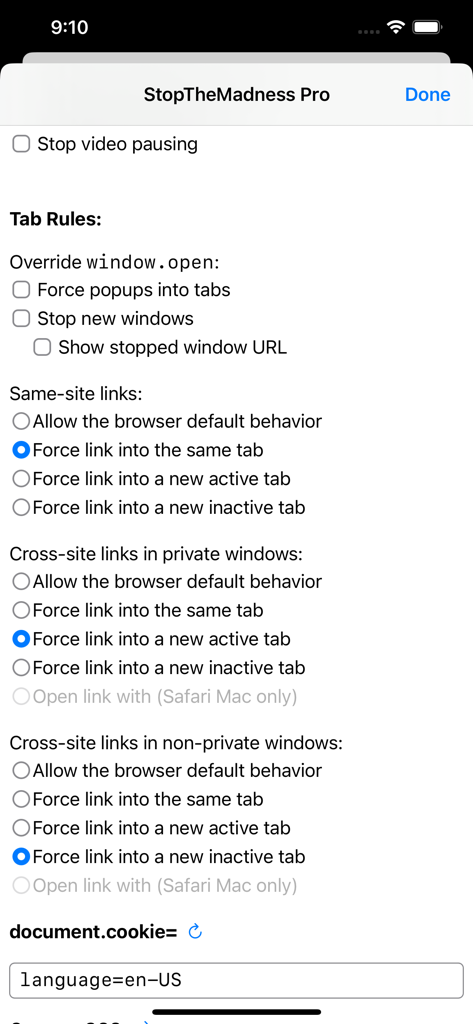
Screenshot of StopTheMadness Pro app showing tab rules and link behavior settings for privacy and control

Screenshot of StopTheMadness Pro app showing tab rules and link behavior settings for privacy and control

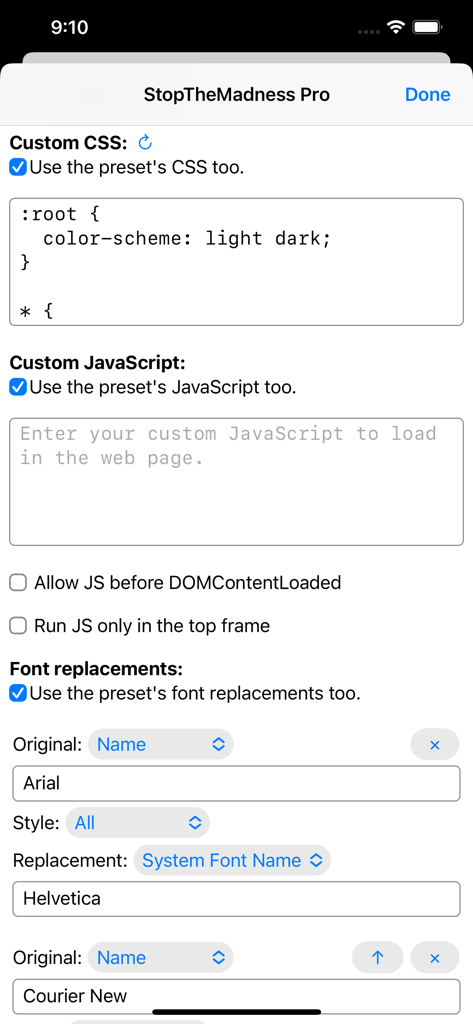
StopTheMadness Pro settings screen for custom CSS JavaScript and font replacements

StopTheMadness Pro settings screen for custom CSS JavaScript and font replacements

Reclaim Your Web Experience

The tools that make this app stand out, trusted by 18K+ users.

🔓

Restore Browser Autonomy

Force websites to respect your system. Re-enable text selection, copy-paste, and contextual menus that sites try to disable.

🛡️

Elite Privacy Protection

Automatically bypass Google AMP, strip tracking parameters from URLs, and block hyperlink auditing and tracking beacons invisibly.

🧹

Eliminate Digital Noise

Instantly hide 'Get the App' banners, 'Sign in with Google' popups, and autoplaying videos for a clean, professional browsing environment.

About the app

Everything you need to know about StopTheMadness Pro.

Description

StopTheMadness Pro is a web browser extension that stops websites from making your browser harder to use, and it protects your privacy on the web. StopTheMadness Pro is not an ad blocker but rather a one of a kind extension with a huge number of unique features! Made by indie developer Jeff Johnson. The support link has documentation and my email address. StopTheMadness Pro includes extensions for Safari on iOS and iPadOS, Safari, Safari web apps, Chrome, and Firefox on macOS. StopTheMadness Pro is a major update to the beloved StopTheMadness extension, adding automatic iCloud sync of settings between all devices, as well as countless other new features and improvements. StopTheMadness Pro features: • Stop websites from disabling user interface features in your browser such as text selection, copy, cut, and paste, drag and drop, contextual menus, AutoFill, ⌘-key keyboard shortcuts, and 2-finger tap to open links in a new tab • Stop Google AMP • Remove URL query tracking parameters automatically • Stop clickjacking on Google Search, Gmail, Facebook, and DuckDuckGo • Stop hyperlink auditing (anchor "ping") • Stop tracking beacons (Navigator.sendBeacon) • Bypass well-known URL shorteners such as bit.ly, tinyurl, and t.co • Stop autoplaying audio and video • Always show Safari's native video controls, including Picture-in-Picture • Unmute videos automatically on first play • Auto-select video playback speed • Stop Safari from pausing audio in background apps such as Apple Music • Hide "Get the app" banners on Google, Google Maps, DuckDuckGo, IMDb, Quora, Patreon, Reddit, and Tumblr • Hide "Sign in with Google" on all websites • Hide "We'd like to send you some notifications" banners on many websites • Hide elements on web pages with a tap • Edit the tab URL in a large separate window instead of Safari's small address bar • Font substitution on websites • Website-specific CSS and JavaScript • Run custom JavaScript snippets at any time • Custom URL redirects • Stop losing characters in maxlength password fields • Force links to open in the current tab instead of a new tab, or force links to open in a new tab instead of the current tab • Force images to the front so you can drag, use the contextual menu, and save • Stop web animations • Stop websites from overwriting your system clipboard • Show the concealed password in password fields • Stop websites from disabling text replacements in Safari • Stop websites from changing the cursor and hiding the scrollbar • Stop the software keyboard from zooming in the web page • Stop websites from disabling pinch to zoom • Reload the web page on a timer • View and edit web page HTML • And many more!

Latest Version

24.1

Size

16.6 MB

First Released

Dec 12, 2023

Take Back Control of Your Browser

Join thousands of power users and professionals who have ended the madness. Experience a cleaner, faster, and truly private web across all your Apple devices today.

Download on App Store
FAQ

Frequently Asked Questions

Everything you need to know about StopTheMadness Pro

What is StopTheMadness Pro?

StopTheMadness Pro is a web browser extension that prevents websites from hindering browser usability and enhances online privacy. It offers unique features beyond ad blocking, such as stopping UI feature disabling and removing tracking parameters.

Which browsers and operating systems does StopTheMadness Pro support?

StopTheMadness Pro supports Safari on iOS and iPadOS, Safari, Chrome, and Firefox on macOS. It provides extensive compatibility for various Apple and desktop browser environments.

Does StopTheMadness Pro block ads?

No, StopTheMadness Pro is not an ad blocker. It is a unique extension focused on stopping websites from interfering with browser functionality and protecting user privacy, offering many distinct features.

How does StopTheMadness Pro protect user privacy?

StopTheMadness Pro protects privacy by removing URL query tracking parameters, stopping clickjacking on major sites, preventing hyperlink auditing, and blocking tracking beacons. It ensures a more private browsing experience.

Can StopTheMadness Pro stop websites from disabling text selection?

Yes, StopTheMadness Pro stops websites from disabling user interface features like text selection, copy, cut, and paste. It restores standard browser functionality for users.

Does StopTheMadness Pro bypass Google AMP pages?

Yes, StopTheMadness Pro can stop Google AMP. This feature is configurable within the extension's settings, allowing users to avoid accelerated mobile pages.

Can StopTheMadness Pro hide "Get the app" banners on websites?

Yes, StopTheMadness Pro hides "Get the app" banners on numerous websites including Google, DuckDuckGo, IMDb, Quora, and Reddit. It helps clear away distracting prompts.

How do I enable the Safari extension for StopTheMadness Pro?

To enable StopTheMadness Pro in Safari, open the iOS/iPadOS Settings app, navigate to Apps, then Safari, and finally select Extensions. From there, you activate the extension.

Does StopTheMadness Pro offer custom URL redirects?

Yes, StopTheMadness Pro supports custom URL redirects. Users can define patterns and replacements for URLs, specifying whether redirects apply to iOS or all platforms.

Can StopTheMadness Pro prevent videos from autoplaying?

Yes, StopTheMadness Pro stops autoplaying audio and video. It also ensures Safari's native video controls are always shown, including Picture-in-Picture functionality.

Does StopTheMadness Pro synchronize settings across devices?

Yes, StopTheMadness Pro includes automatic iCloud sync of settings between all devices. This ensures consistent configurations across iOS, iPadOS, and macOS installations.

Can users run custom JavaScript with StopTheMadness Pro?

Yes, StopTheMadness Pro allows users to run custom JavaScript snippets at any time. It also supports website-specific JavaScript and custom CSS for advanced customization.

Does StopTheMadness Pro remove URL query tracking parameters?

Yes, StopTheMadness Pro automatically removes URL query tracking parameters. This feature enhances user privacy by preventing websites from collecting data through appended link elements.

Is it possible to hide web page elements with StopTheMadness Pro?

Yes, StopTheMadness Pro allows users to hide elements on web pages with a tap. This feature helps customize the browsing experience by removing unwanted content.

Can StopTheMadness Pro prevent websites from changing the cursor or hiding the scrollbar?

Yes, StopTheMadness Pro prevents websites from changing the cursor and hiding the scrollbar. It ensures consistent and user-friendly browser interface behavior.

App information, icons, screenshots, and descriptions displayed on this page are sourced from the Apple App Store and are the property of their respective developers. Download estimates and rankings are based on MWM's proprietary models and may not reflect actual figures. This page is provided for informational and analytical purposes only.

Believe this page infringes your intellectual property? File a dispute