Strata Pro
Strata Pro
Download on App Store

This page is not an official page of the app or its developer, but an independent editorial publication created for informational and commentary purposes. Unless expressly stated otherwise, neither the app nor its developer is affiliated with, endorsed by, sponsored by, authorized by, or otherwise officially connected with MWM, Apple, Google Play, the app publisher, or the app's developer, and nothing on this page implies that the app was developed using MWM's services. Any trademarks, logos, screenshots, and other content remain the property of their respective owners.

Logo of Strata Pro
Download on App Store

Strata Pro

Untether your live production. Transform your iPad into a powerful wireless control surface with macro support, MIDI integration, and full audio mixing for BlackMagic Design ATEM hardware.

Key Figures

Downloads

52K+

User Rating

3.3/5

Total Ratings

0

Publisher

Mark Gilbert

Category

Photo & Video

Locales

1

Latest Version

4.00

Size

1.7 MB

First Released

Feb 26, 2013
Features

Pro-Grade Control Without the Bulk

Strata Pro transforms your iPad into a powerful, portable command center for BlackMagic Design ATEM switchers, delivering professional tactile control anywhere on your network.

Untethered Production Flow

Break free from the production desk. Control Program/Preview busses, T-Bars, and transitions from anywhere in the venue, perfect for roving directors and live event producers.

Custom Automation & MIDI

Unlock advanced workflows with recordable macros and external MIDI support. Use hardware like the Korg NanoPad to trigger complex sequences without the $3,000 price tag of physical panels.

The following screenshots and description are sourced directly from the app's official store listing and are the property of the app developer.

App Store

Screenshots
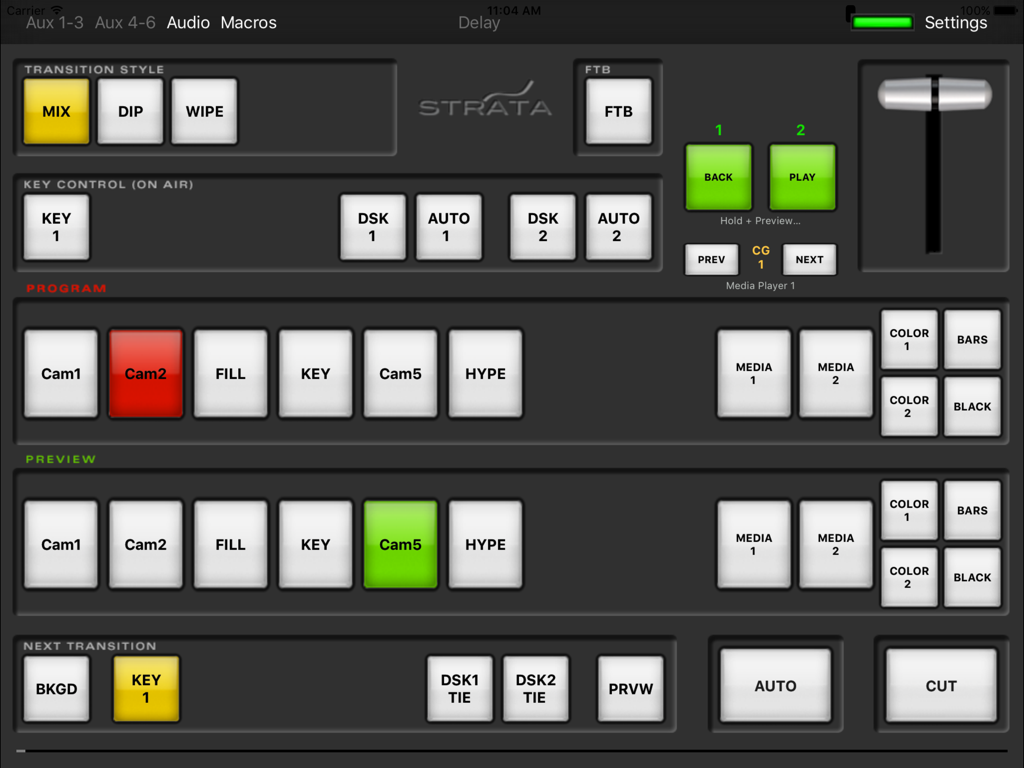
Strata Pro - Interface of the Strata Pro app on an iPad showing control buttons for professional video switching

Interface of the Strata Pro app on an iPad showing control buttons for professional video switching

Description

Strata Pro Remote for BlackMagic Design ATEM Switchers, including ATEM Television Studio, ATEM 1M/E, ATEM 2M/E, Production Studio 4K, 1M/E Production Studio 4K, 2M/E Production Studio 4K, TelevisionStudio HD, ATEM Mini Series. Strata connects directly to your ATEM switcher via Wifi and your switcher's network connection. It does not require a separate computer. PRO VERSION: This Pro version includes control of all the primary buttons on ATEM Switchers including control of the second ME in ATEM 2M/E switchers, control of Aux Outputs and Audio. Pro also supports external or network Midi control supporting devices such as Nanopad, and also adds macro capability to ATEM Switchers with Strata's built in recordable macros, and also ATEM native macros. Using v6.8 of ATEM and later, Strata Pro can even control attached HyperDecks through ATEM Macros. FEATURES: * Control Program and Preview Busses * Cut and Auto Transition Control * Control On-Air of Upstream and Downstream Keys * Control Selection of Next Transition Actions * Transition Preview * TBar Control * Fade To Black * Select Transition Style * Connection Indicator with auto-reconnect * Control of Aux Outputs * Control of Audio Faders and Metering * Configurable Midi Control of all buttons * Recordable Macros - internally and using Link to BMD Atem Software Panel * Trigger native Atem macros, including HyperDeck Control * Step through Stills in Media Player 1 NOTE: This app is not designed for older ATEM Switchers not manufactured by BlackMagic Design. Requires iOS 8.1 or later and ATEM 3.4, thru 8.3 Firmware. Channels 17-20 on 2ME 4K are not controllable. IMPORTANT: The control protocol uses UDP and is fairly intolerant to packet loss and network latency. It is very important to have a reliable, responsive WIFI network for Strata Pro to work reliably. Wifi router performance varies between vendors, and best results have been shown with Apple Airport wifi routers. Some 3rd party routers have shown to be unreliable due to latency or UDP packet loss. See http://www.gallery.co.uk/livepad/support.html for more details on optimising your Wifi environment for Strata. If you are concerned about your WIFI check connectivity to your ATEM first with the free "Strata View" app. Some reviews have mentioned 'crashing' -note that in all cases examined this is due to an unreliable WIFI environment and *not* a problem with the Strata app itself. You *will* need a suitable low latency, low loss WIFI environment if you wish to connect to an ATEM using WIFI - this is due to the ATEM's intolerance of latency and packet loss. The new version of Strata will handle poor connections much more elegantly. Please read all the information at the support site before assuming that Strata is at fault. http://www.gallery.co.uk/livepad/support.html Independent Review of this app at: http://www.studiotech.tv/st59strata/

Download

Download on App Store

This page is not an official page of the app or its developer, but an independent editorial publication created for informational and commentary purposes. Unless expressly stated otherwise, neither the app nor its developer is affiliated with, endorsed by, sponsored by, authorized by, or otherwise officially connected with MWM, Apple, Google Play, the app publisher, or the app's developer, and nothing on this page implies that the app was developed using MWM's services. Any trademarks, logos, screenshots, and other content remain the property of their respective owners.








