System Status -
System Status -
Download on App Store

This page is not an official page of the app or its developer, but an independent editorial publication created for informational and commentary purposes. Unless expressly stated otherwise, neither the app nor its developer is affiliated with, endorsed by, sponsored by, authorized by, or otherwise officially connected with MWM, Apple, Google Play, the app publisher, or the app's developer, and nothing on this page implies that the app was developed using MWM's services. Any trademarks, logos, screenshots, and other content remain the property of their respective owners.

Logo of System Status -
Download on App Store

System Status -

Unlock the black box of your iPhone and iPad. Track CPU, memory, disk, and network activity with real-time graphs and professional-grade diagnostics designed for the technical power user.

Key Figures

Downloads

10K+

User Rating

3.8/5

Total Ratings

0

Publisher

Kenichi Yoshikawa

Category

Productivity

Locales

13

Latest Version

6.1.2

Size

1.4 MB

First Released

May 30, 2015
Features

Take Full Control of Your Device Performance

Professional-grade diagnostics and real-time system monitoring designed for power users who demand peak efficiency and transparency from their hardware.

Deep-Dive System Vitals

Monitor CPU load, RAM allocation, and disk usage with high-precision live charts to identify performance bottlenecks instantly.

Advanced Network Auditing

Track data traffic across Wi-Fi and Cellular networks while verifying IP configurations and DNS stability for secure connectivity.

The following screenshots and description are sourced directly from the app's official store listing and are the property of the app developer.

App Store

Screenshots
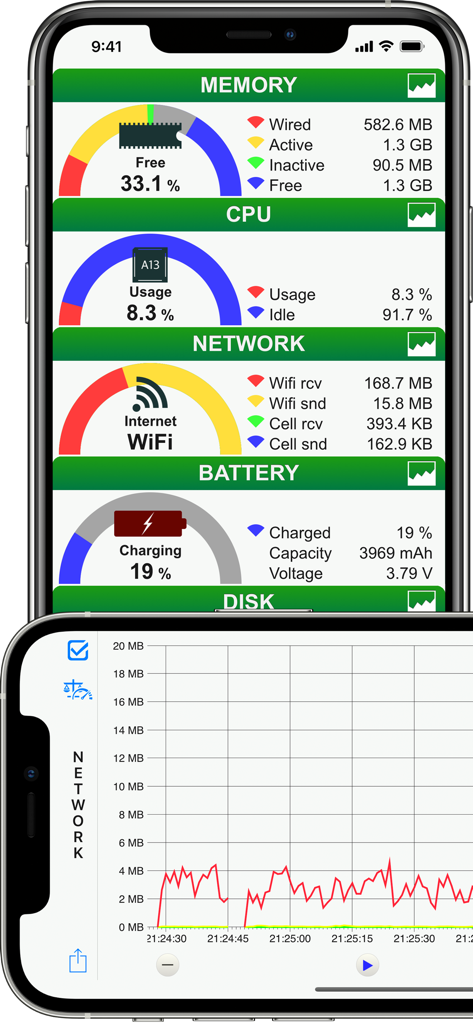
System Status - - Screenshots of the System Status app showing real-time gauges for memory, CPU, and network usage alongside a detailed performance graph
Screenshots of the System Status app showing real-time gauges for memory, CPU, and network usage alongside a detailed performance graph

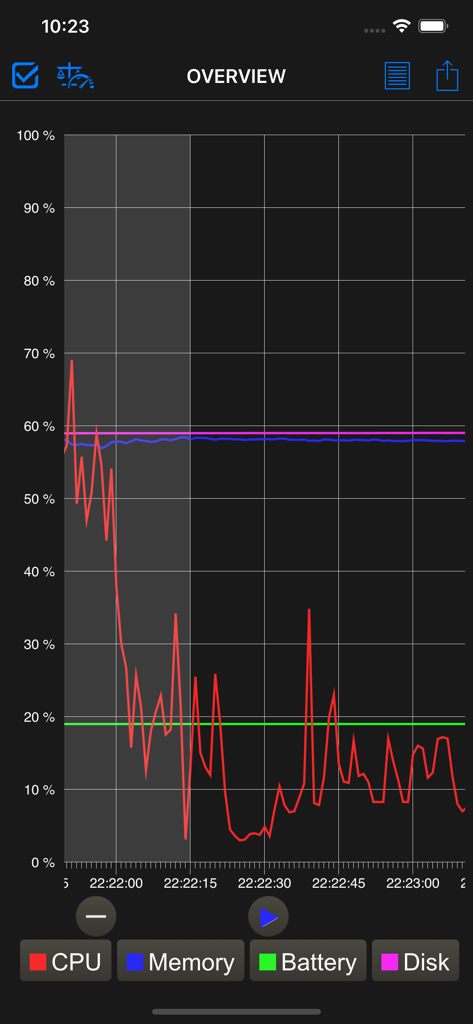
System Status - - Real time system monitoring graph showing CPU memory battery and disk usage levels
Real time system monitoring graph showing CPU memory battery and disk usage levels

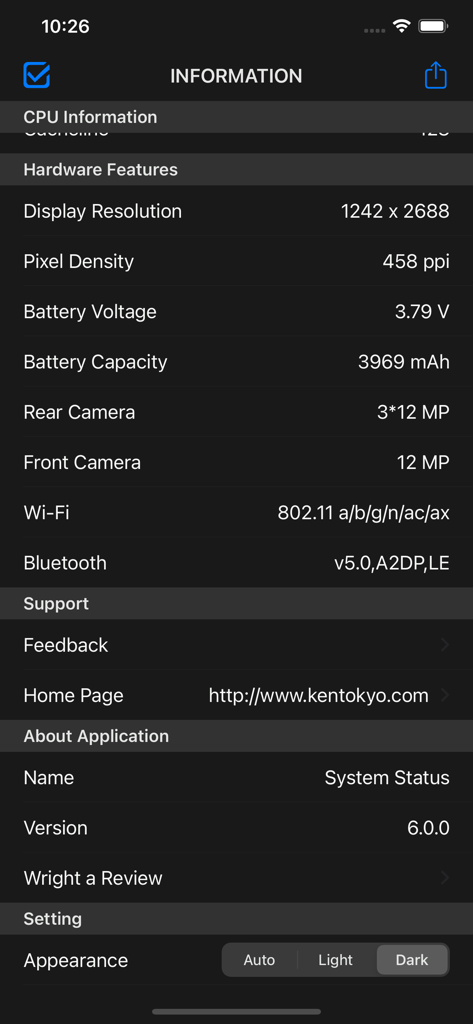
System Status - - Information screen of the System Status app showing detailed hardware specifications and appearance settings
Information screen of the System Status app showing detailed hardware specifications and appearance settings

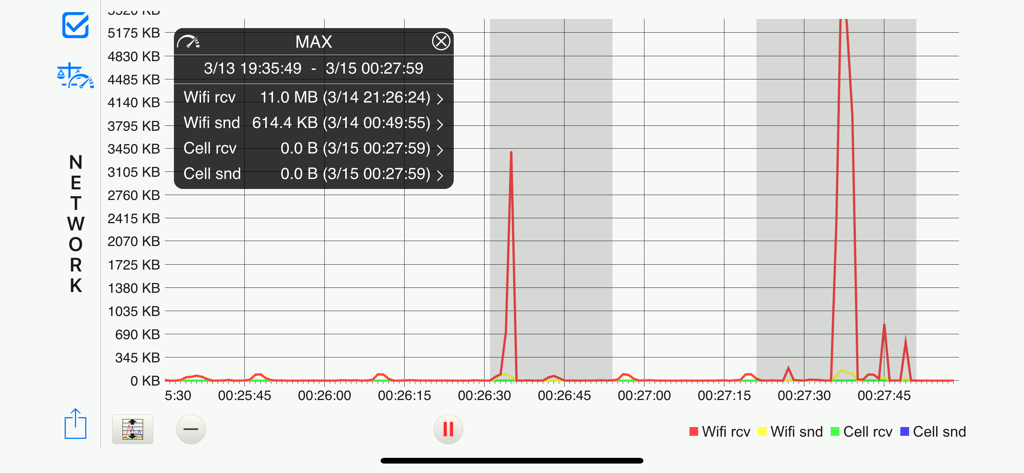
System Status - - A line chart in the System Status app showing real-time WiFi and cellular network data usage
A line chart in the System Status app showing real-time WiFi and cellular network data usage

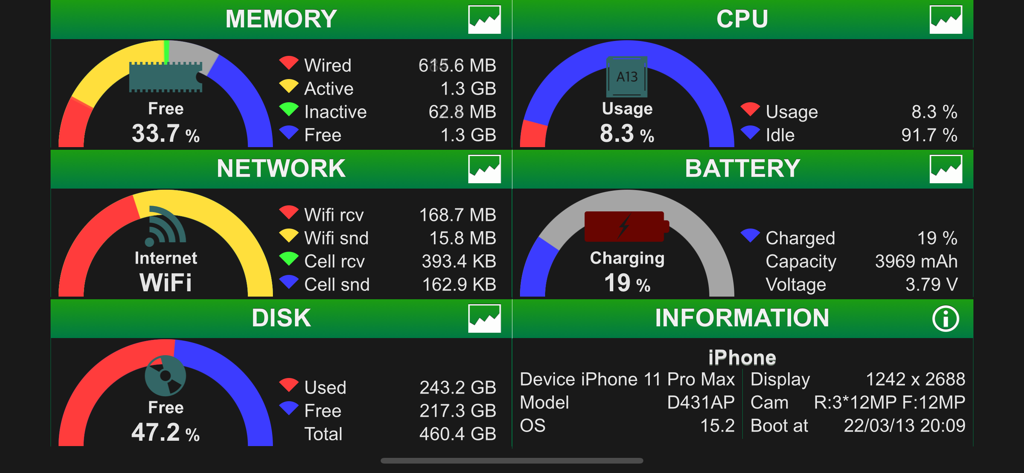
System Status - - Real time system dashboard showing memory CPU network and battery status on an iPhone
Real time system dashboard showing memory CPU network and battery status on an iPhone

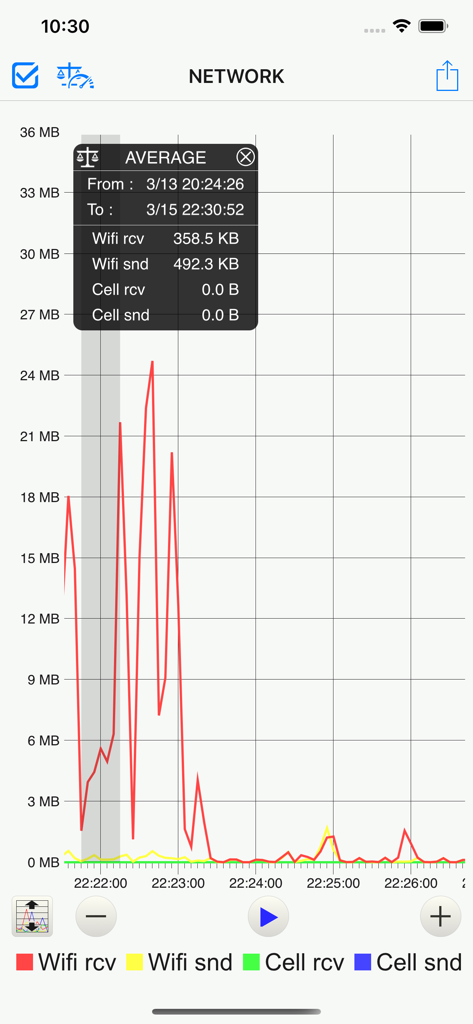
System Status - - Real-time network usage line graph in the System Status app displaying Wi-Fi and cellular data transmission statistics.
Real-time network usage line graph in the System Status app displaying Wi-Fi and cellular data transmission statistics.

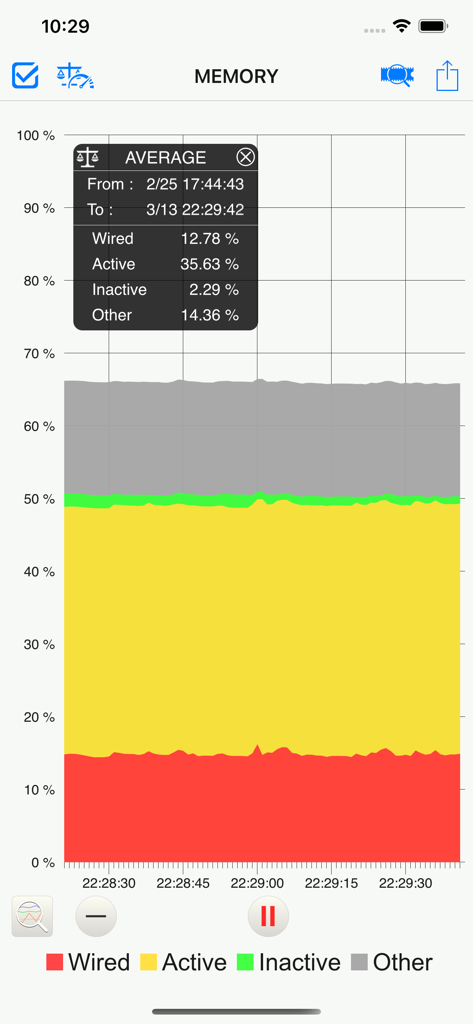
System Status - - Stacked line chart showing memory usage categories including wired and active memory in the System Status app.
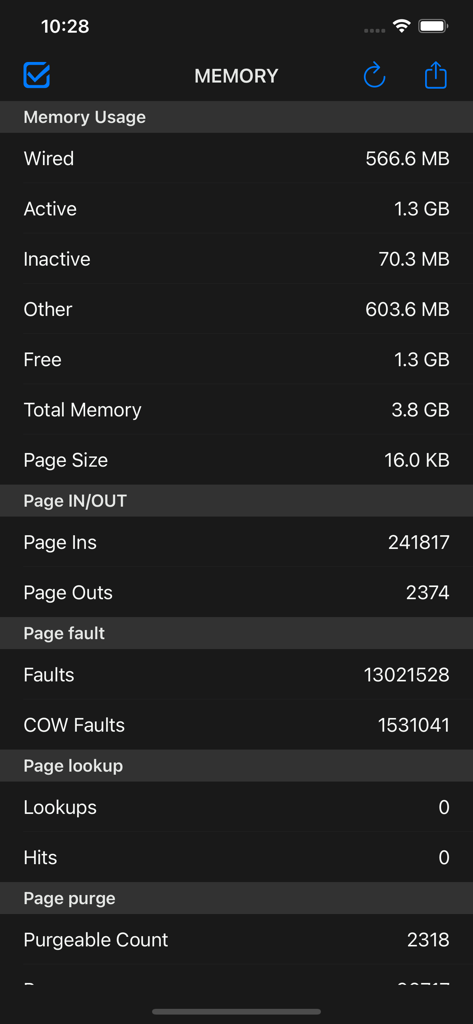
Stacked line chart showing memory usage categories including wired and active memory in the System Status app.

System Status - - Screenshot of the System Status app showing detailed real-time memory and RAM usage statistics on an iPhone
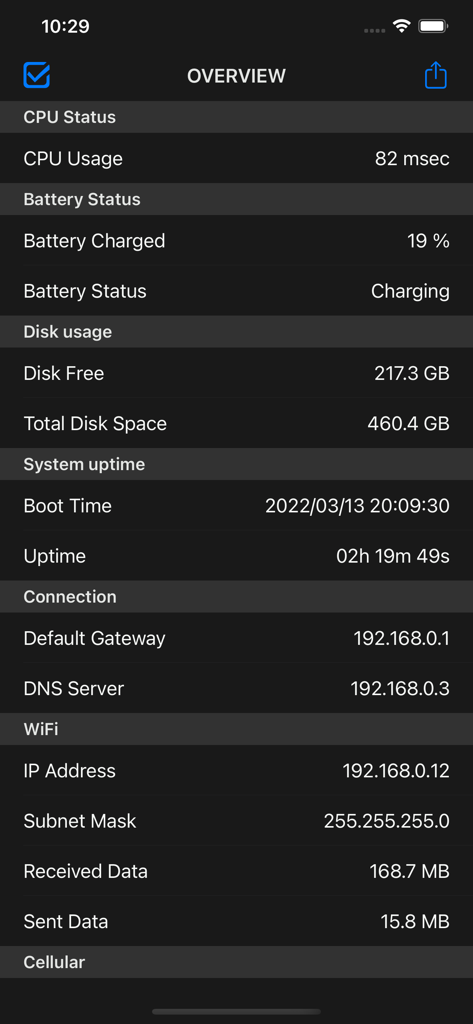
Screenshot of the System Status app showing detailed real-time memory and RAM usage statistics on an iPhone

System Status - - Line graph showing real-time CPU memory battery and disk usage metrics
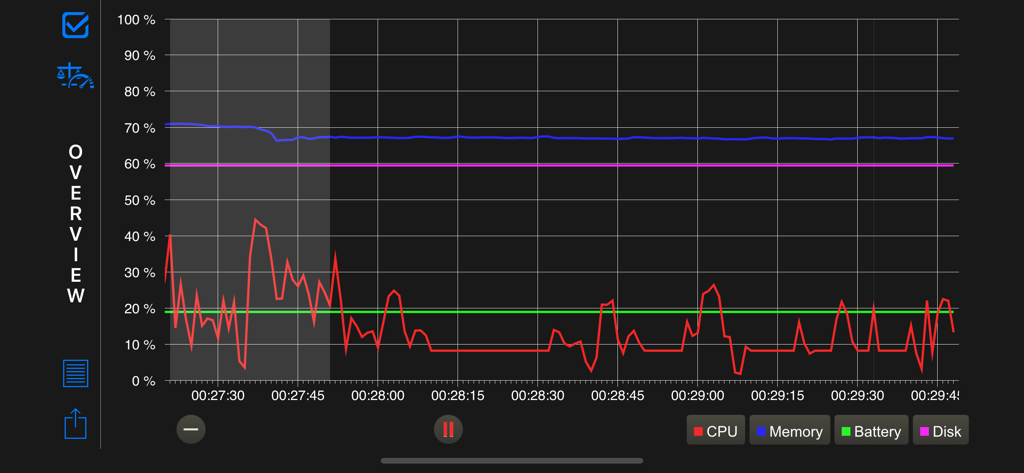
Line graph showing real-time CPU memory battery and disk usage metrics

System Status - - Overview screen of the System Status app displaying CPU battery disk and network diagnostics

Overview screen of the System Status app displaying CPU battery disk and network diagnostics

Description

Detail information on operating system indicates it, and it's possible to save it and print. iPhone user can see wide screen view because it corresponds to a horizontal screen of the iPhone. In addition, iPad Air2 or later, iPad mini 4 or later, and iPad Pro or later can Split View and Slide Over and iPhone with 3D Touch that can be memory optimization from home screen. Also supports dark mode, and you can change the appearance of the app with Setting: Appearance in INFORMATION. Features GENERAL : Rial time monitoring of memory, CPU, battery, disk usage and network connect - Memory : Fee space ratio wired, active, inactive and free memory usage - CPU : Usage and idle state - Network : Wi-Fi, 3G or LTE connection state, sent and received data since system boot time - Battery : Charge level and state (Full, Unplugged or Charging) - Disk : Used, free and total space - Information : Summary device information OVERVIEW : Graph - Line chart of memory, CPU, battery and disk usage OVERVIEW DETAILS : CPU, battery etc, list - CPU Status : CPU usage - Battery Status : battery charged and battery status - Disk usage : Disk free space and total disk space - System uptime : system boot time and uptime - Connection : default getaway address and dns server address - WiFi : Connect IP address, subnet mask, SSID, BSSID, received & sent data since system boot - Cellular : Connect IP address, network type(LTE / 3G) and received & sent data since system boot MEMORY : Graph - Stacked line chart of wired, active, inactive, other memory usage MEMORY DETAILS : Memory details list - Memory Usage : wired, active, inactive, other, free, total memory and page size usage - Page IN/OUT : page ins and page outs - Page fault : faults and COW faults - Page lookup : lookups and hits - Page purge : purgeable count and purges - Other Page : zero Filled, reactivated and speculative read CPU : Graph - Stacked line chart of CPU usage NETWORK : Graph - Line chart of wi-fi received and sent, cellular received and sent data - Change the scale of the number of bytes(manually or automatically) BATTERY : Graph - Stacked line chart of battery charged level DISK : Graph - Stacked line chart of disk used space INFORMATION - Operating System : system, system build number, Kernel, system boot, uptime etc - Device Information : device name, id, device model etc - CPU Information : CPU model, GPU model, CPU frequency etc - Hardware Features : display resolution, pixel density, etc - Setting : Appearance : Auto, Light and Dark Function of then Graph general - Time scale change by button or double tap - Scrolling past data - AirPrint, save image, AirDrop, export email and more - Background monitoring(3 minutes) - Display the maximum value or the average value (range can be set) - Move to the location of the maximum value Supports Non retina and Retina display on iPhone,iPad. iPhone 4s or later, iPhone SE or later, iPhone X or later, iPad 2 or later, iPad Air or later and iPad mini or later. iPhone, iPad both vertical and horizontal screen display. Supported by "3D Touch" of the iPhone. Supported by "Split View" and "Slide Over" of the iPad. iOS 11.0 and later.

Download

Download on App Store

This page is not an official page of the app or its developer, but an independent editorial publication created for informational and commentary purposes. Unless expressly stated otherwise, neither the app nor its developer is affiliated with, endorsed by, sponsored by, authorized by, or otherwise officially connected with MWM, Apple, Google Play, the app publisher, or the app's developer, and nothing on this page implies that the app was developed using MWM's services. Any trademarks, logos, screenshots, and other content remain the property of their respective owners.








