Textcraft

Textcraft

Download on App Store
Logo of Textcraft

Textcraft: The All-in-One Text Utility for Creators and Pros

Transform any text instantly with 100+ formats. From aesthetic social media fonts and meme styles to powerful data cleaning and encoding, Textcraft is the native iOS Swiss Army knife built for your digital workflow.

Download on App Store

Publisher

Pixelfolio Inc.

Category

Utilities

Downloads

1K+

User Rating

4.3/5

Total Ratings

0

Locales

1

A Glimpse Inside

Discover the interface used by 1K+ users.
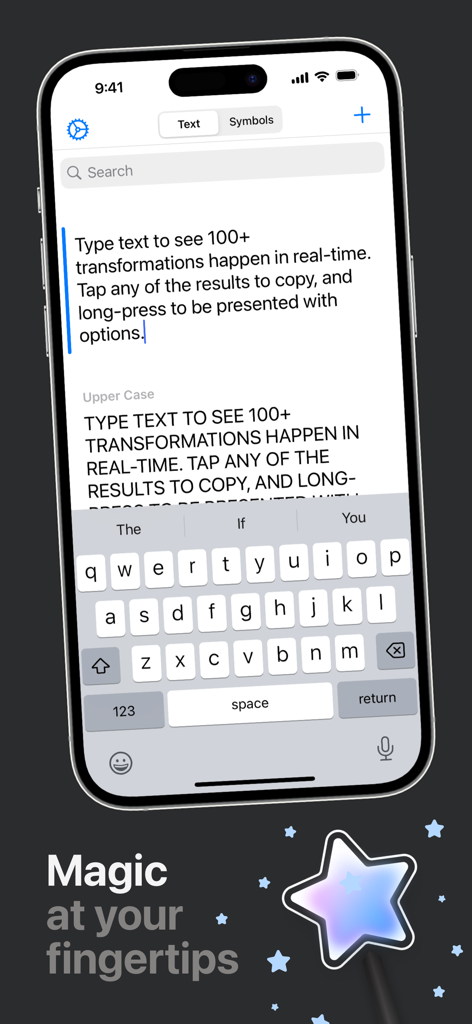
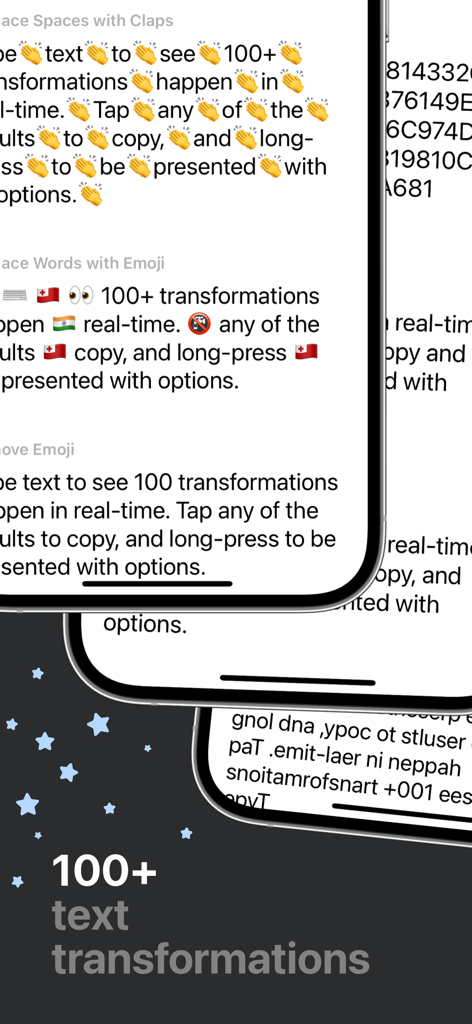
Textcraft iOS app interface demonstrating real-time text transformation and conversion features.

Textcraft iOS app interface demonstrating real-time text transformation and conversion features.

Textcraft app interface showing different text transformation formats on iPhone.

Textcraft app interface showing different text transformation formats on iPhone.

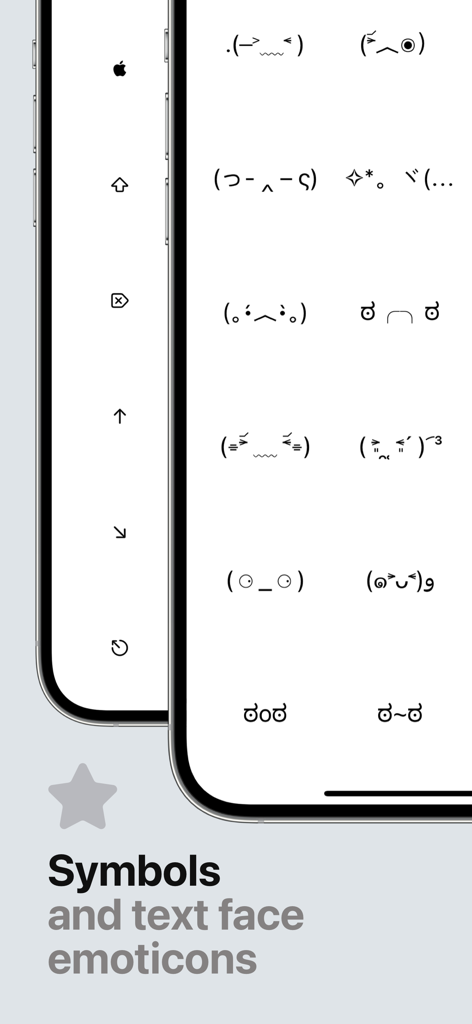
Textcraft app interface displaying a library of ASCII text face emoticons and symbols for copying.

Textcraft app interface displaying a library of ASCII text face emoticons and symbols for copying.

Master Your Text in Real-Time

The tools that make this app stand out, trusted by 1K+ users.

Express Your Unique Style

From aesthetic Cursive to the iconic 'Mocking Spongebob' case, transform your messages to match your vibe across every social platform.

🧹

Instant Data Refinement

Effortlessly clean up messy text by stripping HTML, removing line breaks, or converting lists—saving you minutes of manual editing every day.

Native iOS Performance

Built for speed with Dark Mode, Drag & Drop, and Multi-window support, ensuring a frictionless experience that feels like a native part of your device.

About the app

Everything you need to know about Textcraft.

Description

Textcraft is a magical utility that allows you to transform any text in real-time into a variety of 100+ different formats. WHY YOU’LL LOVE TEXTCRAFT: It’s built with iOS design guidelines in mind to look great in light and dark mode alike, along with containing multiple tints and themes to tweak the app your way. The intuitive ‘tap to copy’, and ‘long-press to share’ gestures coupled with the keyboard shortcuts also makes using the app super simple to pick up and use. Multi-window support coupled with Drag and Drop is also extremely useful for quickly and easily dragging text from other apps directly into the app for quick transforming. Whether this is to add hashtags to words social picture sharing sites, or mimic mocking Spongebob in conversation with your friends, there’s something for everyone. There are also various ASCII text face emoticons for quick and easy copying. Text transformations include: - Upper Case - Lower Case - Word Case - Alternating Case - Remove All Spaces - Remove Multiple Spaces - Add Spaces - Reversed Characters - Reversed Words - Replace Spaces with Underscores - Replace Underscores with Spaces - Replace Spaces with Dashes - Replace Dashes with Spaces - Replace Underscores with Dashes - Replace Dashes with Underscores - Initials - Initials with Dot Separation - Initials with Dash Separation - Initials with Underscore Separation - ROT13 - Bold - Italics - Underline - Strikethrough - Slashthrough - Upside Down - Bubble - Filled Bubble - Square - Filled Square - Cursive - Gothic - Monospace - Demonic - Satanic - Replace Spaces with Claps - Replace Words with Emoji - Remove Emoji - Remove Punctuation - Classified - Hashtags - Full Stops - Remove Links - Strip HTML - URL Encoded - URL Decoded - Base64 Encoded - Base64 Decoded - Replace Spaces with Pluses - Replace Pluses with Spaces - SHA256 Hex - SHA512 Hex - Remove Commas - Remove Single Quotes - Remove Double Quotes - Flatten List Using Commas - Flatten List Using Full Stops - Flatten List Using Pipes - Flatten List Using Underscores - Flatten List Using Pluses - Flatten List Using Forward Slashes - Flatten List Using Backslashes - Replace Single Quotes with Double Quotes - Replace Double Quotes with Single Quotes - Remove Vowels - Remove Consonants - Remove Numbers - Dashed to Bulleted List - Bulleted to Dashed List - MD5 Hash - Add Commas - Replace Line Breaks with \\n - Single Quotes Around Words - Double Quotes Around Words - Convert to Dashed List - Convert to Bulleted List - Convert Commas to Dashed List - Convert Commas to Bulleted List - Hex to Binary - Binary to Hex - 1337 - Superscript - Remove Line Breaks - Remove Line and Paragraph Breaks - Random Case - Sentence Case - Trim Whitespace - Trim Whitespace and New Lines - Small Caps - Lightning - Double Lightning - Double line breaks - Zalgo - Colons to dashes - Dashes to colons - Numeronym - Add percent encoding - Remove percent encoding - Remove citation numbers - Remove citations - Came case to spaces - Spaces to camel case - Numbers to text GET IN TOUCH: If you have any questions or feedback, please get in touch. Textcraft was created by an incredibly small team of one and I’d love to hear your thoughts. I’m available through Twitter @JPEGuin.

Latest Version

1.2.0

Size

7.4 MB

First Released

Dec 31, 2020

Elevate Every Word You Type

Join thousands of creators and power users who use Textcraft to style social feeds and automate productivity. Get 100+ native text transformations on all your devices.

Download on App Store

App information, icons, screenshots, and descriptions displayed on this page are sourced from the Apple App Store and are the property of their respective developers. Download estimates and rankings are based on MWM's proprietary models and may not reflect actual figures. This page is provided for informational and analytical purposes only.

Believe this page infringes your intellectual property? File a dispute