
This page is not an official page of the app or its developer, but an independent editorial publication created for informational and commentary purposes. Unless expressly stated otherwise, neither the app nor its developer is affiliated with, endorsed by, sponsored by, authorized by, or otherwise officially connected with MWM, Apple, Google Play, the app publisher, or the app's developer, and nothing on this page implies that the app was developed using MWM's services. Any trademarks, logos, screenshots, and other content remain the property of their respective owners.

Eisenhower Matrix: Todo & Task
Stop drowning in tasks. This app surgically cuts through the noise, revealing your true priorities.
Downloads
100k+User Rating
Total Ratings
1.1KPublisher
Category
ProductivityLocales
3Latest Version
2.4.8Size
93.9 MBFirst Released
Dec 5, 2023An analytical overview of the core functionalities enhancing task management for proactive users.
Key Features of Eisenhower Matrix: Todo & Task
Eisenhower Matrix Prioritization
The app provides a structured framework for prioritizing tasks based on urgency and importance, guiding users to focus on high-impact activities.
Deadline Tracking & Reminders
This tool features the ability to set specific deadlines and receive timely notifications, ensuring users stay on track and meet their commitments.
Intuitive To-Do List Management
It allows users to quickly add and complete tasks, and visually reorder them within the matrix using drag-and-drop functionality for dynamic organization.
Recurring Task Management
The app simplifies the management of routine responsibilities by enabling users to set up tasks that automatically repeat.
Frequently Asked Questions
Everything you need to know about Eisenhower Matrix: Todo & Task
What is the Todo & Task: Eisenhower Matrix app?
The Todo & Task: Eisenhower Matrix app simplifies task management by prioritizing tasks based on importance and urgency, using the Eisenhower Matrix framework.
How does the Todo & Task: Eisenhower Matrix app use the Eisenhower Matrix?
The app categorizes tasks into four quadrants: Urgent and Important, Important but Not Urgent, Urgent but Not Important, and Neither Urgent nor Important, for effective prioritization.
Can users easily manage tasks with the Todo & Task: Eisenhower Matrix app?
Yes, the app provides easy To-Do List Management. Users can quickly add new tasks, check off completed ones, and drag and drop tasks to adjust their positions.
Does the Todo & Task: Eisenhower Matrix app support recurring tasks?
Yes, the Todo & Task: Eisenhower Matrix app supports recurring tasks. Users can set up and manage tasks that need to be repeated regularly.
How can I use color filters in the Todo & Task: Eisenhower Matrix app?
Users assign colors to tasks for visual differentiation. Color filters allow quick identification of tasks based on specific priority or category within the Todo & Task app.
Does Todo & Task: Eisenhower Matrix provide notifications for tasks?
Yes, the Todo & Task: Eisenhower Matrix app allows users to set notifications for important tasks. Users also set deadlines to keep tasks on track and meet due dates.
How can I quickly add tasks in the Todo & Task: Eisenhower Matrix app?
The Todo & Task app features a "Quick Add Via Chat" option. Users input tasks directly through a chat interface for fast and efficient entry.
Does the Todo & Task: Eisenhower Matrix app support task dependencies?
Yes, the Todo & Task app supports task dependencies. It allows users to set dependencies and manage the order of tasks, visible in the "Tree" view.
Can I track my task progress and insights in the Todo & Task: Eisenhower Matrix app?
Yes, the Todo & Task app offers "Track Your Tasks Insights." This feature includes statistics like current streak, matrix distribution, and hourly or daily charts.
Where can I find the Terms of Use for the Todo & Task: Eisenhower Matrix app?
The Terms of Use for the Todo & Task: Eisenhower Matrix app are available at https://ivorymatrix.blogspot.com/2023/12/terms-of-use-terms.html.
Does the Todo & Task: Eisenhower Matrix app have a Privacy Policy?
Yes, the Privacy Policy for the Todo & Task: Eisenhower Matrix app is available at https://ivorymatrix.blogspot.com/2023/12/privacy-policy.html.
The following screenshots and description are sourced directly from the app's official store listing and are the property of the app developer.
App Store
Screenshots

This tool introduces the fundamental Eisenhower Matrix framework, visually clarifying task prioritization with distinct quadrants for 'Do' and 'Schedule' items.
Matrix Unveiled
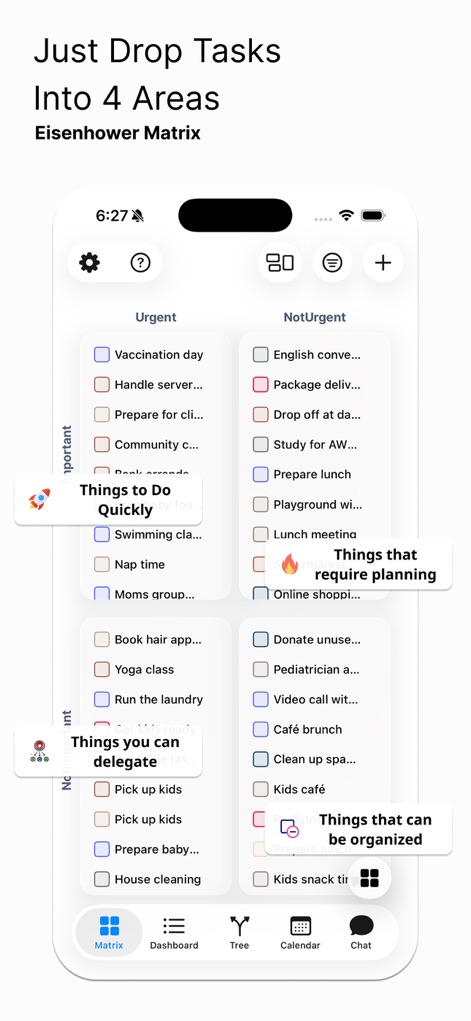
Observe how the app intuitively categorizes tasks into four distinct quadrants, enabling users to easily reallocate items through a responsive drag-and-drop interface.
Dynamic Prioritization
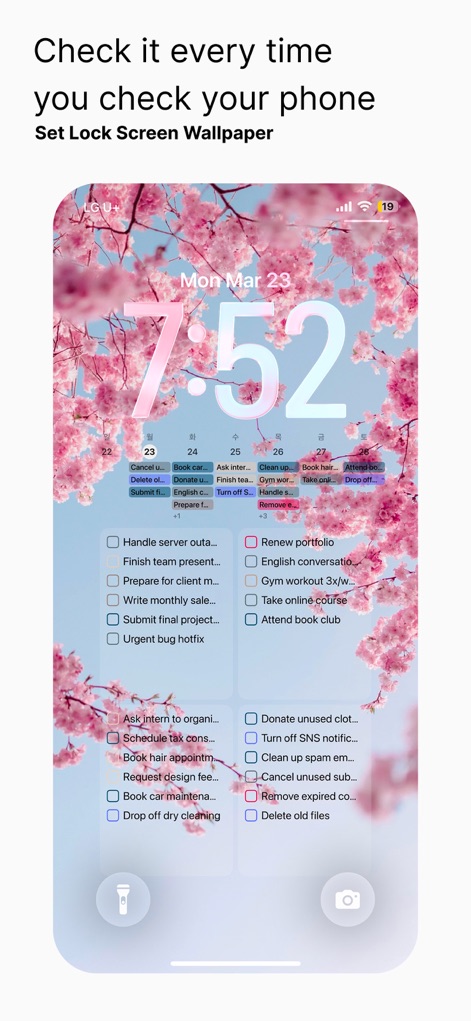
The app seamlessly integrates task viewing onto the iPhone's lock screen, allowing users to check daily priorities directly beneath the calendar display and custom wallpaper.
Lock Screen Access
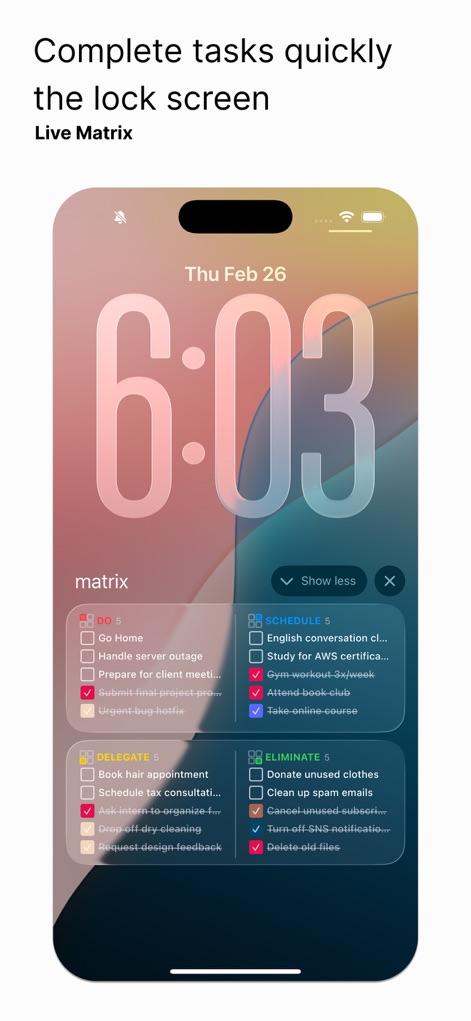
Users can efficiently complete tasks directly from the lock screen via interactive checkboxes, organized clearly within the 'Live Matrix' widget that categorizes items by quadrant.
Instant Task Action
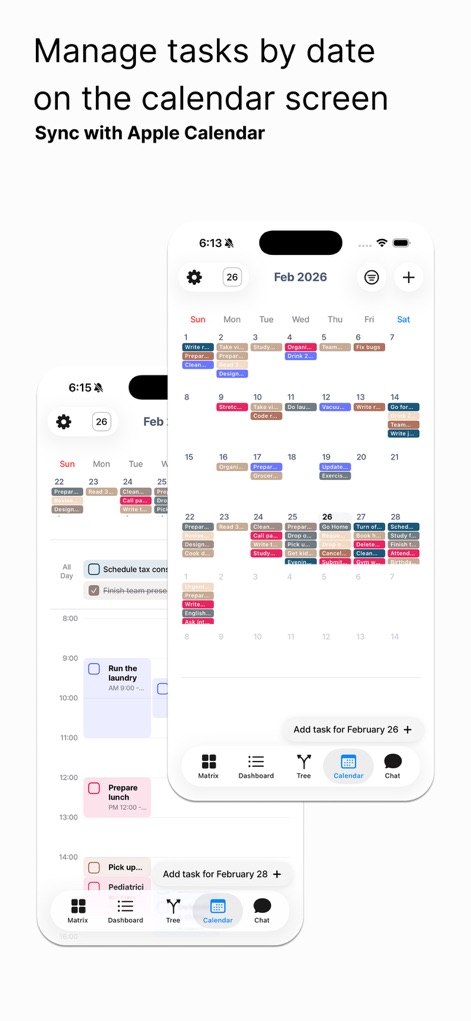
The app presents a clear calendar interface for date-based task management, providing seamless synchronization with the Apple Calendar for unified scheduling.
Calendar Integration
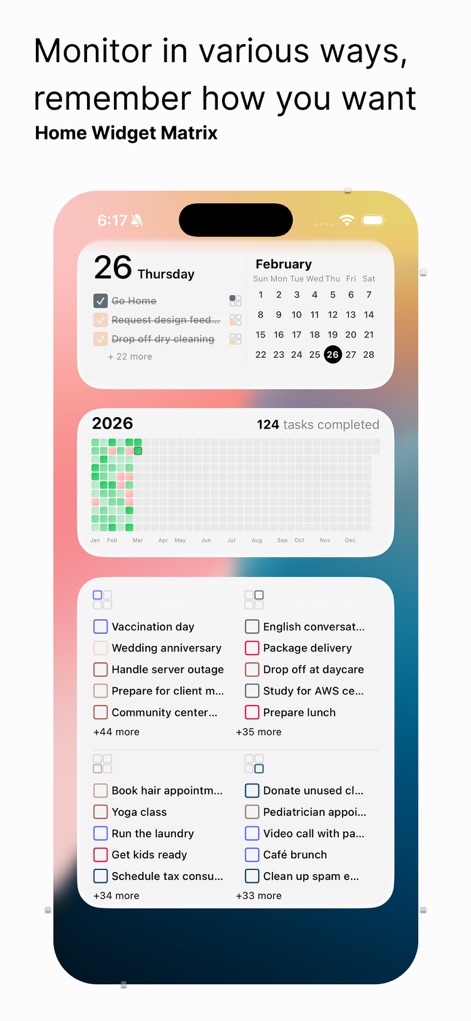
This powerful Home Screen Widget provides a comprehensive overview, combining a task completion heatmap with real-time updates from the Eisenhower matrix quadrants.
Holistic Overview Widget

Users can manage tasks in an organized, sequential list view, complemented by small color-coded indicators that signify task priority or category.
Sequential Task Flow

The app offers robust 'Completion History' for recurring tasks, visually tracking progress with a daily checkmark system and a clear completion rate percentage.
Recurring Task Tracking
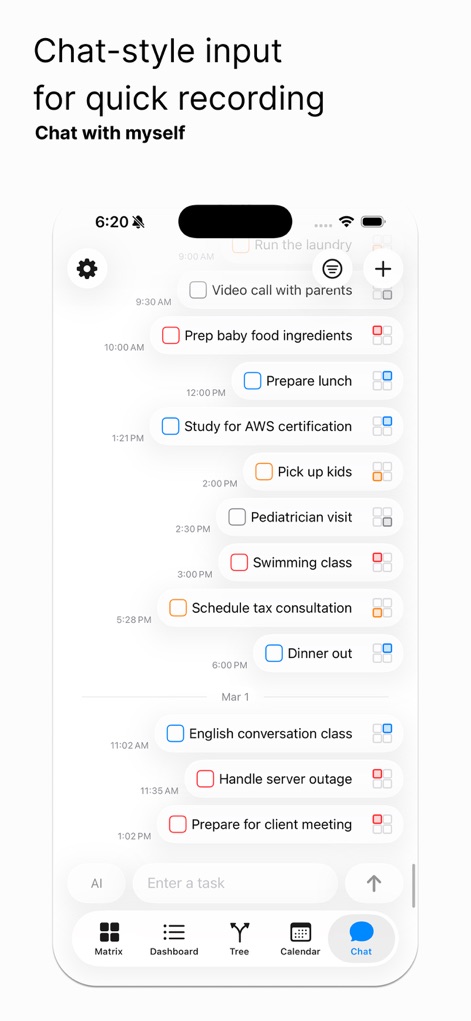
This tool streamlines task creation through a 'Chat-style input' interface, allowing users to quickly log tasks that appear in a chronological, conversational flow.
Intuitive Task Entry

The app provides comprehensive multi-device support across iPhone, iPad, and Mac, ensuring real-time synchronization with native Apple Reminders and Calendar applications.
Ecosystem Integration
Description
Download
More Like This
Top-ranked apps in the same category

ChatGPT
OpenAI OpCo, LLC

Google Gemini
Google LLC

Grok
X.AI Corporation

Gmail - Email by Google
Google LLC

千问 - 阿里最强大模型官方AI助手
Shanghai Zhixin Puhui Technology Co., Ltd.

Google Drive
Google LLC

Microsoft Authenticator
Microsoft Corporation

Google Sheets
Google LLC

Google Docs
Google LLC
This page is not an official page of the app or its developer, but an independent editorial publication created for informational and commentary purposes. Unless expressly stated otherwise, neither the app nor its developer is affiliated with, endorsed by, sponsored by, authorized by, or otherwise officially connected with MWM, Apple, Google Play, the app publisher, or the app's developer, and nothing on this page implies that the app was developed using MWM's services. Any trademarks, logos, screenshots, and other content remain the property of their respective owners.