
This page is not an official page of the app or its developer, but an independent editorial publication created for informational and commentary purposes. Unless expressly stated otherwise, neither the app nor its developer is affiliated with, endorsed by, sponsored by, authorized by, or otherwise officially connected with MWM, Apple, Google Play, the app publisher, or the app's developer, and nothing on this page implies that the app was developed using MWM's services. Any trademarks, logos, screenshots, and other content remain the property of their respective owners.


TV Remote Control App for Roku
Stop hunting for lost remotes. This app gives you dominion over every screen, directly from your phone.
Downloads
100k+User Rating
Total Ratings
1.4KPublisher
Category
EntertainmentLocales
1Latest Version
1.1.4Size
144.9 MBFirst Released
Apr 18, 2025An Analytical Overview of Core Functionalities Enhancing Home Entertainment
Key Features of the TV Remote Control App for Roku
Universal Smart TV Control
This tool features comprehensive control across various smart TV brands including Samsung, LG, VIZIO, Sony, TCL, and Fire TV, consolidating multiple physical remotes into a single application.
Roku Remote Replacement
The app provides a seamless and high-speed replacement for physical Roku remote controls, offering full compatibility with Roku Streaming Sticks, Roku TVs, and all Roku systems.
Voice-Activated Control
It allows users to command their TV with voice, simplifying actions such as changing channels, searching for movies, and adjusting volume for enhanced convenience.
Intuitive Touchpad & Keyboard
This tool features an intuitive touchpad for fluid navigation and an integrated keyboard for rapid text entry, significantly speeding up menu interactions compared to traditional remotes.
Content Casting
The app provides the ability to stream online videos, movies, and live news directly from a smartphone to the television, enhancing the viewing experience on a larger screen.
HD Screen Mirroring
It allows users to mirror their iPhone screen to their television in high definition, ensuring a lag-free experience for sharing content.
Frequently Asked Questions
Everything you need to know about TV Remote Control App for Roku
How do I connect the TV Remote Control App for Roku to my TV?
Yes, connect your iPhone and TV to the same Wi-Fi network. Open the TV Remote Control App for Roku, and the app will automatically find your device for connection.
Which TV brands does the TV Remote Control App for Roku support?
The TV Remote Control App for Roku supports universal control for Roku, Samsung, LG, VIZIO, Sony, TCL, and Fire TV devices. It functions as an all-in-one universal remote.
Can the TV Remote Control App for Roku replace my physical Roku remote?
Yes, the TV Remote Control App for Roku serves as a full replacement for your Roku remote. It offers comprehensive control, including power, volume, channel, and app navigation.
Does the TV Remote Control App for Roku offer screen mirroring?
Yes, the TV Remote Control App for Roku provides HD screen mirroring functionality. You can share your iPhone screen to your TV without lag directly through the app.
Is voice control available in the TV Remote Control App for Roku?
Yes, the TV Remote Control App for Roku includes voice control. You can use voice commands to change channels, search for movies, and adjust the volume on your connected TV.
Does the TV Remote Control App for Roku have a touchpad or keyboard for navigation?
Yes, the TV Remote Control App for Roku features both a touchpad and a keyboard. These allow for intuitive, fluid navigation of menus and faster text input on your TV.
Is the TV Remote Control App for Roku an official app from Roku?
No, the TV Remote Control App for Roku is not officially linked with Roku or other TV brands. It is a third-party app designed to be compatible with popular TV models.
The following screenshots and description are sourced directly from the app's official store listing and are the property of the app developer.
App Store
Screenshots
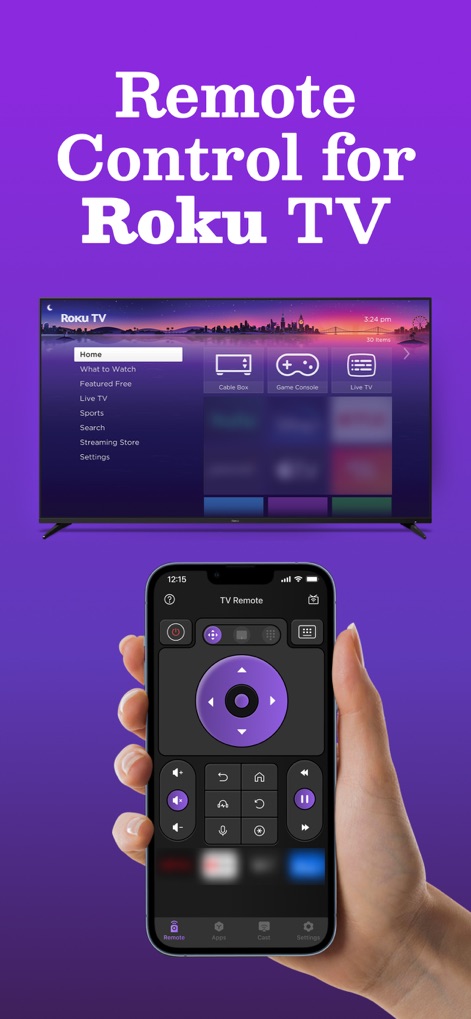
See how this app offers a complete remote interface on your iPhone, seamlessly controlling the Roku TV menu for intuitive navigation.
Roku Control Mastery

Discover the app's intuitive layout, featuring a dedicated power on/off button and a responsive touchpad for precise cursor control.
Essential Controls Integrated

This tool provides users with an on-screen keyboard for easy text entry and direct access buttons for channel surfing and app management.
Enhanced Navigation Options

Observe the streamlined connection process, displaying a comprehensive list of discovered devices and a clear 'Connected successfully!' confirmation.
Effortless Device Connection

Experience seamless interaction with the app's expansive touchpad area, offering fluid navigation and visual feedback for every touch.
Precision Touch Navigation

Witness content streaming in action, with the iPhone displaying current video playback and the TV screen mirroring the media flawlessly.
Seamless Content Casting

This app showcases its broad utility by listing popular TV brands like Samsung and Roku, highlighting its universal remote capabilities.
Universal Compatibility Unlocked
Description
Download
More Like This
Apps with similar features and user experience

The Roku App (Official)
ROKU INC

TV Remote & Smart TV Control
To Ngoc Mai
Universal TV Remote Control .
Apps Venture Inc.

TV Remote, Universal Remote
Hangzhou Yingshitong Technology Co., Ltd.

TV Remote Control “Universo”
Nemo Apps LLC

TV Remote Control Universal AI
Anh Ngo

万能遥控器 ·
宇锋 林

Remote TV Control TCL Onn App
CEMAL CAGLAR KIRICI

Remote Smart Tv Universal
clement gasner
This page is not an official page of the app or its developer, but an independent editorial publication created for informational and commentary purposes. Unless expressly stated otherwise, neither the app nor its developer is affiliated with, endorsed by, sponsored by, authorized by, or otherwise officially connected with MWM, Apple, Google Play, the app publisher, or the app's developer, and nothing on this page implies that the app was developed using MWM's services. Any trademarks, logos, screenshots, and other content remain the property of their respective owners.