
This page is not an official page of the app or its developer, but an independent editorial publication created for informational and commentary purposes. Unless expressly stated otherwise, neither the app nor its developer is affiliated with, endorsed by, sponsored by, authorized by, or otherwise officially connected with MWM, Apple, Google Play, the app publisher, or the app's developer, and nothing on this page implies that the app was developed using MWM's services. Any trademarks, logos, screenshots, and other content remain the property of their respective owners.

TV Remote • Universal Control
Lost your remote? Now control everything. This app delivers ultimate command over your TV and viewing choices.
Downloads
1M+User Rating
Total Ratings
10.5KPublisher
Category
UtilitiesLocales
26Latest Version
10.1.2Size
38.1 MBFirst Released
Dec 3, 2022An in-depth evaluation of the application's core functionalities and their impact on tech-savvy iPhone users seeking a centralized and intelligent home entertainment solution.
Key Features Analysis: TV Remote • Universal Control
Broad TV Compatibility
The app provides extensive compatibility, supporting over 10,000 TV models across major brands like Samsung, Roku, TCL, LG, and Sony, ensuring a single control solution for diverse home entertainment setups.
Personalized Content Recommendations
It offers personalized content recommendations, leveraging user preferences to suggest movies and shows, significantly reducing decision fatigue and enhancing content discovery.
Smart Content Filtering
This tool features smart filters that enable users to quickly find content based on genre, type (movie/series), and personal preferences, streamlining the content selection process.
Watchlist Management
The app allows users to create and manage watchlists for movies and series, providing a centralized system to save, organize, and revisit desired content at their convenience.
Watch History Tracker
It includes a watch history tracker, enabling users to keep a record of what they've watched and easily identify what to view next, contributing to better viewing organization.
Essential Remote Control Functions
The app provides quick access to core remote functionalities such as volume control, channel switching, input/source selection, and direct access to favorite TV applications.
Intuitive User Interface
This tool is designed with a clean, simple interface optimized for one-hand control, ensuring a convenient and efficient daily user experience.
Wi-Fi Based Connectivity
It connects seamlessly over local Wi-Fi networks, eliminating the need for any additional hardware and simplifying the setup process for immediate use.
Customizable Settings
The app offers custom settings, allowing users to adapt the experience to their specific habits and preferences, enhancing personal convenience and control.
Regular Compatibility Updates
The app benefits from frequent updates that continuously improve device compatibility and introduce new features, ensuring long-term utility and relevance.
Frequently Asked Questions
Everything you need to know about TV Remote • Universal Control
What is the "TV Remote • Universal Control" app?
The "TV Remote • Universal Control" app transforms your iPhone into a universal remote, capable of controlling over 10,000 TV models. It also includes a TV Assistant for personalized content discovery.
Which TV brands does the "TV Remote • Universal Control" app support?
The "TV Remote • Universal Control" app supports over 10,000 TV models from major brands including Samsung, Roku, TCL, LG, and Sony. It connects via local Wi-Fi.
How does the "TV Remote • Universal Control" app connect to my TV?
The "TV Remote • Universal Control" app connects to your TV over your local Wi-Fi network. No additional hardware is required for this connection to function.
What features does the TV Assistant in the "TV Remote • Universal Control" app offer?
The TV Assistant provides personalized recommendations, enables users to create watchlists for movies and series, tracks watch history, and offers smart filters for content discovery.
How do I manage my "TV Remote • Universal Control" app subscription?
You can manage your "TV Remote • Universal Control" app subscription and turn off auto-renewal by accessing your Account Settings after purchase. Subscriptions renew monthly or weekly.
Is the "TV Remote • Universal Control" app an official remote for Samsung or Roku TVs?
No, the "TV Remote • Universal Control" app is not an official application of Samsung, Roku, TCL TV, LG, Sony, or any other TV manufacturer. It is an independent app.
Can I create watchlists with the "TV Remote • Universal Control" app?
Yes, the "TV Remote • Universal Control" app allows users to build and manage watchlists for both movies and series. You can save, organize, and track what you've watched.
Does the "TV Remote • Universal Control" app have a TV timer feature?
Yes, the "TV Remote • Universal Control" app includes a timer feature. Users can set a screen time limit for their TV session using custom durations or quick presets.
Is the "TV Remote • Universal Control" app easy to use?
Yes, the "TV Remote • Universal Control" app features a clean, simple interface designed for one-hand control. It also offers custom settings to adapt to user habits.
The following screenshots and description are sourced directly from the app's official store listing and are the property of the app developer.
App Store
Screenshots
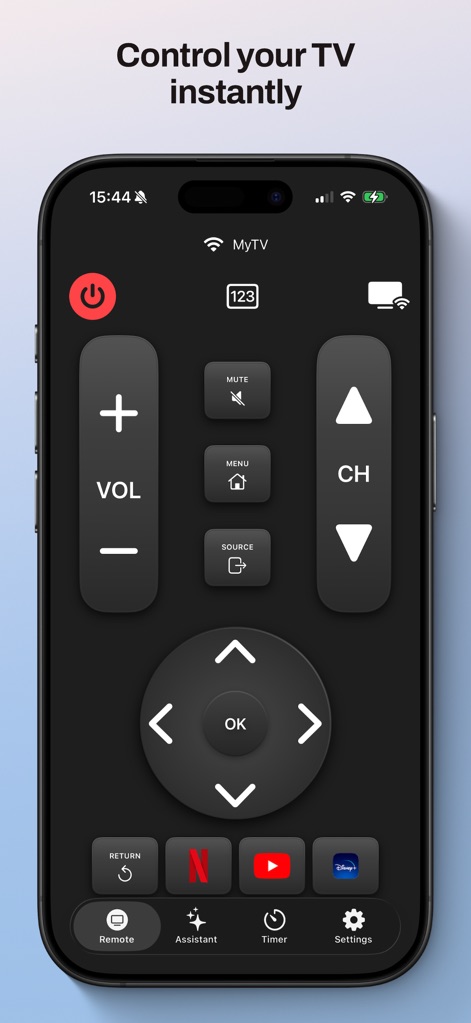
Discover the intuitive remote interface, featuring essential volume and channel controls alongside direct access to popular streaming apps like Netflix and YouTube.
Universal Control Hub

Explore personalized content recommendations, allowing users to fine-tune their preferences with genre filters such as Action, Romance, and Sci-Fi.
Smart Content Discovery
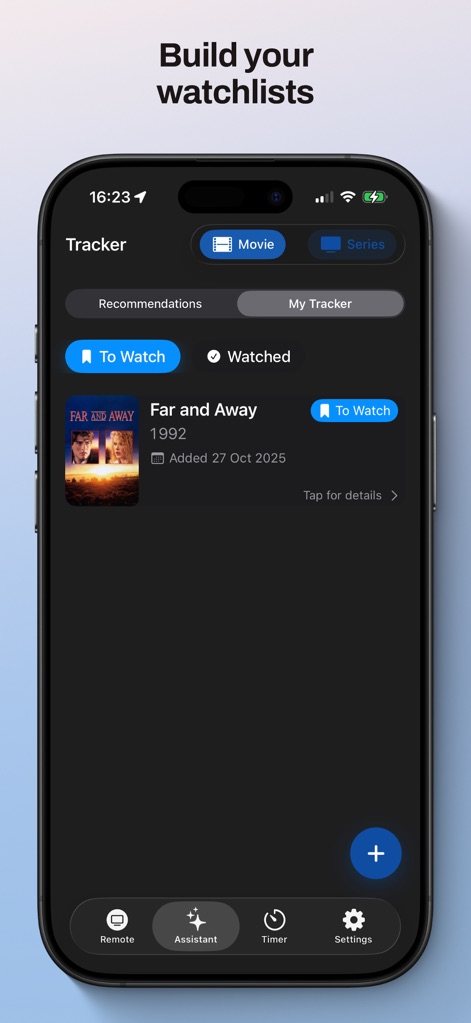
Efficiently manage viewing preferences with the integrated tracker, which organizes content into 'To Watch' and 'Watched' categories, as exemplified by the movie 'Far and Away'.
Curated Watchlists

Utilize the app's screen time management tools, setting precise viewing durations with hourly and minute controls or selecting from convenient quick preset buttons like '30 min' and '1 hour'.
Intelligent TV Timer
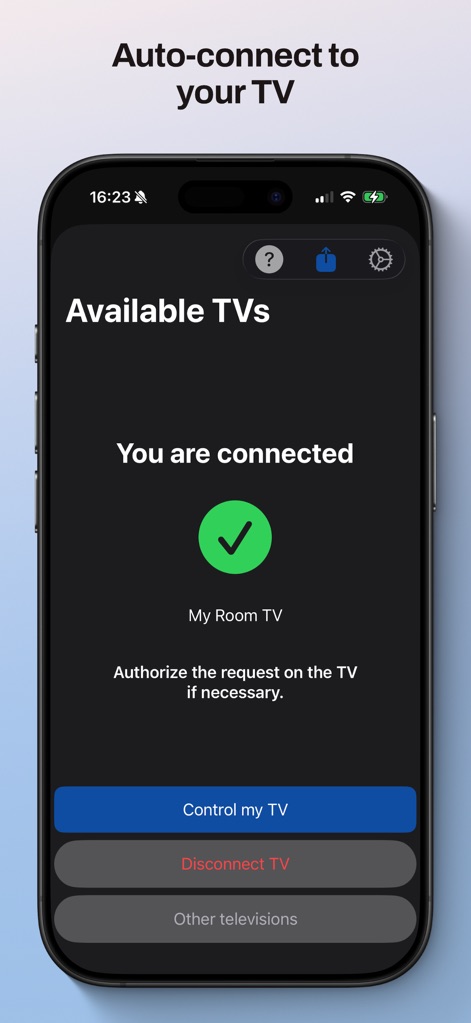
Verify seamless device integration on the 'Available TVs' screen, where a clear 'You are connected' status and an active 'Control my TV' button confirm successful pairing.
Effortless Connectivity
Description
Download
More Like This
Apps with similar features and user experience

The Roku App (Official)
ROKU INC

TV Remote & Smart TV Control
To Ngoc Mai

Universal TV Remote Control .
Apps Venture Inc.

TV Remote, Universal Remote
Hangzhou Yingshitong Technology Co., Ltd.

TV Remote Control “Universo”
Nemo Apps LLC

TV Remote・Universal Control #1
Mihai Turlea

Remote Smart Tv Universal
clement gasner

Remote TV Control TCL Onn App
CEMAL CAGLAR KIRICI

TV Remote Control Universal AI
Anh Ngo
This page is not an official page of the app or its developer, but an independent editorial publication created for informational and commentary purposes. Unless expressly stated otherwise, neither the app nor its developer is affiliated with, endorsed by, sponsored by, authorized by, or otherwise officially connected with MWM, Apple, Google Play, the app publisher, or the app's developer, and nothing on this page implies that the app was developed using MWM's services. Any trademarks, logos, screenshots, and other content remain the property of their respective owners.