
This page is not an official page of the app or its developer, but an independent editorial publication created for informational and commentary purposes. Unless expressly stated otherwise, neither the app nor its developer is affiliated with, endorsed by, sponsored by, authorized by, or otherwise officially connected with MWM, Apple, Google Play, the app publisher, or the app's developer, and nothing on this page implies that the app was developed using MWM's services. Any trademarks, logos, screenshots, and other content remain the property of their respective owners.


Uber Eats Orders
Order management shouldn't be a juggling act. This app puts every Uber Eats order firmly under your thumb, wherever you are.
Downloads
2.5M+User Rating
Total Ratings
1.4KPublisher
Category
BusinessLocales
39Latest Version
40.203.10000Size
276.8 MBFirst Released
Mar 28, 2019An Analytical Overview for Food Service Businesses
Key Operational Features of Uber Eats Orders
Real-time Order Synchronization
This tool features real-time synchronization across multiple devices, ensuring all staff can view and manage orders concurrently without duplication or omissions, streamlining kitchen operations and improving service efficiency.
Remote Operational Control
It allows users to manage critical business operations remotely, including order cancellation, item availability updates, and toggling delivery services, providing essential control even when off-site.
Comprehensive Order Tracking & Notifications
The app offers robust order monitoring, delivering instant notifications for new, in-progress, canceled, and delivered orders, enabling proactive management and enhanced customer communication.
Device Flexibility
The app provides comprehensive device flexibility, allowing deployment across various tablets and mobile phones to suit diverse operational setups and staff preferences.
Frequently Asked Questions
Everything you need to know about Uber Eats Orders
What is the Uber Eats Orders app for?
The Uber Eats Orders app allows businesses to manage all their Uber Eats orders in a single, centralized place. It offers tools for real-time order processing and monitoring.
On which devices can I use the Uber Eats Orders app?
The Uber Eats Orders app runs on any combination of tablets and mobile phones. This provides device flexibility for business owners and staff.
Does Uber Eats Orders support multiple users simultaneously?
Yes, the Uber Eats Orders app features realtime syncing. Multiple staff members can run the app on different devices simultaneously, managing orders without duplicates or misses.
Can I manage Uber Eats orders remotely with the app?
Yes, the Uber Eats Orders app provides remote control. Users can cancel orders, mark items out of stock, and toggle delivery capabilities on or off from any location with an internet connection.
Does the Uber Eats Orders app provide order notifications?
Yes, the Uber Eats Orders app provides notifications for every new, in progress, canceled, and delivered order. This enables continuous order monitoring for businesses.
Can I view detailed information for each order in Uber Eats Orders?
Yes, the Uber Eats Orders app allows users to view detailed information for each order. This includes customer names, order items, prices, and any add-ons.
How can I manage my restaurant's availability in the Uber Eats Orders app?
The Uber Eats Orders app includes controls for managing availability. Users can pause orders and specify item availability directly within the app's menu.
The following screenshots and description are sourced directly from the app's official store listing and are the property of the app developer.
App Store
Screenshots

Observe how team members like the individual depicted meticulously prepare and pack orders into an official Uber Eats bag, representing the streamlined start of the delivery process.
Efficient Order Handling
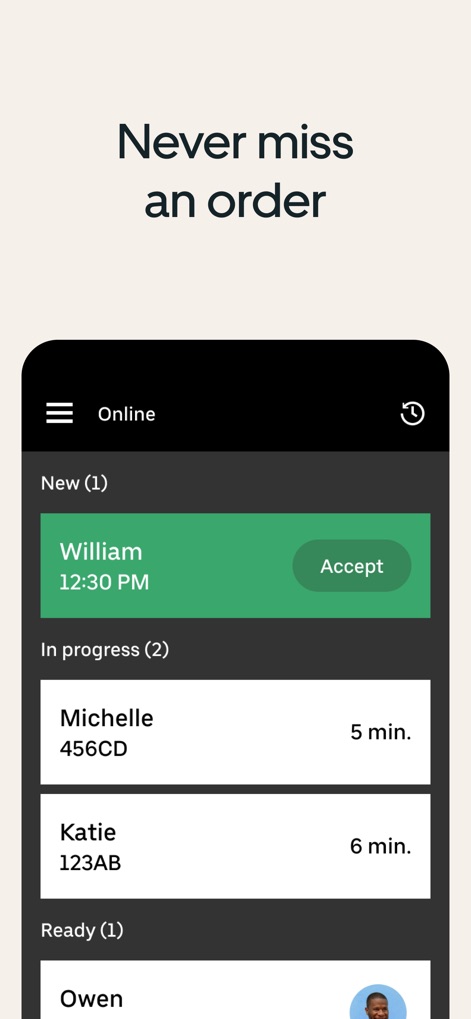
Explore the intuitive interface displaying dynamically updated order statuses, with distinct sections for 'New' and 'In progress' orders, allowing users to promptly 'Accept' new incoming requests.
Dynamic Order Dashboard

Access comprehensive order specifics, including customer details like 'James' and their proximity, alongside an itemized list showing selected customizations such as 'Pepper Jack' and 'Avocado' for precise preparation.
Detailed Order Insight

Review past transactions through the 'Order history' interface, featuring dated entries and clear status labels such as 'Out for delivery' or 'Canceled' for easy reconciliation and record-keeping.
Comprehensive History View
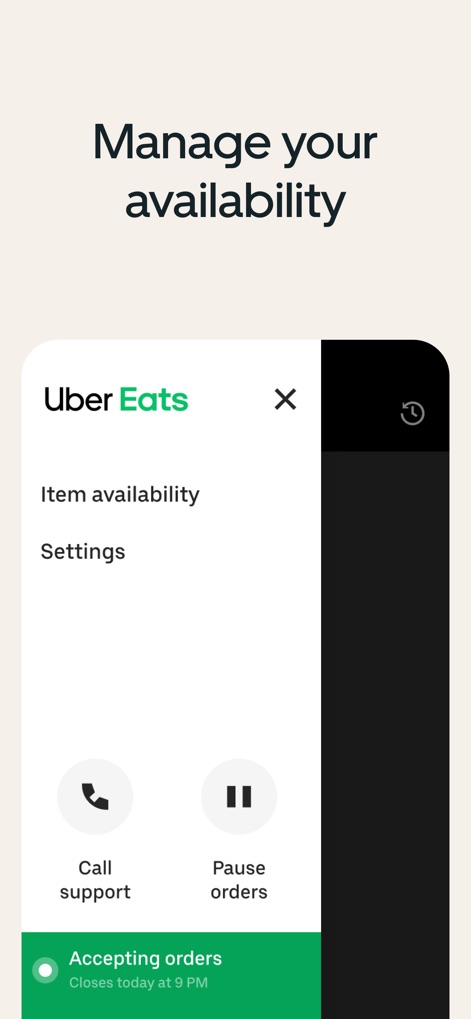
Effortlessly control operational status and offerings through the dedicated menu, providing quick access to 'Item availability' adjustments and the critical 'Pause orders' function.
Availability Management

This concluding visual encapsulates the seamless integration of Uber Eats Orders into daily business operations, as demonstrated by the busy counter environment and the prominent Uber Eats branding on the delivery bag.
Operational Empowerment
Description
Download
More Like This
Apps with similar features and user experience

minne
GMO Pepabo, Inc.

Uber Eats Manager
Uber Technologies, Inc.

GHTK
Giao Hang Tiet Kiem Joint Stock Company

DoorDash - Business Manager
DoorDash, Inc.

レストランボード
Recruit Co.,Ltd.

Trendyol Seller Center
DSM Grup Danismanlik Iletisim ve Satis Tic. A.S.

美团赚赚
Beijing Sankuai Online Technology Co., Ltd.

BIZGO秒账进销存-仓库出入库记账管理开单软件
Zhejiang Kunying Technology Co., Ltd.

GrabMerchant
GRABTAXI HOLDINGS PTE. LTD.
This page is not an official page of the app or its developer, but an independent editorial publication created for informational and commentary purposes. Unless expressly stated otherwise, neither the app nor its developer is affiliated with, endorsed by, sponsored by, authorized by, or otherwise officially connected with MWM, Apple, Google Play, the app publisher, or the app's developer, and nothing on this page implies that the app was developed using MWM's services. Any trademarks, logos, screenshots, and other content remain the property of their respective owners.