Verto Studio 3D
Verto Studio 3D
Download on App Store

This page is not an official page of the app or its developer, but an independent editorial publication created for informational and commentary purposes. Unless expressly stated otherwise, neither the app nor its developer is affiliated with, endorsed by, sponsored by, authorized by, or otherwise officially connected with MWM, Apple, Google Play, the app publisher, or the app's developer, and nothing on this page implies that the app was developed using MWM's services. Any trademarks, logos, screenshots, and other content remain the property of their respective owners.

Logo of Verto Studio 3D
Download on App Store

Verto Studio 3D

Unleash the full potential of your iPad with the most powerful mobile 3D studio. Bridge the gap between mobile design and testing by creating, rigging, and animating professional-grade assets on the go—from rapid prototypes to complex game environments.

Key Figures

Downloads

110K+

User Rating

3.7/5

Total Ratings

200

Publisher

Verto Studio LLC

Category

Productivity

Locales

5

Latest Version

2.6.1

Size

93.1 MB

First Released

Feb 4, 2011
Features

Desktop-Class Power in the Palm of Your Hand

Experience the most robust 3D modeling and graphics studio designed specifically for the iPad. From quick mockups to fully functional game environments, Verto Studio 3D scales with your vision.

Intuitive Gesture Control

Master your workflow with the Auto Tool. Sculpt, rotate, and scale using natural taps and swipes designed for a frictionless touchscreen experience.

Pro Pipeline Compatibility

Seamlessly import and export industry-standard glTF, FBX, and OBJ files. Bridge the gap between mobile design and desktop production without breaking your workflow.

The following screenshots and description are sourced directly from the app's official store listing and are the property of the app developer.

App Store

Screenshots
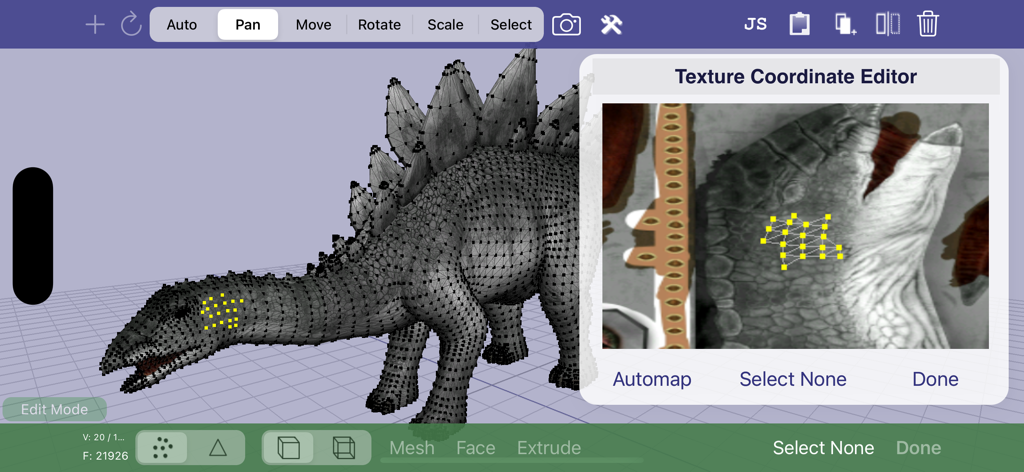
Verto Studio 3D - Texture coordinate editor in Verto Studio 3D with a 3D dinosaur model
Texture coordinate editor in Verto Studio 3D with a 3D dinosaur model

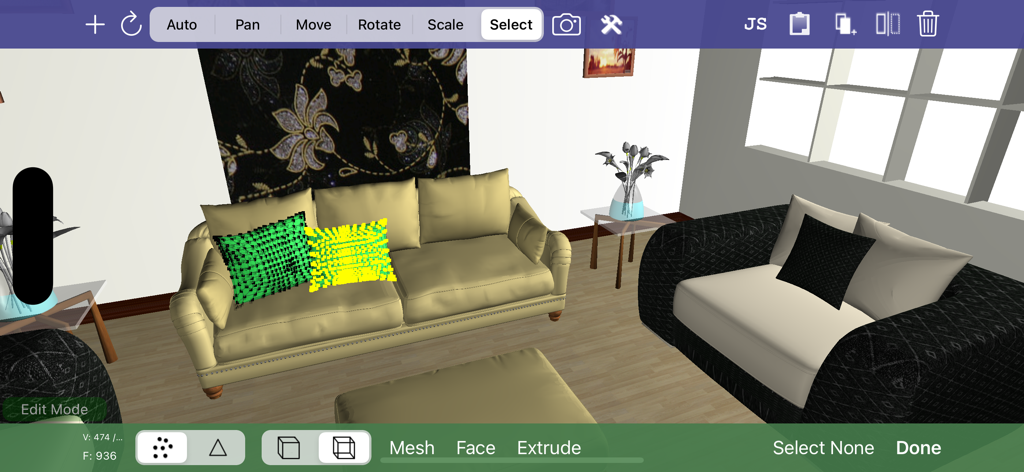
Verto Studio 3D - Verto Studio 3D interface showing 3D interior design and mesh editing tools
Verto Studio 3D interface showing 3D interior design and mesh editing tools

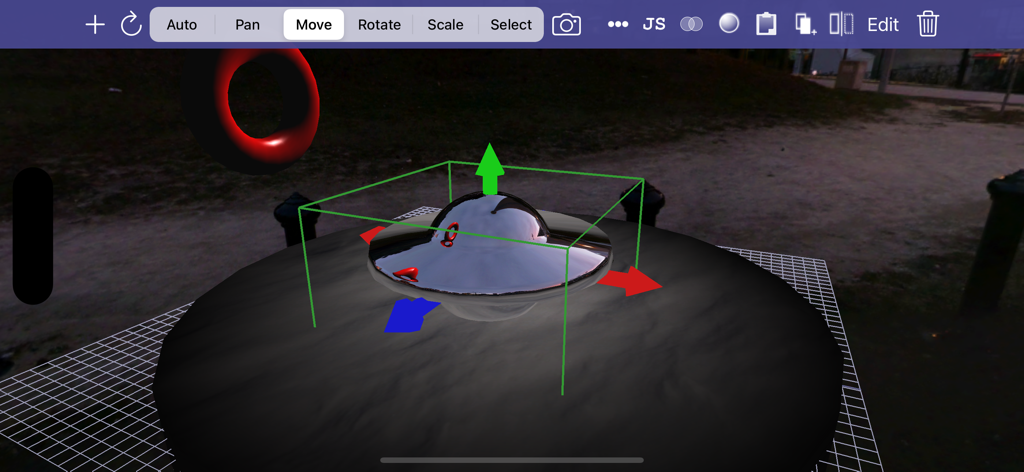
Verto Studio 3D - A mobile 3D modeling interface showing a metallic object with transform handles and edit tools.
A mobile 3D modeling interface showing a metallic object with transform handles and edit tools.

Verto Studio 3D - Verto Studio 3D app interface showing the editing of a 3D office scene with a typewriter and vintage phone on an iPad

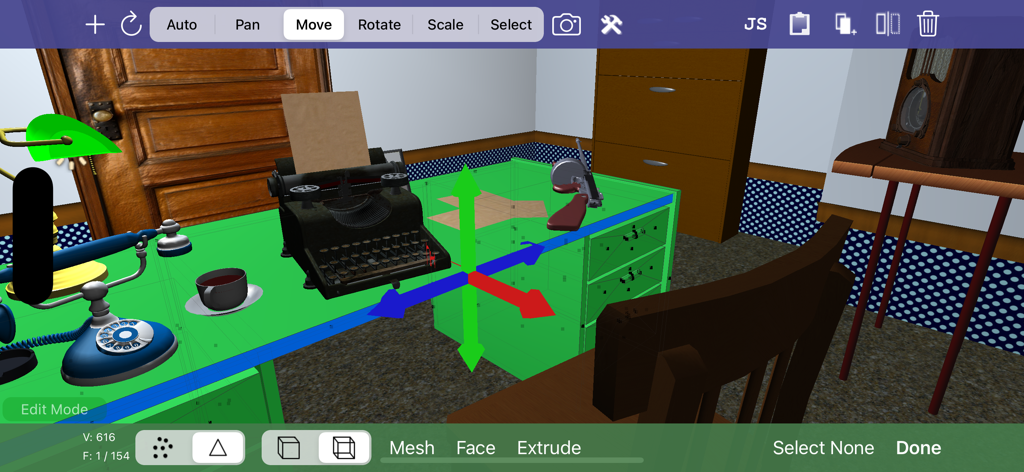
Verto Studio 3D app interface showing the editing of a 3D office scene with a typewriter and vintage phone on an iPad

Description

Verto Studio 3D is the most powerful mobile 3D modeling application. A fully-functional 3D modeling and graphics studio designed to rival desktop studio programs, verto strives to push the boundaries of what is capable on an iPad and from the users that use it. The software is designed for all ranges of users, from professional 3D modelers, game developers, to beginners looking to get their feet wet in 3D content generation. Use it to build quick 3D mockups or fully functional environments for mobile applications. Verto Studio is an ideal solution for mobile 3D content generation because it bridges the gap between design and mobile testing. It supports importing, exporting, viewing and editing 3D models of any size. With the addition the pro animator (separate purchase), Verto Studio can be used to rig and animate a model from scratch completely on the iPad without the need for any external tools! With use of the "auto tool", the user can intuitively gesture using taps, swipes, pinches and twirls to quickly alter the scene as they see fit. Verto Studio includes the following features (and many more not listed here): - Built-in shaders including reflection/refraction environment mapping, BRDF, bump-mapping and more! - Render pipeline editor for multipass & post-processing effects with built-in blending operators - Editing transform handles for easy translate/rotate/scale tools via touchscreen. - Instances (duplicate many, edit once) - File import (glTF, DAE, OBJ, STL, .X, 3DS, FBX) and more! - File export (glTF, DAE, OBJ) - Verto Studio file format support and exchange via email - Mesh generation using quads and triangular faces - Image rendering support -- Planes -- Cubes -- Spheres -- Toruses -- Cylinders -- 3D Text complete with font selection and built-extrusion. -- 3D shapes with built-in shape editor and SVG importer. -- Terrain generator (height field) -- 3D Sketch tool -- Skybox type -- Cubemap renderer type to live-generate environment maps. - Mesh Augmentation -- Polygon extrusion -- Polygon subdivision -- Copy and paste between scene documents -- Texture coordinate editor - Editing features -- Vertex Translation/Rotation/Scaling -- Mirror -- Material editor --- Semi-transparency support. -- Texture mapping -- Texture coordinate editing -- Laplacian smooth -- Mesh separation -- Polycount Reduction -- CSG (Union, Intersect, Subtract) -- Snap to Grid, Face, Edge, Vertex -- Camera to texture (ipad 2) -- Lighting editor -- Undo - Multiple camera modes (top, bottom, left, right, front, back, free) - Simultaneous camera view with 4-view split screen. - Orthographic projection mode for engineering and CAD applications - Advanced camera controls for FOV angle and near and far plane manipulation - "Fly through" mode. Fly through the scene in full screen using FPS-game-style controls. -- Gyro motion view. In "fly through mode", tap the gyro button to use your iPad as a virtual window into the scene, changing the vantage point as you hold the iPad a different angles. - Fully supports the retina display of the new iPad for maximized screen real-estate usage. - New built-in cubemaps (preset environment maps) - Built-in glsl shader-editor. (separate purchase required) - Pro-animator rigging, weight painting, and animation tools (separate purchase required) - Scripting support via VertoJS (separate purchase required)

Download

Download on App Store

This page is not an official page of the app or its developer, but an independent editorial publication created for informational and commentary purposes. Unless expressly stated otherwise, neither the app nor its developer is affiliated with, endorsed by, sponsored by, authorized by, or otherwise officially connected with MWM, Apple, Google Play, the app publisher, or the app's developer, and nothing on this page implies that the app was developed using MWM's services. Any trademarks, logos, screenshots, and other content remain the property of their respective owners.








