Very Long Screenshot Maker

Very Long Screenshot Maker


Download on App Store
Logo of Very Long Screenshot Maker

Very Long Screenshot Maker: Capture the Whole Story in One Seamless Shot

Stop cluttering your gallery with fragmented receipts. Capture full social threads, long chats, and deep scrolls across any app in one high-quality, continuous image.

Download on App Store

Publisher

Xiamen Dehui Chengzhen Network Technology Co., Ltd.

Category

Utilities

Downloads

0

User Rating

4.0/5

Total Ratings

0

Locales

33

Capture the Full Picture

Discover the interface used by 0 users.
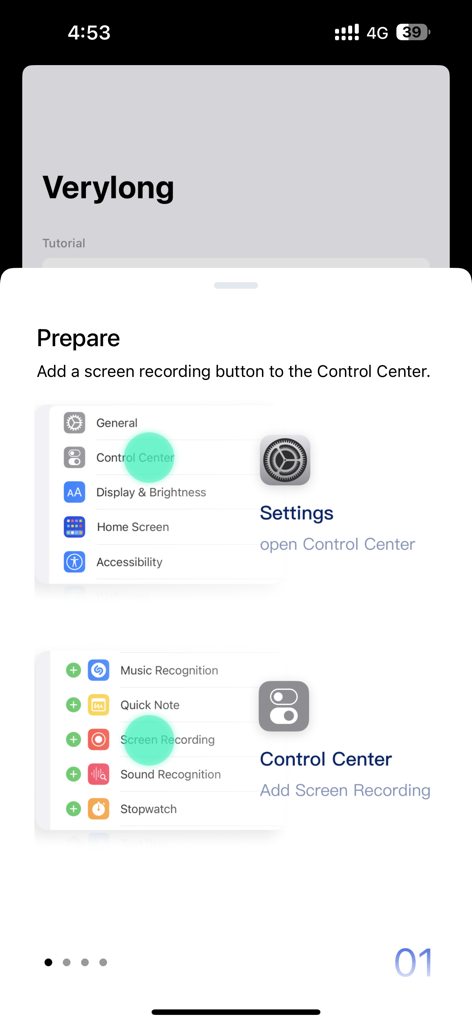
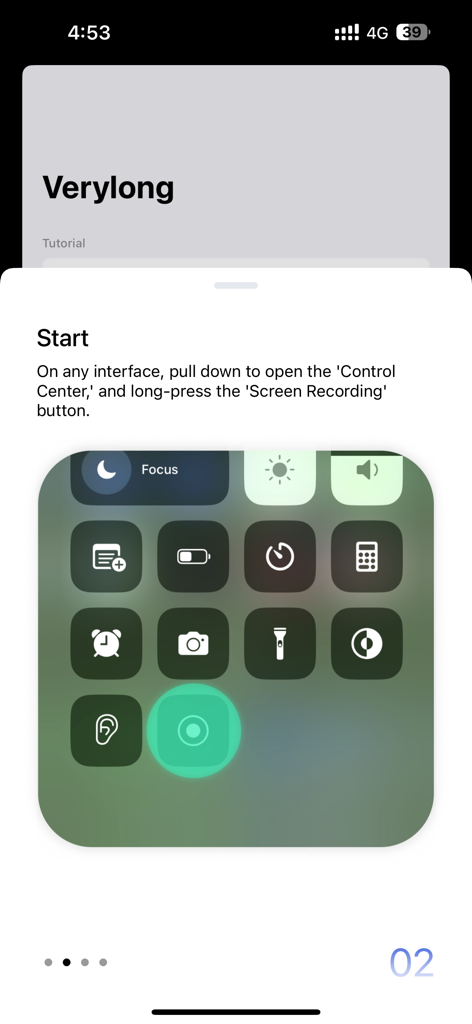
Tutorial screen for Very Long Screenshot Maker app showing how to add screen recording to iOS Control Center

Tutorial screen for Very Long Screenshot Maker app showing how to add screen recording to iOS Control Center

Instruction screen showing how to long press the screen recording button in the iOS Control Center to start a long screenshot

Instruction screen showing how to long press the screen recording button in the iOS Control Center to start a long screenshot

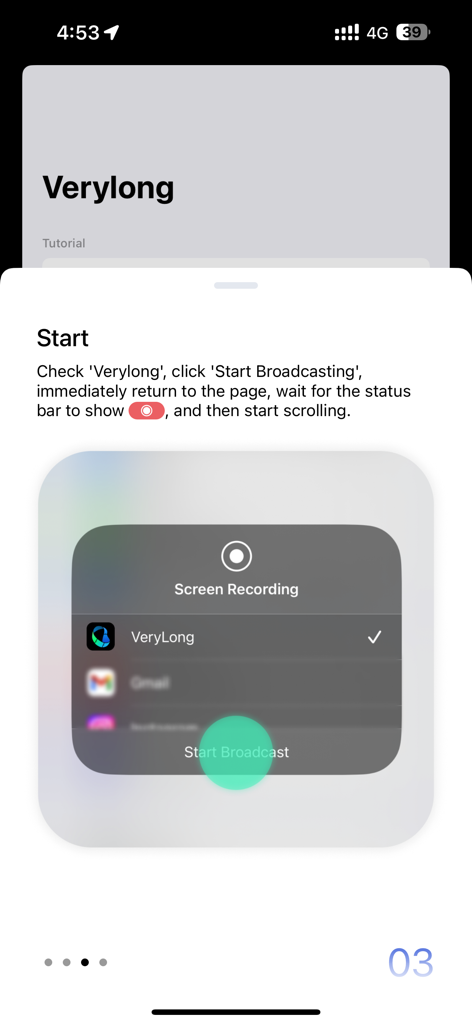
Step 3 tutorial showing how to start the VeryLong screen recording broadcast on iOS

Step 3 tutorial showing how to start the VeryLong screen recording broadcast on iOS

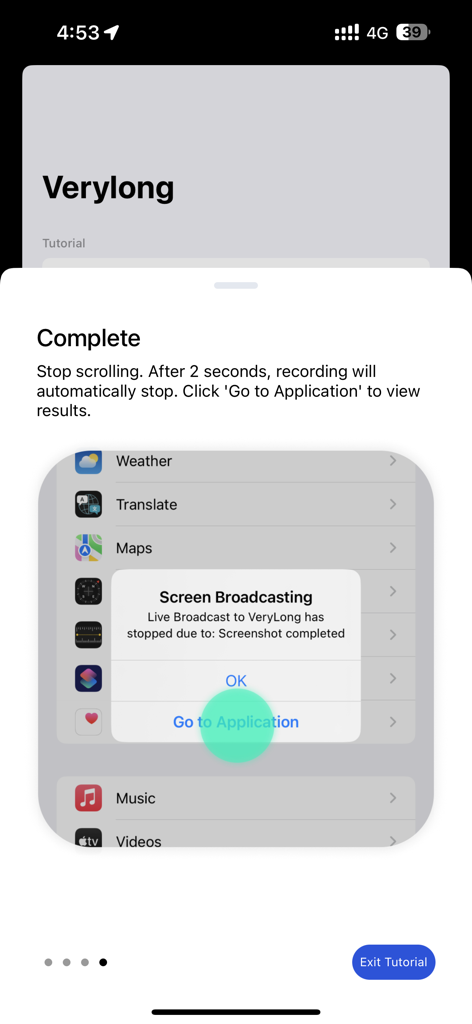
A tutorial screen in the Very Long Screenshot Maker app showing a successful long screenshot capture notification on iOS.

A tutorial screen in the Very Long Screenshot Maker app showing a successful long screenshot capture notification on iOS.

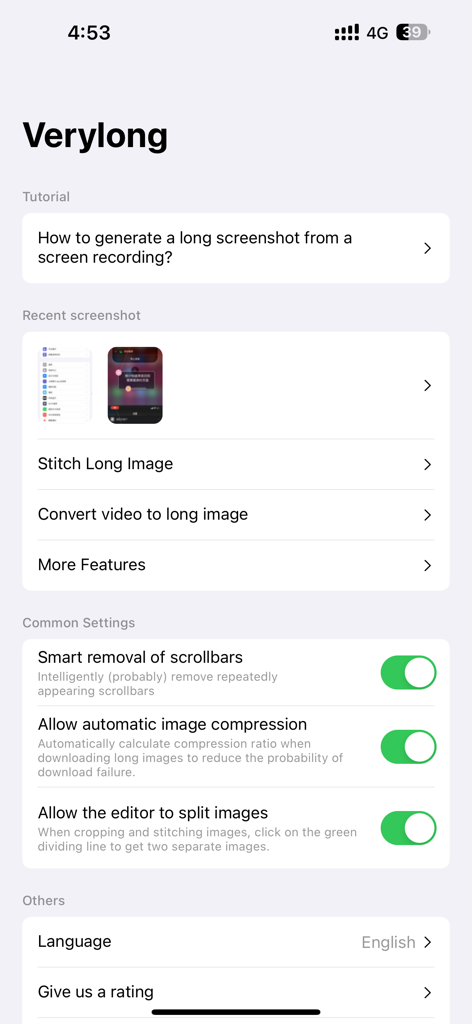
Interface of the Very Long Screenshot Maker app showing settings for smart scrollbar removal and options for stitching images.

Interface of the Very Long Screenshot Maker app showing settings for smart scrollbar removal and options for stitching images.

One Scroll, The Whole Story

The tools that make this app stand out, trusted by 0 users.

📜

Capture Perfect 'Receipts'

Document entire chat threads, viral Reddit posts, or legal terms in one seamless file. No more fragmented images or missing context.

🔓

True Cross-App Freedom

Break free from Safari-only limitations. Take scrolling screenshots in Instagram, WhatsApp, X, and any other app where iOS normally fails.

📂

A Clutter-Free Gallery

Save storage and sanity. Replace 20 messy, overlapping screenshots with one sleek vertical image that keeps your Photos app perfectly organized.

About the app

Everything you need to know about Very Long Screenshot Maker.

Description

With this software, you can easily capture content that extends beyond a single screen. Here are the simple steps: **Preparation:** OPEN Settings; select Control Center; ensure the Screen Recording option has been added: **Steps:** 1. Prepare the content you want to capture, ensuring that dynamically loaded content is fully loaded. 2. Pull down the control center, long-press the screen recording button. 3. Choose the "Verylong" option, then click on start recording. 4. Return to the content page you want to capture before the countdown ends. 5. When the recording button is illuminated, start scrolling through the page. 6. Lift your finger from the screen at the desired endpoint for recording and wait for 3 seconds. 7. After 3 seconds, a pop-up window will appear, click on "Go to the app." Congratulations, you have completed the screenshot operation! User Agreement:https://metal-basin-5f3.notion.site/Pro-Verylong-Terms-of-Use-7adc43bede7846f9996541e8def24566?pvs=4 Privacy Policy: https://metal-basin-5f3.notion.site/Pro-Very-long-Privacy-Policy-c43443aaa77049f5a33bf97a985f0bdf?pvs=4

Latest Version

2.3.8

Size

38.1 MB

First Released

Jan 2, 2024

Ready to Capture the Full Story?

Stop cluttering your gallery with fragmented screenshots. Join thousands of power users capturing long chats, viral threads, and endless pages in one seamless scroll—download now for iOS.

Download on App Store

App information, icons, screenshots, and descriptions displayed on this page are sourced from the Apple App Store and are the property of their respective developers. Download estimates and rankings are based on MWM's proprietary models and may not reflect actual figures. This page is provided for informational and analytical purposes only.

Believe this page infringes your intellectual property? File a dispute