
This page is not an official page of the app or its developer, but an independent editorial publication created for informational and commentary purposes. Unless expressly stated otherwise, neither the app nor its developer is affiliated with, endorsed by, sponsored by, authorized by, or otherwise officially connected with MWM, Apple, Google Play, the app publisher, or the app's developer, and nothing on this page implies that the app was developed using MWM's services. Any trademarks, logos, screenshots, and other content remain the property of their respective owners.


Video Star
The feed demands brilliance. This app elevates standard clips, providing creators with an expansive effects arsenal to craft viral-ready visuals directly from their device.
Downloads
25M+User Rating
Total Ratings
237.6KPublisher
Category
Photo & VideoLocales
22Latest Version
15.1.0Size
702.5 MBFirst Released
Sep 28, 2011Key Capabilities of Video Star
An Analytical Overview for Creative Content Production
Advanced Visual Effects Library
The app provides an extensive library of thousands of effects to color, animate, enhance, warp, combine, and re-time video clips, enabling highly creative and unique visual outputs.
Optimized for Fan Edits and Lip-Sync
This tool is specifically designed for creating high-quality fan edits and engaging lip-sync music videos, catering directly to current social media trends and user content styles.
Premium 'All Access Pass'
It provides an optional 'All Access Pass' subscription, unlocking the full suite of advanced tools, effects, and functionalities for professional-grade editing.
Continuous Feature & Effect Updates
The platform receives regular updates, consistently introducing new effects and features to keep pace with evolving creative trends and user demands.
Community Social Media Challenges
It encourages community interaction through daily challenges on social media platforms like Instagram and TikTok, fostering a creative environment and showcasing user talent.
Seamless Photo and Video Integration
It allows users to seamlessly integrate both photos and video clips into their projects, offering versatility in content creation.
Frequently Asked Questions
Everything you need to know about Video Star
What features does the Video Star app offer for video editing?
Video Star provides thousands of effects for coloring, animating, enhancing, warping, combining, and re-timing video clips. It enables creation of fan edits and lip-sync music videos from photos and videos.
Is Video Star a free video editing app?
Video Star includes numerous free features for video editing. Users can also purchase an All Access Pass via a Pro subscription to unlock all current and future premium content and tools.
What is included with a Video Star Pro subscription?
A Video Star Pro subscription grants unlimited access to all current and future Power Packs available within the app. This enhances editing capabilities with additional effects and tools.
How do I turn off auto-renewal for my Video Star subscription?
To turn off auto-renewal for your Video Star Pro subscription, navigate to your Account Settings after purchase. Manage subscriptions and disable auto-renewal from there.
Where is the official privacy policy for Video Star located?
The official privacy policy for Video Star is published on its website. Users can access the full document at videostarapp.com/privacy.html for details.
Can I adjust video timing and velocity curves in Video Star?
Yes, Video Star enables users to map and precisely adjust velocity curve timing. This feature allows for detailed control over the speed and flow of video content.
Does Video Star allow keyframe editing and multiple video layers?
Yes, Video Star supports keyframe editing and the manipulation of multiple layers. It offers options for layout, color, text, and mirror effects within these layers.
How does Video Star allow users to transform video coloring?
Video Star provides tools to transform video coloring. Users apply effects like "Streak" and fine-tune parameters such as strength, size, angle, and threshold for custom color adjustments.
The following screenshots and description are sourced directly from the app's official store listing and are the property of the app developer.
App Store
Screenshots
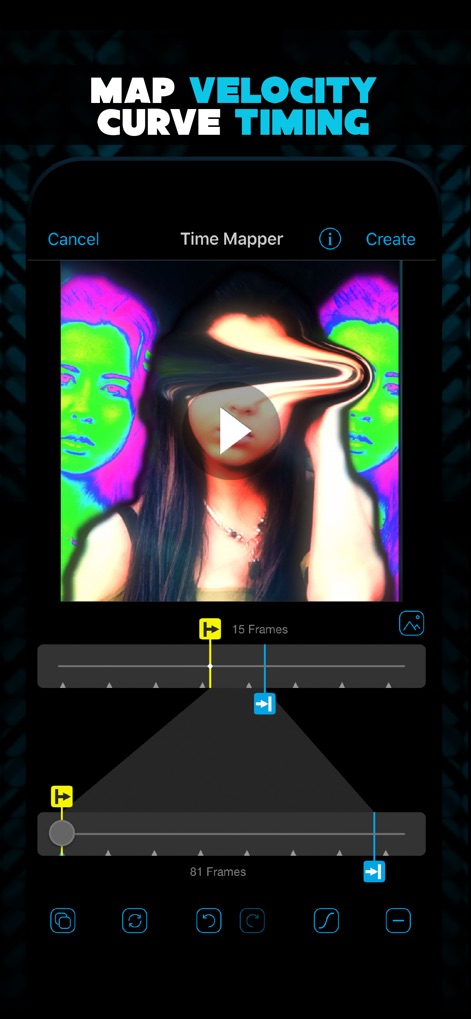
Dynamic Velocity Mapping
Explore how this tool allows for precise control over video timing using the intuitive velocity curve editor and frame-by-frame adjustments for dynamic effects.

Multi-Layered Compositing
Discover how the app empowers users to combine multiple visual elements through its powerful layering system and offers granular control with the dedicated 3D toggle.
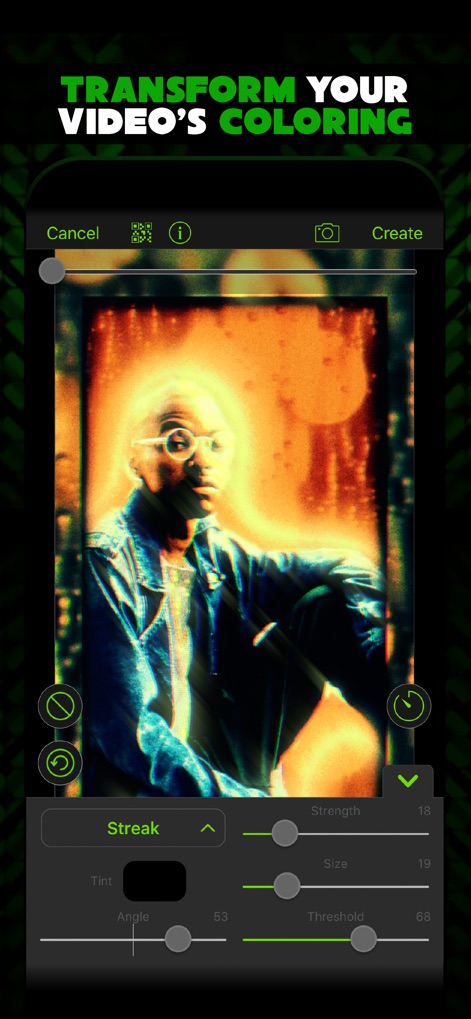
Creative Color Enhancement
Witness the app's robust color transformation capabilities, allowing users to apply unique effects such as 'Streak' and fine-tune parameters like strength and threshold with intuitive sliders.
Description
Download
More Like This
Apps with similar features and user experience

InShot - Video Editor
SHANTANU PTE. LTD.

快影
Beijing Kwai Technology Co., Ltd.

Leto: Font for Instagram Story
Leto.Fonts FZCO

Templify・ Photo & Video Editor
Templify Media, Inc.

Spring - Video Editor
KineMaster Corporation

Impresso - Video & Logo Maker
PIXERY BILGI TEKNOLOJILERI ANONIM SIRKETI

Movavi - Video Editor
Movavi Emea LLC

Zebra: Photo & Video Editor
Dmitriy Biserov

快剪辑-AI写真&视频大片一键制作
Wenzhou XunChi Digital Technology Co., Ltd.
This page is not an official page of the app or its developer, but an independent editorial publication created for informational and commentary purposes. Unless expressly stated otherwise, neither the app nor its developer is affiliated with, endorsed by, sponsored by, authorized by, or otherwise officially connected with MWM, Apple, Google Play, the app publisher, or the app's developer, and nothing on this page implies that the app was developed using MWM's services. Any trademarks, logos, screenshots, and other content remain the property of their respective owners.