
This page is not an official page of the app or its developer, but an independent editorial publication created for informational and commentary purposes. Unless expressly stated otherwise, neither the app nor its developer is affiliated with, endorsed by, sponsored by, authorized by, or otherwise officially connected with MWM, Apple, Google Play, the app publisher, or the app's developer, and nothing on this page implies that the app was developed using MWM's services. Any trademarks, logos, screenshots, and other content remain the property of their respective owners.


Videoleap: AI Video Editor
No more editing compromises. This app elevates mobile video, granting users the tools to craft broadcast-quality content through intuitive AI.
Downloads
50M+User Rating
Total Ratings
530.6KPublisher
Category
Photo & VideoLocales
12Latest Version
2.82Size
495.0 MBFirst Released
Sep 24, 2017Key Features of Videoleap: AI Video Editor
An Analytical Overview for Content Creators
AI Templates & Trending Edits
It provides access to a vast library of AI-generated and community-shared templates, enabling users to effortlessly create trending videos for platforms like TikTok and Instagram Reels with their own content.
Advanced Layered Compositions
This tool features a powerful layer-based editing system, allowing users to combine multiple video clips, images, text, and effects, customizing each layer with transformations, masking, and blending modes for sophisticated visual compositions.
AI Object Removal & Effects
The app offers intelligent AI tools to seamlessly remove unwanted objects from videos and apply a variety of impressive AI presets and effects, transforming ordinary footage into extraordinary content with ease.
Professional Green Screen
It provides robust Green Screen and Chroma Key compositing capabilities, allowing users to effortlessly superimpose subjects onto diverse backgrounds for creative and professional-grade video productions.
Motion Tracking & Keyframes
This tool features precise motion tracking and keyframe animations, enabling users to synchronize elements with moving objects in their footage and create custom, dynamic visual effects with granular control.
Precision Timeline Control
The app offers an intuitive, zoomable timeline that ensures frame-by-frame precision for editing, alongside non-destructive editing and unlimited undo/redo options, making detailed adjustments accessible and forgiving.
Sound Editing & Music Sync
It allows users to enhance their videos with a rich library of over 100 sound effects, record voiceovers, finely control audio volume, apply equalizer presets, and precisely sync video actions to the rhythm of music.
Visual Effects & Text
The app provides a wide selection of trendy fonts, emojis, and styling options for text, along with unique filters to set the mood and seamless cinematic transitions to ensure smooth and engaging video flow.
Frequently Asked Questions
Everything you need to know about Videoleap: AI Video Editor
What is Videoleap by Lightricks?
Videoleap by Lightricks is an intuitive video editor that offers seamless video creation. It includes premade templates, AI tools, professional effects, and features for various social media platforms.
Does Videoleap offer AI video editing features?
Yes, Videoleap provides a full AI video editor. It includes AI video effects, premade AI templates, and the ability to remove unwanted objects from videos using AI technology.
Can I use Videoleap to create videos for TikTok and Reels?
Yes, Videoleap offers a vast selection of ready-to-use templates specifically designed for platforms like Reels, TikToks, and YouTube Shorts to simplify content creation.
What video editing tools are available in Videoleap?
Videoleap includes keyframe animations, Green Screen/Chroma Key, non-destructive editing, unlimited undo/redo, an intuitive timeline with zoom, and a video speed controller.
How can I change the speed of a video clip in Videoleap?
Videoleap features a video speed controller that allows users to adjust the speed of clips. You can slow down for dramatic effects or speed up the action directly within the app.
Does Videoleap support layer-based video editing?
Yes, Videoleap supports layer-based editing. Users can add videos, effects, text, and images, then reorder and customize them with transformation, masking, and blending modes for complex compositions.
Can Videoleap remove objects from videos using AI?
Yes, Videoleap includes an AI feature that can remove unwanted elements from videos. This "Remove objects from video with AI" tool is part of its comprehensive AI video editor.
What kind of text effects does Videoleap provide?
Videoleap offers a variety of trendy fonts, emojis, shadows, colors, opacity controls, and blending options for text effects. Users can also add animation and tracking to text.
Does Videoleap auto-save projects?
Yes, Videoleap automatically saves all projects. This feature allows users to confidently work on their videos whenever and wherever they choose without concerns about losing progress.
Where can I find the privacy policy for Videoleap?
The privacy policy for Videoleap is available on the Lightricks website. A direct link is provided within the app's description for user reference and transparency.
Can I use Videoleap to add music and sound effects to my videos?
Yes, Videoleap offers extensive sound editing features. It includes over 100 sound effects, options to dub audio and voice-overs, volume control, equalizer presets, and music syncing.
The following screenshots and description are sourced directly from the app's official store listing and are the property of the app developer.
App Store
Screenshots
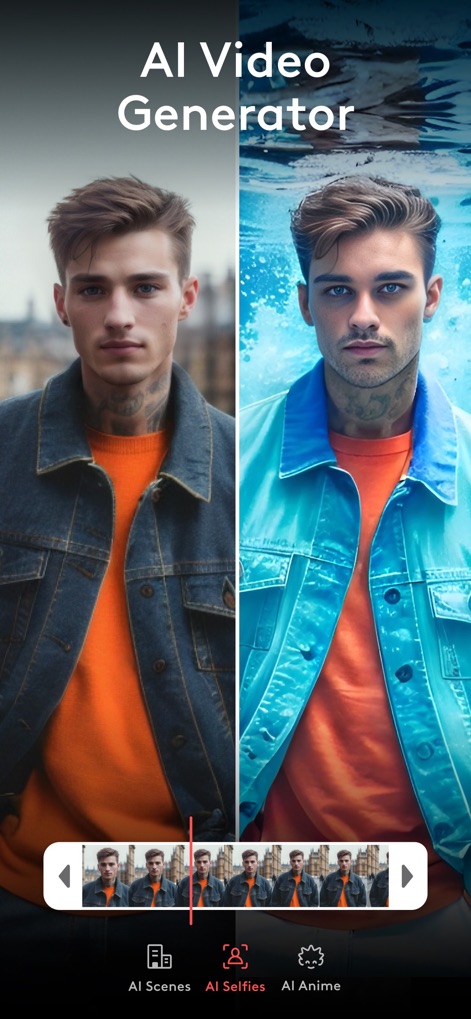
AI Transformation Power
Discover how this tool leverages artificial intelligence to create stunning 'AI Selfies' and 'AI Anime' from user input.

Instant AI Templates
Users can jumpstart their projects with 'Premade AI Templates', featuring advanced AI-generated characters and customizable elements.

Dynamic Time-Lapse
Craft mesmerizing 'Time Lapse Videos' using intuitive controls for 'Speed' and the unique 'Freeze' effect.

Trending REELS Templates
Access a curated collection of 'REELS Templates' to effortlessly create trending short-form content, complete with adaptable layouts.

Vivid Video Filters
Explore a diverse gallery of 'Stunning Video Filters', including dynamic styles like 'Party' and 'Urbanity', to elevate any scene.

Precise Speed Control
Gain granular 'Control Your Speed' over video segments, enabling both dramatic slow-motion and accelerated playback with ease.

Expressive Text Styling
Enhance videos with creative 'Text Effects', choosing from a wide variety of 'Fonts' and applying engaging 'Animation' options.

Advanced Background Editor
Seamlessly modify 'Video Backgrounds' using the powerful 'Cutout' feature and achieve professional results with 'Chroma Key' compositing.

Intuitive Layered Editing
The app simplifies 'Pro Video Editing Made Easy' by allowing users to add 'Stickers' and 'Audio' tracks on an intuitive layered timeline.
Creative Journey Begins
This tool serves as a captivating launchpad for creative video projects, featuring the iconic Videoleap 'brand logo' and stellar 'visual branding'.
Description
Download
More Like This
Apps with similar features and user experience

Edits: Video Editor
Instagram, Inc.

VLLO- Video Editor, Vlog Edits
vimosoft

YouCut - AI Video Editor
SHANTANU PTE. LTD.

必剪-B站官方出品
Shanghai Bilibili Animation Co.,Ltd

剪影 - 视频剪辑 & 卡点影集制作
Shanghai Jian Ji Software Technology Co., Ltd

Videoshop - Video Editor
Jajijujejo Inc.

VDIT - Video Maker & Editor
ImgBase, Inc.

Video Editor with Music・VidLab
Onelight Apps CY Ltd

Video Maker-movie maker&Editor
Changsha Fugui Bamboo Network Technology Co., Ltd.
This page is not an official page of the app or its developer, but an independent editorial publication created for informational and commentary purposes. Unless expressly stated otherwise, neither the app nor its developer is affiliated with, endorsed by, sponsored by, authorized by, or otherwise officially connected with MWM, Apple, Google Play, the app publisher, or the app's developer, and nothing on this page implies that the app was developed using MWM's services. Any trademarks, logos, screenshots, and other content remain the property of their respective owners.