
This page is not an official page of the app or its developer, but an independent editorial publication created for informational and commentary purposes. Unless expressly stated otherwise, neither the app nor its developer is affiliated with, endorsed by, sponsored by, authorized by, or otherwise officially connected with MWM, Apple, Google Play, the app publisher, or the app's developer, and nothing on this page implies that the app was developed using MWM's services. Any trademarks, logos, screenshots, and other content remain the property of their respective owners.


Vocal Remover AI Splitting
Audio liberation. The app offers a surgical strike on sound, empowering users to dissect tracks and own the output.
Downloads
250k+User Rating
Total Ratings
2.5KPublisher
Category
MusicLocales
1Latest Version
2.2.2Size
148.7 MBFirst Released
Sep 9, 2021An evaluation of core functionalities tailored for casual music enthusiasts and content creators.
Key Features Analysis: Vocal Remover AI Splitting
Effortless Instrumental & Karaoke Track Creation
The app provides an intuitive process to quickly transform any song into an instrumental or backing track, perfectly suited for karaoke sessions, singing practice, or preparing material for remixes.
Advanced AI-Driven Audio Separation
This tool features cutting-edge artificial intelligence algorithms that precisely distinguish and isolate vocals from their accompanying music, ensuring high-quality and clean track separations.
Direct MP3 Export & Cross-App Sharing
It allows users to conveniently save their separated vocal and instrumental tracks directly as MP3 files or seamlessly export them to other applications for further editing, sharing, or publishing.
Instant In-App Audio Preview
The app includes a built-in player that enables users to immediately listen to and compare the separated vocal and backing tracks, ensuring satisfaction with the results before export.
Frequently Asked Questions
Everything you need to know about Vocal Remover AI Splitting
What is Vocal Remover AI Splitting?
Vocal Remover AI Splitting is an AI-powered app that splits music tracks into separate vocal and backing components. It provides instrumental versions of songs for karaoke or remix creation.
How does Vocal Remover AI Splitting work?
Vocal Remover AI Splitting uses an advanced AI algorithm. Users upload a track, and the algorithm isolates the vocals, providing instrumental and vocal versions.
Can I remove vocals from songs using Vocal Remover AI Splitting?
Yes, Vocal Remover AI Splitting allows users to easily remove vocals from their favorite songs. The app isolates vocals, leaving an instrumental version.
What file formats can Vocal Remover AI Splitting save to?
Vocal Remover AI Splitting can save generated vocal and backing tracks as MP3 files. It also supports exporting to other applications.
Can I export tracks from Vocal Remover AI Splitting?
Yes, users can easily export generated vocal and backing tracks from Vocal Remover AI Splitting to other applications. Files can also be saved as MP3s.
Does Vocal Remover AI Splitting have a built-in player?
Yes, Vocal Remover AI Splitting includes a built-in player. This player allows users to switch between vocal and backing tracks simultaneously.
Can Vocal Remover AI Splitting be used for karaoke?
Yes, Vocal Remover AI Splitting is designed for karaoke use. It creates instrumental versions of songs by removing vocals, perfect for singing along.
How can I import files into Vocal Remover AI Splitting?
Users can import audio or video files into Vocal Remover AI Splitting. The app provides options to import from existing files or the camera roll.
Where can I find the privacy policy for Vocal Remover AI Splitting?
The privacy policy for Vocal Remover AI Splitting is available at https://heyos.co/privacy-policy. This link is provided in the app description.
The following screenshots and description are sourced directly from the app's official store listing and are the property of the app developer.
App Store
Screenshots

See how the app's intuitive interface displays both vocal and instrumental waveforms, clearly distinguishing between the two separated audio components.
AI Track Splitting

Explore the precise control offered by the vocal volume slider and the dedicated playback options for vocal or instrumental versions.
Vocal Isolation Control

Discover the seamless export functionality, allowing users to easily share processed backing tracks to other applications with a simple tap of the share icon.
Share Your Creations

Witness the app's advanced AI in action as it visually demonstrates the intelligent splitting of a single song into distinct vocal and instrumental audio streams.
AI-Powered Separation
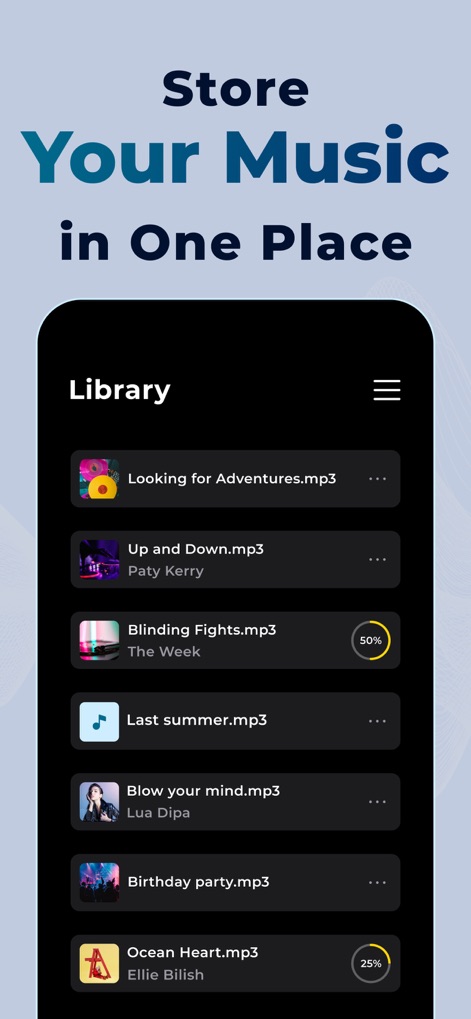
Browse the comprehensive in-app library where processed tracks are stored, clearly displaying song titles and progress indicators for ongoing operations.
Organized Music Library
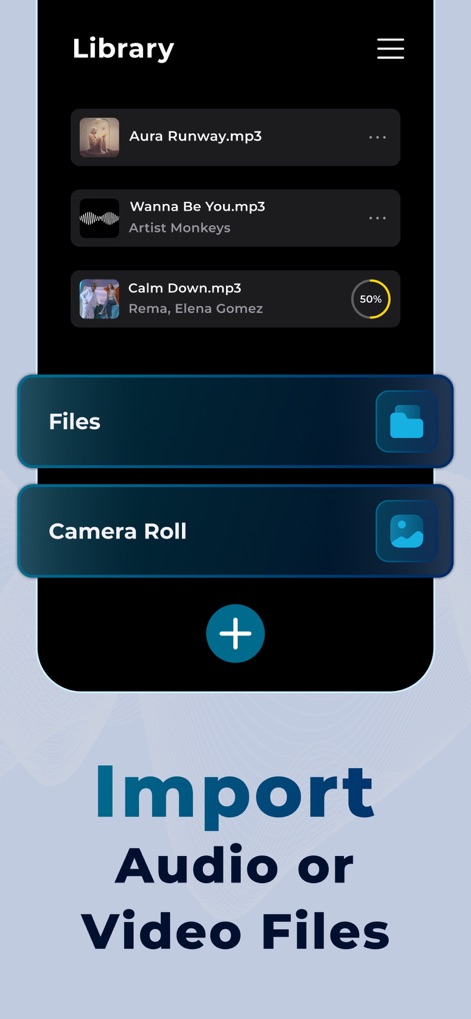
Observe how the app simplifies media import with direct options to access audio from device files and video from the camera roll.
Effortless Media Import
Description
Download
More Like This
Apps with similar features and user experience

Music Speed Changer ▶▶▶
Single Minded Productions, LLC

Vocal Remover - Musiclab
CHENGDU Yiwo Tech Development Co., Ltd

Audio Fusion
景睿 文

Audio Jam: AI for musicians
Kiraku Tech Co., Ltd.

Anytune Pro+: Studio Tools
Anytune Inc.

Moises: The Musician's App
Moises Systems Inc

Strum - Play Guitar
W185 Holdings LLC

Chordify: Songs, Chords, Tuner
Chordify BV

Chord ai - Play any song!
Nomad AI OU
This page is not an official page of the app or its developer, but an independent editorial publication created for informational and commentary purposes. Unless expressly stated otherwise, neither the app nor its developer is affiliated with, endorsed by, sponsored by, authorized by, or otherwise officially connected with MWM, Apple, Google Play, the app publisher, or the app's developer, and nothing on this page implies that the app was developed using MWM's services. Any trademarks, logos, screenshots, and other content remain the property of their respective owners.