Website Downloader & Copier

Website Downloader & Copier

Download on App Store
Logo of Website Downloader & Copier

Website Downloader & Copier: Archive Any Web Page with One Click

The lightweight Safari extension for designers, developers, and researchers. Effortlessly capture HTML, CSS, and assets into a local ZIP archive for offline access and digital preservation.

Download on App Store

Publisher

Pierre Stanislas

Category

Utilities

Downloads

500

User Rating

1.0/5

Total Ratings

0

Locales

1

A Glimpse Inside

Discover the interface used by 500 users.
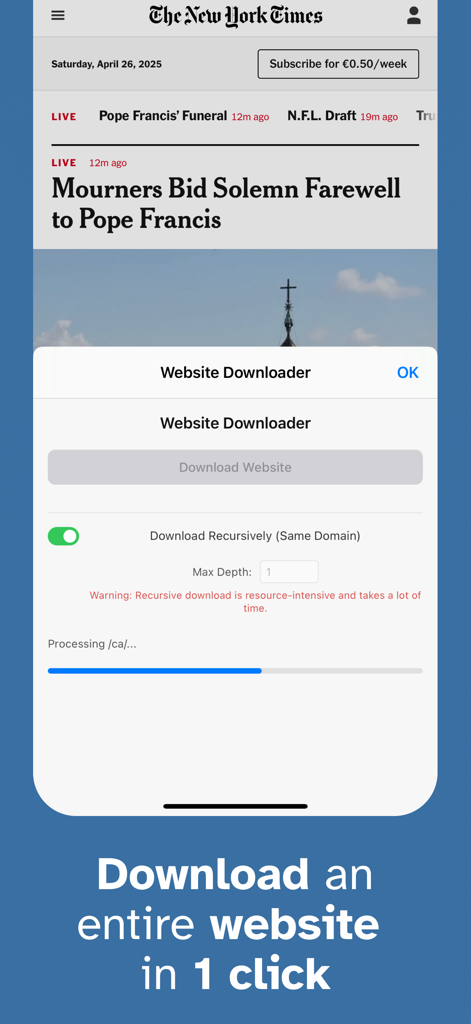
Interface of the Website Downloader Safari extension showing a one-click download button and progress bar for capturing a full webpage.

Interface of the Website Downloader Safari extension showing a one-click download button and progress bar for capturing a full webpage.

Power Features for Your Professional Workflow

The tools that make this app stand out, trusted by 500 users.

📦

Complete Asset Capture

Grab every HTML, CSS, JavaScript, and image file automatically. Perfect for studying source code or building a personal design swipe file.

One-Click Safari Integration

Skip the complex command-line tools. Access professional-grade website cloning directly from your browser with a clean, minimalistic interface.

📂

Instant Portable Archives

Your downloads are neatly packaged into a single ZIP file, making it easy to attach to project boards, share with clients, or browse offline anywhere.

About the app

Everything you need to know about Website Downloader & Copier.

Description

Website Downloader is a lightweight Safari extension that lets you capture and save the full content of any web page effortlessly. Whether you need a local backup, offline access, or a complete snapshot for research, Website Downloader makes the process as smooth as possible. → Key Features • One-Click Download Simply click the Website Downloader icon in your Safari toolbar and hit "Download Website" in the popup. Instantly start capturing everything you see. • Complete Resource Capture Downloads all vital resources of the current page, including: - HTML source code - CSS stylesheets (both linked and inline) - JavaScript files (both linked and inline) - Images (including background images in CSS) - Fonts and other embedded assets where feasible • Live Progress Tracking Stay informed with a clean, modern progress bar that clearly shows the status of your download in real time. • Instant Zip Archive Creation Once downloaded, all resources are neatly packaged into a single zip file. The archive is automatically named after the page title or defaults to "website_download.zip" if unavailable. • No Complicated Setup No additional configuration needed. Install, click, and download — all within seconds. → Built for a Seamless Experience Beautiful, minimalistic popup UI designed for clarity and ease of use Lightweight performance that won't slow down your browsing Designed to handle websites of varying complexity with graceful error handling for network issues and dynamic content limitations → Why Choose Website Downloader? • Offline browsing made effortless • Easy archival of important webpages • Useful for researchers, developers, students, and digital archivists • Privacy-conscious: your downloads stay local and secure Capture the web, your way — with Website Downloader for Safari.

Latest Version

1.0

Size

13.8 MB

First Released

Apr 27, 2025

Stop Bookmarking and Start Archiving

Join professional designers, developers, and researchers who capture complete, high-fidelity web resources in a single click. Secure the Safari extension for your Mac, iPhone, and iPad today.

Download on App Store

App information, icons, screenshots, and descriptions displayed on this page are sourced from the Apple App Store and are the property of their respective developers. Download estimates and rankings are based on MWM's proprietary models and may not reflect actual figures. This page is provided for informational and analytical purposes only.

Believe this page infringes your intellectual property? File a dispute








