
This page is not an official page of the app or its developer, but an independent editorial publication created for informational and commentary purposes. Unless expressly stated otherwise, neither the app nor its developer is affiliated with, endorsed by, sponsored by, authorized by, or otherwise officially connected with MWM, Apple, Google Play, the app publisher, or the app's developer, and nothing on this page implies that the app was developed using MWM's services. Any trademarks, logos, screenshots, and other content remain the property of their respective owners.

WhenToWork Employee Scheduling
Join over 2 million deskless workers and managers who simplify their workweek. View schedules, swap shifts on the Tradeboard, and request time off instantly—all from the palm of your hand.
Downloads
2M+User Rating
Total Ratings
600Publisher
Category
BusinessLocales
1Latest Version
3.02Size
7.3 MBFirst Released
Jan 22, 2016Master Your Schedule, Anywhere
Empowering the deskless workforce with intuitive tools to manage shifts, swaps, and time-off requests in one mobile-first platform.
Instant Shift Swapping
Trade shifts or pick up extra hours directly through the Tradeboard without the back-and-forth phone calls.
Live Schedule Updates
Stay in the loop with instant push notifications for every schedule change, ensuring you never miss a shift again.
Frequently Asked Questions
Everything you need to know about WhenToWork Employee Scheduling
What is WhenToWork Employee Scheduling?
WhenToWork Employee Scheduling is an app that allows employees to view schedules, use the tradeboard, submit time off, and send/receive messages. Managers can also manage schedules, trades, and time off.
Can employees view their schedules with the WhenToWork app?
Yes, WhenToWork Employee Scheduling allows employees to easily view and browse their schedules within the app. The dashboard provides important schedule information at a glance.
Does WhenToWork allow managers to edit employee schedules?
Yes, managers use WhenToWork to add, edit, and publish schedules. They can also approve trades and time off requests directly through the app.
Can users trade shifts using the WhenToWork app?
Yes, the WhenToWork app includes a tradeboard feature. Employees can use the tradeboard to manage and facilitate shift trades, and managers can approve these trades.
How do new organizations begin using WhenToWork Employee Scheduling?
New organizations can start using WhenToWork by having their scheduling manager sign up for a free 30-day trial. The app provides online employee scheduling services.
Can I manage multiple WhenToWork accounts in the app?
Yes, users can access all their WhenToWork accounts within the app. It supports adding multiple users and facilitates easy switching between different accounts.
The following screenshots and description are sourced directly from the app's official store listing and are the property of the app developer.
App Store
Screenshots
Promotional screen for WhenToWork scheduling app showing a person working on a laptop at a wooden table with coffee
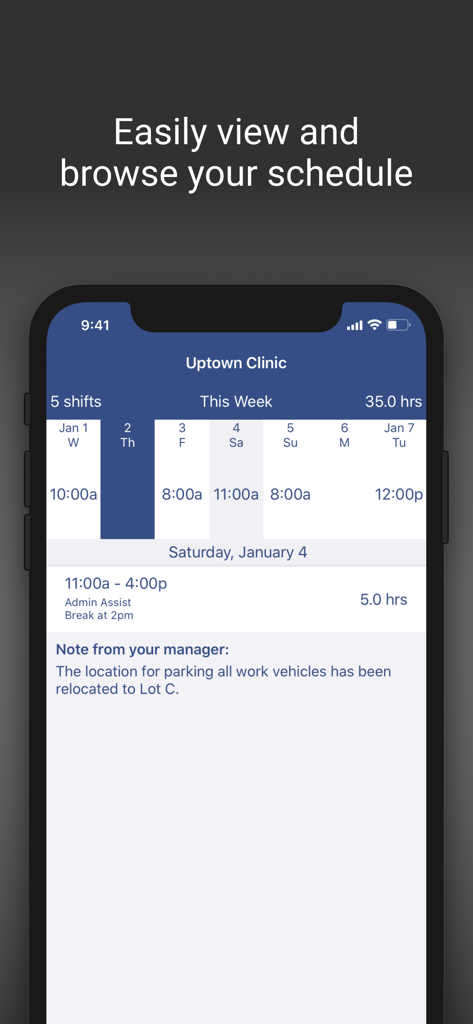
Mobile screen of WhenToWork app showing a weekly shift schedule and manager notes for a clinic employee.
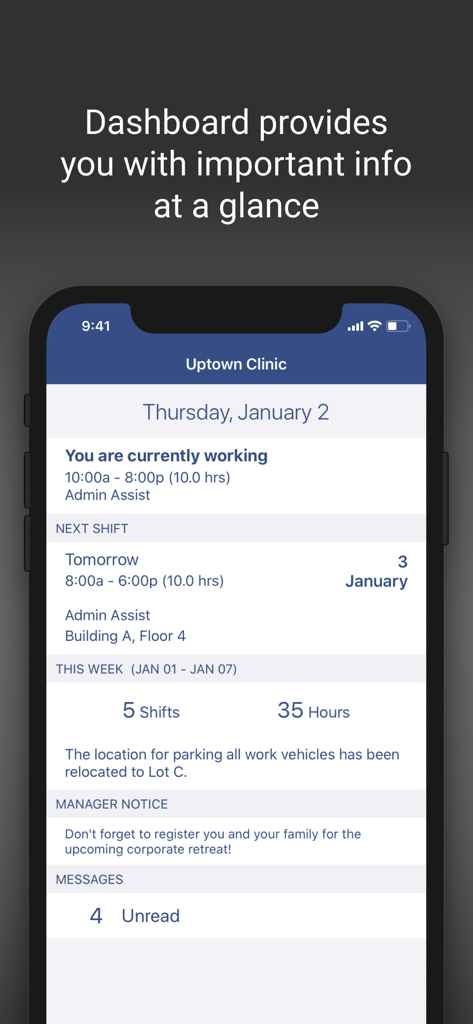
WhenToWork app dashboard displaying employee shift details, weekly hours summary, and manager notices.
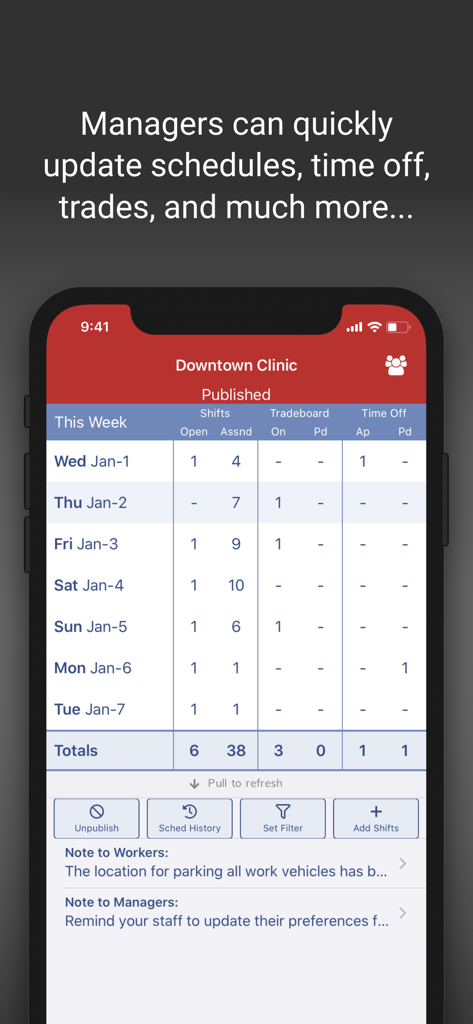
Manager dashboard for employee scheduling showing shifts and tradeboard for a clinic
WhenToWork mobile app welcome screen with a message about on-the-go employee scheduling and the company logo.
Description
Download
More Like This
Apps with similar features and user experience

Connecteam Team Management App
Connecteam, Inc.

Homebase: Team Management
Pioneer Works, Inc.
7shifts: Employee Scheduling
7shifts, Inc.

When I Work Staff Scheduling
When I Work, Inc.

Jibble: Attendance Tracker
Jibble Tech Sdn Bhd

Legion Workforce Engagement
Legion Technologies Inc.

Crunchtime Teamworx
CrunchTime Information Systems
Restaurant365
Dynamic Methods, Inc

AxisCare Mobile
Centex Axiscare Inc
This page is not an official page of the app or its developer, but an independent editorial publication created for informational and commentary purposes. Unless expressly stated otherwise, neither the app nor its developer is affiliated with, endorsed by, sponsored by, authorized by, or otherwise officially connected with MWM, Apple, Google Play, the app publisher, or the app's developer, and nothing on this page implies that the app was developed using MWM's services. Any trademarks, logos, screenshots, and other content remain the property of their respective owners.