
This page is not an official page of the app or its developer, but an independent editorial publication created for informational and commentary purposes. Unless expressly stated otherwise, neither the app nor its developer is affiliated with, endorsed by, sponsored by, authorized by, or otherwise officially connected with MWM, Apple, Google Play, the app publisher, or the app's developer, and nothing on this page implies that the app was developed using MWM's services. Any trademarks, logos, screenshots, and other content remain the property of their respective owners.


Wireless Display - TV+
Break free from tiny screens. This app delivers your phone to the big TV, instantly.
Downloads
750k+User Rating
Total Ratings
432Publisher
Category
UtilitiesLocales
7Latest Version
2.8Size
52.9 MBFirst Released
Sep 13, 2023A Comprehensive Analysis of Key Functionalities
Wireless Display - TV+ Features
Real-time HD Screen Mirroring
The app provides seamless, high-definition screen mirroring from mobile devices to larger screens, ensuring a fluid and visually clear experience without lag.
User-Friendly Interface
It allows users to easily connect and cast content with a straightforward interface, making the sharing process simple and accessible for all users.
Universal Device Compatibility
This tool features comprehensive support for popular casting protocols including Chromecast, AirPlay, Miracast, and direct Smart TV integration, allowing users to connect to a wide array of display devices.
Personal Media Sharing
The app enables users to mirror their personal photos and videos directly from their smartphone or tablet to a TV, perfect for sharing memories with family and friends.
Web Video Casting
This tool features the ability to cast videos directly from web browsers and various websites to a smart TV, expanding entertainment options beyond dedicated apps.
Live Event Streaming
It allows users to stream a variety of live content, including news, sports, and other real-time events, directly to a larger screen for an enhanced viewing experience.
Frequently Asked Questions
Everything you need to know about Wireless Display - TV+
What is Wireless Display - TV+?
Wireless Display - TV+ is an application that helps cast a small phone screen to a big TV screen. It delivers content in high quality and real-time speed.
Does Wireless Display - TV+ support screen mirroring technologies like Airplay and Miracast?
Yes, Wireless Display - TV+ supports screen mirroring. It utilizes Airplay and Miracast for wireless connections, enabling users to cast devices like laptops, tablets, or smartphones to display receivers.
Can I cast content from my iPhone or iPad to a TV using Wireless Display - TV+?
Yes, Wireless Display - TV+ enables casting of iPhone and iPad screens to a TV. Users can mirror photos and videos, and stream live news or sports.
Does Wireless Display - TV+ offer a free trial period?
Yes, Wireless Display - TV+ may offer a free trial period. If offered, any unused portion of the free trial is forfeited when the user purchases a subscription.
How does the subscription model work for Wireless Display - TV+?
Subscriptions for Wireless Display - TV+ automatically renew unless turned off 24 hours prior to the current period's end. Payment is charged to the iTunes Account upon purchase confirmation.
Can Wireless Display - TV+ cast videos directly from a web browser to a TV?
Yes, Wireless Display - TV+ includes a Web Video Caster feature. This allows users to watch videos from websites directly on their television screen.
Does Wireless Display - TV+ provide high-quality picture and video streaming?
Yes, Wireless Display - TV+ provides high-quality streaming. It supports HD video quality for Miracast and displays pictures in Full HD on the TV screen.
How does a user connect to a TV with Wireless Display - TV+?
Users connect to a TV with Wireless Display - TV+ via a one-tap process. They select their desired device, such as Airplay TV or Android TV, from a provided list.
Can Wireless Display - TV+ stream live content?
Yes, Wireless Display - TV+ streams live content. Users can stream various forms of media, including live news and sports, to their connected TV.
Does Wireless Display - TV+ allow multitasking between a PC and TV?
Yes, Wireless Display - TV+ supports multitasking. With wireless media streaming, users can perform different functions simultaneously on their PC and TV.
The following screenshots and description are sourced directly from the app's official store listing and are the property of the app developer.
App Store
Screenshots

The app demonstrates its straightforward 'Screen Casting' feature, allowing users to effortlessly initiate mirroring and select media types like 'Image' or 'Video' directly from their mobile device.
Instant Screen Cast
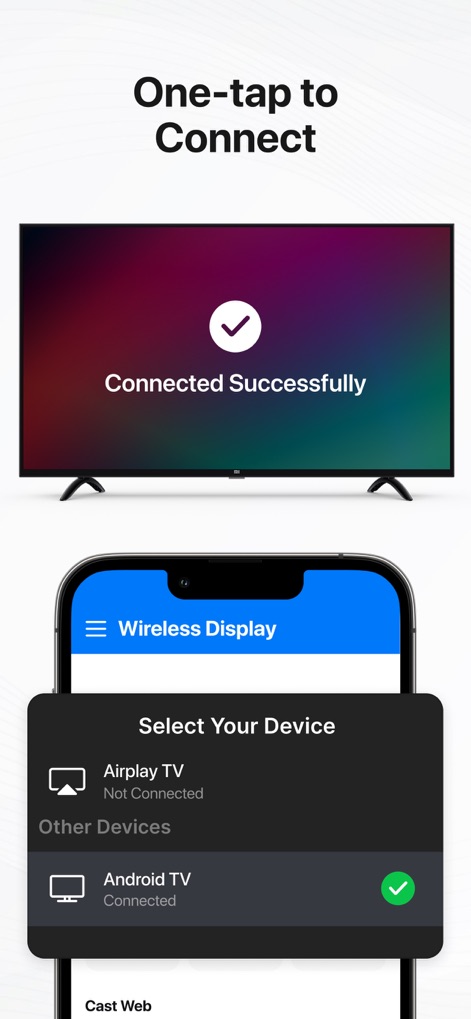
Users can quickly establish a connection, as seen with the 'Connected Successfully' message on the TV, by selecting their desired 'Android TV' or 'Airplay TV' from the device list within the app.
Seamless Connection Setup

This tool transforms personal viewing into a shared experience, displaying 'movies and videos' on a larger screen while providing intuitive 'play/pause and volume controls' on the mobile device.
Big Screen Entertainment

Enjoy crystal-clear visuals as the app mirrors 'high-quality pictures in Full HD' to the TV, offering a detailed 'gallery view' of images directly on the connected smartphone.
Crisp Image Display

The app enables seamless casting of 'web videos from any browser' onto a TV, allowing users to enjoy their favorite online content with integrated 'playback controls' accessible on their mobile device.
Web Content Casting
Description
Download
More Like This
Apps with similar features and user experience

Web Video Cast | Browser to TV
InstantBits Inc

PigeonCast:Send by Google Cast
Sichuan FalconAI Technology Co., Ltd.

Screen Mirroring • Smart TV
Mihkel Pikk

Screen Mirroring | Cast to TV
Ozuna Limited

Screen Mirroring・Smart View TV
TOGGLE APPS SP Z O O

UbeCast: Music Streamer & PiP
AER SOFTWARE COMPANY LIMITED

AirDroid Cast-screen mirroring
SAND STUDIO CORPORATION LIMITED

Miracast: Screen Mirroring TV
Hainan Delta Software Co., Ltd

Screen Mirroring・Air Cast TV
Dalma Innovation Solutions d.o.o.
This page is not an official page of the app or its developer, but an independent editorial publication created for informational and commentary purposes. Unless expressly stated otherwise, neither the app nor its developer is affiliated with, endorsed by, sponsored by, authorized by, or otherwise officially connected with MWM, Apple, Google Play, the app publisher, or the app's developer, and nothing on this page implies that the app was developed using MWM's services. Any trademarks, logos, screenshots, and other content remain the property of their respective owners.