Wireless Mobile Utility: Connect Your Nikon Camera to Your iPhone for Instant High-Quality Sharing
Wirelessly transfer your best shots, use your device as a remote viewfinder, and share professional photos with friends and family the moment they are captured.
Nikon Wireless Mobile Utility app splash screen with camera and play icons

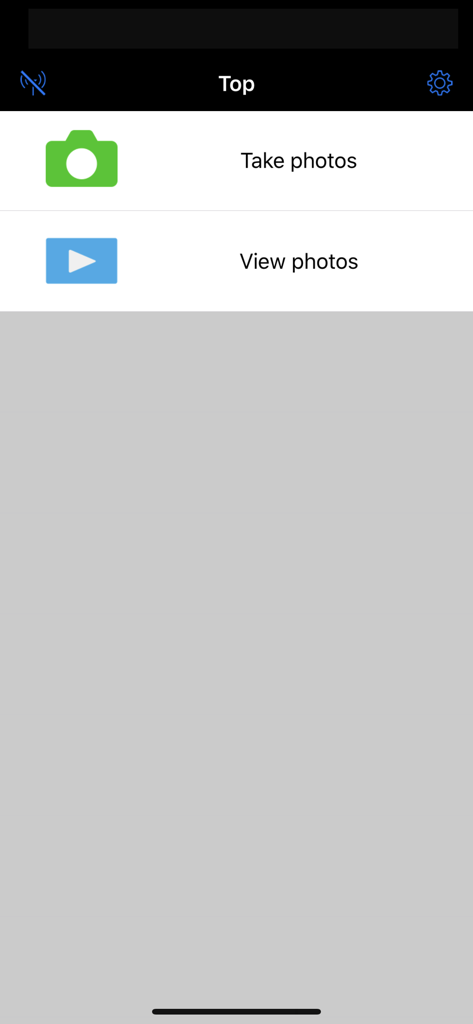
Main menu of the Nikon Wireless Mobile Utility app displaying options to take and view photos
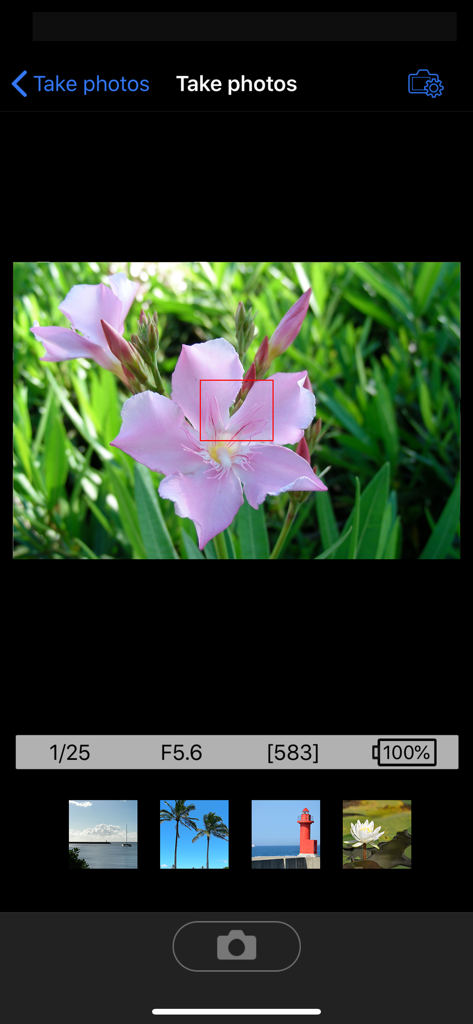
Remote shooting interface of the Nikon Wireless Mobile Utility app displaying a live view of a pink flower
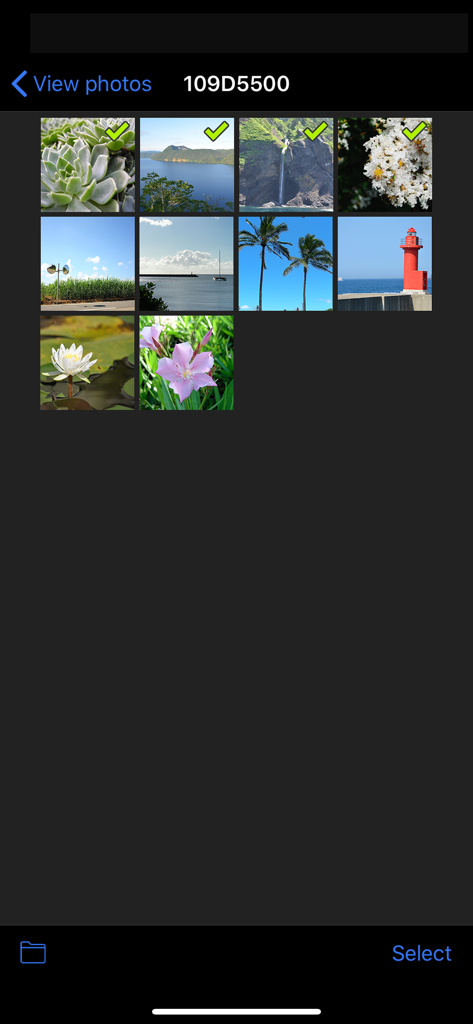
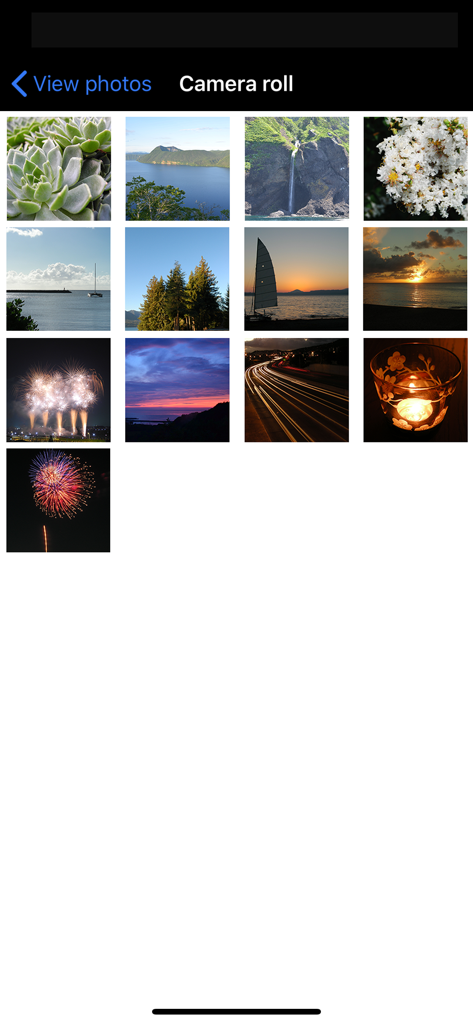
Photo selection screen in the Nikon Wireless Mobile Utility app showing a grid of images ready for transfer
A grid view of high-quality landscape and macro photos inside the Nikon Wireless Mobile Utility app camera roll.
Bring Modern Connectivity to Your Trusted Nikon
The tools that make this app stand out, trusted by 4M+ users.
📲
Instant Wireless Download
Ditch the cables and SD card readers. Transfer high-resolution photos from your DSLR directly to your iOS device for immediate editing and sharing.
📱
Remote Control Live View
Use your smartphone as a professional remote monitor and shutter. Perfect for family portraits, wildlife, and capturing creative angles from a distance.
🌍
Travel-Ready Geo-Tagging
Keep your digital memories organized. Automatically sync location data from your iPhone to your Nikon photos during every upload.
About the app
Everything you need to know about Wireless Mobile Utility.
Description
The Wireless Mobile Utility connects your iPhone, iPad, or iPod touch to Nikon digital cameras wirelessly (via Wi-Fi), letting you download photos, take pictures remotely, and share them hassle-free via e-mail or upload to social networking sites.
•Principal Features
-View the scene through the camera lens live in the app window.
-Establish a wireless connection and take pictures with the camera or remotely from the iOS device (see note).
-Automatically add new pictures to the camera roll.
-View existing pictures remotely and add selected photos to the camera roll.
-Pass photos to other apps via iOS file-sharing and share them hassle-free.
-Add location data from the iOS device to pictures during upload.
-Control optical zoom on COOLPIX cameras (see note).
-Make pictures brighter or darker with the live view window (see note).
-Use the camera to select pictures for download before connecting (see note).
-Take pictures with the self-timer.
-Synchronize the camera clock with iOS devices.
•Cautions
- Cannot be operated with a SnapBridge-compatible camera.
-Note: The features available vary with the camera. See the camera manual or the link below for details.
-The app may not recognize photos taken with non-supported cameras.
-The app can not be used to download movies or record movies remotely.
-Download of Motion Snapshots is restricted to the photograph portion only.
-Only one camera can be connected at a time.
-Performance varies with network and local conditions.
•User's Manual
For more information, see the app manual, which can be downloaded from the following URL:
http://nikonimglib.com/ManDL/WMAU-ios/
•Terms of Use
Before using the app, download and read the End User License Agreement, available at the following URL:
http://nikonimglib.com/eula/WMAU-ios/
Supported Digital Cameras
Requires a camera with built-in wireless LAN or support for the WU-1a/b wireless mobile adapter.
D610, D600, D750, D7200, D7100, D3300, D3200, D5500, D5300, D5200, Df
Nikon 1 V3, V2, J5, J4, J3, S2, S1, AW1
COOLPIX S7000, S6900, S6800, S6600, S6500, S9900(s), S9700(s), S9600, S9500, S5300, S5200, S3700, L810, P520, P330, P7800, P900(s), P610(s), P600, P530, P340, COOLPIX A, AW130(s), AW120(s), AW110, AW110s,
Cameras that have been confirmed to work (as of March 2025)
D750, D7200, D7100, D5500, D5300, D3300, Df, J5, P900, S7000, S3700, AW130
iOS Device System Requirements
iOS18.3
There is no guarantee that this app will run on all devices.
•Trademark Information
iPad, iPhone, and iPod touch are trademarks or registered trademarks of Apple Inc. in the United States and/or other countries. All other trade names mentioned in this document are the trademarks or registered trademarks of their respective holders.
Latest Version
1.6.3
Size
4.1 MB
First Released
Sep 14, 2012
Bring Your Nikon Masterpieces to Your iPhone
Stop waiting to get home to your computer. Download the Wireless Mobile Utility today and start sharing professional-quality photos directly from the camera you love.
FAQ
Frequently Asked Questions
Everything you need to know about Wireless Mobile Utility
What is the Nikon Wireless Mobile Utility app?
The Wireless Mobile Utility connects your iPhone, iPad, or iPod touch to Nikon digital cameras wirelessly via Wi-Fi. It allows users to download photos, take pictures remotely, and share them easily.
Can I take photos remotely with the Wireless Mobile Utility app?
Yes, the Wireless Mobile Utility app allows users to take pictures remotely from their iOS device. It also provides a live view through the camera lens in the app window.
Can I view and download photos from my camera using the Wireless Mobile Utility app?
Yes, the Wireless Mobile Utility app enables users to view existing pictures remotely from the camera. Selected photos can then be added to the iOS device's camera roll.
Does the Wireless Mobile Utility app support SnapBridge-compatible cameras?
No, the Wireless Mobile Utility app cannot be operated with a SnapBridge-compatible camera. It is designed for specific Nikon models requiring built-in Wi-Fi or a WU-1a/b adapter.
Can the Wireless Mobile Utility app download or record videos?
No, the Wireless Mobile Utility app cannot be used to download movies or record movies remotely. It focuses on still image transfer and remote control functions.
What are the iOS system requirements for the Wireless Mobile Utility app?
The Wireless Mobile Utility app requires iOS18.3. There is no guarantee that this app will run on all iOS devices, even if the system requirement is met.
Can the Wireless Mobile Utility add location data to photos?
Yes, the Wireless Mobile Utility app adds location data from the iOS device to pictures during upload. This feature is part of its principal functionalities.
Does the Wireless Mobile Utility app support optical zoom control?
Yes, the Wireless Mobile Utility app allows control over optical zoom on compatible COOLPIX cameras. The specific features available vary with the connected camera model.
Does the Wireless Mobile Utility app synchronize camera time?
The Wireless Mobile Utility app can synchronize the camera clock with iOS devices. This ensures consistent timekeeping across your camera and mobile device.
Which cameras are compatible with the Wireless Mobile Utility app?
The Wireless Mobile Utility app supports specific Nikon D-series, Nikon 1, and COOLPIX cameras. It requires a camera with built-in wireless LAN or support for the WU-1a/b wireless mobile adapter.
App information, icons, screenshots, and descriptions displayed on this page are sourced from the Apple App Store and are the property of their respective developers. Download estimates and rankings are based on MWM's proprietary models and may not reflect actual figures. This page is provided for informational and analytical purposes only.
Believe this page infringes your intellectual property? File a dispute