WordClock Widget

WordClock Widget

Download on App Store
Logo of WordClock Widget

WordClock Widget: Transform Your Time into Minimalist Art

Elevate your iPhone with elegant, word-based typography. Personalize your home screen and StandBy mode with beautiful themes and 20+ languages—all with a privacy-first approach and zero ads.

Download on App Store

Publisher

Tobias Weissert

Category

Utilities

Downloads

300

User Rating

1.0/5

Total Ratings

0

Locales

21

Elegance in Every Word

Discover the interface used by 300 users.
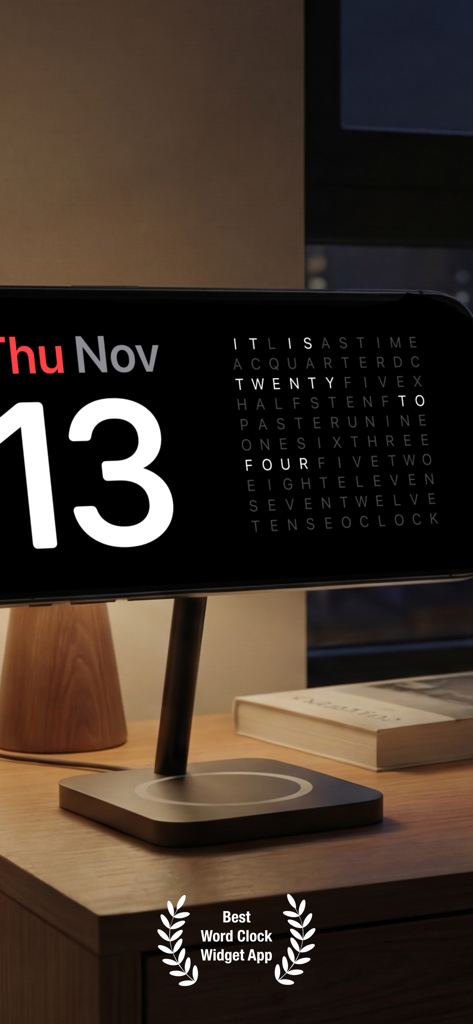
iPhone on a charging stand displaying the WordClock widget in StandBy mode

iPhone on a charging stand displaying the WordClock widget in StandBy mode

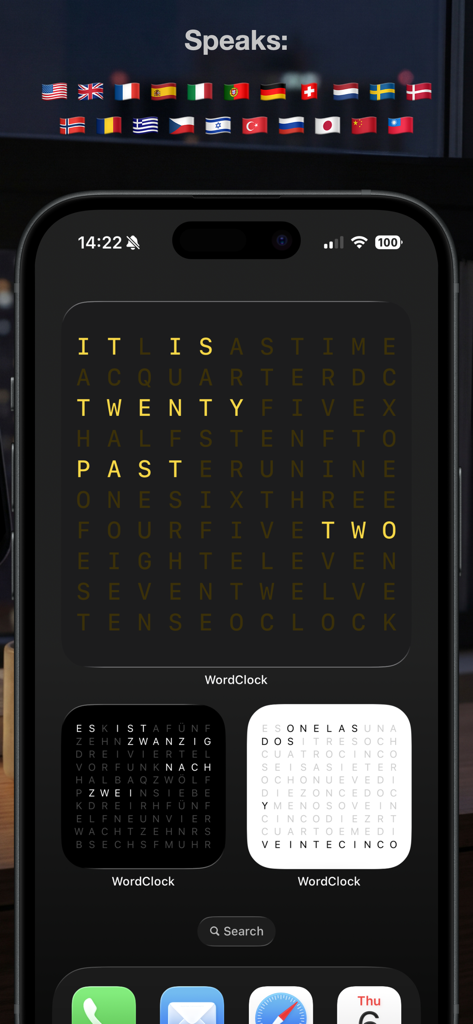
iPhone home screen showing WordClock widgets in English, German, and Spanish with international flags above.

iPhone home screen showing WordClock widgets in English, German, and Spanish with international flags above.

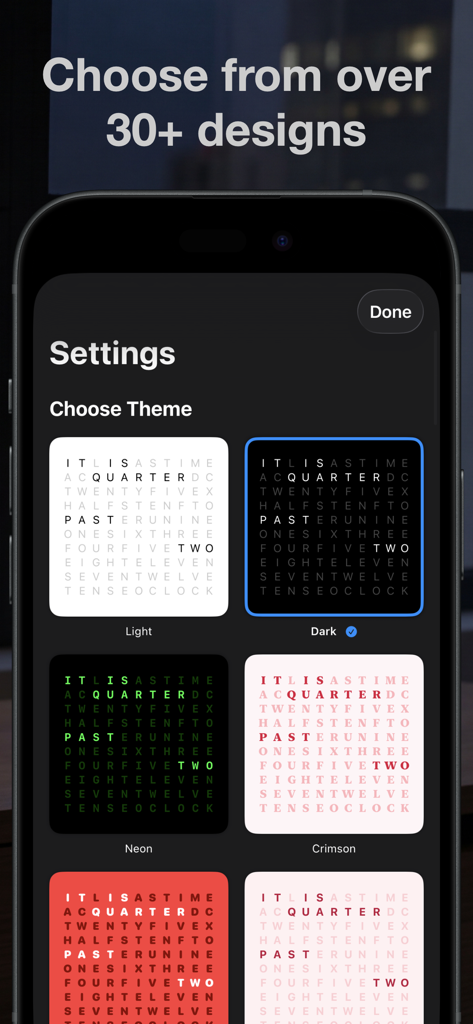
iPhone screen showing the theme selection menu for WordClock Widget with various designs like Light, Dark, Neon, and Crimson.

iPhone screen showing the theme selection menu for WordClock Widget with various designs like Light, Dark, Neon, and Crimson.

Elevate Your iPhone’s Aesthetic

The tools that make this app stand out, trusted by 300 users.

🎨

Curated Home Widgets

Available in multiple sizes and themes to match your personal vibe and minimalist home screen setups.

🌙

Elegant StandBy Mode

Transform your phone into a sophisticated ambient clock that looks stunning on any MagSafe charging stand.

🛡️

Privacy by Design

Enjoy a premium experience with zero tracking, no ads, and no subscriptions—just beautiful time, locally on your device.

About the app

Everything you need to know about WordClock Widget.

Description

Turn your iPhone into an elegant word clock that displays time in beautiful typography. See the current time expressed in natural language, right on your home screen. BEAUTIFUL TYPOGRAPHY Word Clock transforms the way you see time. Instead of traditional digits, time is displayed as elegant words arranged in a grid. Each minute, the display updates to show the current time in a visually stunning way. MULTIPLE LANGUAGES Choose from 20+ languages including English, German, French, Spanish, Italian, Japanese, Chinese, and more. Each language has its own unique way of expressing time, making Word Clock perfect for language learners and multilingual users. CUSTOMIZABLE THEMES Personalize your clock with beautiful themes. Choose from light, dark, neon, and color-themed options. Each theme features carefully selected colors that make the active words pop while keeping inactive words subtle. HOME SCREEN WIDGET Keep time visible at all times with beautiful home screen widgets. Available in small and large sizes, Word Clock widgets update automatically and blend seamlessly with your home screen design. STAND BY MODE Perfect for nightstand use, Word Clock supports StandBy mode on iPhone. Display time elegantly while your phone charges, creating a beautiful ambient clock for your bedroom. KEY FEATURES • Word-based time display in elegant typography • Support for 20+ languages • Multiple beautiful themes • Home screen widgets (small and large) • StandBy mode support • Real-time updates every minute • Clean, minimalist interface • No ads, no subscriptions PRIVACY FIRST Word Clock doesn't collect any data. Everything runs locally on your device. No tracking, no analytics, no external servers. Whether you're looking for a unique way to display time, want to practice reading time in different languages, or simply appreciate beautiful design, Word Clock brings elegance to your iPhone. Start experiencing time differently today!

Latest Version

1.1.2

Size

1.4 MB

First Released

Nov 10, 2025

Transform Your Home Screen into a Work of Art

Experience time through elegant typography and minimalist design. No ads, no subscriptions, and 100% private—start your aesthetic journey with WordClock today.

Download on App Store
FAQ

Frequently Asked Questions

Everything you need to know about WordClock Widget

What is the WordClock Widget?

The WordClock Widget transforms your iPhone into an elegant word clock. It displays the current time using beautiful typography and natural language instead of traditional digits.

Does the WordClock Widget support multiple languages?

Yes, WordClock Widget supports over 20 languages. Users can choose from languages such as English, German, French, Spanish, Italian, Japanese, and Chinese.

Can users customize the appearance of the WordClock Widget?

Yes, WordClock Widget offers customizable themes. Users personalize their clock with various options like light, dark, neon, and color-themed designs.

Does the WordClock Widget have home screen widgets?

Yes, WordClock Widget includes home screen widgets. These widgets are available in small and large sizes and update automatically to blend seamlessly with your home screen design.

Is the WordClock Widget compatible with iPhone StandBy mode?

Yes, WordClock Widget supports StandBy mode on iPhone. It elegantly displays the time while the phone charges, creating an ambient clock perfect for nightstand use.

Does the WordClock Widget collect user data?

No, WordClock Widget does not collect any user data. All processing runs locally on your device, ensuring no tracking, analytics, or external servers are involved.

Does the WordClock Widget contain ads or require subscriptions?

No, WordClock Widget is free from ads and does not require any subscriptions. It offers a clean, minimalist interface without additional costs.

How often does the WordClock Widget update the time display?

The WordClock Widget updates its display every minute. This ensures the current time is always accurately expressed in natural language.

App information, icons, screenshots, and descriptions displayed on this page are sourced from the Apple App Store and are the property of their respective developers. Download estimates and rankings are based on MWM's proprietary models and may not reflect actual figures. This page is provided for informational and analytical purposes only.

Believe this page infringes your intellectual property? File a dispute