
This page is not an official page of the app or its developer, but an independent editorial publication created for informational and commentary purposes. Unless expressly stated otherwise, neither the app nor its developer is affiliated with, endorsed by, sponsored by, authorized by, or otherwise officially connected with MWM, Apple, Google Play, the app publisher, or the app's developer, and nothing on this page implies that the app was developed using MWM's services. Any trademarks, logos, screenshots, and other content remain the property of their respective owners.


X Icon Changer: Customize Icon
Tired of the same old look? This app hands you the keys to your iPhone's aesthetic, letting you ditch generic icons for a style that's actually yours.
Downloads
1M+User Rating
Total Ratings
15.7KPublisher
Category
Graphics & DesignLocales
1Latest Version
1.3.6Size
46.6 MBFirst Released
Jan 14, 2022An analytical overview for personalizing your mobile experience.
Key Features of X Icon Changer: Customize Icon
Free Access to Premium Content
The app provides entirely free access to its core functionality and an extensive library of personalized icon packs, catering to users who seek creative customization without financial commitment.
Customizable App Icons
It allows users to fully change the default icons for any application on their device, offering a fundamental way to personalize the visual aesthetic of their home screen.
Personal Image Integration for Icons
This tool features the ability to select any image from the user's gallery to serve as a custom app icon, enabling deep personal expression and unique artistic flair.
Customizable App Names
The app allows users to edit and rename their applications, providing an additional layer of personalization beyond just visual changes.
Curated Icon Pack Library
It offers a diverse selection of built-in, pre-designed icon packs, providing users with ready-to-use aesthetic themes for quick and stylish customization.
Home Screen Shortcut Creation
This tool automatically creates a new shortcut on the home screen for each customized app, seamlessly integrating the new icon and name without altering the original application.
Frequently Asked Questions
Everything you need to know about X Icon Changer: Customize Icon
Is X Icon Changer: Customize Icon a free application?
Yes, X Icon Changer is a totally free app. The application and all personalized icon packs are available to download and use without any cost.
What is X Icon Changer: Customize Icon used for?
X Icon Changer is an application designed to help users change and customize the icons and names for any apps on their iPhone. It creates new shortcut icons on the home screen.
How do I change app icons using X Icon Changer: Customize Icon?
To change app icons with X Icon Changer, enter the app, choose an application, select a new icon from built-in packs or your gallery, and optionally edit the app's name. The new shortcut then appears on your home screen.
Can users customize app icons with personal photos in X Icon Changer?
Yes, X Icon Changer allows users to select new icons from their own photo gallery. This feature enables personal images to be used as customized app shortcuts.
Does X Icon Changer: Customize Icon allow users to change app names?
Yes, X Icon Changer provides the option to edit a new name for the application. This customized name appears alongside the newly created shortcut icon on the home screen.
Where do the new customized app icons appear after using X Icon Changer?
X Icon Changer creates a shortcut to the new icon directly on your iPhone's home screen. This customized shortcut icon visually replaces the original app's representation.
The following screenshots and description are sourced directly from the app's official store listing and are the property of the app developer.
App Store
Screenshots

The app presents a streamlined interface where users can easily select any installed application from a searchable list to begin the customization process.
App Selection Simplified
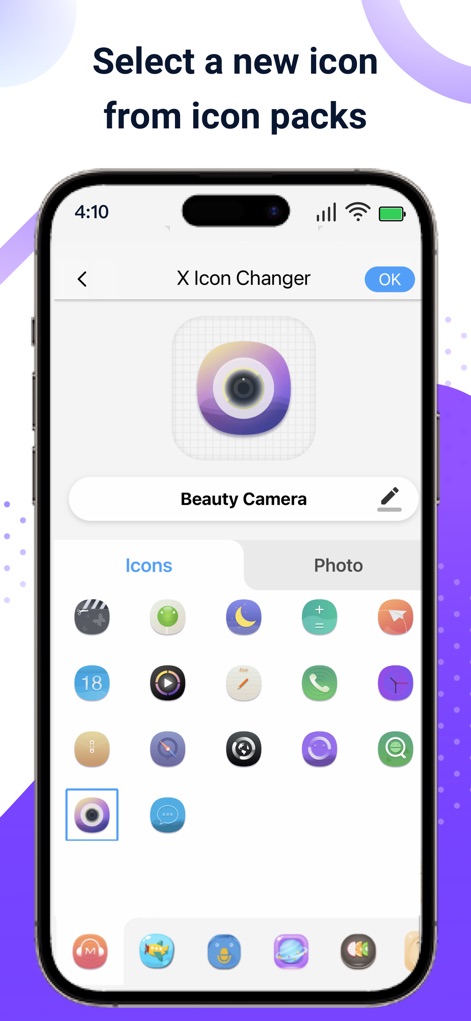
Users can browse through diverse built-in icon packs, previewing their chosen selection with an editable name field before applying the new look.
Icon Pack Selection
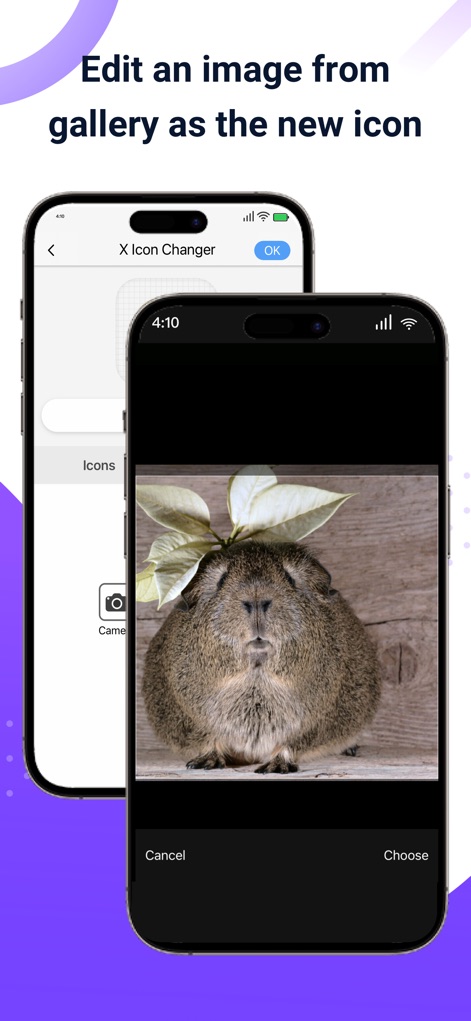
This tool allows users to import personalized images directly from their gallery, providing 'Choose' and 'Cancel' options for precise selection.
Gallery Image Integration

Observe the seamless integration of the customized icon onto the home screen, complete with a celebratory sparkling effect indicating successful application.
Home Screen Integration

This app showcases its extensive array of selected built-in icon packs, presenting various themed clusters to cater to diverse aesthetic preferences.
Diverse Icon Collections
Description
Download
More Like This
Apps with similar features and user experience

iScreen - Widgets & Wallpaper
Xiamen ShenZhuo Information Technology Co., Ltd.

Top Widgets⁺ Icons & Themes
Chengdu Tiange Technology Co., Ltd

Colorful Widget- Widget&Themes
Guangzhou ZHIFENG Information Technology Co.,Ltd.

最美壁纸-手机动态主题AI壁纸
文彬 黄

Clockology Watch Faces
Clockology, LLC

全能实况 - 实况壁纸制作器&视频转实况动态壁纸
Xiamen Infinity Starway Technology Co., Ltd.

Fun Widgets-Widgets&Wallpapers
Beijing Curious Cat Co.Ltd

屏幕精灵 - 个性的动态壁纸&充电动画&来电壁纸秀
Guangzhou Shuhong Network Technology Co., Ltd.

Themes - Widget & Icon Themes
S.HOUSING INTERIOR ARCHITECTURE COMPANY LIMITED
This page is not an official page of the app or its developer, but an independent editorial publication created for informational and commentary purposes. Unless expressly stated otherwise, neither the app nor its developer is affiliated with, endorsed by, sponsored by, authorized by, or otherwise officially connected with MWM, Apple, Google Play, the app publisher, or the app's developer, and nothing on this page implies that the app was developed using MWM's services. Any trademarks, logos, screenshots, and other content remain the property of their respective owners.