
This page is not an official page of the app or its developer, but an independent editorial publication created for informational and commentary purposes. Unless expressly stated otherwise, neither the app nor its developer is affiliated with, endorsed by, sponsored by, authorized by, or otherwise officially connected with MWM, Apple, Google Play, the app publisher, or the app's developer, and nothing on this page implies that the app was developed using MWM's services. Any trademarks, logos, screenshots, and other content remain the property of their respective owners.


新东方云教室
The online classroom, reborn. It redefines virtual interaction, empowering users to connect and learn without compromise.
Downloads
2.5M+User Rating
Total Ratings
46.4KPublisher
Category
BusinessLocales
1Latest Version
2.71.5Size
233.6 MBFirst Released
Aug 19, 2019An analysis of the core functionalities enabling interactive and stable online learning environments.
新东方云教室 (Roombox) App Evaluation: Key Features
High-Quality & Stable Audio-Visual Communication
The app provides a high-definition, smooth, secure, and stable audio-visual communication experience, essential for clear and uninterrupted online interactions.
Advanced Engagement & Moderation Tools
This tool features a comprehensive set of interactive elements, including fun tools, emojis, and rewards. It also offers robust moderation controls such as hand-raising, quick answering, authorization, stage management, and mic control, allowing instructors or hosts to manage participant engagement and maintain an active learning environment effectively.
Interactive Group Learning & Collaboration
The app supports interactive 1-to-N rooms, facilitating group cooperative scenarios with multi-person video capabilities and breakout discussion rooms. This feature is crucial for collaborative learning and teamwork.
Versatile Real-time Communication Scenarios
It allows users to conduct a wide array of real-time communication activities, including online meetings, tutoring sessions, and corporate training, making it adaptable to diverse educational and professional needs.
Cross-Platform Compatibility
This tool is compatible with various common client terminals, ensuring broad accessibility for users across different devices and operating systems.
Intuitive & User-Friendly Interface
The app offers an easy-to-use interface, simplifying navigation and operation for all users, from students to professionals, reducing the learning curve and enhancing user experience.
Frequently Asked Questions
Everything you need to know about 新东方云教室
What is the primary function of 新东方云教室 (Roombox)?
新东方云教室 (Roombox) is an audio and video communication tool for online meetings, teaching, and enterprise training. It provides high-definition, stable, and secure real-time interactive solutions for various scenarios.
What interactive tools does Roombox offer for engagement?
Roombox offers rich interactive tools to boost engagement. These include quiz tools, a small blackboard, red packet rain, rewards, and controls like raising hands, snatching answers, and managing stage permissions.
Can Roombox host large-scale live broadcasts?
Yes, Roombox supports multi-type live broadcast modes, including small micro live, hundreds of people live, joint live, and ten thousand people live sessions. This allows for diverse audience sizes.
Is 新东方云教室 (Roombox) accessible on different devices?
Yes, 新东方云教室 (Roombox) is compatible with various common client terminals. This ensures users can access its features across different platforms and devices seamlessly.
Does Roombox include features for user comfort during streams?
Yes, Roombox integrates considerate live broadcast functions for user comfort. These include an eye protection mode, a focus mode, and a beauty mode to optimize the streaming experience.
The following screenshots and description are sourced directly from the app's official store listing and are the property of the app developer.
App Store
Screenshots

See how 新东方云教室 visually celebrates achievements with prominent reward indicators and showcases active participant video feeds, fostering an engaging learning atmosphere.
Dynamic Engagement Rewards

This app integrates a comprehensive interactive quiz interface and a unique red envelope reward system to boost user participation and engagement.
Interactive Learning Tools

The app offers diverse live broadcast modes, from micro-sessions to large-scale events, clearly presented alongside a multi-participant video mosaic for enhanced collaboration.
Flexible Broadcast Modes
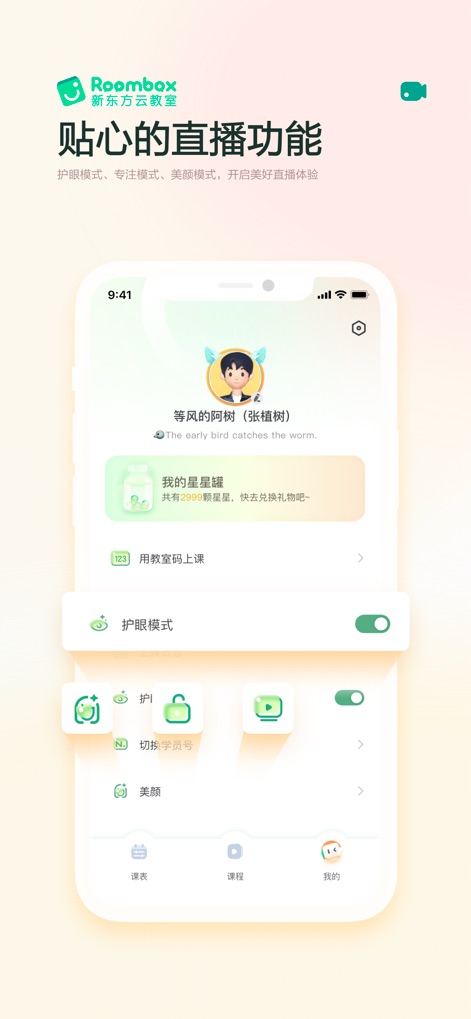
Users can customize their learning environment through features like the eye protection mode toggle and beautify filter options, accessible within a well-organized personal settings panel.
Personalized User Experience
Description
Download
More Like This
Apps with similar features and user experience

ClickMeeting Webinars Meetings
ClickMeeting Sp. z o.o.

VK Calls
VK LLC

join.me - Simple Meetings
GoTo Group, Inc.

Zoho Webinar - Online Webinars
Zoho Corporation

Flow IM: Video Conferencing
Portable Ltd

微赞-企业直播视频营销平台
Guangzhou Appreciate Information Technology Co., Ltd.

爱问云
Yixing Aiwen Technology Co., Ltd.

G-Net MeetNow
G-Net Cloud Service Co., Ltd.

京ME会议
Jingdong Technology Information Technology Co., Ltd.
This page is not an official page of the app or its developer, but an independent editorial publication created for informational and commentary purposes. Unless expressly stated otherwise, neither the app nor its developer is affiliated with, endorsed by, sponsored by, authorized by, or otherwise officially connected with MWM, Apple, Google Play, the app publisher, or the app's developer, and nothing on this page implies that the app was developed using MWM's services. Any trademarks, logos, screenshots, and other content remain the property of their respective owners.