
This page is not an official page of the app or its developer, but an independent editorial publication created for informational and commentary purposes. Unless expressly stated otherwise, neither the app nor its developer is affiliated with, endorsed by, sponsored by, authorized by, or otherwise officially connected with MWM, Apple, Google Play, the app publisher, or the app's developer, and nothing on this page implies that the app was developed using MWM's services. Any trademarks, logos, screenshots, and other content remain the property of their respective owners.


ZArchiver
Storage limits are dead. This app hands users the power to shrink, organize, and share their digital world without compromise.
Downloads
2.5M+User Rating
Total Ratings
16.7KPublisher
Category
UtilitiesLocales
10Latest Version
13.2Size
57.0 MBFirst Released
Aug 19, 2022An analytical overview of key functionalities for mobile file handling.
ZArchiver: Essential File Management & Archiving
Diverse Archive Extraction
It allows users to effortlessly extract content from various archive formats, including ZIP, RAR, and 7z, ensuring access to a wide range of compressed files.
Multi-format File Compression
The app provides robust compression capabilities, supporting popular formats like ZIP and 7z, allowing users to efficiently reduce file sizes for storage and transfer.
Integrated RAR File Support
The app provides a dedicated RAR file reader, enabling users to open and extract content from RAR archives directly on their mobile device without needing external tools.
Optimized for Sharing
This tool features functions specifically designed to reduce file and folder sizes, making it easier and faster to send large attachments via email or messaging platforms.
Document & Media Optimization
This tool features specialized compression for common document types (PDF, DOCX, XLSX) and media files (photos, videos), helping to significantly shrink their size without compromising essential content.
Complete Folder Archiving
The app provides the ability to compress entire folders, consolidating multiple files and subfolders into a single archive, which is ideal for organized sharing and backup.
Frequently Asked Questions
Everything you need to know about ZArchiver
What is ZArchiver used for?
ZArchiver is a file compressor and zip file opener. It extracts and compresses various file types, including documents, photos, and videos, reducing their size and managing archives.
Which file types can ZArchiver compress and extract?
ZArchiver compresses and extracts doc, docx, ppt, pptx, xls, xlsx, pdf, txt, 7z, Rar, photos, and videos. It also reads Rar files.
Does ZArchiver offer a subscription for its features?
Yes, ZArchiver offers auto-renewing subscriptions for ad-free access. Options include weekly ($2.99), 1-month ($4.99), and 1-year ($29.49) durations.
How can I remove ads in the ZArchiver app?
Users can remove ads in the ZArchiver app by purchasing an auto-renewing subscription. This provides access to all app features without advertisements.
Can I share files using the ZArchiver app?
Yes, ZArchiver allows users to share files and folders after compressing them. The app also supports Wi-Fi transfer, as shown on the "Send File" screen.
Does ZArchiver allow file management operations like deleting or renaming?
Yes, ZArchiver provides file management options. Users can rename, move, copy, send, archive, and delete files directly within the application interface.
How do I compress files using the ZArchiver application?
Users open the app, select desired photos, videos, or documents, and then compress them using the zip tool within ZArchiver.
Where can I find the Privacy Policy for ZArchiver?
The Privacy Policy for ZArchiver is available at the provided link: https://zipunzipextractor.blogspot.com/2022/08/privacy-policy.html.
The following screenshots and description are sourced directly from the app's official store listing and are the property of the app developer.
App Store
Screenshots
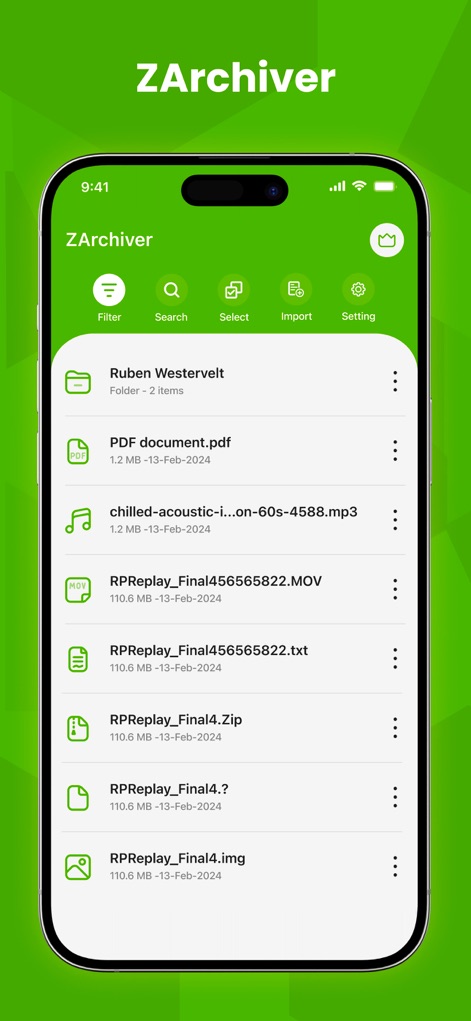
See how the app neatly organizes diverse file types like PDF documents and MP3 audio, alongside a convenient navigation bar for quick access to Filter and Search functions.
Intuitive File Explorer
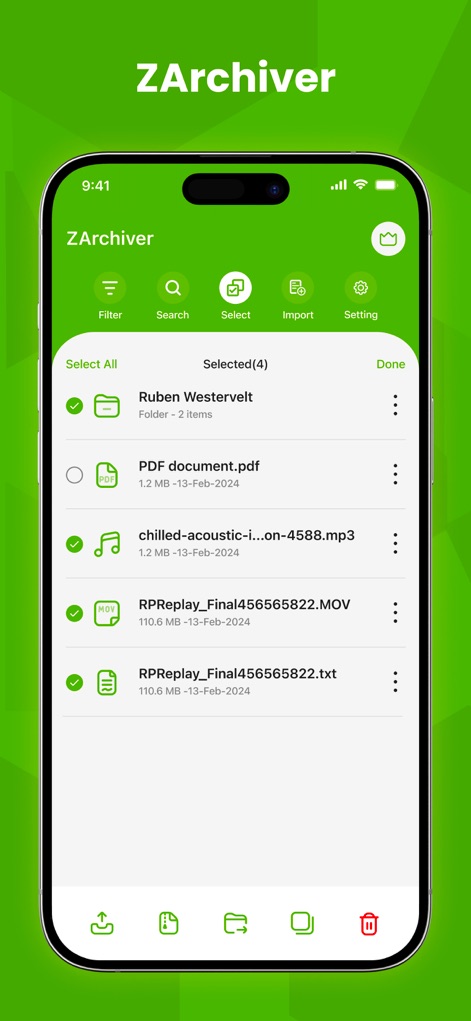
Users can efficiently manage multiple files by utilizing the clear selection checkboxes and the streamlined bottom action bar for operations like copying or deleting.
Effortless File Management
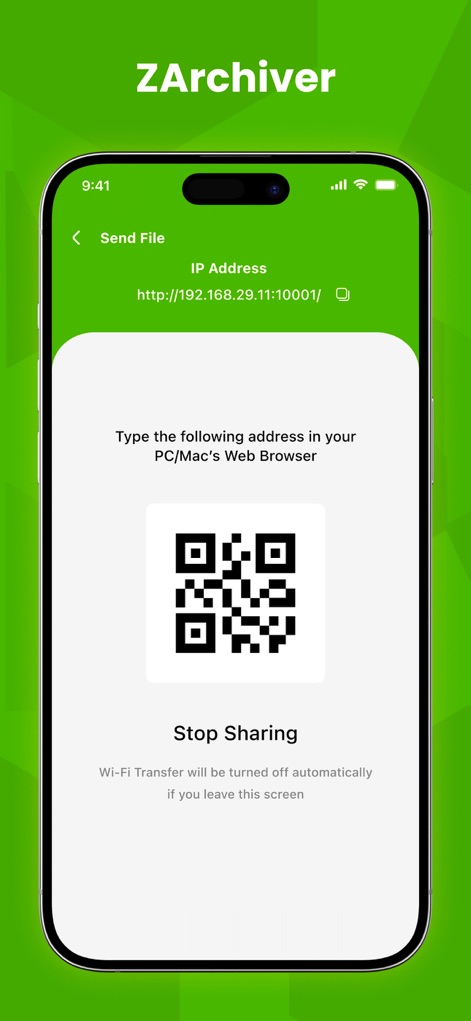
This tool offers a secure file sharing method, displaying both an IP address for direct browser access and a scannable QR code for convenient transfers.
Seamless File Sharing
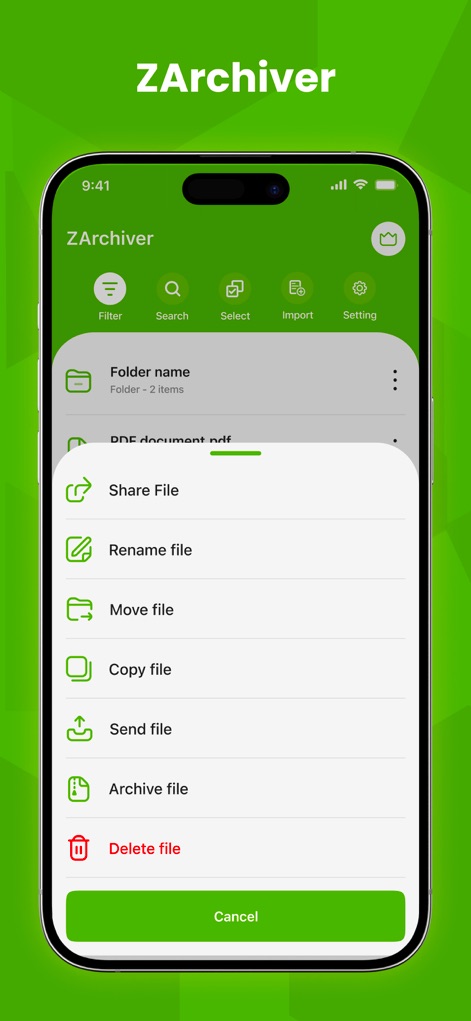
Explore the extensive context menu, which provides users with direct options to 'Archive file' for compression and 'Share File' for quick distribution.
Comprehensive File Actions
Description
Download
More Like This
Apps with similar features and user experience

Unzip – ZIP RAR 7Z Extractor
Little Sweet Technology Co., Ltd.

Unzip - zip,rar,7z file opener
书勇 贾

Zip & RAR File Extractor
PENGHUI ZHAO

iZip – Zip Unzip Unrar
ComcSoft Corporation

Zip, RAR, 7z File Extractor
FANGZHOU INTERACTIVE TECHNOLOGY CO., LIMITED

ZArchiver: UnZip, UnRar, 7Z
TIMON SOFTWARE SOLUTIONS COMPANY LIMITED

iRAR - zip,rar,7z file opener
书敏 贾

Zip & RAR & 7z File Extractor
琳 胡

MT管理器
瑞 胡
This page is not an official page of the app or its developer, but an independent editorial publication created for informational and commentary purposes. Unless expressly stated otherwise, neither the app nor its developer is affiliated with, endorsed by, sponsored by, authorized by, or otherwise officially connected with MWM, Apple, Google Play, the app publisher, or the app's developer, and nothing on this page implies that the app was developed using MWM's services. Any trademarks, logos, screenshots, and other content remain the property of their respective owners.