
このページはアプリまたはその開発者の公式ページではなく、情報提供および論評を目的として作成された独立した編集出版物です。明示的に別段の記載がない限り、アプリおよびその開発者は、MWM、Apple、Google Play、アプリのパブリッシャー、またはアプリの開発者と提携、承認、後援、認可、またはその他の公式的な関係はなく、このページのいかなる内容も、アプリがMWMのサービスを使用して開発されたことを意味するものではありません。すべての商標、ロゴ、スクリーンショット、その他のコンテンツはそれぞれの所有者の財産です。


KineMaster (OLD)
手のひらで映像を彫刻する。このツールは、単なる編集を超え、クリエイターの意志を視覚言語へと昇華させる力を持っていた。
ダウンロード
25M+ユーザー評価
評価数
261.0K開発元
カテゴリ
Photo & Video対応言語
18最新バージョン
5.2.17(1329)サイズ
97.5 MBリリース日
2017年4月28日KineMaster (OLD) アプリケーションの主要機能分析
テックアナリストによる詳細評価とユーザーインパクト分析
4K 60FPSでの高画質出力
ユーザーは、自身の動画プロジェクトを最高品質の4K解像度、60フレーム/秒で保存することが可能です。これにより、プロフェッショナルな視聴体験を提供し、高品質なコンテンツ制作の要求に応えます。
プレミアム購読による機能強化
プレミアム購読により、ユーザーは動画のウォーターマークを削除し、広告なしの環境で編集作業を行い、アセットストアの全コンテンツに無制限にアクセスできます。これは、プロフェッショナルな動画制作を目指すユーザーにとって、より洗練されたブランドイメージを構築するために不可欠なオプションです。
豊富なアセットストア
本アプリは、トランジション、エフェクト、動画、画像、ステッカー、フォント、アニメーションなど、検索可能でダウンロード可能な多種多様なアセットを内蔵ストアから提供します。これにより、ユーザーは動画の表現力を豊かにし、視覚的に魅力的なコンテンツを容易に作成できます。
動画テンプレートの利用
ユーザーは、提供される動画テンプレートをダウンロードし、自身のコンテンツに合わせて再編集することが可能です。これにより、動画編集の経験が少ないユーザーでも、短時間でプロフェッショナルな見た目の動画を作成できます。
基本的な動画・画像編集ツール
このツールは、動画や画像のカット、トリミング、ズームといった基本的な編集操作を提供します。ユーザーは、自身の素材を正確に調整し、ストーリーテリングに必要な部分のみを効果的に利用できます。
アプリの無料利用
このアプリケーションは、基本的な編集機能を完全に無料で利用できます。これにより、初期費用をかけずに動画編集を始めることが可能となり、幅広いユーザー層にアクセスを提供します。
よくある質問
について知っておくべきこと KineMaster (OLD)
What are the main features of KineMaster (OLD)?
KineMaster (OLD) enables video creation with tools to cut, crop, zoom, and save in 4K at 60FPS. It also provides downloadable templates, assets from the Asset Store, and features for text, effects, and transitions.
Is KineMaster (OLD) a free application?
Yes, KineMaster (OLD) is completely free to use. Users can access additional features and remove the watermark with a KineMaster Premium subscription.
What benefits does a KineMaster Premium subscription offer?
A KineMaster Premium subscription removes the KineMaster watermark, provides an ad-free experience, and grants unlimited access to the entire Asset Store for enhanced video editing.
Can users download and re-edit video templates in KineMaster (OLD)?
Yes, KineMaster (OLD) allows users to download and re-edit video templates directly within the application to streamline their video creation process.
Does KineMaster (OLD) support 4K video export?
Yes, KineMaster (OLD) supports saving videos in high resolution, including 4K at 60 frames per second, ensuring high-quality output for users.
How can I access additional assets for video editing in KineMaster (OLD)?
KineMaster (OLD) users can access additional assets like transitions, effects, stickers, and fonts through the KineMaster Asset Store. A Premium subscription offers unlimited access.
Can I use Chroma Key for green screen effects in KineMaster (OLD)?
Yes, KineMaster (OLD) includes a Chroma Key feature. Users can enable and adjust the key color and detail curve to create professional green screen effects.
Does KineMaster (OLD) offer color correction tools?
Yes, KineMaster (OLD) provides powerful color controls for video adjustment. Users can modify parameters such as shadows, gain, and gamma to enhance their video's appearance.
What types of content can KineMaster (OLD) be used for?
KineMaster (OLD) is used by creators for YouTube, TikTok, and Instagram videos. Journalists, educators, marketers, and vloggers also utilize it professionally for various content creation needs.
Does KineMaster (OLD) have an option to record audio or video directly within the app?
Yes, KineMaster (OLD) features a "Built-in Recording Studio". This allows users to record audio or video directly within the application using the REC button on the interface.
以下のスクリーンショットと説明は、アプリの公式ストアリスティングから直接取得されたものであり、アプリ開発者の所有物です。
アプリストア
スクリーンショット

高度な編集機能
直感的なインターフェースで、複数のレイヤーを組み合わせた動画制作が可能です。特に、メインプレビュー画面とタイムライン表示により、複雑な編集も視覚的に把握できます。

プロジェクトを再利用
豊富なテンプレートライブラリから既存のプロジェクトを選択し、カスタマイズが可能です。レトロやミュージックビデオなど、多様なカテゴリからインスピレーションを得られます。

魅力的なアセット追加
2,500以上の豊富なアセットストアから、多様なトランジションエフェクトを動画に追加できます。プレビュー機能とタイムライン表示で、効果の適用状況を瞬時に確認可能です。

音声調整を自在に
内蔵された録音スタジオ機能により、音声のボリュームエンベロープを細かく調整できます。タイムライン上の波形表示で、オーディオのタイミングとレベルを視覚的に管理できます。

テキスト表現を豊かに
テキストのフォント、色、配置など、多様なオプションで文字をスタイライズできます。画面上での直接的なテキスト編集と、タイムラインでの位置調整により、クリエイティブな表現が可能です。

動的なグラフィック
クリップグラフィック機能を利用して、魅力的な視覚効果やアニメーションを簡単に動画に追加できます。選択可能なグラフィックの豊富さと、プレビューでの即時確認が特徴です。
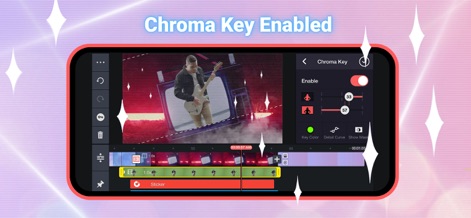
高度なクロマキー
プロフェッショナルなクロマキー機能により、指定した色を背景から正確に除去できます。キーカラー選択とディテールカーブ調整で、合成の精度を最大化します。

強力な色彩調整
強力なカラーコントロール機能で、シャドウ、ゲイン、ガンマなどの要素を細かく調整し、動画の雰囲気を劇的に変化させられます。リアルタイムプレビューで、変更の効果を即座に確認可能です。

高解像度で出力
4K 2160Pや2K 1440Pといった高解像度での出力に対応しており、動画のフレームレートも自由に選択できます。高品質なビットレート調整により、細部まで鮮明な動画を共有可能です。
説明
Download
類似アプリ
似た機能とユーザー体験を持つアプリ

Edits: Video Editor
Instagram, Inc.

VLLO- Video Editor, Vlog Edits
vimosoft

YouCut - AI Video Editor
SHANTANU PTE. LTD.

必剪-B站官方出品
Shanghai Bilibili Animation Co.,Ltd

剪影 - 视频剪辑 & 卡点影集制作
Shanghai Jian Ji Software Technology Co., Ltd

Videoshop - Video Editor
Jajijujejo Inc.

VDIT - Video Maker & Editor
ImgBase, Inc.

Video Editor with Music・VidLab
Onelight Apps CY Ltd

Video Maker-movie maker&Editor
Changsha Fugui Bamboo Network Technology Co., Ltd.
このページはアプリまたはその開発者の公式ページではなく、情報提供および論評を目的として作成された独立した編集出版物です。明示的に別段の記載がない限り、アプリおよびその開発者は、MWM、Apple、Google Play、アプリのパブリッシャー、またはアプリの開発者と提携、承認、後援、認可、またはその他の公式的な関係はなく、このページのいかなる内容も、アプリがMWMのサービスを使用して開発されたことを意味するものではありません。すべての商標、ロゴ、スクリーンショット、その他のコンテンツはそれぞれの所有者の財産です。